Announcing availability of the AWS IoT Button in Europe

The AWS IoT Button for developers is now available in Europe. Starting today, the button can be ordered in the United Kingdom, Germany, France, Italy and Spain from the local Amazon retail websites. The AWS IoT Button is a Wi-Fi device that can be used to test, pilot and deploy innovative ideas without the need for development of additional hardware, firmware or networking protocols. A wide variety of use cases can be addressed using the AWS IoT button including home automation, ordering, feedback, notification, integration with third party APIs and many others.
Quelle: aws.amazon.com

New sample model for Azure Analysis Services

In April we announced the general availability of Azure Analysis Services, which evolved from the proven analytics engine in Microsoft SQL Server Analysis Services. The success of any modern data-driven organization requires that information is available at the fingertips of every business user, not just IT professionals and data scientists, to guide their day-to-day decisions. Self-service BI tools have made huge strides in making data accessible to business users. However, most business users don’t have the expertise or desire to do the heavy lifting that is typically required, including finding the right sources of data, importing the raw data, transforming it into the right shape, and adding business logic and metrics, before they can explore the data to derive insights. With Azure Analysis Services, a BI professional can create a semantic model over the raw data and share it with business users so that all they need to do is connect to the model from any BI tool and immediately explore the data and gain insights. Azure Analysis Services uses a highly optimized in-memory engine to provide responses to user queries at the speed of thought.

Last December we wrote a post on creating your first model with Azure Analysis Services. Now you can try Azure Analysis Services without the need to build anything with our new sample model based on the Adventure Works Internet Sales database. It is designed to show a range of Analysis Services modeling features.

Ready to give it a try? Follow the steps in the rest of this blog post and you’ll see how easy it is.

Before getting started, you’ll need:

Azure Subscription – Sign up for a free trial.

Create an Analysis Services server in Azure

1. Go to http://portal.azure.com.

2. In the Menu blade, click New.

3. Expand Data + Analytics, and then click Analysis Services.

4. In the Analysis Services blade, enter the following and then click Create:

Server name: Type a unique name.
Subscription: Select your subscription.
Resource group: Select Create new, and then type a name for your new resource group.
Location: This is the Azure datacenter location that hosts the server. Choose a location nearest you.
Pricing tier: For our simple model, select D1. This is the smallest tier and great for getting started. The larger tiers are differentiated by how much cache and query processing units they have. Cache indicates how much data can be loaded into the cache after it has been compressed. Query processing units, or QPUs, are a sign of how many queries can be supported concurrently. Higher QPUs may mean better performance and allow for a higher concurrency of users.

Now that you’ve created a server, you can add the sample to it.

Adding the sample model to your server

1. On the overview blade of your server, click + New Model on the top left.

2. Under choose data source select Sample data and click add.

It will take a few moments for the model to be created. When it is finished you will see in in the list of models on your server:

The model can now be queried in Microsoft Excel, Power BI Desktop, or edited in Visual Studio by clicking on the three dots next to the model name and selecting the tool that you wish to use.

Note: if you need to download any of these tools, click on the links below:

SQL Server Data Tools/Visual Studio – Download the latest version for free.

Power BI Desktop – Download the latest version for free.

Then you can start visualizing the data.

Learn more about Azure Analysis Services.
Quelle: Azure

#FuelMyAwesome Asks: What Gets You In the Code Zone?

#FuelMyAwesome is a salute to coding and creating. It’s a celebration of the awesome work you do, and the awesome ways you do it. A chance for us to recognize those of you who put all you’ve got into your apps, software, and games.

We want to know: What fuels your awesome? What favorite snack or music or ritual gets you cranking out that beautiful code? It’s easy to let us know, and there are prizes involved. Just jump on Twitter and tweet to @Azure, letting us know what gets you in the code zone with the hashtags #FuelMyAwesome and #sweepstakes. In return, we’ll be rewarding some of the most fun and intriguing responses with care packs full of Microsoft #FuelMyAwesome goodies.

More on how to enter and eligibility:

You must be a current follower of the @Azure handle on Twitter.
You must use the hashtags #FuelMyAwesome and #sweepstakes when tweeting to the @Azure Twitter handle about what fuels your awesome.
Twenty (20) winners will be selected each week during a six (6) week period. Entries are only eligible for one weekly period, and cannot roll over to the following week. You can enter each week at the end of each drawing period.
You may tweet with the hashtag #FuelMyAwesome as frequently as you wish, but multiple tweets within a week will not increase your chances of winning.
You must have an active Twitter account (create one for free at www.twitter.com).
You must be 18 years of age or older.
If you are 18 years of age or older but are considered a minor in your place of residence, you should ask your parent’s or legal guardian’s permission prior to entering the sweepstakes.
You must be a legal resident of the United States, residing in a location where sweepstakes are not prohibited.
You must not be an employee of Microsoft Corporation or an employee of a Microsoft subsidiary.
You have from June 7 to July 21 to enter—so get out there and tell us what gets your awesome going.

Check out the full Terms and Conditions, including winner selection and prize details, here. We can’t wait to see what fuels your awesome.
Quelle: Azure

Judge Rejects Uber's Bid To Pause Self-Driving Car Lawsuit

Waymo CEO John Krafcik unveils a Chrysler Pacifica Minivan equipped with a self-driving system developed by the Alphabet Inc unit at the North American International Auto Show in Detroit, Michigan, U.S., January 8, 2017.

Joe White / Reuters

A federal judge on Wednesday denied Uber's attempt to pause legal proceedings in the trade secrets lawsuit brought against it by self-driving car rival Waymo.

Uber has been working hard to push the lawsuit out of court and into arbitration. US District Judge William Alsup denied its request to do so in May. Uber then asked an appeals court to reconsider that decision, and asked Alsup to pause proceedings in the meantime. The judge declined.

“We can, in the meantime, go ahead as if this is going to go to trial on October 2,” Alsup said, ruling from the bench. “Waymo has made a showing that deserves an answer.”

Uber has not yet responded to a request for comment.

Waymo sued Uber in February, alleging that Anthony Levandowski — its former employee — stole its self-driving car trade secrets and brought them to the ride-hail giant. Uber maintains its self-driving car technology is “fundamentally different” from Waymo’s, but its lawyers have also argued that they “don’t have any basis for disputing” whether or not Levandowski stole the secrets at issue in the case. Meanwhile, Levandowski has pleaded the 5th Amendment to avoid self-incrimination should the case become a criminal matter. Uber fired him last week for refusing to comply with its investigation into the lawsuit's allegations. Alsup referred the case to federal prosecutors in May to investigate potential theft of trade secrets.

Quelle: <a href="Judge Rejects Uber's Bid To Pause Self-Driving Car Lawsuit“>BuzzFeed

Behind the scenes with IBM Cloud Automation Manager

A glimpse of the overall functional architecture of IBM Cloud Automation Manager.
Many businesses have adopted a hybrid cloud approach to manage cloud-enabled and cloud-native workloads spanning across multiple locations, from on-premises data centers to private, dedicated and public clouds.
On a recent webcast, we took a deep dive into the architectural principles of IBM Cloud Automation Manager (CAM). IBM experts shared the architectural principles of CAM and how it supports the complete lifecycle management of both cloud-enabled and cloud-native workloads. Here are the most important takeaways.
Your complex multicloud environment requires central management so you can effortlessly manage workloads and their underlying resources across all your clouds. IBM Cloud Automation Manager is a hybrid cloud management platform that helps automate, accelerate and ultimately enhance your overall delivery of cloud infrastructure.
Simplifying the user experience for multicloud deployments

IBM CAM has a powerful provisioning engine that can deploy composite workloads on public clouds as well as on-premises virtual environments. This engine leverages the Terraform technology, a very rich workload-provisioning engine that can support IBM Cloud and other cloud vendors, as an external “manage to” cloud. It includes of a rich library of content with high-quality application packs to automate deployment and ongoing operation of many production workloads.
The orchestration platform enables automation of workflows. With its authoring environment you can easily create automation content and self-service offerings. The self-service portal can help standardize the deployment of cloud services. CAM also has an operational console for running instances of deployed services so you can manage ongoing operations. The operational dashboard provides visibility on cloud resources, complimented with cognitive insights.
These capabilities will all be delivered as IBM CAM evolves through the year. Want to explore more? Watch the webcast replay to get a detailed understanding on the functional architecture of IBM Cloud Automation Manager.
The post Behind the scenes with IBM Cloud Automation Manager appeared first on Cloud computing news.
Quelle: Thoughts on Cloud

Getting started with Shared VPC

By Neha Pattan, Staff Software Engineer

Large organizations with multiple cloud projects value the ability to share physical resources, while maintaining logical separation between groups or departments. At Google Cloud Next ’17, we announced Shared VPC, which allows you to configure and centrally manage one or more virtual networks across multiple projects in your Organization, the top level Cloud Identity Access Management (Cloud IAM) resource in the Google Cloud Platform (GCP) cloud resource hierarchy.

With Shared VPC, you can centrally manage the creation of routes, firewalls, subnet IP ranges, VPN connections, etc. for the entire organization, and at the same time allow developers to own billing, quotas, IAM permissions and autonomously operate their development projects. Shared VPC is now generally available, so let’s look at how it works and how best to configure it.

How does Shared VPC work?
We implemented Shared VPC entirely in the management control plane, transparent to the data plane of the virtual network. In the control plane, the centrally managed project is enabled as a host project, allowing it to contain one or more shared virtual networks. After configuring the necessary Cloud IAM permissions, you can then create virtual machines in shared virtual networks, by linking one or more service projects to the host project. The advantage of sharing virtual networks in this way is being able to control access to critical network resources such as firewalls and centrally manage them with less overhead.

Further, with shared virtual networks, virtual machines benefit from the same network throughput caps and VM-to-VM latency as when they’re not on shared networks. This is also the case for VM-to-VPN and load balancer-to-VM communication.

To illustrate, consider a single externally facing web application server that uses services such as personalization, recommendation and analytics, all internally available, but built by different development teams.

Example topology of a Shared VPC setup.

Let’s look at the recommended patterns when designing such a virtual network in your organization.

Shared VPC administrator role
The network administrator of the shared host project should also have the XPN administrator role in the organization. This allows a single central group to configure new service projects that attach to the shared VPC host project, while also allowing them to set up individual subnetworks in the shared network and configure IP ranges, for use by administrators of specific service projects. Typically, these administrators would have the InstanceAdmin role on the service project.

Subnetworks USE permission
When connecting a service project to the shared network, we recommend you grant the service project administrators compute.subnetworks.use permission (through the NetworkUser role) on one (or more) subnetwork(s) per region, such that the subnetwork(s) are used by a single service project.

This will help ensure cleaner separation of usage of subnetworks by different teams in your organization. In the future, you may choose to associate specific network policies for each subnetwork based on which service project is using it.

Subnetwork IP ranges
When configuring subnetwork IP ranges in the same or different regions, allow sufficient IP space between subnetworks for future growth. GCP allows you to expand an existing subnetwork without affecting IP addresses owned by existing VMs in the virtual network and with zero downtime.

Shared VPC and folders
When using folders to manage projects created in your organization, place all host and service projects for a given shared VPC setup within the same folder. The parent folder of the host project should be in the parent hierarchy of the service projects, so that the parent folder of the host project contains all the projects in the shared VPC setup. When associating service projects with a host project, ensure that these projects will not move to other folders in the future, while still being linked to the host project.

Control external access
In order to control and restrict which VMs can have public IPs and thus access to the internet, you can now set up an organization policy that disables external IP access for VMs. Do this only for projects that should have only internal access, e.g. the personalization, recommendation and analytics services in the example above.

As you can see, Shared VPC is a powerful tool that can make GCP more flexible and manageable for your organization. To learn more about Shared VPC, check out the documentation.

Quelle: Google Cloud Platform

Docker Enterprise Edition enters FIPS certification process

Docker Enterprise Edition enters FIPS certification process

Security is a key pillar of the Docker Enterprise Edition (EE)  platform. From built in features automatically configured out of the box to a new secure supply chain and flexible yet secure configurations that are portable with the app from one environment to another – enabling the most secure infrastructure and applications is paramount.
In addition to all the security features, ensuring that the Docker platform is validated against widely-accepted standards and best practices is a critical aspect of our product development as this enables companies and agencies across all industries to adopt Docker containers. The most notable of these standards is that of the Federal Information Processing Standard (FIPS) Publication 140-2, which validates and approves the use of various security encryption modules within a software system.
Today, we’re pleased to announce that the Docker EE cryptography libraries are at the “in-process” phase of the FIPS 140-2 Level 1 Cryptographic Module Validation Program.
This is just one of the many initiatives Docker is driving to support agencies in the adoption of Docker and deployment of container applications in a secure and compliant manner.  In addition to starting the FIPS certification process, below are the other compliance initiatives to date:

Introduce federal security and compliance guidance for Docker Enterprise Edition 
Support for OpenControl to further agile compliance efforts with an open sourced set of documentation for Federal agency security IT personnel.
Azure Blueprint for Docker Enterprise Edition (Standard/Advanced) for secure configuration on Azure Government.
Centralized access to all Docker Enterprise Edition compliance needs like NIST 800-53 and FedRAMP recommendations into a single repo.

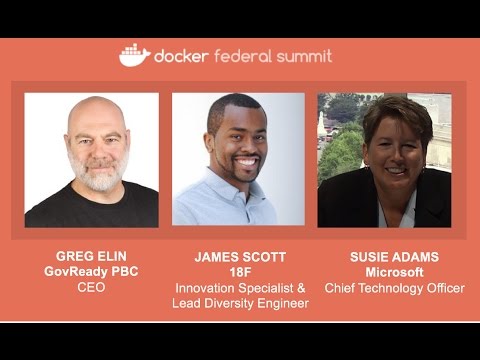
New technology adoption and federal compliance are evolving to enable agencies to deliver software faster in support of critical missions. With that in mind, Docker hosted a panel discussion with Microsoft, GovReady and 18F at this year’s Federal Summit in May. Watch the session on-demand to learn more:
<iframe width=”854″ height=”480″ src=”https://www.youtube.com/embed/8KH0Vn8M-j0?list=PLkA60AVN3hh9b-Tlwmrqs8Gddzb8SEeeI” frameborder=”0″ allowfullscreen></iframe>
More Resources

Learn More about Docker in public sector.
Try Docker Enterprise Edition for Free
Read the NIST listing
Question? Contact Docker Sales
Join us at an upcoming event near you

[Tweet #Docker EE enters FIPS certification w/ crypto library for Federal Government]
The post Docker Enterprise Edition enters FIPS certification process appeared first on Docker Blog.
Quelle: https://blog.docker.com/feed/