New Azure VPN Gateways now 6x faster

Running mission-critical workloads require both performance and reliability. To improve your Azure VPN experience, we are introducing a new generation of VPN gateways with better performance, a better SLA, and at the same price as our older gateways.

Many customers with network intensive workloads in Azure Virtual Networks (VNets) are driving the need for increased cross-premises and cross-region VPN performance. To accommodate even more demanding workloads we re-engineered our VPN Gateway service to provide 6X more performance coupled with better reliability and backed by an even stricter SLA.

In addition to performance, many customers with mission-critical workloads need control over the VPN policies to meet compliance regulations. We now provide custom IPsec/IKE policy selection giving you more flexibility to choose your encryption policy. We are also enhancing the new gateways to accommodate both route-based and policy-based VPNs. Although a route-based VPN using BGP to automatically learn routing is easier to manage, many customers have already deployed policy-based VPNs at their branch offices. The new VPN gateways allow multiple sites using policy-based VPNs to connect to the same VPN gateway.

New guidance

As we introduce the new VPN gateways, called VpnGw1, VpnGw2, and VpnGw3, we are also updating our deployment guidance. The existing Basic VPN gateway is unchanged with the same 80-100 Mbps performance and a 99.9% SLA. The Basic VPN gateway is appropriate for non-production dev/test scenarios. The Basic VPN gateway should not be used for any production scenarios.

For your production services, we strongly recommend that you select or migrate to the new VPN Gateways that have a 99.95% SLA. The new VPN gateways have a higher SLA and better performance at the same price as the old gateways. We will continue to support the old VPN gateways so you can manage existing deployments, but starting in September you will not be able to create the older Standard or High Performance VPN gateways.

Better performance

The new generation of Azure VPN Gateways provide single tunnel performance of up to 1 Gbps and aggregate up to 1.25 Gbps with multiple tunnels improving your access to VNets either from your premises or for cross-region VNet-to-VNet connectivity. Enabling the active-active VPN gateway option provides even higher throughput with multiple flows to your Azure VPN gateways.

Here are the details:

VPN Gateway
Recommended Workload Type
Price
($ per hour)
Throughput Benchmark*
SLA

S2S & V2V tunnels

($ per tunnel-hour)

PS2 Tunnels
(Max)

Basic
Dev/Test
$0.04
100 Mbps
99.9%

Max 10
1- 10: included

0

VpnGw1
Production
$0.19
650 Mbps
99.95%

Max 30
1- 10: included
11-30:  $0.015

128

VpnGw2
Production
$0.49
1 Gbps
99.95%

Max 30
1-10: included
11-30: $0.015

128

VpnGw3
Production
$1.25
1.25 Gbps
99.95%

Max 30
1-10: included
11-30: $0.015

128

* Benchmark data obtained by running iperf3 between VNets in the same region, with minimum duration of 120 seconds and up to 32 flows. Refer to this page for more details on how to measure throughput across your Azure VPN gateways.

VpnGw1 at 650 Mbps provides a 6.5x and VpnGw2 at 1Gbps provides a 5x performance improvement at the same price as the old Standard and High Performance gateways, respectively. We also increased the Site to Site (S2S) tunnel count from 10 to 30 tunnels so you can connect more of your sites to the VPN Gateway. There is a per S2S tunnel charge for the 11th through 30th tunnels. We also are introducing a new, even higher performance VPN gateway called VpnGw3. With multiple tunnels VpnGw3 has shown 1.25 Gbps throughput in our tests. Please note that the actual performance in production is highly dependent on the application behavior, the quality of your ISP, and the actual distance (network path) from your physical VPN device to the Azure region with your Azure VNet.

Customers often deploy a S2S VPN to connect branch offices to the same Azure VNet while the main corporate WAN is accessed via ExpressRoute. The corporate WAN may also use S2S VPN as a backup path in case of a connectivity issue with ExpressRoute. 

If you have a 1 Gbps ExpressRoute circuit you can now also have a 1 Gbps S2S tunnel on the backup path so if a failover event occurs you still have a performant network connection to your VNets, although via the Internet. Note the performance caveats mentioned previously regarding the quality of your ISP.

New VPN capabilities – Custom IPsec/IKE policy & multi-site policy-based VPN

We are also releasing two new features to improve VPN manageability and give customers more choices. These include the support for custom IPsec/IKE connection policies to satisfy your compliance and security requirements, and the ability to connect multiple on-premises networks using policy-based firewall devices to your Azure VPN gateway.

With custom IPsec/IKE policy, you can now set the exact cryptographic algorithms and key strengths on each S2S or VNet-to-VNet connection to satisfy your enterprise compliance and security requirements. Azure VPN gateways utilize a default set of IPsec/IKE cryptographic algorithms that maximize interoperability with a wide range of 3rd party VPN devices. The default list may not meet all your compliance requirements. For example, you may need higher Diffie-Hellman Group or PFS Group (Perfect Forward Security) than the default, or there are certain cryptographic algorithms that you want to exclude (e.g., SHA1, 3DES, etc.) You can now specify the exact combinations of cryptographic algorithms and key strengths, as shown in the example below:

Additionally, you can now connect multiple on-premises policy-based VPN devices to your Azure VPN gateway, by utilizing the custom policy:

We do understand that configuring and maintaining VPNs for mission-critical workloads are complex tasks. These new VPN capabilities were developed based on customer feedback. We have re-written much of our documentation and will be providing more deployment blueprints, guidance, and best practices.

Please let us know how we can further enhance the Azure VPN service. Here are some links to get started with the new VPN gateways:

About new VPN gateway SKUs & migration instruction
About cryptographic requirements and Azure VPN gateways
Configure IPsec/IKE policy on S2S VPN or VNet-to-VNet connections
Connect multiple policy-based VPN devices to Azure VPN gateway

Quelle: Azure

Meet The 82-Year-Old App Developer Who Says Life Gets Better With Age

This is Masako Wakamiya. Earlier this year the 82-year-old resident of Japan started learning the Swift programming language and has already released her first app.

This is Masako Wakamiya. Earlier this year the 82-year-old resident of Japan started learning the Swift programming language and has already released her first app.

Yui Kashima / BuzzFeed

BuzzFeed News caught up with Wakamiya at last week's Worldwide Developers Conference (WWDC) in San Jose, where Apple CEO Tim Cook introduced her as the oldest developer in attendance.

Ma-chan, as she’s affectionately called, discovered the internet when she was retired, caring for her elderly mother full-time, and feeling particularly isolated.

Ma-chan, as she's affectionately called, discovered the internet when she was retired, caring for her elderly mother full-time, and feeling particularly isolated.

Yui Kashima / BuzzFeed

When Ma-chan retired from the bank she'd worked at since finishing high school, she got depressed thinking about life in her sixties and beyond. As an extrovert, she felt trapped in the house while taking care of her mother, like she was no longer part of the outside world.

She didn't know how to use a computer, and it took her three months to get online, but Ma-chan eventually joined a site for seniors called Mellow Club.

Every time her computer connected to the Internet, and she saw the words on the screen that said “Welcome, Ma-chan,” her face became wet — both with sweat and tears, she said.

The internet “gave me wings,” she said. “Those wings took me to a wide world I never knew before I used a computer.”

Next, Ma-chan tried her hand at creating Excel art and became an overnight sensation. “I always liked making things, but for example with handicrafts, you can only give them to people you actually meet, right?” she said. “But I wanted to give some joy to not only my friends, but also to people I had never met. It sounds so romantic.”

“Most applications are for young people, and people of my generation find them boring,” Ma-chan told BuzzFeed News. “As we age, our eyesight gets worse, and we can't move our fingers the way we'd like to. This game is designed so that even people with these problems can enjoy it.”

“It is never a waste to try something and fail,” Ma-chan said of the fits and starts she experienced while learning to code. “You will not die or get injured even if things don’t pan out well. It’s best to enjoy your failures. If you fail, you fail. What’s wrong with that?”

"It is never a waste to try something and fail," Ma-chan said of the fits and starts she experienced while learning to code. "You will not die or get injured even if things don't pan out well. It's best to enjoy your failures. If you fail, you fail. What's wrong with that?"

Justin Sullivan / Getty Images

Besides meeting Apple CEO Tim Cook at WWDC, Ma-chan also connected with the youngest developer at the conference, a 10-year-old boy from Australia named Yuma Soerianto. “I never imagined gaining a friend who is 72 years my junior and lives in the Southern hemisphere,” she said. “I am not proficient in English, but I was able to enjoy chatting with him.”

Ma-chan said she’s having the time of her life, and she’s planning to make another app: “I think my legacy could be to give hope to someone that it is possible to program, even at age 82.”

Ma-chan said she's having the time of her life, and she's planning to make another app: "I think my legacy could be to give hope to someone that it is possible to program, even at age 82."

Yui Kashima / BuzzFeed

“It seems that many people, who are a bit younger than I am, don't think of old age as an enjoyable time,” she said. “I am having the best time of my life!”

When she joined the Mellow Club website, nervous about her transition into retirement, Ma-chan got the message that life is fun at 60, and even more fun at 70.

“What happens after 80?” she said. “Well, it got even better.”

This post was translated from Japanese.

Quelle: <a href="Meet The 82-Year-Old App Developer Who Says Life Gets Better With Age“>BuzzFeed

Best practices for App Engine startup time: Google Cloud Performance Atlas

By Colt McAnlis, Developer Advocate

[Editor’s note: In the past couple of months, Colt McAnlis of Android Developers fame joined the Google Cloud developer advocate team. He jumped right in and started blogging — and vlogging — for the new Google Cloud Performance Atlas series, focused on extracting the best performance from your GCP assets. Check out this synopsis of his first video, where he tackles the problem of cold boot performance in App Engine standard environment. Vroom vroom!]

One of the fantastic features of App Engine standard environment is that it has load balancing built into it, and can spin up or spin down instances based upon traffic demands. This is great in situations where your content goes viral, or for daily ebb-and-flows of traffic, since you don’t have to spend time thinking about provisioning whatsoever.

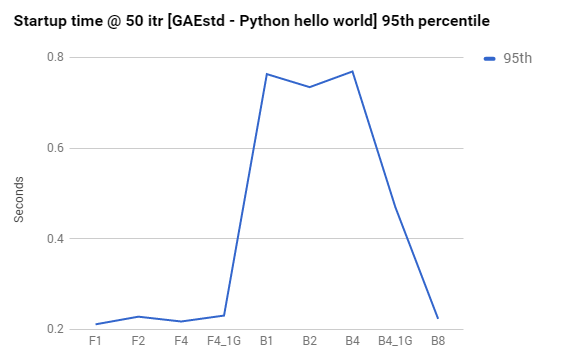
As a baseline, it’s easy to establish that App Engine startup time is really fast. The following graph charts instance type vs. startup time for a basic Hello World application:

250ms is pretty fast to boot up an App Engine F2 type instance class. That’s faster than fetching a Javascript file from most CDNs on a 4G connection, and shows that App Engine responds quickly to requests to create new instances.

There are great resources that detail how App Engine manages instances, but for our purposes, there’s one main concept we’re concerned with: loading requests.

A loading request triggers App Engine’s load balancer to spin up a new instance. This is important to note, since the response time for a loading request will be significantly higher than average, since the request must wait for the instance to boot up before it’s serviced.

As such, the key to being able to respond to rapid load balancing while keeping user experience high is to optimize the cold-boot performance of your App Engine application. Below, we’ve gathered a few suggestions on addressing the most common problems to cold-boot performance.

Leverage resident instances
Resident instances are instances that stick around regardless of the type of load your app is handling; even when you’ve scaled to zero, these instances will still be alive.

When spikes do occur, resident instances service requests that cannot be serviced in the time it would take to spin up a new instance; requests are routed to them while a new instance spins up. Once the new instance is up, traffic is routed to it and the resident instance goes back to being idle.

The point here is that resident instances are the key to rapid scale and not shooting users’ perception of latency through the roof. In effect, resident instances hide instance startup time from the user, which is a good thing!

For more information, check our our Cloud Performance Atlas article on how Resident instances helped a developer reduce their startup time.

Be careful with initializing global variables during parallel requests
While using global variables is a common programming practice, they can create a performance pitfall in certain scenarios relating to cold boot performance. If your global variable is initialized during the loading request AND you’ve got parallel requests enabled, your application can fall into a bit of a trap, where multiple parallel requests end up blocking, waiting on the first loading request to finish initializing of your global variable. You can see this effect in the logging snapshot below:

The very first request is our loading request, and the next batch is a set of blocked parallel requests, waiting for a global variable to initialize. You can see that these blocked requests can easily end up with 2x higher response latency, which is less than ideal.

For more info, check our our Cloud Performance Atlas article on how Global variables caused one developer a lot of headaches.

Be careful with dependencies
During cold-boot time, your application code is busy scanning and importing dependencies. The longer this takes, the longer it will take for your first line of code to execute. Some languages can optimize this process to be exceptionally fast, other languages are slower, but provide more flexibility.

And to be fair, most of the time, a standard application importing a few modules should have a negligible impact on performance. However, when third-party libraries get big enough, we start to see them do weird things with import semantics, which can mess up your boot time significantly.

Addressing dependency issues is no small feat. You might have to use warm-up requests, lazy-load your imports, or in the most extreme case, prune your dependency tree.

For more info, check our our Cloud Performance Atlas article on how the developer of a platypus-based calculator tracked down a dependency problem.

Every millisecond counts
In the end, optimizing cold-boot performance for App Engine instances is critical for scaling quickly and keeping user perception of latency in a good place. If you’d like to know more about ways to optimize your Google Cloud applications, check out the rest of the Google Cloud Performance Atlas blog posts and videos. Because when it comes to performance, every millisecond counts.
Quelle: Google Cloud Platform

Embed Video Indexer insights in your website

Video Indexer embeddable widgets is a great way to start adding AI insights to your videos. Whether you want to add deep search ability to your published videos or let your users be more engaged with the video content on your website, you can easily achieve that by using the embeddable option at Video Indexer web application or by using Video Indexer API.

Getting Started

To get started embedding Video Indexer insights to your website you must have a registered account. If you don't have an account you can easily Sign-In to Video Indexer using a Microsoft, Google, LinkedIn, or Azure Active Directory and get one generated for you.

Video Indexer supports embedding two types of widgets into your application: Cognitive Insights and Player.

Cognitive Insights Widget

This widget contains all the visual insights that were extracted from the video after the indexing process such as people appearances, top keywords, sentiment analysis, transcript and search.

It also allows you to change the language and get all the insights based on the selected language. Here is an example:
 

Player Widget

The player widget is a customized Azure Media Player that except of providing video streaming, contains extra features such as playback speed and closed captions. Here is an example:

In order to embed a widget in your website you need to get an embed code and paste it in your html file. The embed code contains iframe tag with embed URL.

You have two options to get the embed URL: via Video Indexer web application or by calling Video Indexer API specific method. We will cove both ways.

Get your embed code via Video Indexer web application (Public videos only)

You can easily get the embed code for your indexed videos with a click of a button:

1. Login to your account at VI

2. Upload a video

3. After indexing process has completed click “play” on the video at the main gallery page.

4. Click the “embed button” and select the widget you want to embed with the desired options. (player/insights)
 

5. Copy and paste the code into your html file.

Notice: if you embed via the web application you can embed only public videos. Private videos requires accessToken parameter in the embed URL that contains 1h access token for the video.

Get your embed code via Video Indexer API (Public or Private videos)

In order to get the embed URL that contains the accessToken for your video you can use Video Indexer API and call Get Insights Widget Url or Get Player Widget Url by passing the video id.

If you manage your own videos you can also get the embed code based on your internal video id by calling Get Insight Widget By External Id.

In order to start working with the API you will have to register and get your API subscription key first. The Getting started with the Video Indexer API blog post is where you will find a very detailed blog post about getting started with Video Indexer API.

After you have your embed URL just paste it as “src” attribute of an iframe element which you want to locate anywhere in your website.

<iframe width="580" height="580" src="https://www.videoindexer.ai/embed/insights/c4c1ad4c9a/?widgets=people,search" frameborder="0" allowfullscreen></iframe>

Embedding options

Video Indexer widgets are customizable per your need. You can choose to embed only the insights widget or the player, or embed them both.

Embed both types of widgets in your application

Copy and paste the embed codes for the player widget and the insights widget and include the following JS file before the closing <body> tag:

<script src="https://breakdown.blob.core.windows.net/public/vb.widgets.mediator.js"></script>

The above file is required in order to handle cross origin communications between the widgets.

You can read more about how it works at our docs.

Embed cognitive insights and use your Azure Media Player

If you are using Azure Media Player in your website you can easily embed Video Indexer insights widget that will communicate with your player using vi communication plugin. Just paste the following script in your page after azure media player library script and you are all set.

<script src="https://breakdown.blob.core.windows.net/public/amp-vb.plugin.js"></script>

The plugin let you also get the VTT file for your player and choose if you want to sync between language and transcript with your video.

For more information and code samples see the relevant Video Indexer docs.

Embed cognitive insights with any video player

If you are using other players like YouTube player, Vimeo or your own player you can still embed Video Indexer cognitive insights and make them communicate with your player, for example jump into the relevant moment when user clicks on one of the widgets.

In order to achieve that you will have to implement some functions and listen to “postMessage” JavaScript event.

Here is a detailed demo that demonstrates this approach.

How to customize Video Indexer widgets?

Video Indexer widget are customizable per your need. You can choose to embed only the insights that you think will be more valuable for your users.

Customize the cognitive insights widget

You can choose the types of insights you want by specifying them as a value to the  following URL parameter added to the to the embed code you get (from API or from the web application):

&widgets=<list of wanted widgets>

The possible values are: people, keywords, sentiments, transcript, search.

For example, if you want to embed widget containing only people and search insights the iframe embed URL will look like this:

https://www.videoindexer.ai/embed/insights/c4c1ad4c9a/?widgets=people,search

You can see a detailed demo here and read more at Video Indexer docs.

Customize the player widget

If you embed Video Indexer player you can choose the size of the player by specifying the size of the iframe.

For example :

<iframe width="640" height="360" src="https://www.videoindexer.ai/embed/player/{id}” frameborder="0" allowfullscreen />

By default Video Indexer player will have auto generated closed captions based on the transcript of the video that was extracted from the video with the source language that was selected when the video was uploaded.

If you want to embed with a different language you can add &captions=< Language | ”all” | “false” > to the embed player URL or put “all” as the value if you want to have all available languages captions.

The embed URL then will look like this : https://www.videoindexer.ai/embed/player/6bc9113d26/?captions=italian. If you want to disable captions you can pass “false” as value for captions parameter.

Auto play – by default the player will start playing the video. you can choose not to by passing &autoplay=false to the embed URL above.

For more details, please take a look at the Video Indexer Documentation. Follow us on Twitter @Video_Indexer to get the latest news on the Video Indexer. If you have any questions or need help, contact us at visupport@microsoft.com.
Quelle: Azure