The Former FDA Chief Is Heading To Silicon Valley To Join Alphabet's Life Sciences Division

Win Mcnamee / Getty Images

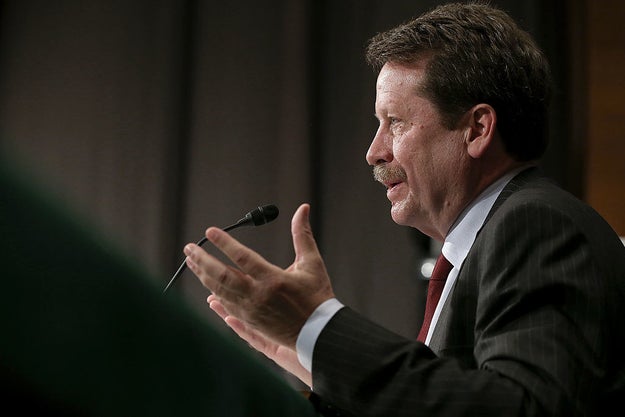
Robert Califf, a former Food and Drug Administration Commissioner under President Obama, has revealed his next job — or, rather, jobs: He's becoming a top scientist at Verily, Alphabet's life sciences subsidiary, and an executive specializing in health data science at Duke University.

“Although we are in the midst of an explosion of capability in the worlds of computing and information, we are still learning how to translate this capacity into better health and healthcare,” Califf wrote in a blog post on Verily's website on Wednesday. “Bridging this gap has been a recurring theme of my career, and it’s at the heart of what I hope to accomplish at both institutions.”

Califf served as FDA Commissioner from early 2016 until January of this year. CNBC first reported news of his move to Verily, which comes a week after it saw a high-profile departure: Thomas Insel, former director of the National Institutes of Health's mental health division.

Prior to joining Verily, Califf had helped design the Baseline Study, the company's attempt to identify biomarkers for healthy people, which launched this spring. At the time, Califf told Bloomberg that he harbored skepticism about tech companies' approach to reinventing medicine. “At times, Silicon Valley people are very naive about the complexity of health care,” he said. “It’s going to be a lot harder than they think.”

At Verily, Califf wrote in his blog post, “I’m hoping to offer insights that will allow the company to better tailor its technologies to meet the needs of doctors, other providers, health systems and the patients they serve, and to drive evidence-based approaches that will enable continuous learning and improvement.”

Califf plans to split his time between Verily and Duke, where he will be vice chancellor for health data science of Duke University Health System and director of a new center focused on the same subject. A. Eugene Washington, CEO of Duke's hospitals system, said Califf's “lifelong pursuit of effectively applying clinical data to improving healthcare and population health uniquely qualifies him to lead these vitally important health data science endeavors at Duke.”

Quelle: <a href="The Former FDA Chief Is Heading To Silicon Valley To Join Alphabet's Life Sciences Division“>BuzzFeed

Gmail Can Now Write Replies For You

Google

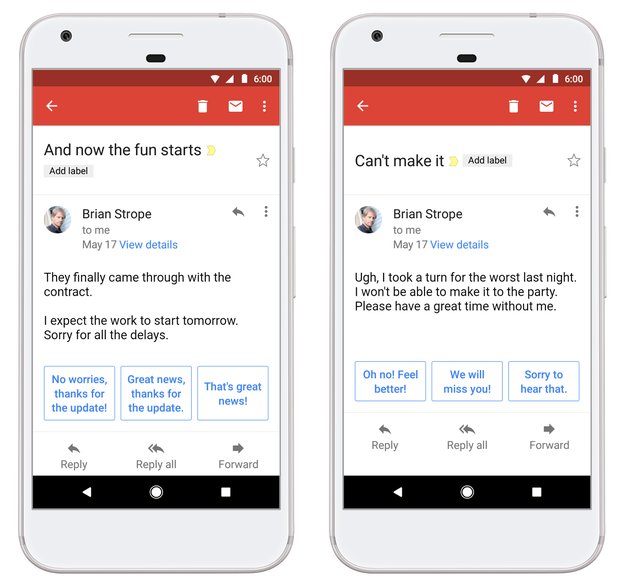
Google is introducing a feature called Smart Replies to the Gmail app on Android and iOS that will suggest answers to some of your incoming emails.

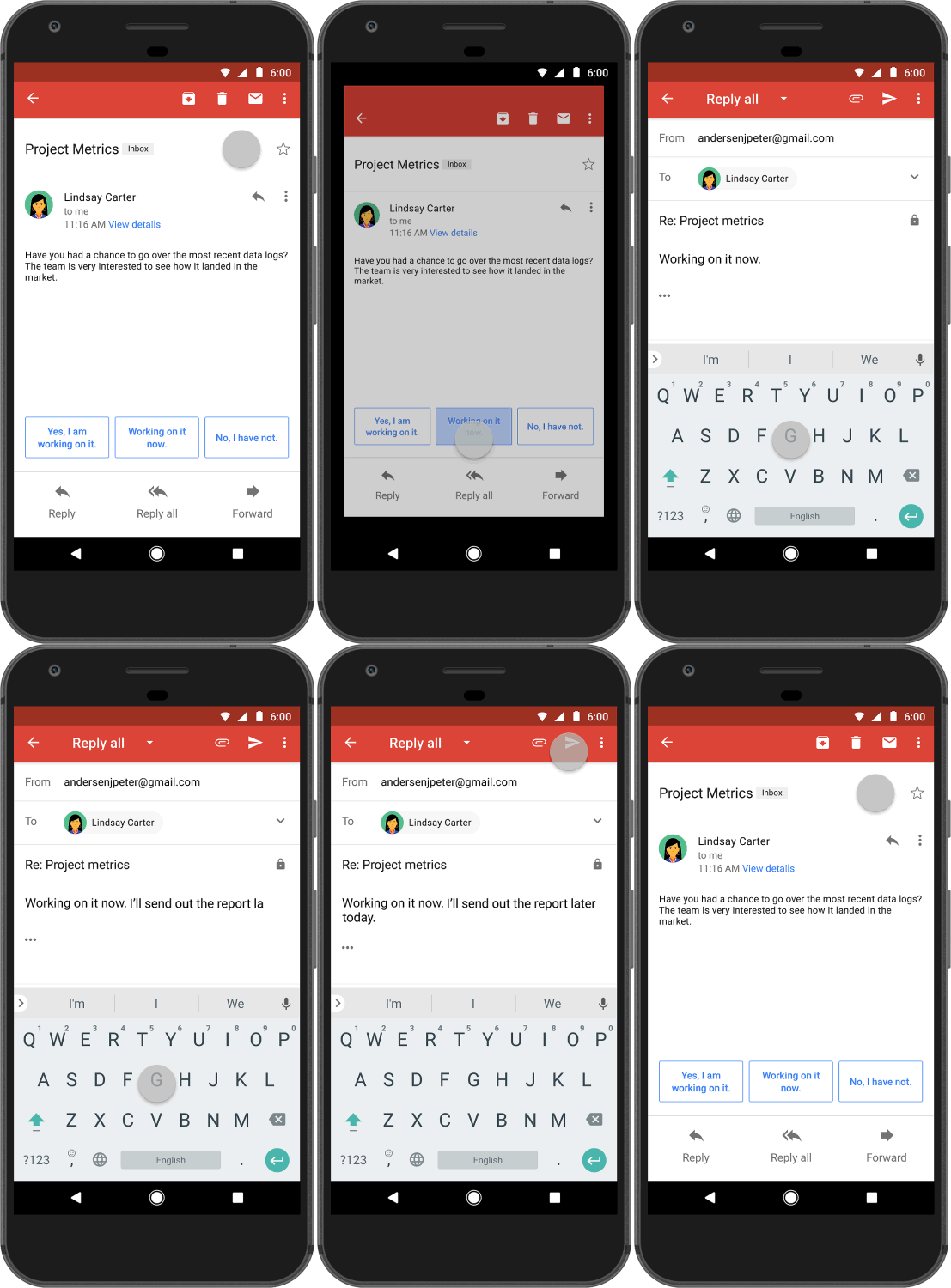
The feature will display possible responses to some of your emails, and when you've selected one, you can send it immediately or edit it before sending. Smart Replies won't be available on the desktop version of Gmail.

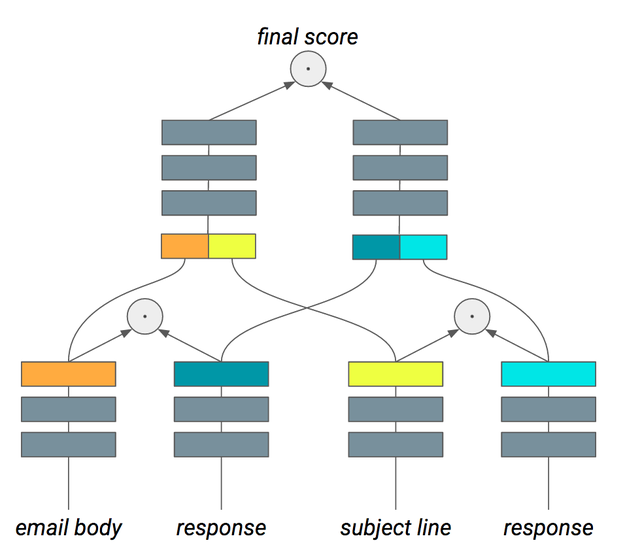
The feature makes use of Google's artificial intelligence software, something the company has emphasized more and more in recent years. According to a press release, Smart Replies scans the text of an email and attempts to understand its various units in terms of their importance, as in the chart below:
Google

Google said in a statement that Smart Replies will learn to understand your writing style — for example, if you prefer exclamation points to periods, your suggested replies will reflect that.

Smart Replies rolls out globally today in English, with Spanish to follow in the next few weeks, according to Google. Here it is in action on Android:
Google

Smart Replies won't work on all your emails, though.

A Google spokesperson wrote, “Smart Reply works on emails that it can suggest optimal responses to,” based on its analysis of a large, anonymized body of other emails. The company declined to specify how the artificial intelligence makes the decision of whether its own suggestions are relevant enough to appear.

Inbox, another email app made by Google, already has a feature that works a lot like Smart Replies, as does one of Google's AI assistants, Allo.

Google said the similar feature on Inbox drives 12% of the replies made within the app, which motivated the team to introduce the feature to Gmail, which boasts over a billion users. The company said in a press release that the new Gmail feature was “more algorithmically efficient” than Inbox's and would “increase the percentage of usable suggestions.”

The company doesn't plan to discontinue Inbox, according to a Google spokesperson, who wrote in an email to BuzzFeed News that the two apps offer very different experiences.

Here is a comparison of how Smart Replies might respond to two different emails from the same person:
Google

As with any sort of artificial intelligence, it remains to be seen whether Smart Replies is ~intelligent~ enough to be useful.

So does this mean Google is reading every single one of your emails?

A Google spokesperson told BuzzFeed News, “No one is reading your email. Smart Reply is similar to how email is processed automatically for spam/malware detection, spell checking, etc. Our natural language processing algorithms analyze a very large, anonymized corpus of emails to automatically generate possible responses to each email. Our machine learning algorithms then rank these to pick the three best responses to the email at hand.”

If you give Smart Reply a try and decide it isn't for you, you can always turn off the feature in Gmail through Settings.

Quelle: <a href="Gmail Can Now Write Replies For You“>BuzzFeed

Google's Voice-Enabled Assistant Comes To The iPhone

Google

Google Assistant, the voice-controlled software powered by Google's AI and machine learning technology, is making its way to iPhone. The software was originally exclusive to the Google Pixel smartphone and Google Home smart speaker. Today, at the company's big developer conference in Mountain View, CA, VP of engineering Scott Huffman announced that Google Assistant will be available on iOS as a free app for download, rivaling the iPhone's native Siri assistant.

The iPhone app is only available to US users for now (Home launched for UK in March, and Pixel is now available in Australia, Canada, and Germany). Google Assistant will support French, German, Brazilian Portuguese and Japanese soon, with Italian, Spanish and Korean later this year. While the iOS version won't have the deep integration that it does on Android, it will be able to send iMessages, for example, but not set alarms.

Google Assistant is also coming to many more products. The company is making an SDK available to hardware developers who want to integrate the voice assistant in their products.

Quelle: <a href="Google's Voice-Enabled Assistant Comes To The iPhone“>BuzzFeed

Run Your Microsoft SharePoint and SQL Server Always On Availability Groups in the AWS Cloud More Easily by Using AWS Directory Service for Microsoft Active Directory

Today, we made it easier for you to run Microsoft SharePoint and SQL Server Always On availability groups in the AWS Cloud. With AWS Directory Service for Microsoft Active Directory (Enterprise Edition), also known as AWS Microsoft AD, you can now migrate additional Windows workloads such as SharePoint and SQL Server Always On availability groups without the complexity of building and maintaining your own Active Directory (AD) infrastructure. Using the AD security features announced recently, you can provide single sign-on (SSO) to Microsoft SharePoint by using AWS Microsoft AD, and improve the security of SQL Server Always On availability groups.
Quelle: aws.amazon.com

WannaCrypt attacks: guidance for Azure customers

The recent global ransomware attack, known as WannaCrypt, has brought forward the importance of running a well secured infrastructure. Whether or not you were impacted by the recent WannaCrypt malware, we recommend all Azure customers take the following 8 steps to further protect your organization from attacks like these.

This recent WannaCrypt malware exploits a Service Message Block (SMB) vulnerability (CVE-2017-0145). Customers should immediately install MS17-010 to resolve this vulnerability.
Review all Azure subscriptions that have SMB endpoints exposed to the internet, commonly associated with ports TCP 139, TCP 445, UDP 137, UDP 138. Microsoft recommends against opening any ports to the internet that are not essential to your operations.
Disable SMBv1 – instructions located here: https://aka.ms/disablesmb1
Utilize Windows Update to keep your machines up-to-date with the latest security updates. If you are running Azure Cloud Services (Platform as a Service Web Roles and Worker Roles or Infrastructure as a Service (IaaS)) automatic updates are enabled by default, so there is no further action required.  All Guest OS versions released after March 14th, 2017 contain the MS17-010 update. You can view the update status of your resources on an on-going basis in Azure Security Center.
Use the Azure Security Center to continuously monitor your environment for threats. Collect and monitor event logs and network traffic to look for potential attacks using the Azure Security Center, and check for new security alerts and quickly investigate any threats detected.
Use Network Security Groups (NSGs) to restrict network access. To reduce exposure to attacks, configure NSGs with in-bound rules that restrict access to only required ports. You can use network firewalls from a range of companies for additional security. Azure Security Center provides a view of the security for all your networks in Azure, and helps you identify those with internet accessible endpoints, insufficient NSG protections, and in some cases recommends a firewall solution.
Confirm that anti-malware is deployed and updated. If you are using Microsoft anti-malware for Azure or Windows Defender, Microsoft released an update last week which detects this threat as Ransom:Win32/WannaCrypt. If you are running anti-malware software from any number of security companies, you should confirm with your provider that your are protected. You can also use Azure Security Center to verify that anti-malware, and other critical security controls, are configured for all of your Azure virtual machines.
Configure backups with multifactor authentication. An important part of recovery from any compromise is having a strong backup solution in place. If you are already using Azure Backup, you can recover data if your servers are attacked by ransomware. Only users with valid Azure credentials can access the backups stored in Azure. We also recommend enabling Azure Multi-Factor Authentication to provide an additional layer of security to your backups in Azure.

For a comprehensive look at the Affected Software, Vulnerability Information and Security Update Deployment, see Microsoft Security Bulletin MS17-010.

For more information about this update, see Microsoft Knowledge Base Article 4013389.

Support

For understanding your cloud security state: Azure Security Center

Help for installing updates: Windows Update FAQ

Security solutions for IT professionals: TechNet Security Support and Troubleshooting

Help for protecting your Windows-based computer from viruses and malware: Microsoft Secure
Quelle: Azure