Developing a Spring Boot app on Docker: The AtSea Demo App

This is the first of a series of blog posts that demonstrates using Docker to develop a typical web application and deploying it in production. For DockerCon 2017, we wanted to build a new demo application that would demonstrate the flexibility of using Docker in development as well as showcase the features of Docker in a production environment. The result was the AtSea Shop, a storefront application that can be deployed on different operating systems and can be customized to both your enterprise development and operational environment.

A Hybrid Architecture
The team decided on a few ground rules. First, we wanted to use modern components commonly used in enterprise applications. We decided to build a Java application using the Spring Boot framework. The web client is a javascript application written using React as a framework.  Second, the application should be able to use any relational database and that it could be deployed on a Linux or Windows environment or cluster. Finally, the team wanted to show the process from development to deployment including building the application, implementing security, and deploying the application.

The application combines a typical Java n-tier architecture that uses Spring Boot’s web MVC framework for the REST API and Spring Data to manage database operations. We chose PostgreSQL for the database, but the application can use any database defined by Spring Data. The storefront client was developed separately using React, and added to the AtSea jar file. Finally, we used a bash script to simulate a payment gateway that uses secrets to authorize transactions.
Although the application is deployed in an n-tier configuration, with the javascript client included in the application jar, each of these components could be deployed separately in a microservice architecture.
Developing and Deploying with Docker
Developing an application with a distributed team can be challenging. Docker provides significant advantages when developing an application by:

enabling migration to microservices
establishing a consistent deployment environment
developers can use familiar tools and IDEs
allowing for rapid implementation and testing of ideas
simplifying the process to deploying to production
easily develop polyglot applications with multiple programming languages
building in security tools
enabling quick deployment of your application

You can see the code for the AtSea app in our new Docker Samples organization on GitHub, where we share our sample applications.
In following articles, we’ll go into depth on the following topics

developing with Eclipse and Docker
using multistage builds to create containers
implementing container security using secrets
deploying the application to a cluster
running the application in Windows containers

While you’re waiting, check out these developer resources and videos from Dockercon 2017.

AtSea Shop demo
Docker Labs
Developer Tools
Java development using docker
DockerCon videos
Docker for Java Developers
The Rise of Cloud Development with Docker & Eclipse Che
All the New Goodness of Docker Compose
Docker for Devs

Learn how to Develop a @SpringBoot app on #Docker: The AtSea Demo AppClick To Tweet

The post Developing a Spring Boot app on Docker: The AtSea Demo App appeared first on Docker Blog.
Quelle: https://blog.docker.com/feed/
How to do serverless pixel tracking with GCP

By Matthieu Mayran, Cloud Solutions Architect

Whether they’re opening a newsletter or visiting a shopping cart page, how users interact with web content is very interesting to publishers. One way to understand user behavior is by using pixels, small 1×1 transparent images embedded into the web property. When loaded, the pixel calls a web server that records the request parameters passed in the URL that can be processed later.

Adding a pixel is easy, but hosting it and processing the request can be challenging for various reasons:

You need to set up, manage and monitor your ad servers
Users are usually global, which means that you need ad servers around the world
User visits are spiky, so pixel servers must scale up to sustain the load and scale down to limit the spend.

Google Cloud Platform (GCP) services such as Container Engine and managed autoscaled instance groups can help with those challenges. But at Google Cloud, we think companies should avoid managing infrastructure whenever possible.

For example, we recently worked with GCP partner and professional services firm DoiT International to build a pixel tracking platform that relieves the administrator from setting up or managing any servers. Instead, this serverless pixel tracking solution leverages managed GCP services, including:

Google Cloud Storage: A global or regional object store that offers different options such as Standard, Nearline, Cold with various prices and SLAs depending on your needs. In our case, we used Standard, which offers low millisecond latency
Google HTTP(s) Load Balancer: A global anycast IP load balancer service that can scale to millions of QPS with integrated logging. It also can be leveraged by Cloud CDN to prevent useless access to Google Cloud Storage by caching pixels closer to the user in Google edges
BigQuery: Google’s fully managed, petabyte-scale, low-cost enterprise data warehouse for analytics
Stackdriver Logging: A logging system that allows you to store, search, analyze, monitor and alert on log data and events from GCP and Amazon Web Services (AWS). It supports Google load balancers and can export data to Cloud Storage, BigQuery or Pub/Sub

Tracking pixels with these services works as follows:

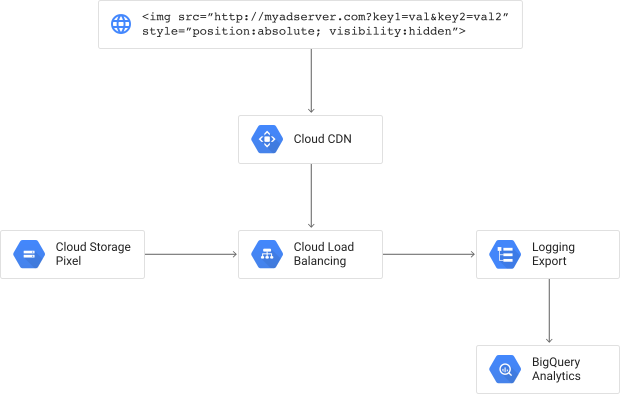
A client calls a pixel URL that’s served directly by Cloud Storage.
A Google Cloud Load Balancer in front of Cloud Storage records the request to Stackdriver Logging, whether there was a cache hit or not.
Stackdriver Logging exports every request to BigQuery as they come in, which acts as a storage and querying engine for ad-hoc analytics that can help business analysts better understand their users.

All those services are fully managed and do not require you to set up any instances or VMs. You can learn more about this solution by:

Reading the solution paper: Serverless Pixel Tracking Architecture
Following the tutorial: How to Do Serverless Pixel Tracking
Load-testing it: How to load test a serverless pixel tracking setup

Going forward, we look forward to building more serverless solutions on top of GCP managed offerings. Let us know in the comments if there’s a solution that you’d like us to build!
Quelle: Google Cloud Platform

April 7, 2017 – Azure Thursday’s meeting summary

This blog post was authored by the Azure TSP team.

Meeting Topics: Azure News, Azure Managed Disks, Azure EA Portal, Azure Governance, and Configuration best practices resources.

Speakers: Chris Hanson, Azure TSP and Kyle Wilson, Azure TSP

Discussion notes & key links

1. Azure News: Azure Monitor & Azure Advisor both were released for general availability. You can track Azure service news by following the Service Updates Feed, for high level announcements, and by reading the core Azure Blog, typically longer detailed explanations.

2. Azure Managed Disks: A new way of creating VM disks that is simpler to implement and manage and provides better scale and resilience. Here is a short overview video and a longer overview video (27 minutes).

In addition we have posted a guide for converting to managed disks from traditional storage accounts and page blobs.

3. Azure EA Portal: We talked briefly about the benefits of the EA Portal managing multiple subscriptions and reporting on usage with Resource Tags, project cost tracking. There is a good video series that explains the various roles in the EA Portal and how to use its features.

4. Azure Configuration best practices: We talked about how the Azure Advisor combined with the Azure Enterprise Scaffold Documentation are both good resources for best practices and governance.
Quelle: Azure






