The Trump Administration Wants To Hack Your Drone
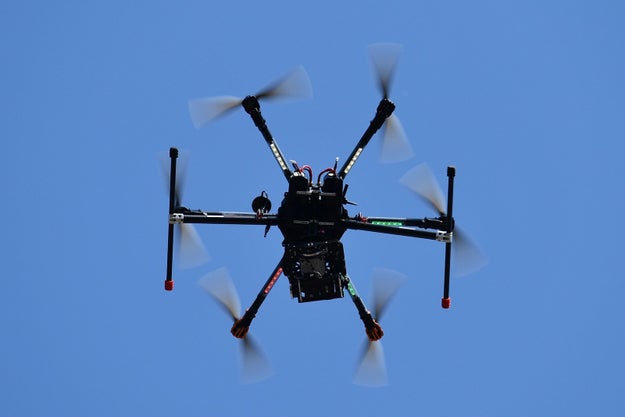
Vincenzo Pinto / AFP / Getty Images

The Trump administration wants Congress to let it surveil, hijack, or strike down any drone in US airspace.

Trump's team has published a 10-page draft of legislation requesting authority for the federal government to develop countermeasures and take action against any drone over US soil deemed to pose a threat. The proposed bill focuses on commercial drones, such as small quadcopters like the DJI Mavic or Phantom that are easy to purchase online. The New York Times first reported the news.

What kind of threats do drones actually pose?

Drones pose a rising security risk as their technology advances, their range improves, and they're able to bear heavier payloads.

After ISIS used small quadcopter drones like ones you'd buy at Radioshack to surveil and drop explosives in Iraq and Syria, it stoked US officials' fears that the group will attempt to use drones to carry out terrorist attacks. And in 2015 when a drone evaded the White House's radar system and mistakenly crash landed on its lawn, the incident prompted a Secret Service investigation.

More and more people also have drones. Sales are expected to go well beyond $1 billion this year, up sharply from around $800 million last year. An estimated one million drones were sold in the 2015 holiday season alone.

So here are powers the government wants to have over drones:

  • Surveil them: “Detect, monitor, identify, or track, without prior consent, an unmanned aircraft system, unmanned aircraft, payload, or cargo, to evaluate whether it poses a threat to the safety or security of a covered event or location.”
  • Hijack them: “Redirect, disable, disrupt control of, exercise control of, seize, or confiscate, without prior consent, an unmanned aircraft system.”
  • Strike them down: “Use reasonable force to disable, disrupt, damage, or destroy an unmanned aircraft system, unmanned aircraft, or unmanned aircraft's payload or cargo that poses a threat to the safety of a covered facility.”
  • Research them: “Conduct research, testing, training on, and evaluation of any equipment.”

“Threats” in this case are defined as anything that could interfere with a wide range of government activities: disaster rescue or emergency services, prisoner detention, the safety of military or government personnel, transportation of nuclear materials, and other processes.

The document does say that the Federal Aviation Administration would still hold sway over the regulation of the general national airspace, so the Trump administration's power wouldn't be limitless if the new legislation passed as it is right now. But the regulation is likely to change as the administration consults the Department of Transportation, the FAA, and Congress.

The reason the Trump administration is having to ask Congress to give it this control over drones is because current privacy protection laws technically prevent the government from interfering with drones. As noted in the bill's draft, “some of the most promising technical countermeasures for detecting and mitigating [unmanned aircraft systems] may be construed to be illegal under certain laws that were passed when [drones] were unforeseen.”

The Trump administration did not immediately respond to a request for comment.

What are the privacy concerns?

The administration is asking for a broad swath of powers that may trouble drone owners. According to the draft, any drone that the government disables is immediately considered US government property, and its communications as well as its hardware may be dissected to develop more defenses against drones. That kind of research would subject all the digital records of your drone to government investigation.

The act does, however, stipulate that the privacy implications of any new measures must be reviewed by the Secretary of Homeland Security, a position appointed by the president. A recent court decision struck down the regulation obligating consumers to register their recreational drones with the Federal Aviation Administration.

The draft says that the government would have to take action against drones while respecting “privacy, civil rights, and civil liberties,” but it also says that US courts would have no power to hear lawsuits over the federal government's actions against drones, which means drone owners would have no recourse to recover their forfeited equipment. The information gathered under the legislation would also be exempt from information disclosure laws, according to the draft.

DJI, the world's largest drone manufacturer and seller, declined to comment, saying it was still evaluating the impact of the proposed legislation.

Quelle: <a href="The Trump Administration Wants To Hack Your Drone“>BuzzFeed

Cloud Source Repositories: now GA and free for up to five users and 50GB of storage

By Chris Sells, Product Manager

Developers creating applications for App Engine and Compute Engine have long had access to Cloud Source Repositories (CSR), our hosted Git version control system. We’ve taken your feedback to get it ready for the enterprise, and are excited to announce that it’s leaving beta and is now generally available.

The new CSR includes a number of changes. First off, we’ve increased the supported repository size from 1GB to 50GB, which should give your team plenty of room for large projects.

Second, CSR has a new pricing model, complete with a robust free tier that should allow many of you to use it at no cost. Customers can use CSR associated with their billing accounts for free each month, provided that the repos meet the following criteria:

Up to five project-users accessing repositories
Source repos consume less than 50GB in storage
Access to repos uses less than 50GB of network egress bandwidth

Beyond that, pricing for CSR is $1/project-user/month (where a project-user represents each user working on each project) plus $0.10/GB/month for storage and $0.10/GB for network egress. Network ingress is offered at no cost and you can still create an unlimited number of repositories.

For further details, visit the Cloud Source Repositories pricing page.

Getting started with Cloud Source Repositories
To get started with CSR, go to https://console.cloud.google.com/code/ or choose Source Repositories from the Cloud Console menu:

Creating a CSR repo is as easy as pressing the “Get started” button in the Cloud Console and providing a name:

Or if you prefer, you can create a new repo from the gcloud command line tool, either from your local shell (make sure to execute “gcloud init” first) or from the Cloud Shell:

Once you’ve created your repo, browse it from the Source Repositories section of the Cloud Console or clone it to your local machine (making sure you’ve executed “gcloud init” first) or into the Cloud Shell:

Or, if you’re using Cloud Tools for IntelliJ (and soon our other IDE extensions), you can access your CSR repos directly from inside your favorite IDE:

As you’d expect, you can use standard git tooling to commit changes and otherwise manage your new repos. Or, if you’ve already got your source code hosted on GitHub or BitBucket, you can mirror your existing repo into your GCP project, like so

Once you’ve created your repos, manage them with the Repositories section in the Cloud Console:

If you prefer using command line tools, there’s a full set of CLI commands available:

You’ll also notice the reference to Permissions in the Cloud Console and IAM policies at the command line; that’s because IAM roles are fully-supported in CSR and can be applied at any level in the resource hierarchy.

And as if all of that weren’t enough, there’s a CSR management API as well, which is what we use ourselves to implement the gcloud CSR commands. If you’d like to get a feel for it, you can access the CSR API interactively in the Cloud API Explorer:

Full documentation for the CSR API is available for your programming pleasure.

Where are we?
Like our Cloud Shell and it’s new code editor, the new CSR represents a larger push toward web-based experience for GCP developers. We’re thrilled with the feedback we’ve already gotten and look forward to hearing how you’re using CSR in your developer workflow.

If you’ve got questions about Cloud Source Repositories, feel free to drop them onto StackOverflow. If you’ve got feedback or suggestions, feel free to join in the discussion on Google Groups or Slack.

Quelle: Google Cloud Platform

Spring Boot Development with Docker

The AtSea Shop is an example storefront application that can be deployed on different operating systems and can be customized to both your enterprise development and operational environments. In my last post, I discussed the architecture of the app. In this post, I will cover how to setup your development environment to debug the Java REST backend that runs in a container.
Building the REST Application
I used the Spring Boot framework to rapidly develop the REST backend that manages products, customers and orders tables used in the AtSea Shop. The application takes advantage of Spring Boot’s built-in application server, support for REST interfaces and ability to define multiple data sources. Because it was written in Java, it is agnostic to the base operating system and runs in either Windows or Linux containers. This allows developers to build against a heterogenous architecture.
Project setup
The AtSea project uses multi-stage builds, a new Docker feature, which allows me to use multiple images to build a single Docker image that includes all the components needed for the application. The multi-stage build uses a Maven container to build the the application jar file. The jar file is then copied to a Java Development Kit image. This makes for a more compact and efficient image because the Maven is not included with the application. Similarly, the React store front client is built in a Node image and the compile application is also added to the final application image.
I used Eclipse to write the AtSea app. If you want info on configuring IntelliJ or Netbeans for remote debugging, you can check out the the Docker Labs Repository. You can also check out the code in the AtSea app github repository.
I built the application by cloning the repository and imported the project into Eclipse by setting the Root Directory to the project and clicking Finish
    File > Import > Maven > Existing Maven Projects 
Since I used using Spring Boot, I took advantage of spring-devtools to do remote debugging in the application. I had to add the Spring Boot-devtools dependency to the pom.xml file.
<dependency>
    <groupId>org.springframework.boot</groupId>
    <artifactId>spring-boot-devtools</artifactId>
</dependency>
Note that developer tools are automatically disabled when the application is fully packaged as a jar. To ensure that devtools are available during development, I set the <excludeDevtools> configuration to false in the spring-boot-maven build plugin:
<build>
    <plugins>
        <plugin>
            <groupId>org.springframework.boot</groupId>
            <artifactId>spring-boot-maven-plugin</artifactId>
            <configuration>
                <excludeDevtools>false</excludeDevtools>
            </configuration>
        </plugin>
    </plugins>
</build>
This example uses a Docker Compose file that creates a simplified build of the containers specifically needed for development and debugging.
 version: “3.1”

services:
 database:
   build: 
      context: ./database
   image: atsea_db
   environment:
     POSTGRES_USER: gordonuser
     POSTGRES_DB: atsea
   ports:
     – “5432:5432″ 
   networks:
     – back-tier
   secrets:
     – postgres_password

 appserver:
   build:
      context: .
      dockerfile: app/Dockerfile-dev
   image: atsea_app
   ports:
     – “8080:8080″
     – “5005:5005″
   networks:
     – front-tier
     – back-tier
   secrets:
     – postgres_password

secrets:
 postgres_password:
   file: ./devsecrets/postgres_password
   
networks:
 front-tier:
 back-tier:
 payment:
   driver: overlay
 The Compose file uses secrets to provision passwords and other sensitive information such as certificates –  without relying on environmental variables. Although the example uses PostgreSQL, the application can use secrets to connect to any database defined by as a Spring Boot datasource. From JpaConfiguration.java:
 public DataSourceProperties dataSourceProperties() {
        DataSourceProperties dataSourceProperties = new DataSourceProperties();

    // Set password to connect to database using Docker secrets.
    try(BufferedReader br = new BufferedReader(new FileReader(“/run/secrets/postgres_password”))) {
        StringBuilder sb = new StringBuilder();
        String line = br.readLine();
        while (line != null) {
            sb.append(line);
            sb.append(System.lineSeparator());
            line = br.readLine();
        }
         dataSourceProperties.setDataPassword(sb.toString());
     } catch (IOException e) {
        System.err.println(“Could not successfully load DB password file”);
     }
    return dataSourceProperties;
}
Also note that the appserver opens port 5005 for remote debugging and that build calls the Dockerfile-dev file to build a container that has remote debugging turned on. This is set in the Entrypoint which specifies transport and address for the debugger.
ENTRYPOINT [“java”, 

“-agentlib:jdwp=transport=dt_socket,server=y,suspend=y,address=5005″,”-jar”, 

“/app/AtSea-0.0.1-SNAPSHOT.jar”]
Remote Debugging
To start remote debugging on the application, run compose using the docker-compose-dev.yml file.
docker-compose -f docker-compose-dev.yml up –build
Docker will build the images and start the AtSea Shop database and appserver containers. However, the application will not fully load until Eclipse’s remote debugger attaches to the application. To start remote debugging you click on Run > Debug Configurations …
Select Remote Java Application then press the new button to create a configuration. In the Debug Configurations panel, you give the configuration a name, select the AtSea project and set the connection properties for host and the port to 5005. Click Apply > Debug.  

The appserver will start up.
appserver_1|2017-05-09 03:22:23.095 INFO 1 — [main] s.b.c.e.t.TomcatEmbeddedServletContainer : Tomcat started on port(s): 8080 (http)

appserver_1|2017-05-09 03:22:23.118 INFO 1 — [main] com.docker.atsea.AtSeaApp                : Started AtSeaApp in 38.923 seconds (JVM running for 109.984)
To test remote debugging set a breakpoint on ProductController.java where it returns a list of products.

You can test it using curl or your preferred tool for making HTTP requests:
curl -H “Content-Type: application/json” -X GET  http://localhost:8080/api/product/
Eclipse will switch to the debug perspective where you can step through the code.

The AtSea Shop example shows how easy it is to use containers as part of your normal development environment using tools that you and your team are familiar with. Download the application to try out developing with containers or use it as basis for your own Spring Boot REST application.
Interested in more? Check out these developer resources and videos from Dockercon 2017.

AtSea Shop demo
Docker Reference Architecture: Development Pipeline Best Practices Using Docker EE
Docker Labs

Developer Tools
Java development using docker

DockerCon videos

Docker for Java Developers
The Rise of Cloud Development with Docker & Eclipse Che
All the New Goodness of Docker Compose
Docker for Devs

Developing the AtSea app with #Docker and #SpringBoot by @sparaClick To Tweet

The post Spring Boot Development with Docker appeared first on Docker Blog.
Quelle: https://blog.docker.com/feed/

Amazon RDS for PostgreSQL Supports Linux Huge Pages

Amazon RDS for PostgreSQL now supports Linux kernel huge pages for increased database scalability. The use of huge pages results in smaller page tables and less CPU time spent on memory management, increasing the performance of large database instances. Amazon RDS for PostgreSQL supports multiple page sizes for PostgreSQL versions 9.4.11 and later, 9.5.6 and later, and 9.6.2 and later.
Quelle: aws.amazon.com

A Human Resources Shakeup At Tesla Follows Discrimination Suits And Allegations Of Labor Violations

Tesla employees work in the Tesla factory in Fremont, Calif., Thursday, May 14, 2015. (AP Photo/Jeff Chiu)

Jeff Chiu / AP

Arnnon Geshuri, the high-profile VP of human resources at Tesla who oversaw its 2011 hiring spree, is leaving the company, BuzzFeed News learned earlier this month and Tesla confirmed in a blog post Tuesday evening. His departure is the third in a string of HR exec exits from Tesla, which has recently been beset by allegations of unsafe working conditions, discrimination and harassment, and potentially illegal mishandling of a union drive at its California manufacturing plant.

Geshuri follows two other HR executives who have left Tesla this year. The first — Jennifer Kim, director of HR for engineering — left Tesla this spring. The second — Mark Lipscomb, who served as VP of HR under Geshuri — left the company earlier this year for Netflix.

“Arnnon helped transition Tesla from a small car company that many doubted would ever succeed, to an integrated sustainable energy company with more than 30,000 employees around the globe,” reads Tesla’s blog post on the matter. “As Tesla prepares for the next chapter in its growth, Arnnon will be taking a short break before moving on to a new endeavor.”

Geshuri will be replaced by Gaby Toledano, an industry veteran who comes to Tesla from Entertainment Arts (EA).

In recent months, a growing body of evidence suggesting that, for workers, Tesla’s state-of-the-art factory in Fremont, California hasn’t always been the safest or most comfortable place to work. In fact, from 2013 to 2016, Tesla’s incident rate in that facility that was higher than the industry average, the Guardian reported and the company acknowledged earlier this week.

Today, a group called Worksafe published a report that pokes holes in Tesla's argument that the company has successfully lowered its incident rate for the beginning of 2017 to a number that's below the industry average. Worksafe said its independent review of public health and safety data shows Tesla's injury rate has “changed significantly since the company’s recent claims of success in reducing injuries in the first quarter of 2017.”

Allegations about working conditions at Tesla first arose on February 9, when factory employee Jose Moran kicked off a union drive with a blog post in which he points to long hours, repetitive stress injuries, and lower than competitive compensation as reasons why Tesla workers should unionize. Tesla recently staved off threats of a strike at its German factory over similar issues by offering workers there a pay raise.

The United Auto Workers — the union trying to organize Tesla’s Fremont, CA plant — filed charges against Tesla with the NLRB last month, alleging illegal coercion, surveillance and intimidation against workers who distributed information about the union effort. Geshuri is listed as the “employer representative” in those charges.

In addition to issues with the union, Tesla has faced broader allegations of discrimination. In March, a video surfaced in which Tesla employees repeatedly used the n-word and threatened violence against an African American colleague, a man named DeWitt Lambert who later sued the company. At the time, Tesla rebutted Lambert’s allegations, saying Lambert had accused his fellow employees, with whom he was friendly outside of work, out of retaliation when he mistakenly believed they had reported him to HR. But Tesla also acknowledged that an error in its investigation process caused the company to lose track of its initial HR investigation into the video.

“We don't feel that we met our standard in terms of how we handled the people involved in that situation,” said Tesla managing counsel Carmen Copher in an interview with NBC. “We also, pointedly, don't believe we met our standard in terms of how the investigation was handled.”

Geshuri’s departure was unrelated to this incident, according to Tesla.

Meanwhile, another Tesla employee, AJ Vandermeyden, is also suing Tesla for discrimination. Vandermeyden, who still works as an engineer for the company, alleges that she is paid less than her male peers, was passed over for deserved promotions because of her gender, and has endured “inappropriate language, whistling, and catcalls” on the factory floor. Vandermeyden’s suit, which was filed in 2016, is currently in private arbitration.

According to his LinkedIn, Geshuri had been with Tesla for over seven years; previously, he was senior director of staffing and human resources at Google, where he was involved in the high-tech antitrust litigation scandal.

Geshuri did not respond to request for comment from BuzzFeed News.

Quelle: <a href="A Human Resources Shakeup At Tesla Follows Discrimination Suits And Allegations Of Labor Violations“>BuzzFeed

JFrog Artifactory on OpenShift – a Deployment Guide

While different tools exist for artifact management, many Red Hat customers utilize JFrog Artifactory as their preferred solution.

Contributing to the close, longstanding partnership with JFrog, Red Hat published a deployment guide describing how to configure and deploy JFrog Artifactory on OpenShift Container Platform.
Quelle: OpenShift

Become a Blueworks Live ninja: Process made simple in the cloud

Business processes and decisions are the backbone of every company and the source of its competitive advantage. Understanding processes and decisions allows companies to increase efficiency and customer satisfaction. Blueworks Live can give you the ability to discover and document process knowledge in a better way.
Blueworks Live ninja skills
I often see customers race from minimal or no process discipline to an overcomplicated approach. This “zero to 100 miles an hour” approach can overwhelm participants and often results in limited project success.
Being a Blueworks Live ninja is about two things: simplicity and discipline. The following best practices focus primarily on implementing a process modeling program that is both easy to use and successful.
Project best practices
Choose a champion. A successful project must have a management champion. The champion supports the project, helps overcome resistance and protects the team from any political interference.
Model with a reason. Why you are modeling? The reason guides the level of detail for the process diagram and documentation.
Measure milestones. Prepare an approach that defines milestones and deadlines. This minimizes risk by simplifying a large project or rollout into smaller measurable steps.
Model with simplicity. Remember that your most important goal is to understand how things work. Others should be able to easily understand what happens in the process.
Be consistent. It is vital to represent processes in a consistent manner with a consistent level of detail, regardless of the project or individual modeling the process.
Use vigilant validation. Ensure that the process models and associated information are validated and approved by stakeholders and participants. Their buy-in is critical.
Take small steps. Take an incremental rather than a big-bang approach to modeling processes. You will produce results that help create momentum when you start small.
Go pro. Use professional services. The main benefit of using IBM Services or IBM Business Partners is the experience they bring.
Modeling best practices
Depict reality. Identify and document how people really perform the existing process and not how they should. Capture undocumented workarounds.
Leverage expertise. Collaborate with the people who know how the process works and who are responsible for its success—not those who think they know how it works.
Use visual elements. Use colors to visually indicate process issues you need to resolve. Colors can also be used to highlight manual or system performed activities.
Be a taskmaster. Tasks represent the smallest unit of work in your process. A process groups related activities into one parent activity:

Label using action verb + noun. This helps the focus on what is really done
The name should be concise -= easy-to-read
Capitalize the first letter of each word in the name

Ready to become a ninja? Learn more about Blueworks Live.
The post Become a Blueworks Live ninja: Process made simple in the cloud appeared first on Cloud computing news.
Quelle: Thoughts on Cloud

Kubernetes in action: How orchestration and containers can increase uptime and resiliency

It’s been about a month since we finalized the acquisition of Deis to expand the Azure Container Service and Kubernetes support on Azure. It’s been really fantastic to watch the two teams come together and begin to work together. In particular I’ve been excited to get to know the Helm team better and begin to see how we can build tight integrations between Helm and Kubernetes on Azure Container Service.

Containers and Kubernetes can dramatically improve the operability and reliability of software that is developed on the cloud. First the container itself is an immutable package that carries all of its dependencies with it. This means that you have strong assurances that if you build a working solution on your laptop, it will run the same when you deploy it to Azure.


In addition to that, orchestrators like Kubernetes provide native support for application management best practices, like automatic health-check based restarts and monitoring. In addition to these basic features, Kubernetes also supplies features for doing automatic rollout and rollback of a service, which allows a user to do a live update of their service without affecting end-user traffic, even if the new version of that service fails during the update. All of these tools mean that its incredibly easy for a user to take an application from a prototype to a reliable production system.

However, in many cases you aren’t deploying your own code, but rather using open source software developed by others, for example MongoDB or the Ghost blogging platform. This is the place where the Helm tool from Deis really shines. Helm is a package manager for your cluster, it gives a familiar interface for people who have used single machine package managers like apt, homebrew or yum, but in the case of Helm, it installs software into your entire Kubernetes cluster. In a few command lines, you can install a replicated, reliable version of MongoDB for your application to start using.

I’m really excited to see how we can better integrate Helm and other awesome open source tooling from Deis into Azure Container Service to make it even easier for developers to build scalable, reliable distributed applications on Azure. For more details and examples of how Kubernetes changes operations for operators, check out my recent appearance on the Microsoft Mechanics show where I demonstrate and discuss Containers, Kubernetes, and Azure.

Brendan Burns, Azure Container Service 
Quelle: Azure