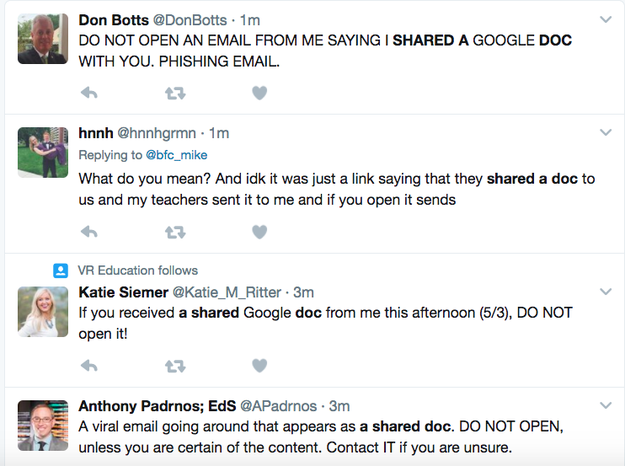
Phishing: Bösartige Google Docs-Einladungen kopieren Kontakte

Wer heute eine Einladung für ein Google-Docs-Dokument bekommen hat, sollte dieser auf keinen Fall Folge leisten – denn es dürfte sich in den meisten Fällen um eine Phishing-Kampagne handeln. Wer klickt, gibt seine Kontakte frei und bekommt Scareware-Anzeigen. Die Macher scheinen vom Erfolg überrascht. (Google Docs, Google)
Quelle: Golem

People Broke Into My Starbucks App And Charged Me $100

The timing was perfect on this one.

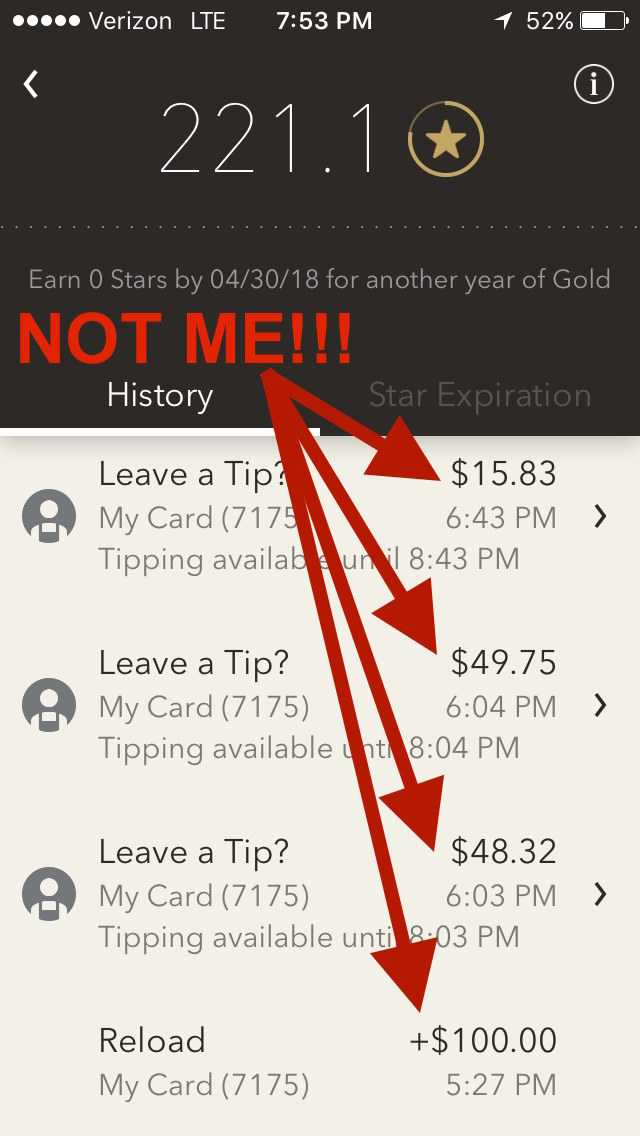
Last week, just as I finished writing a story about “unauthorized activity” on Chipotle's payment system, I received an email alert from Starbucks. It contained a receipt for reloading $100 onto my Starbucks mobile app, using my saved credit card.

The problem, of course, was I had nothing to do with that transaction. By the time I opened the app to see what was going on, the fraudster had already made three purchases at a Starbucks in San Diego: one for $48.32, one for $49.75, and another for $15.83.

By the time I was on the phone with customer service, my account had been completely emptied.

This is not a new thing — it's called an account takeover, and it's a long-running problem in the Starbucks app. In 2015, customers of the coffee chain reported having their accounts reloaded using their stored credit cards and then emptied, possibly onto gift cards that the scammers then sold at a discount on the black market.

At the time, the company said because many consumers reuse usernames and passwords on multiple sites and apps, criminals were obtaining stolen logins from hacked websites, and trying them out in the Starbucks app.

“We have a team of engineers dedicated to advancing our security and fraud prevention capabilities,” the company said in a statement at the time.

But two years later, the Starbucks app still seems vulnerable to exactly the same weakness. Despite the app being linked to people's credit cards, and capable of charging money to them at will, the company confirmed to BuzzFeed News that it does not support two-factor authentication — a widespread security measure that typically involves the user being sent a code via text message or email when attempting to log in from a new device.

It's a notable weakness, given that mobile payment now represents about 25% of all Starbucks transactions. For a chain that brought in $13.2 billion in sales in fiscal 2016 just through company-operated stores in the US, Canada, and Latin America, that means billions of dollars flowing through the app.

“Relying on usernames and passwords is a failure because no matter what you do, there will always be some percentage of users, probably double digits, who will use a password that they used somewhere else,” said journalist Brian Krebs, author of KrebsOnSecurity.

“I was surprised that in two years, Starbucks hasn’t gotten more aggressive,” said Rob LaMear, CEO of US Cyber Vault. LaMear said his and his wife's Starbucks accounts were both recently compromised. With a global brand, there's “a lot of volume at play here.”

A Starbucks spokesperson said in an email to BuzzFeed News “while account takeover (ATO) activity is an industry wide challenge, we see only a tiny fraction of one percent of our account holders impacted.”

Meanwhile, a slow trickle of complaints from Starbucks customers continues to emerge on social media.

Like many other big restaurant chains launching their own ordering and payment apps, mobile is a critical part of Starbucks' growth plan. While repeat customers are big fans of the convenience of these apps, the companies also benefit from the reams of highly-detailed data they collect on customer habits.

How serious is Starbucks about getting digital right? It's newly-appointed CEO, Kevin Johnson, was previously the CEO of tech company Juniper Networks, and was a senior executive at Microsoft before that. Last month, Johnson singled out “digital relationships with customers” as one of the company's “most important things for the future.”

Asked about rolling out two-factor authentication, Starbucks said, “While we do not share specifics on future security protocol timelines or practices, our security and anti-fraud teams actively continue to develop, and invest in, enhanced protection measures, further strengthening our platforms.”

Starbucks customer service said they would cancel the $100 charge with my credit card company and refund the balance that was on my account before it was compromised. The representative had me change my password while I was still on the phone with her.

Was your Starbucks account compromised? To contact the reporter on this story, email venessa.wong@buzzfeed.com, or go to tips.buzzfeed.com to learn how send your tip securely.

Chipotle Says Its Payment System May Have Been Hacked

Quelle: <a href="People Broke Into My Starbucks App And Charged Me 0“>BuzzFeed

If You Just Got An Unexpected Google Doc, Don’t Open It

Have you gotten an email today (or perhaps several), saying that someone from your contacts list shared a Google document with you? Think twice before opening it or clicking the link to access the doc.

A number of people have been victim of an apparent phishing attempt (where hackers try to get you to click on sketchy links) by an unknown organization starting around 11:30 am PT today.

At least some of the emails are addressed to “hhhhhhhhhhhhhhhh@mailinator.com” and appear to place the intended target in the BCC field. The subject line reads “[someone in your contacts] just shared a Google Doc with you,” imitating the way Google emails appear when people share Google Documents with one another.

If you click on the fraudulent link within the email, it will take you to a real Google page asking for widespread permissions across your Google accounts, which, if granted (don't) would give the attackers access to a vast amount of personal data. For now, it doesn't seem like the hack can access this information unless you give it permission; however, if you open the link, it does seem to forward the email to everyone on your contact list.

The attack hit a number an unknown number of employees within BuzzFeed and seems to also target people outside of the organization, including school districts.

If you search “shared a doc” on Twitter, the results keep piling up.

Here's what to do if you did click the link to the suspicious Google Doc:

  • Go to the google security checkup and go through the checklist.
  • Pay close attention to the Account Permissions section. Check for anything that looks suspicious and revoke access.

Google did not immediately respond to requests for comment.

Quelle: <a href="If You Just Got An Unexpected Google Doc, Don’t Open It“>BuzzFeed

Waymo Alleges Ex-Employee And Uber Created A Cover-Up Company To Steal Its Self-Driving Tech

Anthony Levandowski, Otto Co-founder and VP of Engineering at Uber

Afp / AFP / Getty Images

In a court hearing on Wednesday, Waymo's lawyers alleged that Anthony Levandowski – its former employee who is at the center of its contentious lawsuit against Uber – started his self-driving truck company Otto as a ruse so Uber could acquire it and steal proprietary information about Google's self-driving car program.

“We've learned that Uber and Levandowski together created a cover-up scheme for what they were doing,” Charles Verhoeven, a lawyer for Waymo, said. “They concocted a story for public consumption. The story was that Mr. Levandowski left Waymo for his own company.”

Waymo's lawyers pointed to a stock agreement that gave Levandowski more than $5 million shares of vesting stock – an amount Waymo's lawyers said was worth about $250 million – on January 28, 2016, the day after Levandowski left Google.

According to state records, Levandowski’s company Ottomotto LLC was incorporated in Delaware on January 15, 2016. Uber acquired Otto and appointed Levandowski as head of its self-driving car program a few months later, in July 2016.

Uber told reporters outside the courtroom that the stock was granted at the time of the acquisition but the vesting was back-dated to account for Levandowski's time at Otto. The ride-hail giant's lawyers didn't address the vesting agreement in court.

The lawyers also pointed to emails sent in January by Brian McClendon, Uber's former vice president of maps who left the company earlier this year, that referenced a meeting with “Anthony,” presumed to be Levandowski.

The hearing on Wednesday is centering around whether US District Judge William Alsup should grant Waymo's request for an injunction to halt Uber's self-driving program pending a trial.

The lawsuit centers around laser technology called LiDAR (Light Detection And Ranging), which helps self-driving cars see and navigate. Uber says its own technology is “fundamentally different” from Waymo’s designs. Waymo alleges Levandowski downloaded 14,000 company files before leaving the company to start Otto.

This is a developing news story. Check back for updates.

Quelle: <a href="Waymo Alleges Ex-Employee And Uber Created A Cover-Up Company To Steal Its Self-Driving Tech“>BuzzFeed

Azure IoT Hub Server TLS Leaf certificate renewal – May 2017

The following blog contains important information about TLS certificate renewal for Azure IoT Hub endpoints which may impact client connectivity.

As part of the periodic renewal cycle, the Azure IoT Hub leaf certificates used for TLS connection will be renewed starting mid-May 2017. This could potentially impact some clients connecting to the Azure IoT Hub service. This change only impacts Azure IoT Hubs created in public Azure cloud, and not Azure in China nor Azure Germany.

Certificate renewal summary

The table below provides information about the certificate being renewed. Depending on which cert your device or gateway clients use for TLS connection, action may be needed to prevent loss of connectivity.

Expected behavior

Not impacted: Devices connecting to Azure IoT Hub using Azure IoT Device or Gateway SDK, as provided. Using your own connection code that utilizes the root certificate or SDKs using the Operating System's built-in Certificate Store for TLS connection will not be impacted. 
Potentially impacted: Devices using a connection stack other than the connection stack provided in an Azure IoT SDK. Specifically, connection logic that pins the leaf certificate will experience TLS connection failures after the rollover if not updated. Our recommendation is to pin the root certificates as they renew less frequently.

Validation

We recommend validation to mitigate any untoward impact to your IoT infrastructure connecting to Azure IoT Hub. We have setup a test environment for your convenience to try out before we renew the leaf certificate in Azure IoT Hub. The connection string for this test environment is: HostName=playground01.df.azure-devices-int.net;SharedAccessKeyName=owner;SharedAccessKey=0DvHNevPwsDjpMor6eT6aZefKp77Tdo7z2eaFX9kF5I=

A successful TLS connection to the test environment signifies a positive test outcome, and that your infrastructure will work with this change. This connection test string contains an invalid key so once the TLS connection is established, any runtime operations performed against this test IoT Hub will fail. This is by design as the hub exists solely for customers to validate their TLS connection functions. This test environment will be available until all public cloud regions have been updated.

If you have any technical questions on implementing these changes, open a support request with the options below and an engineer will get back to you shortly.

Issue Type: Technical
Azure Service: Internet of Things/IoT SDKs
Problem Type: Security/Authentication
Glossary of terms: Root, Intermediate, and Leaf certificates – Types of digital certificates also known as public key or Identity certificates used to manage identity, access, and trust over a network.

Quelle: Azure

Reacting to maintenance events… before they happen

Introducing Scheduled Events (Preview)

What if you could learn about upcoming events which may impact the availability of your VM and plan accordingly?  Well, with Azure Scheduled Events you can.

Scheduled Events is one of the subservices under Azure Metadata Service that surfaces information regarding upcoming events (for example, reboot). Scheduled events give your application sufficient time to perform preventive tasks to minimize the effect of such events. Being part of the Azure Metadata Service, scheduled events are surfaced using a REST Endpoint from within the VM. The information is available via a Non-routable IP so that it is not exposed outside the VM.

What is covered with scheduled events

While we continue to invest in increasing the scope of scheduled events, the following are already covered during the preview:

VM Preserving maintenance (also known as – in place VM migration). This class of maintenance operations is used to patch and update the hosting environment (hypervisor and agents) without rebooting the VM. With VM preserving maintenance, your VM freezes for up to 30 seconds without losing open files and network connections. While most modern applications are not impacted by such a short pause, some workloads (like gaming) are too sensitive and consider this as an outage. With scheduled events, your application will be able to learn of such maintenance with an event type of freeze.
VM Restarting maintenance. While the majority of updates have zero to little impact on virtual machines, there are cases where we do need to reboot your virtual machine. With scheduled events, your application can detect such scenarios with event type being set to Reboot or Redeploy.
User operations. You may not reboot your production servers manually, but you can definitely try and reboot or redeploy your test VMs to test your failover logic. In both cases, a scheduled event is surfaced with event type being set to Reboot or Redeploy.

Use cases for scheduled events

We have observed several use cases for using scheduled events:

Proactive failover. Instead of waiting for your application, SLB or traffic manager to sense that something went wrong, you can proactively failover to another node. In some cases, knowing that a VM will be back soon can help the application logic to start accumulate and log changes rather than failover a partition/replica.
Drain a node. Instead of failing running jobs, you can block the VM from accepting new jobs and let it drain those already started.
Log and audit. knowing that the VM was interrupted by Azure can simplify root cause analysis of detection availability issues.
Notify and correlate. Send notification to your admin (human) or monitoring software and correlate the schedule event with other signals.

Getting Started with scheduled events

You can query for Scheduled Events simply by making the following call from within a VNET enabled VM:

curl -H Metadata:true http://169.254.169.254/metadata/scheduledevents?api-version=2017-03-01

A response contains an array of scheduled events. An empty array means that there are currently no events scheduled. In the case where there are scheduled events, the response contains an array of events:

{
"DocumentIncarnation":{IncarnationID},
"Events":[
{
"EventId":{eventID},
"EventType":"Reboot" | "Redeploy" | "Freeze",
"ResourceType":"VirtualMachine",
"Resources":[{resourceName}],
"EventStatus":"Scheduled" | "Started",
"NotBefore":{timeInUTC},
}
]
}

In order to trigger and test your logic dealing with scheduled events on your VM, simply go to the Azure portal and either Restart or Redeploy your VM.

Next Steps

Checkout Azure Scheduled Events documentation to learn more.
Take a look at the following sample which uses Azure Event Hub to collect scheduled events from multiple VMs.

Quelle: Azure

Google Cloud Launcher adds more container support

By Quan To, Senior Program Manager

Containers are a repeatable and reliable way to deploy on Google Cloud Platform (GCP). With more and more customers adopting containers, there’s a clear need for more pre-packaged, secure, maintained container offerings that customers can easily deploy into their environments. A few weeks ago at Google Cloud Next ‘17, we launched container runtime base images for Debian, Ruby, OpenJDK, Jetty, Node.js and ASP.NET Core. Today, we’re pleased to add the following Google maintained containers:

Cassandra
ElasticSearch
Jenkins
MongoDB
MySQL
Nginx
PostgreSQL
RabbitMQ
Redis
Wordpress

Google container solutions are managed by Google engineers. Since we’re maintaining the images, the containers available on Google Cloud Launcher will be current with the latest application and security updates.

The recipes we use to build the containers are publicly available on GitHub so that you can see how they were created. You can use the scripts and tweak them to create your own flavor of the containers. We strive to ensure these containers are not bloated and are vanilla images.

There’s no additional cost to use these containers beyond the cost of infrastructure. They’re compatible with Docker and Kubernetes. The container images can be used on GCP with Google App Engine, Google Container Engine, Docker, or even off GCP in an on-premises Kubernetes environment. They’re production-grade, which means you can deploy them onto a compatible virtual machine and run your business on them.

Our team of engineers welcomes feedback so feel free to post on the issue tracker in GitHub for the container solutions. We’d love to hear about any issues or feature requests. View our full list of open source container solutions managed by Googlers here.

If you’re new to GCP, it’s easy and free to get started with our $300 dollar of credit for 12 months.
Quelle: Google Cloud Platform