Deploying CloudForms at Scale

One of the challenges of deploying CloudForms to manage a large environment is knowing how to tune it – what knobs to turn and dials to watch for.
Red Hat’s Systems Engineering team have just completed a document entitled “Deploying CloudForms at Scale”. This describes the architectural components that affect large-scale deployment, and details the monitoring, troubleshooting and scaling measures that can be taken to optimally tune each component.

The document is divided into three sections:
Part I – Architecture and Design

Architecture discusses the principal architectural components that influence scaling: appliances, server roles, workers and messages.
Regions and Zones discusses the considerations and options for region and zone design.
Database Sizing and Optimization presents some guidelines for sizing and optimizing the PostgreSQL database for larger-scale operations.

Part II – Component Scaling

Inventory Refresh discusses the mechanism of extracting and saving the inventory of objects – VMs, hosts or containers for example – from an external management system.
Capacity and Utilization explains how the three types of C&U worker interact to extract and process performance metrics from an external management system.
Automate describes the challenges of scaling Ruby-based automate workflows, and how to optimize automation methods for larger environments.
Provisioning focuses on virtual machine and instance provisioning, and the problems that sometimes need to be addressed when complex automation workflows interact with external enterprise tools.
Event Handling describes the three workers that combine to process events from external management systems, and how to scale them.
SmartState Analysis takes a look at some of the tuning options available to scale SmartState Analysis in larger environments.
Web User Interface discusses how to scale WebUI appliances behind load balancers.
Monitoring describes some of the in-built monitoring capabilities, and how to setup alerts to warn of problems such as worker restarts.

Part III – Putting it into Practice

Design Scenario takes the reader through a hypothetical design, scaling CloudForms Management Engine appliances in a region with several zones to manage a hybrid cloud.

The document is available here: https://access.redhat.com/documentation/en-us/reference_architectures/2017/html/deploying_cloudforms_at_scale/
Quelle: CloudForms

Management Pack for Microsoft Azure Stack now available

With this blog post we announce the availability of the technical preview of the Microsoft Azure Stack Management Pack for System Center Operations Manager.

Microsoft System Center is a powerful management tool for the datacenter. Microsoft Azure Stack is a new hybrid cloud platform that allows you to run Microsoft Azure services in your datacenter. Azure Stack integrated systems will be a part of the larger assets customers have in their datacenters, so it is vital that there is an integration that facilitates aggregate management via System Center for Azure Stack.

Download the management pack!

This management pack enables System Center Operations Manager 2012 R2 & 2016 to monitor Azure Stack.  In addition to alert management, Operations Manager expands Azure Stack with capabilities like sending notifications via different channels or scheduling maintenance windows during an update run. Once alerts are received in the Operations Manager, existing connections within the Operations Manager to other products, such as Service Manager, can be leveraged. For example, this product can be leveraged to create a service ticket. 

This management pack allows you to integrate Microsoft Azure Stack with your existing IT Lifecyle by leveraging already existing processes and workflows. The Health dashboard allows to view and drill into the health of multiple deployments of Azure Stack including multiple Azure Stack Regions, once available.

For customers not using Microsoft System Center Operations Manager, we also released a Nagios monitoring plugin with similar capabilities in partnership with Cloudbase. This plugin is written in python and leverages Azure Stack Health Resource Rest API. The same rest API is used by Azure Stack’s own Portal, PowerShell, and of course the Azure Stack Management Pack. Please provide feedback by using the Azure Stack Forum. If you have a feature request that we should consider please use Azure Stack User Voice.

Additional resources

Azure Stack Management Pack for System Center Operations Manager
Azure Stack Plugin for Nagios 
Azure Stack Tools
Microsoft System Center  

Quelle: Azure

Docker Enterprise Edition Brings New Life Back to Legacy Apps at Northern Trust

Many organizations understand the value of building modern 12-factor applications with microservices. However, 90+% of applications running today are still traditional, monolithic apps. That is also the case for Northern Trust – a 128-year old financial services company headquartered in Chicago, Illinois. At DockerCon 2017, Rob Tanner, Division Manager for Enterprise Middleware at Northern Trust, shared how they are using Docker Enterprise Edition (EE) to modernize their traditional applications to make them faster, safer, and more performant.
Bringing Agility and Security to Traditional Apps
Founded in 1889, Northern Trust is a global leader in asset servicing, asset management, and banking for personal and institutional clients. Their clients expect best-of-breed services and experiences from Northern Trust and Rob’s team plays a large role in delivering that. While their development teams are focused on microservices apps for greenfield projects, Rob is responsible for over 400 existing WebLogic, Tomcat, and .NET applications. Docker EE became the obvious choice to modernize these traditional apps and manage their incredibly diverse environment with a single solution.
Containerizing traditional applications with Docker EE gives Northern Trust a better way to manage them and some immediate benefits:

Improved security: As a financial institution, security is a top priority. Containerizing traditional applications helps improve their underlying security posture in a few ways:

Security scanning – Northern Trust is leveraging image scanning to discover vulnerabilities within their existing apps. There were some new vulnerabilities that were previously undetected but with the binary level scan, they are automatically alerted to new issues and can address and resolve them immediately.
Smaller attack surface – With Docker, Northern Trust can reduce the attack surface of their application by only allowing the required access, syscalls and processes needed to run the application.
Faster updates – With the ability to rapidly deploy new containers, Northern Trust no longer patches applications  in place, but quickly deploys a new container with the updates and fixes and removes the previous one.

Improved infrastructure efficiency: Instead of managing unique infrastructure stacks for each application, each with its own challenging dependencies, Docker allows Northern Trust to treat all infrastructure as a heterogeneous pool of resources. Dependencies are not packaged into the containers with the app, thus removing it from the infrastructure problem. This makes the application portable so that Northern Trust is free to explore a hybrid cloud strategy.

Impact and Results
With Docker EE in place, Northern Trust is seeing immediate improvements in the way they do software development. It used to take 30 days to provision infrastructure for new projects. With Docker EE, they experience a 4x improvement in deployment time and it now only takes 7 days. Northern Trust is also seeing 2x improvement in infrastructure utilization, getting more out of their available capacity than before.

By simplifying infrastructure management and making applications more portable, Docker EE is improving the quality of their traditional apps. This enables both their developers and operations team to be more responsive and ultimately, Northern Trust is able to stay a leader in their market by delivering the services that their clients are asking for.
To learn more about how Northern Trust is modernizing their traditional applications, watch Rob’s breakout session with Rohit Tatachar, Sr. Program Manager at Microsoft and Brandon Royal, Solutions Architect at DockerCon 2017:

Next Steps

View all the recorded sessions from DockerCon 2017
Learn more about modernizing traditional apps with Docker EE
Sign up for the Modernize Traditional Apps kit

Traditional Apps at @NorthernTrust are more agile and secure with Docker Enterprise Edition…Click To Tweet

The post Docker Enterprise Edition Brings New Life Back to Legacy Apps at Northern Trust appeared first on Docker Blog.
Quelle: https://blog.docker.com/feed/

Managing Secrets on OpenShift – Vault Integration

Credentials are environment dependent configurations that need to be kept secret and should be read only by subjects with a need-to-know. In this article, I present an integration with Vault from Hashicorp as one approach to solving the problem of strict secret management requirements. This orchestration was built on the work previously done by Kelsey Hightower.
Quelle: OpenShift

Windows on the rise at GCP

By Chris Sells, Product Manager

It’s been a little over three months since we made our no-charge VM migration tool available for GCP in the Google Cloud Console, and customers have jumped at the chance to move their enterprise workloads to Google Cloud. While customers are moving applications using a variety of source operating systems to Google Cloud, we’ve been especially excited to see that almost half of the VM migrations to Google Cloud via this new service have been of Microsoft Windows workloads.

Why is this significant to you? Because our goal to make Google Cloud the best place to run any application — from Windows workloads to new cloud native applications. We believe that the significant number of Windows applications migrating to Google Cloud through this new service is indicative of strong demand to give enterprise Windows applications the agility, scale and security advantages of Google Cloud.
“We are leveraging Google Cloud to deliver the experiences our customers demand, and we want to make sure that all our workloads can take advantage of Google Cloud’s unique infrastructure and services. Using the free Google Cloud migration tools, we’ve been able to easily move our Windows servers to Google Cloud with near-zero downtime.” — Rob Wilson, CTO at Smyths ToysWe’re happy to see customers take advantage of our first class support for Windows, SQL Server and both .NET and .NET Core on GCP. We’ve made sure that those applications are well-supported by providing support for Windows Server 2016 within weeks of it reaching GA, by adding support for SQL Server Web, Standard and Enterprise editions (including support for High Availability), by integrating Visual Studio and PowerShell, by making all of Google’s APIs available via NuGet and by joining the .NET Foundation’s Technical Steering Committee. Further, with Stackdriver Logging, Error Reporting and Trace support for Windows and .NET; developers and administrators have the support they need to build, deploy and manage their applications. Finally, with the recent announcement of .NET Core support in all of our libraries and tooling, as well as in our App Engine and Container Engine products, you’re covered into the future as well.

Internally, we’ve seen other signs of more Windows and .NET workloads running on GCP, including a 57% increase in Windows CPU usage in the second half of 2016. Further, we know that sometimes you need help to take advantage of the full capabilities of GCP, which is why we announced the Windows Partner Program. These top-notch systems integrators will help you to not just “lift & shift,” but rather to “move & improve,” with cutting-edge capabilities such as big data processing, data analytics, machine learning and container management.

Learn more about Windows, SQL Server and .NET on GCP; and don’t hesitate to reach out with questions and suggestions. We’ve had lots of folks make the switch already, we’d love you to join them. Our migration service is offered at no charge and you get $300 of GCP credits when you sign up so you can migrate a few servers to see how easy it is to run your windows apps in GCP. Click here to get started.
Quelle: Google Cloud Platform

USAspending.gov data available via Amazon Relational Database Service (RDS)

USAspending.gov data is now available for anyone to access via Amazon Relational Database Service (RDS). USAspending.gov is a government website launched in 2007 to provide access to the federal spending data mandated by the Federal Funding Accountability and Transparency Act of 2006. USAspending.gov includes data on all spending by the federal government, including contracts, grants, loans, employee salaries, and more. This data can be used by researchers, entrepreneurs, and anyone interested in analyzing how federal tax dollars are spent. Learn more about how to access the data on the USAspending.gov on AWS landing page and on Jeff Barr’s blog.
Quelle: aws.amazon.com

Amazon Just Launched A Brand-New Echo With A Screen For Video Calls

Amazon Just Launched A Brand-New Echo With A Screen For Video Calls

Amazon

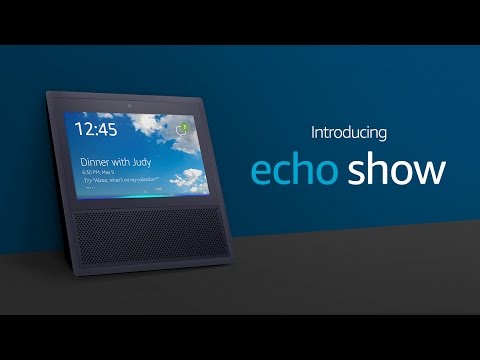
Amazon has launched a brand new device called the Echo Show. It’s essentially an Amazon Echo with a 7-inch touchscreen and a 5-megapixel camera built-in — which means you can now tell Alexa to show you that YouTube video, throw up lyrics to the song that’s playing, see weather forecasts, and also make video calls with anyone with another Echo Show or the Alexa App.

The 41-ounce device will be available in two colors — black and white — and will be available in the US for $229 on June 28. Here's what it's like to use.

youtube.com

The Echo Show is the latest addition to Amazon’s family of Echo devices. Late last month, Amazon unveiled a hands-free, voice-activated camera called the Echo Look, which uses algorithms to let you know which outfit looks best on you.

Quelle: <a href="Amazon Just Launched A Brand-New Echo With A Screen For Video Calls“>BuzzFeed

Waves platform now available on Azure

We are excited to announce our collaboration with Waves and their support of the blockchain efforts on Microsoft Azure. The Waves Platform is a decentralized platform for crowdfunding and creation of digital tokens. The platform functions primarily to allow easy creation and distribution, trading and asset exchange, and leveraging a blockchain backend. The product is based on a proof of stake consensus algorithm, which can help lower the carbon footprint of the more compute intensive proof of work models, which is also attractive to enterprise customers. The system has been designed to make it easy to get started with custom tokens. The token systems are a key component in solutions that enterprises are requesting.

The initial release works in conjunction with the testnet. So, with a one click deployment, a node can be added to the testnet and developers can start using the platform with minimal effort. You can get started using the platform by deploying via one click in the Azure marketplace.

"As an open, flexible and scalable cloud computing platform, Azure has much in common with Waves. We’re both exploring new ways of doing computing, new ways of making powerful functionality accessible to end users in a way that has never been possible before. It is reassuring to partner with an organisation that shares many of our core values and that recognises the importance of enabling businesses to use these new tools."

  – Sasha Ivanov, CEO of Waves Platform


Quelle: Azure