Scrum Master – Contract

The post Scrum Master – Contract appeared first on Mirantis | Pure Play Open Cloud.
We are looking for a Scrum Master to coach and enable our development teams to work efficiently together. You will collaborate with cross functioning, global, highly skilled engineering teams in a fast moving environment. Role & Responsibilities:Drive the organization-wide agile transformation strategyDesign and deliver transformational agile training for engineering managers, product managers, development teams, and executivesPut in place measurable key performance indicators (KPIs) and metrics to track progressCoach people across different functions and levels of the organizations and geographies , including senior executivesWho You Are: You have successfully transformed an software company from ad hoc to agile methods.An expert working as a change agent to transform how an organization thinks and worksHyper-focus on impact, building organizational muscle around measuring progress, and developing capabilities to help the organization create sustainable change.Requirements:  Experience & Skills10 years experience in a product company, in a variety of roles from developer to leader, manager or coach5 years of hands-on experience with scrum, kanban and other agile practicesStrong presentation, coaching and facilitation skillsCapable of multitasking and transforming multiple teams at onceExperience with coaching ExecutivesAble to work with individuals and teams across all levels within the companyAble to influence peers / managers and build consensus while dealing with ambiguityPlays well as a member of a teamExcellent communication skillsPreferred Qualifications:Certified Scrum Coach or Kanban Coaching ProfessionalHave had exposure to highly-available, scalable software and servicesYou have done experimentation and data driven decisions in an agile environmentThe post Scrum Master – Contract appeared first on Mirantis | Pure Play Open Cloud.
Quelle: Mirantis

Here's How To Deactivate Alexa Calling After You Sign Up

Amazon

Earlier this week, Amazon launched its own Internet voice and messaging service, Alexa Calling and Messaging, available free to all users with an Amazon Echo, Echo Dot, or Alexa app for iOS and Android. You can also use the service on Amazon’s new device, Echo Show, a touchscreen with a 5-megapixel camera and the company’s voice-enabled digital assistant Alexa built-in. But some users have noticed they don't have the ability to block people from calling their Echo devices — and they find it unsettling.

To use Alexa calling and messaging, users also need to verify their phone number and import their entire address book to the Alexa app, which a spokesperson says is stored “securely in the Amazon cloud.” Your phone number is essentially your username and, like on WhatsApp and Signal, anyone with your phone number will be able to contact you on your at-home Echo or Echo Dot (including, er, PR people, much to the chagrin of this reporter). WhatsApp and Signal allow users to block certain contacts, while Alexa does not. You can, however, turn on Do Not Disturb for Alexa, by telling your Echo, “Don't disturb me.” The feature can also be scheduled for certain days and times in the app.

There are other privacy concerns as well. There's no password protection to use Alexa calling, which means anyone in your household can make an Alexa call using your account (the call is placed over the Internet via the Alexa app). They can also ask your Echo device, “Play my message” when you receive a new text messages (Alexa calling does not support voicemail) and listen to that message without your consent.

If learning all of this means you're reconsidering your decision to enable Alexa Calling and Messaging on your device and you want to turn it off, it's a lot less straightforward than you might think. I combed through Amazon's entire Alexa-to-Alexa calling support site to find out how to deactivate calling and messaging but couldn't find instructions, so I reached out to Amazon.

As it turns out, users will need to call Amazon customer service to disable the new feature. You can do this one of two ways:

1. Call the general help number toll-free at 1-877-375-9365.

2. Go to this special Contact Us page and select Amazon Devices > your Echo name > Echo Devices > under “Select issue details,” Something Else > under “How Would You Like To Contact Us,” select Phone. You will then enter your phone number and an Amazon rep will call you.

I tried the second method, and it took 10 minutes for a representative to deactivate calling for my Amazon account.

If you don't want to disable the feature but you want more privacy, try using a burner number.

If you still want to use Alexa calling and messaging with a limited group of people (like the grandparents), sign up for a Google Voice or Sideline number (both are free), then use that number when setting up Alexa calling. Then, have your friends and family add that number to their address book and use it when they want to talk to you on your Amazon device.

Quelle: <a href="Here's How To Deactivate Alexa Calling After You Sign Up“>BuzzFeed

The Driverless Car Lawsuit Against Uber Could Land Executives In Prison

Anthony Levandowski

Afp / AFP / Getty Images

In an unexpected twist on Thursday evening, the federal judge presiding over Waymo’s bitter lawsuit against Uber referred the case to the United States attorney to investigate allegations that the ride-hail giant stole trade secrets from the Google driverless car spinoff. The specter of possible criminal implications has long been looming over the case; Its referral to the US attorney has added a new layer of intrigue and drama to an already high-stakes legal battle between two tech titans.

While it's impossible to say with any degree of certainty just what will come of such a call for a possible criminal probe — even the judge who made it said he “takes no position on whether a prosecution is or is not warranted” — former U.S. attorneys and legal scholars say it doesn't bode well for Uber.

“This is bad news for Uber,” said Timothy Heaphy, a former US attorney for the Western District of Virginia, who now chairs a white collar defense and internal investigations practice at the law firm Hunton & Williams. “The focus of the federal investigation would be how high did awareness of this activity go within Uber management?”

John Marsh, a trade secrets litigator and partner at the firm Bailey Cavalieri, said it’s rare for a case like Waymo v. Uber to be referred to a US attorney so early on. “I follow this area of law pretty closely,” he told BuzzFeed News. “I can’t remember a federal judge doing that.”

Asked whether Waymo has communicated with the Justice Department about the prospect of or existence of a criminal investigation, a spokesman declined to comment. An Uber spokesperson declined to comment on the matter as well. The Justice Department did not return a request for comment.

The maximum penalty for theft of trade secrets is up to 10 years of imprisonment, and a fine of up to three times the value of the trade secrets at hand.

Waymo’s case against Uber hinges on Anthony Levandowski, a former employee it alleges stole its self-driving car trade secrets before joining the ride-hail company to oversee its self-driving car program. Levandowski, though not party to Waymo's suit, has so far invoked his 5th Amendment rights to avoid self-incrimination should the case become a criminal matter. The referral of the case to the US Attorney would seem to raise the stakes on that issue.

“[Levandowski] is clearly at the thick of it. He’s a target,” said Heaphy, the former US attorney.

That said, there are many unknowns here and it’s possible that the US attorney could determine that prosecution or investigation is unwarranted. But legal scholars said there are a few scenarios federal prosecutors would likely consider while weighing a criminal probe. Foremost among them, the idea that some Uber executives might have been aware of Levandowski’s alleged theft of trade secrets. The maximum penalty for theft of trade secrets is up to 10 years of imprisonment, and a fine of up to three times the value of the trade secrets at hand.

Uber has emphatically denied in court that the files Levandowski allegedly stole from Waymo ever made it into its systems. But the company has not disputed allegations that Levandowski downloaded files he shouldn't have from Waymo. “We don’t have any basis for disputing that,” Uber’s attorney Arturo Gonzalez said in court last week, adding that “there’s no evidence” Levandowski consulted the Waymo files once he began working at Uber.

Still, Waymo claims that its allegedly stolen proprietary information did find its way into Uber's plans for its LiDAR system, a technology that uses rapid pulses of laser light to help self-driving cars measure distance and navigate the world around them. And it insists that same info helped Uber fast-track its driverless car efforts, avoiding years of costly research and development.

This mess of allegations and rebuttals is particularly fraught for Uber given Levandowski's reportedly cozy relationship with CEO Travis Kalanick. According to Bloomberg, Kalanick courted Levandowski on a series of 10-mile walks across San Francisco, and once said of the engineer, “I feel like we’re brothers from another mother.” Certainly, the question of who knew what and when does seem to be wafting about.

Waymo’s lawyers have not yet deposed Kalanick. In court last week, Uber’s lawyer Gonzalez said “we'll produce our CEO for deposition. Nobody's hiding at Uber.” As the case moves toward a trial – the judge denied Uber’s attempt to force it into arbitration on Thursday – the public may eventually have an opportunity to hear Kalanick’s side of the story.

“The relationship itself isn't proof he aided and abetted a crime,” Heaphy said. “There would need to be evidence Travis was aware of – and took steps to affirmatively facilitate – Anthony’s [alleged] removal of Waymo’s trade secrets, and use of that proprietary information.”

“The only person who can really share that is Anthony himself,” Heaphy said. “He’ll have a huge incentive to do that if he is personally culpable for a criminal violation. Walks and friendships fade away when somebody's facing a jail cell.”

Quelle: <a href="The Driverless Car Lawsuit Against Uber Could Land Executives In Prison“>BuzzFeed

Was This Tweet From Jesse Tyler Ferguson An Ad Or A Dad Joke?

Welcome to “Is This an Ad?” — a column in which we take a celebrity’s social media post about a brand or product and find out if they’re getting paid to post about it or what. Because even though the FTC recently came out with rules on this, it’s not always clear. Send a tip for ambiguous tweets or ’grams to katie@buzzfeed.com.

THE CASE:

Alberto E. Rodriguez / Getty Images

Here we have a tweet about heartburn pill Pepcid from Jesse Tyler Ferguson, the actor from the hit tv show Modern Family:

A Facebook group for fans of the celebrity gossip podcast Who? Weekly flagged this tweet for me because they couldn't figure it out. Keep in mind, these are people who live and breathe celebrities on social media, and they're very savvy about whether or a tweet or Instagram post is #spon or not. So if this had them stumped, it's a real stumper!

THE EVIDENCE:

Saying that the giant, grotesque meal you're about to eat is “sponsored by Pepcid” is obviously a joke, right? I can totally imagine making that joke myself (almost). Overindulging on Shake Shake burgers so much that you need stomach medicine is the kind of thing people would make a self-deprecating joke about. Like if you posted a picture of yourself looking really hungover and captioned it, “sponsored by Jose Quervo and bad decisions.”

If it ISN'T a joke, then it's clearly an ad – the disclosure “I teamed up w/ PEPCID” is pretty clear that this is a spokesperson relationship. And though the FTC has recently cracked down on people doing sort of tricky things like saying “#sp” instead of “#sponsored” or using obfuscation to hide the #ad hashtag at the end of a super long caption, there isn't an official hard and fast rule on exactly what language someone MUST use. The idea is that it should be clear if you are working for the brand, and I think “I teamed up with [brand]” is clear enough disclosure.

Usually when I'm investigating a celebrity's social media post, the confusion is over whether the celeb's disclosure is clear to the average person. But this is different – the big question here is: Is this an ad, or just a cheesy dad joke?

THE VERDICT:

To find out once and for all, I reached out to Johnson & Johnson, which owns the Pepcid brand. “We know that Jesse can be quite the jokester, but lucky for us, he relies on PEPCID® to treat his frequent heartburn and he agreed to team up with us!” said a J&J spokesperson. “As he disclosed per FTC guidelines, this post is part of our partnership agreement – he’s been a paid spokesperson for the brand since 2016.”

There you have it folks. Sometimes a dad joke is really an ad.

Quelle: <a href="Was This Tweet From Jesse Tyler Ferguson An Ad Or A Dad Joke?“>BuzzFeed

It’s Easy To Fall For Email Phishing Scams. Here’s How To Protect Yourself

Lorena Salagre and B. Farias / Noun Project / Via thenounproject.com

You – and just about anyone with an email account – are susceptible to being tricked by what’s called a “phishing” scam, or malicious emails that look genuine. Hacked inboxes aren’t just a problem for political figures like vice president Mike Pence, senior members of Hillary Clinton’s campaign, and French president-elect Emmanuel Macron. Cybercriminals target Internet users of all stripes to gain access to email and other online accounts associated with that email address, like online banking or social media. In fact, these kinds of attacks are so widespread that in a recent consumer alert, the IRS reported a 400% increase in online phishing and malware incidents during the 2016 tax season.

With email hacking methods becoming more sophisticated, it’s important to know how exactly to identify illegitimate emails and what to do if you get tricked. Here’s a guide to everything you need to know to protect yourself from email scams.

What is “phishing”?

No, it is not the act of enjoying the band Phish.

Phishing is a form of social engineering. An email phishing attack is often a message designed to look like it’s from a trusted source when it’s actually not. It can appear to be an email from a colleague asking if you can take a look at a document. It can appear to be an automated message from a service you use, asking you to log in to your account to verify something.

Talented hackers thoughtfully craft their messages to make them look legitimate in order to get victims to give up personal information, click on a link, or download an attachment that may infect their device. To be “phished” usually requires user action. You need to actually do something – like click on a malicious link or attachment – otherwise, it’s just a phishing attempt.

Phishing can also be executed through malicious ads on unsecure websites or links sent through a text message.

Why is it called that?

A quick Google search for “origin of the word phishing” reveals that the term is a portmanteau of the words fishing and phreaking. Fishing refers to using different methods (like emails, advertisements, and links on sites) as lures for account information, like passwords. Phreaking was a term used to describe people who explored, experimented with, and hacked telephone systems in the ‘60s and ‘70s. The most commonly referenced origin story is that the term phishing was created in 1996 by a group of AOL hackers.

What does a phishing email look like?

What makes phishing emails so effective is that they look like normal emails from people you know or organizations you’re familiar with.

“I recently received an email from a lawyer that was completely within the wheelhouse of something he would ask me. It said, ‘Can you take a look at this attachment?’,” recalled Richard Aborn, president of the Citizens Crime Commission of New York City (CCC). That email turned out to be fraudulent.

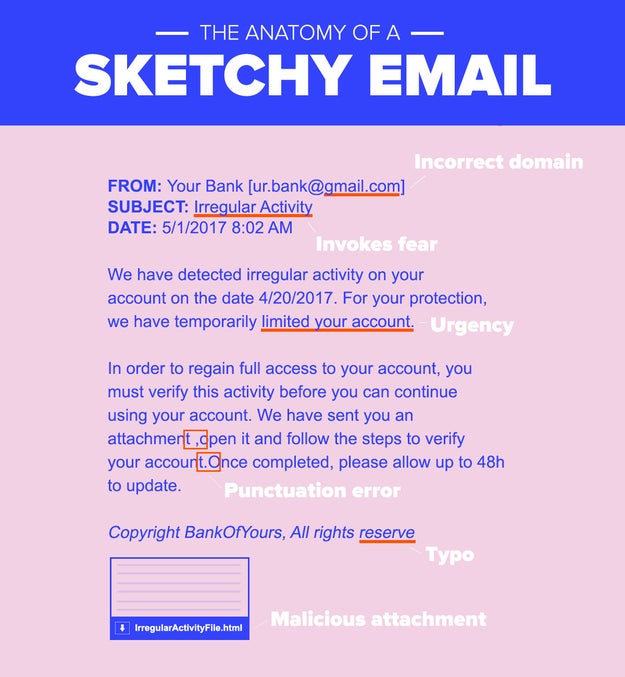
Aborn stressed that, when analyzing a sketchy email, paying attention to detail is crucial. “I also received an email from American Express that looked so real…but there was a small typo at the bottom.”
Nicole Nguyen / BuzzFeed News

The CCC, which recently published a report on the state of phishing, provides a great checklist of what to look out for. If you receive a suspicious email, ask yourself these questions:

– The sender: Is the “name” of the sender purporting to be an organization’s, but the sender’s email address domain is gmail.com? Is there a variation in the address’s domain (such as .net or .org, instead of .com)?

– The recipient: Does the email address you by name? If so, is it inaccurate?

– The message: Are there grammatical errors or typos? Does the message’s language sound urgent? Is there a deadline for action?

– Links or attachments: Hover over the hyperlink with your cursor and check if the hyperlinked text and URL match. Is it a sketchy IP address instead of a normal URL? Is it a .exe file (a type of file known to carry viruses)?

If you answered “yes” to one or more of these questions, it’s probably a phishing attempt.

Be extra vigilant about confirming an email's authenticity if it's an email you didn't expect, especially ones requesting sensitive personal information. Asking for things like your password, Social Security number, bank account PIN or credit card number is a telltale sign of fraud.

“A company with good security practices will never ask for your username and password via email,” said security expert Jessy Irwin.

One popular form of phishing is an email from a social media site like Facebook, Instagram, or Twitter, stating that you have become verified or there is an issue with your account because of copyright and threatening deactivation, unless you fill out a form linked in the email.

Another states that your iCloud or Microsoft Outlook account has been suspended or someone has logged in to your account on an unrecognized device. The email will have a link that leads to a website that *looks* like an official Apple or Microsoft page, with fields to submit a username and password, but the URL will look long and spammy.

In more sophisticated attacks, the hacker may already know something about you and use that nugget of information to their advantage. For example, it may appear to be from a friend or colleague and include language like, “Here are pictures from last week.” In one very targeted instance, a hacker breached a major oil company by sending a PDF of a takeout menu for a Chinese restaurant that was popular with employees.
Twitter: @zeynep

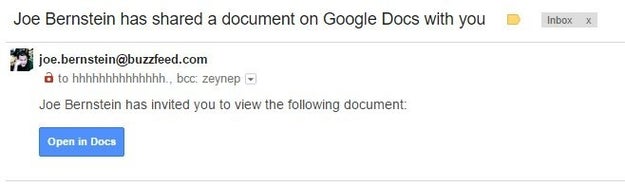
The most recent viral scam, which security experts said was one of the fastest-spread phishing campaigns in history, had someone from a recipient’s address book send an email with the subject “[Name] has shared a document on Google Docs with you.” In the body of the email was an “Open in Docs” link, styled the way a genuine Google Docs email would. Clicking on the link sent the phishing scam to everyone on a victim’s contact list, and granting the app permission gave attackers complete access to their victims’ Google data.

What are some tips for avoiding phishing scams?

The CCC’s Aborn follows this simple rule: “Don’t click until you’re sure. Even if you know the sender.”

You can try verifying links is through a link checker (Norton Safe Web and Phish Tank have free online tools that can help you determine whether or not something is legitimate) – but the easiest, safest thing to do is navigate to the website directly in your browser or contact customer service. If the message purportedly from a colleague or friend, contact them through another method of communication (phone, text, Facebook, IRL, etc.) and ask for verification.

For attachments, don’t download anything that looks suspicious. Microsoft Word documents (which end in .doc or .docx), if opened in Word, have the ability to execute code that can infect your device. Gmail has a built-in anti-virus scanner that allows you to preview PDF or Word documents, and if you open an attached document in “preview mode” (by clicking “View” and not “Download”), you can see the contents of the file without opening the Word or Adobe desktop apps. However, I’d advise you not to even preview the file, even though that is considered less risky than downloading it. A very clever attack replicated the attachment pane in Gmail, and led users to a fake Google sign-in page.

Still, following these authentication steps may not be enough. Some hackers are very, very good at what they do, and even IT professionals have fallen for phishing schemes.

“Many people think that the trick to not getting phished is to spot suspicious emails and attachments 100% of the time, but it is an absolute waste of time to try to become an expert…because attackers are so far ahead of the email counterfeiting game,” Irwin said.

Irwin urges people to be picky about giving any app access to your email. “If you haven't used an app in a long time, or can't remember why you gave it permission to access your inbox, revoke its permissions immediately so that it cannot harvest any of your personal information,” she advised. You can easily revoke apps you don’t recognize or haven’t used in a while with access to Google, if you use Gmail. While you’re at it, check your app integrations with Twitter and Facebook, too.

You should also turn on two-factor authentication everywhere you can (here’s a comprehensive list of websites with two-factor), which requires an additional form of verification so your password isn’t the only way to access an account. However, Irwin notes that, “SMS is an incredibly insecure method for sending an extra factor of authentication.” Instead of text message, she suggests using a code generator app like Google Authenticator or a security key like Yubikey. However, two-factor may not be enough to stump hackers. They might have a copy of your backup codes or physical access to your phone with an authenticator app installed, for example.

“Don’t click until you’re sure. Even if you know the sender.”

Additionally, Irwin recommends using a password manager (like LastPass or 1Password), which can help you avoid being phished online by not auto-populating your username and password unless you’re on the right website. Most managers have browser extensions that automatically fill in your credentials for sites like Gmail or Facebook, and won’t recognize a spammy or fake URL.

Password managers can also help you create super strong, unique passwords for every account, which is *crucial* to protecting your online privacy. According to Brian Krebs, an independent cybersecurity journalist and author of Spam Nation, “most breaches in general – including email account hacking – involve successful phishing attacks. However, credential re-use across multiple sites is also a huge contributor to email account hacks, maybe bigger than phishing.”

What happens if I fall for a phishing scam? How dangerous is it?

Change your password immediately. Then, review the third-party apps you’ve authenticated with your account, and report the phishing attempt to the company the hackers were posing as:

Apple: Report hackers with iCloud, me.com, or mac.com email addresses to abuse@icloud.com and send emails to reportphishing@apple.com.

Facebook: Send emails to phish@fb.com.

Google: Report hackers with Gmail addresses here and emails in Gmail with the down arrow next to Reply > click Report phishing.

Microsoft: In Outlook, click the arrow next to Junk > click Phishing scam. You can also contact the Microsoft Answer Desk.

Amazon: Send emails to stop-spoofing@amazon.com.

Continue to check your login history for your Apple, Facebook, Google, and Microsoft after changing your password to remotely log out of any unrecognized devices, and make sure hackers still don’t have access to your account. There is no way to review where you are logged in with your Amazon account currently, so if your Amazon account is hacked, change your password immediately.

Next, if you are a US resident, file a complaint with the FBI’s Internet Crime Complaint Center. In Canada, reach out to the Anti-Fraud Center, and in the UK, you can report an attack to ActionFraud.

If hackers gain access to your email account, they may be able to reset the password of any account associated with that email address. They may also hold it for ransom and request a sum of money to turn it back over to you. Hackers can also hijack your reputation, by posting content to your social media accounts.

So, yeah, whatever you do: Don’t click if you aren’t sure and don’t re-use passwords!

cc.com / Via giphy.com

And don’t just protect your email accounts. “It's really important for people to realize that most of what can happen to them through email can also happen in their text messages and their social media inboxes, too,” Irwin said. “So building good habits for email, if applied to texting and to social media, can help everyone keep it together online.”

Quelle: <a href="It’s Easy To Fall For Email Phishing Scams. Here’s How To Protect Yourself“>BuzzFeed