Azure File Storage on-premises access for Ubuntu 17.04

Azure File Storage is a service that offers shared File Storage for any OS that implements the supported SMB Protocol. Since GA we supported both Windows and Linux. However, on premises access was only available to Windows. While Windows customers widely use this capability, we have received the feedback that Linux customers wanted to do the same. And with this capability Linux access will be extending beyond the storage account region to cross region as well as on premises. Today we are happy to announce Azure File Storage on-premises access from across all regions for our first Linux distribution – Ubuntu 17.04. This support is right out of the box and no extra setup is needed.

How to Access Azure File Share from On-Prem Ubuntu 17.04

Steps to access Azure File Share from an on-premises Ubuntu 17.04 or Azure Linux VM are the same.

Step 1: Check to see if TCP 445 is accessible through your firewall. You can test to see if the port is open using the following command:

nmap <azure storage account>.file.core.windows.net

Step 2: Copy the command from Azure Portal or replace <storage account name>, <file share name>, <mountpoint> and <storage account key> on the mount command below. Learn more about mounting at  how to use Azure File on Linux.

sudo mount -t cifs //<storage account name>.file.core.windows.net/<file share name> <mountpoint> -o vers=3.0,username=<storage account name>,password=<storage account key>,dir_mode=0777,file_mode=0777,sec=ntlmssp

Step 3: Once mounted, you can perform file-operations

Other Linux Distributions

Backporting of this enhancement to Ubuntu 16.04 and 16.10 is in progress and can be tracked here: CIFS: Enable encryption for SMB3. RHEL is also in progress. Full-support will be released with next release of RHEL.

Summary and Next Steps

We are excited to see tremendous adoption of Azure File Storage. You can try Azure File storage by getting started in under 5 minutes. Further information and detailed documentation links are provided below.

Use Azure File on Linux
Azure Files Storage: a frictionless cloud SMB file system for Windows and Linux
Inside Azure File Storage

We will continue to enhance the Azure File Storage based on your feedback. If you have any comments, requests, or issues, you can use the following channels to reach out to us:

Stack Overflow
MSDN
User Voice

Quelle: Azure

Mark Zuckerberg’s Next Big Bet: Making The Real World An Extension Of Facebook

Facebook

At F8 today, Facebook is announcing a bunch of utterly crazy shit that we&;ll soon be able to do to the pictures we take. That includes Facebook, WhatsApp, Facebook Messenger, and Instagram and affects, oh, somewhere approaching 2 billion people. But while the company is talking a lot about cameras, it would be a mistake to look at what it is rolling out as a mere photography tool. Yes, there are cool picture effects. But what Facebook is really trying to do is to fully insert itself in the real world. Facebook’s augmented reality camera effects are an early attempt to let the digital infiltrate the physical, a way for the company to become the conduit between everything you see in the world around you, and all the information that exists, via your smartphone.

“Facebook is so much about marrying the physical world with online,” the company’s CEO Mark Zuckerberg told BuzzFeed News in an interview late last week. “When you can make it so that you can intermix digital and physical parts of the world, that&039;s going to make a lot of our experiences better and our lives richer.”

“Facebook is so much about marrying the physical world with online.”

It is certainly going to make life weirder. At an earlier demo, when a group of 18 Facebook engineers gathered to show their work to an outsider for the first time, they were clearly nervous. One pointed his phone at a table, and a 3D propeller plane popped up on screen, circling around a water bottle that rested on the tabletop. Another used his phone’s camera to turn the room into a planetarium, with planets and stars hewing across the ceiling as shooting stars fired from side to side. Still another took a normal photo of a face — and then made it smile, frown, and gape with the push of a button. Little wonder they seemed on edge: The stuff they were showing off was wild and largely unprecedented.

This new Camera Platform, as the company calls it, is a major bet that the camera isn’t simply a tool used to capture images. It’s something you’ll use when you want to share photos and videos, sure, but also when you want to overlay digital experiences on the real world. Imagine, Zuckerberg urged, using Facebook’s camera to view pieces of digital art affixed to a wall. Or to play a digital game overlaid on a tabletop. Or to leave a digital object in a room for someone to later discover — perhaps even future generations. Imagine using your phone to take a 2D photo, and then transform that photo into a 3D space. Imagine manipulating a friend’s expression to make them smile, or frown, or, well, whatever. Imagine changing your home into Hogwarts for a Harry Potter-obsessed daughter. That’s what Facebook is doing. “We see the beginning of an important platform,” Zuckerberg said. Onstage at F8 Tuesday morning, he reiterated this point: “The camera needs to be more central than the text box in all of our apps. … We’re making the camera the first augmented reality platform.”

And you thought this was just about Snapchat.

AI at War

It’s easy to draw comparisons to Snapchat. And certainly the camera platform’s Snapchat-like effects are likely to grab the most attention early on. But the more interesting stuff that Facebook is trying to pull off involves layering the digital and physical worlds on top of each other — bringing the former into the latter, and vice versa. There will be three big augmented reality areas Facebook is pushing into. The ability to display information on top of the world in front of you, the ability to add new digital objects to your environment (think: Pokemon Go), and the ability to enhance existing objects.

For example, Facebook’s Camera can map out two-dimensional photographs in 3D. The company hopes developers will someday build digital products that behave and interact in those formerly 2D spaces, just as they would in the rich three-dimensional world we live in. Picture this: In one demo, Facebook showed off various 3D scenes created entirely from a handful of 2D photos. The scenes had real depth to them — you could peer around a tree in a forest, or tilt your head to see behind a bed in a room. With a few clicks, the lights went down in the room. The forest flooded with water. It was magic.

The demo was on an Oculus headset, but Facebook’s ambition is to bring these kind of scenes directly into the News Feed itself, no Oculus required. It wants people to be able to create and interact with them directly on their phones.

The ultimate idea here is to turn the real world into an extension of Facebook itself. “There&039;s all these different random effects which are fun, but also foundational to a platform where people can create 3D objects and put them into the world,” Zuckerberg explained.

To pull off these radical camera effects, the company turned to an unexpected source: its AI team. When Zuckerberg began setting plans in motion for his company’s camera platform more than a year ago, he tapped Facebook’s Applied Machine Learning group (AML) to lead it. That put the technology in the hands of team artificial intelligence geeks, not the graphic designers or 3D artists you might otherwise expect.

Facebook

While not a traditional imaging team, Facebook’s AML group does work extensively in visuals. Much of what the team does is in the AI discipline of computer vision, the science of training computers to analyze and extract information from images, the same way humans do (Think about the way Facebook or Google can identify a face or a landmark in pictures uploaded to them). The group’s computer vision expertise made it an ideal fit for a project predicated on understanding what’s appearing before and beyond a camera lens.

As Facebook’s AML group went to work on Camera last summer, it waded into a thicket of wildly popular rival camera products. Snapchat’s beloved selfie filters, for instance, had inspired hundreds of millions of shares and put the company on the fast track to a multibillion-dollar IPO. Meanwhile, Prisma, a photo app for iOS and Android, was using AI-powered effects to break down images and redraw them in the style of famous paintings.

Facebook promptly put its AML group on lockdown, a drop-everything-and-work-on-only-this measure the company sometimes uses when developing products it sees as highly competitive. Facebook famously went into lockdown to improve its site performance and user experience in 2011 following the debut of Google+.

Yet by the end of lockdown, the camera team had pulled off a significant feat: It had neural net–powered AI software working directly on people’s phones — not remotely on servers where this kind of stuff has traditionally operated. That meant Facebook now had the ability to read and manipulate images very quickly, and could create powerful camera effects that were previously infeasible due to computing limitations.

The first effect the team developed was one called “style transfers.” Like Prisma, it redrew photos as artwork, but unlike the app, it could do so almost instantly. The AML team created a green-screen effect that could pick out a person’s body and put all sorts of backgrounds behind it live in camera. It built filters that automatically identified common objects that might appear in images and created specialized effects for more than 100 of them: a heart-shaped cloud of steam that rises from a cup of coffee, a propeller plane that circles household objects, starscapes that transform a bedroom into a planetarium, and more.

The centralized camera team quickly became the de facto hub for camera effects across Messenger, Instagram, WhatsApp, and Facebook proper. Build once; deploy everywhere. “This is heaven,” Joaquin Candela, the head of AML, told BuzzFeed News. “We have this massive release channel and we’re just going to keep putting stuff in there.”

And Facebook won’t be alone in “putting stuff in there” — at least not if things go the way it hopes. Over the coming months, Zuckerberg said, the company plans to give developers (and to a more minor extent the public at large) a chance to use its tools to create their own filters and effects for Facebook’s cameras. Developers who want to build their own apps, games, and art will be able to do so, opening up a wide array of creative possibilities that Zuckerberg himself admits — and perhaps even hopes — will take Camera in unanticipated directions.

And in opening its platform, Facebook will give developers access not only to AML’s tools, but also to its multi-app, billion-plus-person release channel. “Even though they&039;ll feel a little bit different in terms of features between Instagram and WhatsApp and Messenger, all the stuff that developers are going to build is going to be fundamentally compatible with cameras in all of these,” Zuckerberg said.

Snatch That

But, okay, remember when we said it’s not about Snapchat? Well, it’s also more than a little bit about Snapchat. Or at least, it’s certainly heavily Snapchat influenced.

Facebook

In the past few months, Facebook has gone hard at its neighbor in Southern California, adding Snapchat-style ephemeral stories to Facebook, WhatsApp, Instagram, and Messenger. Snapchat, for its part, isn’t standing still, today releasing its own set of augmented reality effects, albeit underwhelming compared to Facebook’s. When BuzzFeed News asked Zuckerberg if he was happy with Stories’ performance in Facebook, and showed him an utterly barren Stories section on an account with more than 700 friends, the Facebook CEO swallowed, paused, and replied “it’s still early.”

True&;

While Zuckerberg may urge patience, it’s likely his new camera platform will be judged in the early going by whether it can help Stories take off inside all Facebook products — not just Instagram, but Messenger, Facebook and WhatsApp as well. And the seeming failure of stories to gain traction inside places like the main Facebook app, or Messenger, raises the question of what truly belongs there. Because Facebook’s real power is in its network.

The same social graph Mark Zuckerberg talked about at F8 some 10 years ago — the one that connects you to your old friends, new acquaintances, high school teachers, and probably a lot of co-workers — remains its defining characteristic. The lesson of Snapchat seems to be that some things make sense on the big social graph, and some things don’t. And what will that mean for all this augmented reality? Are we really going to want to see flooded forests in our feeds?

And yet there is also this: A year ago, the social giant was in the midst of a small crisis, fending off a challenge from Snapchat which seemed to now own the fun, raw moments that originally gave social media its charm. Meanwhile Facebook proper was experiencing a decline in orignal sharing. In response, Facebook ruthlessly copied Snapchat Stories into all its products. And while Stories may seem like a wasteland in the main Facebook App, last week, daily users of Instagram Stories surpassed Snapchat as a whole (at least based on the latest numbers Snapchat provided). There are a lot of ways Facebook can use its network to win.

So, yes it’s still early. And yes, this may be a shot at Snapchat. But the war is for something much bigger. It’s about using the thing in your hand to analyze, interpret, explain, and fundamentally alter the way you experience the world around you. “We just view this of part of the first round of what a modern camera is,” Zuckerberg said.

Zuckerberg recalled telling his team a year ago that the path ahead of them wouldn’t necessarily be smooth. That they’d ship products missing many of the capabilities the company intended to develop down the road. And that they’d have to deal with whatever criticism came at them. “We&039;re going to go through a period where people don&039;t understand what we&039;re doing. And don&039;t understand the full vision,” Zuckerberg explained. “But, hey, that&039;s the cost of entry to doing anything interesting.”

Quelle: <a href="Mark Zuckerberg’s Next Big Bet: Making The Real World An Extension Of Facebook“>BuzzFeed

Cloud migration and disaster recovery of load balanced multi-tier applications

Support for Microsoft Azure virtual machines availability sets has been a highly anticipated capability by many Azure Site Recovery customers who are using the product for either cloud migration or disaster recovery of applications. Today, I am excited to announce that Azure Site Recovery now supports creating failed over virtual machines in an availability set. This in turn allows that you can configure an internal or external load balancer to distribute traffic between multiple virtual machines of the same tier of an application. With the Azure Site Recovery promise of cloud migration and  disaster recovery of applications, this first-class integration with availability sets and load balancers makes it simpler for you to run your failed over applications on Microsoft Azure with the same guarantees that you had while running them on the primary site.

In an earlier blog of this series, you learned about the importance and complexity involved in recovering applications – Cloud migration and disaster recovery for applications, not just virtual machines. The next blog was a deep-dive on recovery plans describing how you can do a One-click cloud migration and disaster recovery of applications. In this blog, we look at how to failover or migrate a load balanced multi-tier application using Azure Site Recovery.

To demonstrate real-world usage of availability sets and load balancers in a recovery plan, a three-tier SharePoint farm with a SQL Always On backend is being used.  A single recovery plan is used to orchestrate failover of this entire SharePoint farm.


Here are the steps to set up availability sets and load balancers for this SharePoint farm when it needs to run on Microsoft Azure:

Under the Recovery Services vault, go to Compute and Network settings of each of the application tier virtual machines, and configure an availability set for them.
Configure another availability set for each of web tier virtual machines.
Add the two application tier virtual machines and the two web tier virtual machines in Group 1 and Group 2 of a recovery plan respectively.
If you have not already done so, click the following button to import the most popular Azure Site Recovery automation runbooks into your Azure Automation account.


Add script ASR-SQL-FailoverAG as a pre-step to Group 1.  
Add script ASR-AddMultipleLoadBalancers as a post-step to both Group 1 and Group 2.
Create an Azure Automation variable using the instructions outlined in the scripts. For this example, these are the exact commands used.

$InputObject = @{"TestSQLVMRG" = "SQLRG" ;
"TestSQLVMName" = "SharePointSQLServer-test" ;
"ProdSQLVMRG" = "SQLRG" ;
"ProdSQLVMName" = "SharePointSQLServer";
"Paths" = @{
"1"="SQLSERVER:SQLSharePointSQLDEFAULTAvailabilityGroupsConfig_AG";
"2"="SQLSERVER:SQLSharePointSQLDEFAULTAvailabilityGroupsContent_AG"};
"406d039a-eeae-11e6-b0b8-0050568f7993"=@{
"LBName"="ApptierInternalLB";
"ResourceGroupName"="ContosoRG"};
"c21c5050-fcd5-11e6-a53d-0050568f7993"=@{
"LBName"="ApptierInternalLB";
"ResourceGroupName"="ContosoRG"};
"45a4c1fb-fcd3-11e6-a53d-0050568f7993"=@{
"LBName"="WebTierExternalLB";
"ResourceGroupName"="ContosoRG"};
"7cfa6ff6-eeab-11e6-b0b8-0050568f7993"=@{
"LBName"="WebTierExternalLB";
"ResourceGroupName"="ContosoRG"}}

$RPDetails = New-Object -TypeName PSObject -Property $InputObject | ConvertTo-Json

New-AzureRmAutomationVariable -Name "SharePointRecoveryPlan" -ResourceGroupName "AutomationRG" -AutomationAccountName "ASRAutomation" -Value $RPDetails -Encrypted $false

You have now completed customizing your recovery plan and it is ready to be failed over.


Once the failover (or test failover) is complete and the SharePoint farm runs in Microsoft Azure, it looks like this:


Watch this demo video to see all this in action – how using in-built constructs that Azure Site Recovery provides we can failover a three-tier application using a single-click recovery plan. The recovery plan automates the following tasks:

Failing over SQL Always On Availability Group to the virtual machine running in Microsoft Azure
Failing over the web and app tier virtual machines that were part of the SharePoint farm
Attaching an internal load balancer on the application tier virtual machines of the SharePoint farm that are in an availability set
Attaching an external load balancer on the web tier virtual machines of the SharePoint farm that are in an availability set


With relentless focus on ensuring that you succeed with full application recovery, Azure Site Recovery is the one-stop shop for all your disaster recovery and migration needs. Our mission is to democratize disaster recovery with the power of Microsoft Azure, to enable not just the elite tier-1 applications to have a business continuity plan, but offer a compelling solution that empowers you to set up a working end to end disaster recovery plan for 100% of your organization&;s IT applications.

You can check out additional product information and start protecting and migrating your workloads to Microsoft Azure using Azure Site Recovery today. You can use the powerful replication capabilities of Azure Site Recovery for 31 days at no charge for every new physical server or virtual machine that you replicate, whether it is running on VMware or Hyper-V. To learn more about Azure Site Recovery, check out our How-To Videos. Visit the Azure Site Recovery forum on MSDN for additional information and to engage with other customers, or use the Azure Site Recovery User Voice to let us know what features you want us to enable next.
Quelle: Azure

Guest post: Using Terraform to manage Google Cloud Platform infrastructure as code

By Seth Vargo, Director of Technical Advocacy, HashiCorp

Managing infrastructure usually involves a web interface or issuing commands in the terminal. These work great for individuals and small teams, but managing infrastructure in this way can be troublesome for larger teams with complex requirements. As more organizations migrate to the cloud, CIOs want hybrid and multi-cloud solutions. Infrastructure as code is one way to manage this complexity.

The open-source tool Terraform, in particular, can help you more safely and predictably create, change and upgrade infrastructure at scale. Created by HashiCorp, Terraform codifies APIs into declarative configuration files that can be shared amongst team members, edited, reviewed and versioned in the same way that software developers can with application code.

Here’s a sample Terraform configuration for creating an instance on Google Cloud Platform (GCP):

resource “google_compute_instance” “blog” {
name = “default”
machine_type = “n1-standard-1″
zone = “us-central1-a”

disk {
image = “debian-cloud/debian-8″
}

disk {
type = “local-ssd”
scratch = true
}

network_interface {
network = “default”
}
}

Because this is a text file, it can be treated the same as application code and manipulated with the same techniques that developers have had for years, including linting, testing, continuous integration, continuous deployment, collaboration, code review, change requests, change tracking, automation and more. This is a big improvement over managing infrastructure with wikis and shell scripts!

Terraform separates the infrastructure planning phase from the execution phase. The terraform plan command performs a dry-run that shows you what will happen. The terraform apply command makes the changes to real infrastructure.

$ terraform plan
+ google_compute_instance.default
can_ip_forward: “false”
create_timeout: “4”
disk.#: “2”
disk.0.auto_delete: “true”
disk.0.disk_encryption_key_sha256: “”
disk.0.image: “debian-cloud/debian-8″
disk.1.auto_delete: “true”
disk.1.disk_encryption_key_sha256: “”
disk.1.scratch: “true”
disk.1.type: “local-ssd”
machine_type: “n1-standard-1″
metadata_fingerprint: “”
name: “default”
self_link: “”
tags_fingerprint: “”
zone: “us-central1-a”

$ terraform apply
google_compute_instance.default: Creating…
can_ip_forward: “” => “false”
create_timeout: “” => “4”
disk.#: “” => “2”
disk.0.auto_delete: “” => “true”
disk.0.disk_encryption_key_sha256: “” => “”
disk.0.image: “” => “debian-cloud/debian-8″
disk.1.auto_delete: “” => “true”
disk.1.disk_encryption_key_sha256: “” => “”
disk.1.scratch: “” => “true”
disk.1.type: “” => “local-ssd”
machine_type: “” => “n1-standard-1″
metadata_fingerprint: “” => “”
name: “” => “default”
network_interface.#: “” => “1”
network_interface.0.address: “” => “”
network_interface.0.name: “” => “”
network_interface.0.network: “” => “default”
self_link: “” => “”
tags_fingerprint: “” => “”
zone: “” => “us-central1-a”
google_compute_instance.default: Still creating… (10s elapsed)
google_compute_instance.default: Still creating… (20s elapsed)
google_compute_instance.default: Creation complete (ID: default)

Apply complete! Resources: 1 added, 0 changed, 0 destroyed.

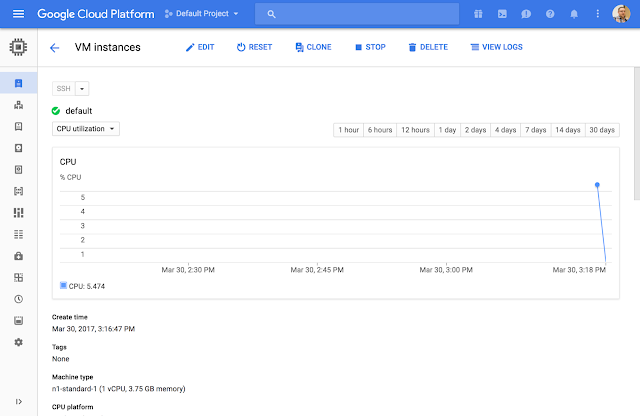
This instance is now running on Google Cloud:

(click to enlarge)

Terraform can manage more that just compute instances. At Google Cloud Next, we announced support for GCP APIs to manage projects and folders as well as billing. With these new APIs, Terraform can manage entire projects and many of their resources.

By adding just a few lines of code to the sample configuration above, we create a project tied to our organization and billing account, enable a configurable number of APIs and services on that project and launch the instance inside this newly-created project.

resource “google_project” “blog” {
name = “blog-demo”
project_id = “blog-demo-491834″
billing_account = “${var.billing_id}”
org_id = “${var.org_id}”
}

resource “google_project_services” “blog” {
project = “${google_project.blog.project_id}”

services = [
“iam.googleapis.com”,
“cloudresourcemanager.googleapis.com”,
“cloudapis.googleapis.com”,
“compute-component.googleapis.com”,
]
}

resource “google_compute_instance” “blog” {
# …

project = “${google_project.blog.project_id}” #

Terraform also detects changes to the configuration and only applies the difference of the changes.

$ terraform apply
google_compute_instance.default: Refreshing state… (ID: default)
google_project.my_project: Creating…
name: “” => “blog-demo”
number: “” => “”
org_id: “” => “1012963984278”
policy_data: “” => “”
policy_etag: “” => “”
project_id: “” => “blog-demo-491834″
skip_delete: “” => “”
google_project.my_project: Still creating… (10s elapsed)
google_project.my_project: Creation complete (ID: blog-demo-491835)

Apply complete! Resources: 1 added, 0 changed, 0 destroyed.

We can verify the project is created with the proper APIs:

(click to enlarge)

And the instance exists inside this project.

This project + instance can be stamped out multiple times. Terraform can also create and export IAM credentials and service accounts for these projects.

By combining GCP’s new resource management and billing APIs and Terraform, you have more control over your organization’s resources. With the isolation guaranteed by projects and the reproducibility provided by Terraform, it’s possible to quickly stamp out entire environments. Terraform parallelizes as many operations as possible, so it’s often possible to spin up a new environment in just a few minutes. And in larger organizations with rollup billing, IT teams can use Terraform to stamp out pre-configured environments tied to a single billing organization.

Use Cases
There are many challenges that can benefit from an infrastructure as code approach to managing resources. Here are a few that come to mind:

Ephemeral environments
Once you’ve codified an infrastructure in Terraform, it’s easy to stamp out additional environments for development, QA, staging or testing. Many organizations pay thousands of dollars every month for a dedicated staging environment. Because Terraform parallelizes operations, you can curate a copy of production infrastructure in just one trip to the water cooler. Terraform enables developers to deploy their changes into identical copies of production, letting them catch bugs early.

Rapid project stamping
The new Terraform google_project APIs enable quick project stamping. Organizations can easily create identical projects for training, field demos, new hires, coding interviews or disaster recovery. In larger organizations with rollup billing, IT teams can use Terraform to stamp out pre-configured environments tied to a single billing organization.
On-demand continuous integration
You can use Terraform to create continuous integration or build environments on demand that are always in a clean state. These environments only run when needed, reducing costs and improving parity by using the same configurations each time.

Whatever your use case, the combination of Terraform and GCP’s new resource management APIs represents a powerful new way to manage cloud-based environments. For more information, please visit the Terraform website or review the code on GitHub.
Quelle: Google Cloud Platform

Cloud Speech API is now generally available

By Dan Aharon, Product Manager

Last summer, we launched an open beta for Cloud Speech API, our Automatic Speech Recognition (ASR) service. Since then, we’ve had thousands of customers help us improve the quality of service, and we’re proud to announce that as of today Cloud Speech API is now generally available.

Cloud Speech API is built on the core technology that powers speech recognition for other Google products (e.g., Google Search, Google Now, Google Assistant), but has been adapted to better fit the needs of Google Cloud customers. Cloud Speech API is one of several pre-trained machine-learning models available for common tasks like video analysis, image analysis, text analysis and dynamic translation.

With great feedback from customers and partners, we’re happy to share that we have new features and performance to announce:

Improved transcription accuracy for long-form audio
Faster processing, typically 3x faster than the prior version for batch scenarios
Expanded file format support, now including WAV, Opus and Speex

Among early adopters of Cloud Speech API, we have seen two main use cases emerge: speech as a control method for applications and devices like voice search, voice commands and Interactive Voice Response (IVR); and also in speech analytics. Speech analytics opens up a hugely interesting set of capabilities around difficult problems e.g., real-time insights from call centers.

Houston, Texas based InteractiveTel is using Cloud Speech API in solutions that track, monitor and report on dealer-customer interactions by telephone.

“Google Cloud Speech API performs highly accurate speech-to-text transcription in near-real-time. The higher accuracy rates mean we can help dealers get the most out of phone interactions with their customers and increase sales.” — Gary Graves, CTO and Co-Founder, InterActiveTel
Saitama, Japan-based Clarion uses Cloud Speech API to power its in-car navigation and entertainment systems.

“Clarion is a world-leader in safe and smart technology. That’s why we work with Google. With high-quality speech recognition across more than 80 languages, the Cloud Speech API combined with the Google Places API helps our drivers get to their destinations safely.” — Hirohisa Miyazawa, Senior Manager/Chief Manager, Smart Cockpit Strategy Office, Clarion Co., Ltd.
Cloud Speech API is available today. Please click here to learn more.
Quelle: Google Cloud Platform

Networking to and within the Azure Cloud, part 2

This is the second blog post of a three-part series. Before you begin reading, I would suggest reading the first post Networking to and within the Azure Cloud, part 1. Hybrid networking is a nice thing, but the question then is how do we define hybrid networking? For me, in the context of the connectivity to virtual networks, ExpressRoute’s private peering or VPN connectivity, it is the ability to connect cross-premises resources to one or more Virtual Networks (VNets). While this all works nicely, and we know how to connect to the cloud, how do we network within the cloud? There are at least 3 Azure built-in ways of doing this. In this series of 3 blog posts, my intent is to briefly explain: Hybrid networking connectivity options Intra-cloud connectivity options Putting all these concepts together Intra-Cloud Connectivity Options Now that your workload is connected to the cloud, what are the native options to communicate within the Azure cloud? There are 3 native options: VNet to VNet via VPN (VNet-to-VNet connection) VNet to VNet via ExpressRoute VNet to VNet via Virtual Network Peering (VNet peering) and VNet transit My intent here is to compare these methods, what they allow, and the kind of topologies you can achieve with these. VNet-to-VNet via VPN As exposed in the below picture, when 2 VNets are connected together using VNet-to-VNet via VPN, this is what routing tables look like for both virtual networks: This is interesting with 2 VNets, but it can grow by some measure: If you notice, the route tables for VNet4 and VNet5 indicate how to reach VNet3. However, VNet4 is not able to reach VNet5. Despite this being the case, there are 2 methods to achieve this: Full Mesh VNet-to-VNet Using BGP enabled VPNs With both of these methods, all 3 VNets know how to reach each VNet. Obviously this could scale to many more VNets, assuming the limits of the VPN Gateways are respected (maximum number of tunnels, etc.). VNet-to-VNet via ExpressRoute While maybe not everyone realizes, linking a VNet to an ExpressRoute circuit has an interesting side-effect when you are linking more than one VNet to the same ExpressRoute circuit. For example, when you have 2 VNets linked to the same ExpressRoute circuit, this is what the route table looks like: Interestingly, both VNets are able to communicate with each other, without going outside of the Microsoft Enterprise Edge (MSEE) router. This makes possible the communication between VNets that are either within the same geopolitical region or globally, except on National Clouds, if this is an ExpressRoute Premium circuit. This means you can use the world wide Microsoft backbone, to connect multiple VNets together. And by the way, that VNet-to-VNet traffic is free, as long as you can connect these VNets to the same ExpressRoute circuit. In the example below, you would have 3 VNets connected to the same ExpressRoute circuit: You also see in the picture above the different routes that appear in each VNet’s subnet’s Effective Route Table (read that, it’s very useful to understand why routing doesn’t work like you expect, if that ever happens). VNet-to-VNet with Virtual Network Peering The final option to connect multiple VNets together is to use Virtual Network Peering, which is constrained within one Azure region. This peering arrangement between 2 VNets makes the VNets behave essentially like if this were 1 big virtual network, but you can govern/control these communications with NSGs and route tables. For an illustration of what this means, see below: So taking that to the next level, you could imagine a topology where you would have a hub and spoke topology like this: Peering is non-transitive, therefore in that case, HR VNet cannot talk directly to Marketing VNet, however they can all three, HR, marketing, and engineering, talk to the Hub VNet, that would contain shared resources, like Domain Controllers, Monitoring Systems, Firewalls, or other Network Virtual Appliances (NVA). Using a combination of User-Defined-Routes applied on the spoke VNets and NVA in the centralized Hub VNet. However, like in the case of VPN, if for some reason you would need each VNet to be able to talk to each other, you could create a topology similar to this as well: When using VNet peering, one of the great resource that can be shared is the Gateways, both VPN and ExpressRoute gateways. That would look something like this: This way, you do not have to deploy an ExpressRoute or VPN Gateway in every spoke VNet, but can centralize the security stamp and Gateway access into the Hub Vnet. Please make sure to check out the next post when it comes out to put all these concepts together!
Quelle: Azure