You Can Now Add Multiple Users To Google Home

Allyson Laquian / BuzzFeed News

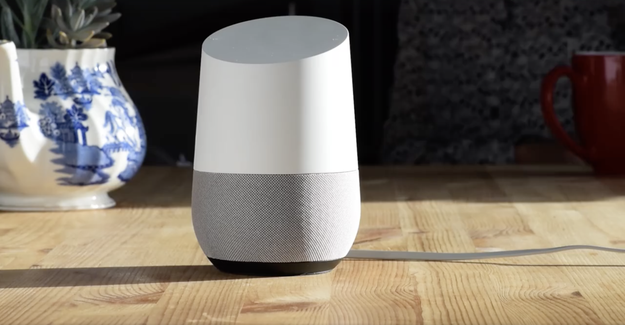
Google Home, the voice-activated smart speaker powered by Google Assistant, is about to get smarter. The speaker will finally be able to support multiple Google accounts, rectifying one of my biggest gripes with the device when I first reviewed it five months ago. Last week, Ars Technica spotted a message in the speaker’s app reading, “Multiple users now supported,” but, as it turns out, that notification was just a glitch. Today, Google is officially rolling out the ability to add up to six accounts to a single Google Home.

Managing six different users in one household sounds like a logistical nightmare, but Google Home uses your voice as authentication, so you won’t have to fiddle with the app or learn extra commands. Rather than saying, “How long is Nicole’s commute?,” a user will be able to say, “How long is my commute?” and the speaker will be able to switch to the correct profile by analyzing the characteristics of the voice.

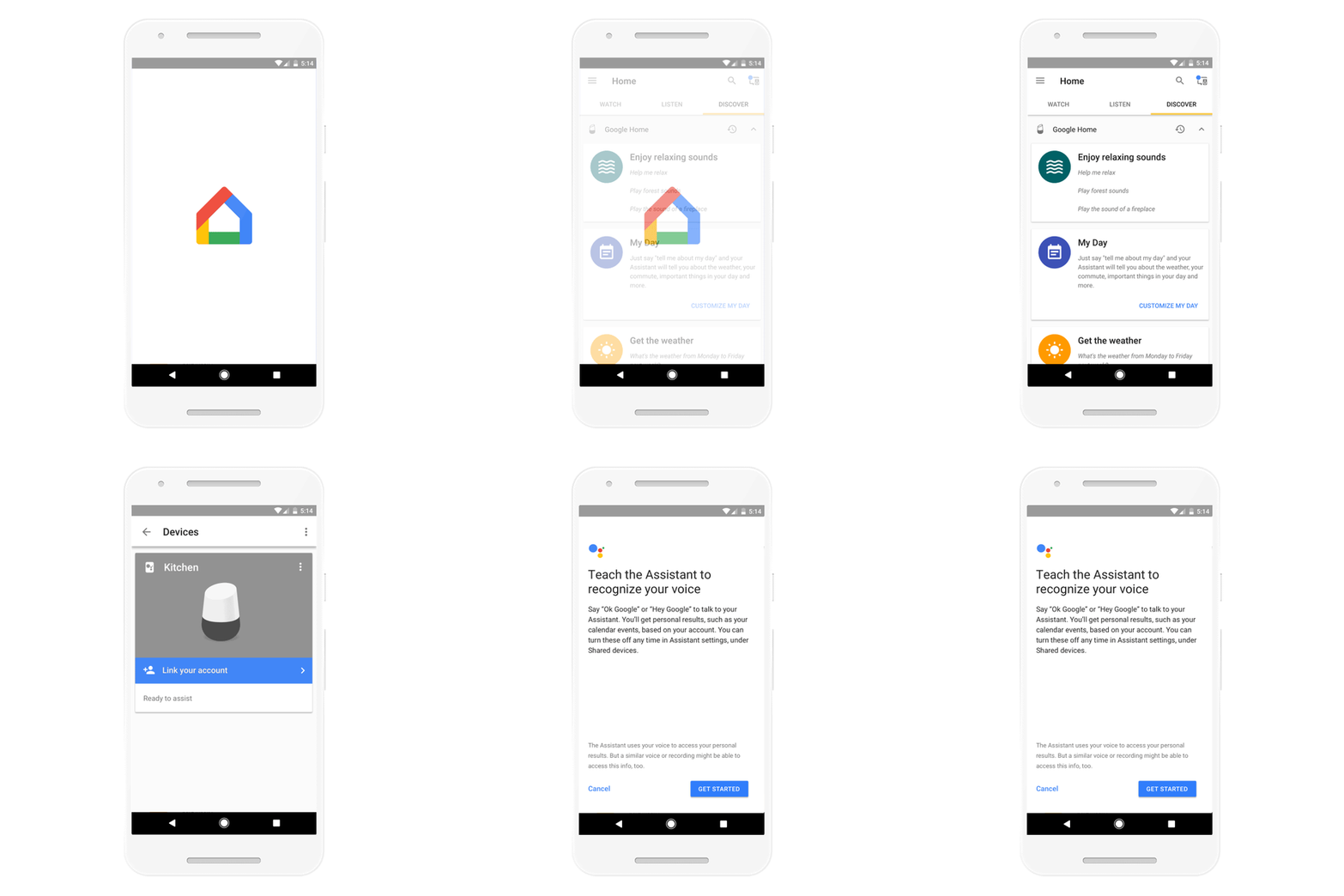
During profile setup, the Google Home app prompts users to say “Ok Google” and “Hey Google” repeatedly, so the software onboard the speaker can identify their voices’ distinct qualities. Every time someone activates Google Home, a neural network (in other words, a type of software that gets better over time) will perform an analysis that compares the voice input to those initial setup recordings. Apparently, the analysis occurs locally, on the device, rather than on a server, so it only takes milliseconds to complete.

This update means a household with multiple roommates or family members will be able to access their own personalized info when they interact with Google Home, rather than that of the primary owner. Each person can download the Google Home app and complete the set up process from their own device.

Google

However, it’s not clear what kind of content will – and won’t – be available in multi-user mode. Adding up to six different voices, especially if those voices are part of the same family and sound similar, makes profile authorization increasingly complicated.

And if the password to unlocking a profile’s private info is simply someone’s voice, then early multi-profile adopters may want to make sure that there isn’t something sensitive on, say, their calendars. Google Home may mis-identify a user’s voice and accidentally reveal the surprise party you’ve been planning for months, or the romantic date with a close friend you’ve been hiding from your roommate. It’s important to note that you can opt out of personal results, by opening the Google Home app > Menu > More settings > scroll down and toggle “Personal Results” to off.

In its announcement, Google specifically mentions personal commute times, calendars, shopping lists, news, and personal playlists. You can also check a flight’s status (based on your email history or calendar events) when you say, “Is my flight on time?” – but that feature isn’t cited in the press release.

Additionally, I’ll be curious to find out how multi-user mode handles third-party services, like music. Will multiple people be able to say, “Play my discover weekly on Spotify”? Also, will me and my partner be able to set two different timers and say, “How much time left on my timer”?

Unfortunately, this feature rollout, while useful, still doesn’t fix one of Google Home’s biggest flaw: being limited to only one calendar, the main calendar associated with your Google profile. So if someone shares their calendar with you, or if your employer uses Google Apps for Work, you won’t be able to add add these calendars to Google Home. This is bizarre — you can add multiple Google Calendars to Amazon Echo’s Alexa but not Google’s own Home&;

Nicole Nguyen / BuzzFeed News

Automatic voice recognition does, however, give the $129 Google Home an edge over the $180 Amazon Echo (or $50 Echo Dot). Echo users need to prompt Alexa to “switch accounts” to listen their own Spotify playlists or calendar agendas, and only two adults can be added to a household.

All US users will be able to add multiple accounts to their Home, starting today. UK customers won’t receive the feature for a few more months. When you open the app, you’ll see a prompt that says, “multi-user is available” and you can set up profiles there, or tap the “connected devices” icon in the top right, and select “Link your account.”

Quelle: <a href="You Can Now Add Multiple Users To Google Home“>BuzzFeed

Getting started with Cloud Identity-Aware Proxy

By Matthew Sachs, Technical Lead Manager

At Google Cloud Next ’17, we announced the beta of Cloud Identity-Aware Proxy (Cloud IAP). Cloud IAP lets you control access to your web applications running on Google Cloud Platform (GCP). You can learn more about it and why it’s a simpler and more secure method than traditional perimeter-based access controls such as LANs and VPNs, in our previous post about Cloud IAP. In this post, we go into the internals of how Cloud IAP works and some of the engineering decisions we made in building it.

How does Cloud IAP work?
When a request comes into App Engine or Cloud Load Balancing HTTP(S), code inside the serving infrastructure for those products checks whether Cloud IAP is enabled for the App Engine app or Google Compute Engine backend service. If it is, the serving infrastructure calls out to the Cloud IAP auth server with some information about the protected resource, such as the GCP project number, the request URL and any Cloud IAP credentials present in the request headers or cookies.

If the request has valid credentials, the auth server can use those credentials to get the identity (email address and user ID) of the user. Using that identity information, the auth server calls Cloud Identity & Access Management (Cloud IAM) to check whether the user is authorized for the resource.

Authenticating with OpenID Connect
The credential that Cloud IAP relies on is an OpenID Connect (OIDC) token. That token can come from either a cookie (GCP_IAAP_AUTH_TOKEN1) or an Authorization: bearer header. To initiate the flow needed to get this token, Cloud IAP needs an OAuth2 client ID and secret. When you turn on Cloud IAP from Cloud Console, we silently create an OAuth2 client in your project and configure Cloud IAP to use it. If you use GCP APIs or the Cloud SDK to enable Cloud IAP, you’ll need to configure an OAuth2 client manually.

Anyone who interacts with a Cloud IAP-secured application from a web browser receives a cookie with their credentials. When the Cloud IAP auth server sees a request with missing or invalid credentials, it redirects the user into Google’s OpenID Connect flow. By using the OIDC flow, users get control over which applications can see their identity. The auth server handles the OAuth redirect and completes the OpenID Connect flow.

To protect against Cross-Site Request Forgery attacks, the auth server also generates a random nonce when redirecting the user into the OAuth flow. Auth server stores that nonce in a GCP_IAAP_XSRF_NONCE cookie, as well as signed with a key private to the auth server in the OAuth flow state parameter (along with the original URL requested by the user, also signed.) When processing an OAuth redirect, the auth server verifies the signature on the state parameter and checks that its nonce value matches the one from the cookie.

Robot parade
To support access from scripts and programs, the auth server also looks for an OIDC token in an Authorization header. The process to obtain an OIDC token given an OAuth2 access token or a service account private key is a bit complex; the IAP documentation provides sample code for authenticating from a service account or mobile app. If you want to know what’s going on behind the scenes there, or want to roll your own, the steps automated by that sample code are:

Create a JWT with the following claims:

aud: https://www.googleapis.com/oauth2/v4/token
exp: Some time in the future.
iat: The current time.
iss: Your service account’s email address.
target_audience: Either the base URL (protocol, domain and optional port; no path) or OAuth2 client ID for your Cloud IAP-protected application. (This controls the aud claim in the resulting OpenID Connect token. Cloud IAP validates this claim to prevent a token intended for use in one application from being used with another application.)

If you have a service account private key, use it to sign the JWT. If you only have an access token, use the App Engine standard environment App Identity API or Cloud IAM signBlob API to sign it.
POST it to the URL in the aud claim by Using OAuth 2.0 for Server to Server Applications.

Authorization with Cloud IAM
The Cloud IAP access list displayed in Cloud Console is really just part of your project’s Cloud IAM policy. You can use all standard Cloud IAM capabilities to manipulate it, including the IAM API and granting the Cloud IAP role at the folder and organization levels of the Cloud IAM hierarchy.

The role that grants access to Cloud IAP is roles/iap.httpsResourceAccessor. Unlike many other Cloud IAM roles, none of the broad roles like Owner or Editor grant the permissions associated with this role. This was done to better enable scenarios where security administrators are responsible for configuring the access policy, but they’re not intended to use the application. (Yes, they can always grant themselves access, but this way it’s something they have to go out of their way to do. If application owners got access automatically, they might unintentionally access the application.)

Propagating identity
Many applications protected by Cloud IAP will want to know the user’s identity, either to perform additional access control or as part of a user preferences system. Cloud IAP provides a few ways to do this. Two of them are straightforward:

For applications using the Google App Engine standard environment, Cloud IAP supports the App Engine Users API. Existing code using this API typically works with no modifications, and Cloud IAP even uses the same user IDs as Users API.
Cloud IAP sends the user’s email address and ID in two HTTP headers.

The third way requires a few additional steps to ensure maximum security for your application. For applications that can’t use the Users API and so have to go with option 2, relying on unauthenticated HTTP headers is a security risk2. If you accidentally disable Cloud IAP, anyone could potentially connect to your application and set those headers to arbitrary values! If your application runs on Compute Engine or Google Container Engine, anyone who can connect directly to a VM running your application could then bypass Cloud IAP and set those headers to whatever they want. As discussed earlier, Cloud IAP access control is enforced inside the HTTP(S) load balancer, so if someone can bypass the load balancer, they can bypass Cloud IAP! This could happen if you’ve misconfigured your firewall rules, or because the attacker was able to SSH into the instance or another instance on the network.

So, Cloud IAP provides a third HTTP header, which contains a JSON Web Token (JWT) signed with a Cloud IAP private key. This JWT closely resembles the OpenID Connect token, but it’s signed by Cloud IAP instead of by the Google account service. We considered just passing through the OpenID Connect token that Cloud IAP used to authenticate the user, but by minting our own token, we’re free to add additional methods for users to authenticate to Cloud IAP in the future.

We hope this provides you a solid understanding of how Cloud IAP works behind the scenes, as well as some of the simplicity it offers. Spend a few minutes reading the IAP quickstarts to learn how to use it, and stay tuned for a steady stream of security and identity content.

1 Yes, there’s an extra A.
2 The Users API, on the other hand, is safe. Cloud IAP uses a protected internal channel to set the identity information consumed by this API.

Quelle: Google Cloud Platform

Announcing APN Service Delivery Program for AWS Partners with Service Catalog Expertise

The AWS Service Delivery Program helps AWS customers find qualified APN Partners that have demonstrated the ability to provide expertise in a specific service or skill area. AWS Service Catalog partners help create catalogs of IT services that are approved by the customer’s organization for use on AWS. With AWS Service Catalog, customers and partners can centrally manage commonly deployed IT services to help achieve consistent governance and meet compliance requirements while enabling users to self-provision approved services.
Quelle: aws.amazon.com

Azure IoT Suite connected factory now available

Getting Started with Industrie 4.0

Many customers tell us that they want to start with the digital transformation of their assets, for example production lines, as well as their business processes. However, many times they just don’t know where to start or what exactly Industrie 4.0 is all about. At Microsoft, we are committed to enabling businesses of all sizes to realize their full potential and today we are  proud to announce our connected factory preconfigured solution and six-step framework to quickly enable you to get started on your Industrie 4.0 journey.

Azure IoT Suite preconfigured solutions are engineered to help businesses get started quickly and move from proof-of-concept to broader deployment. The connected factory preconfigured solution leverages Azure services including Azure IoT Hub and the new Azure Time Series Insights. Furthermore, it leverages the OPC Foundation’s cross-platform OPC UA .Net Standard Library reference stack for OPC UA connectivity, as well as a rich web portal with OPC UA server management capabilities, alarms processing and telemetry visualizations. The web portal and the Azure Time-Series Insights can be used to quickly see trends in OPC UA telemetry data and see Overall Equipment Effectiveness (OEE) and several key performance indicators (KPIs) like number of units produced and energy consumption.

This solution builds on the industry-leading cloud connectivity for OPC UA that we have first announced at Hannover Messe a year ago. Since then, all components of this connectivity have been released cross-platform and open-source on GitHub in collaboration with the OPC Foundation making Microsoft the largest open-source contributor to the OPC Foundation. Furthermore, the entire connected factory preconfigured solution is also published open-source on GitHub.

Azure IoT Suite is the best solution for Industrie 4.0

As we demonstrated at Hannover Messe 2016, we believe that the Azure IoT Suite is the best choice for businesses to cloud-enable industrial equipment — including already deployed machines, without disrupting their operation — to allow for data and device management, insights, machine learning capabilities and even the ability to manage equipment remotely.

To demonstrate this functionality, we have gone to great lengths to build real OPC UA servers into the solution, grouped into assembly lines where each OPC UA server is responsible for a “station” within the assembly line. Each assembly line is producing simulated products. We even built a simple Manufacturing Execution System (MES) with an OPC UA interface, which controls each assembly line. The connected factory preconfigured solution includes 8 such assembly lines and they are running in a Linux Virtual Machine on Azure. Our Azure IoT Gateway SDK is also used in each simulated factory location.

Secure by design, secure by default

As verified by the BSI Study, OPC UA is secure by default. Microsoft is going one step further and is making sure that the OPC UA components used in the connected factory solution are secure by default, to give you a secure base to build your own solution on top. Secure by default means that all security features are turned on and already configured. This means that you don’t need to do this step manually and sees how an end-to-end solution can be secured.

Easy to extend with real factories

We have made it as simple as possible to extend the connected factory preconfigured solution with real factories. For this, we have partnered with several industry leaders in the OPC UA ecosystem who have built turnkey gateway solutions that have the Azure connectivity used by this solution already built in and are close to zero-config. These partners include Softing, Unified Automation, and Hewlett Packard Enterprise. Please visit our device catalog for a complete list of gateways compatible with this solution. With these gateways, you can easily connect your on-premises industrial assets to this solution.

However, we have gone even further and additionally provided open-source Docker containers as well as pre-built Docker container images available on Docker Hub for the Azure connectivity components (OPC Proxy and OPC Publisher), both integrated in the Azure IoT Gateway SDK and available on GitHub to make a PoC with real equipment achievable in hours, enabling you to quickly draw insights from your equipment and to plan commercialization steps based on these PoCs.

The future is now

Get started on the journey to cloud-enable industrial equipment with Azure IoT Suite connected factory preconfigured solution and see the solution in action at Hannover Messe 2017. To learn more about how IoT can help transform your business, visit www.InternetofYourThings.com.

Learn more about Microsoft IoT

Microsoft is simplifying IoT so every business can digitally transform through IoT solutions that are more accessible and easier to implement. Microsoft has the most comprehensive IoT portfolio with a wide range of IoT offerings to meet organizations where they are on their IoT journey, including everything businesses need to get started — ranging from operating systems for their devices, cloud services to control them, advanced analytics to gain insights, and business applications to enable intelligent action. To see how Microsoft IoT can transform your business, visit www.InternetofYourThings.com.​
Quelle: Azure

Announcing Azure Stream Analytics on edge devices (preview)

Today, we are announcing Azure Stream Analytics (ASA) on edge devices, a new feature of Azure Stream Analytics that enables customers to deploy analytical intelligence closer to the IoT devices and unlock the full value of the device-generated data.

Azure Stream Analytics on edge devices extends all the benefits of our unique streaming technology from the cloud down to devices. With ASA on edge devices, we are offering the power of our Complex Event Processing (CEP) solution on edge devices to easily develop and run real-time analytics on multiple streams of data. One of the key benefit of this feature is the seamless integration with the cloud: users can develop, test, and deploy their analytics from the cloud, using the same SQL-like language for both cloud and edge analytics jobs. Like in the cloud, this SQL language notably enables temporal-based joins, windowed aggregates, temporal filters, and other common operations such as aggregates, projections, and filters.  Users can also seamlessly integrate custom code in JavaScript for advanced scenarios.

Enabling new scenarios

Azure IoT Hub, a core Azure service that connects, monitors and updates IoT devices, has enabled customers to connect millions of devices to the cloud, and Azure Stream Analytics has enabled customers to easily deploy and scale analytical intelligence in the cloud for extracting actionable insights from the device-generated data. However, multiple IoT scenarios require real-time response, resiliency to intermittent connectivity, handling of large volumes of raw data, or pre-processing of data to ensure regulatory compliance. All of which could now be achieved by using ASA on edge device to deploy and operate analytical intelligence physically closer to the devices.

Hewlett Packard Enterprise (HPE) is an early preview partner who has demonstrated a working prototype of ASA on edge devices at Microsoft&;s booth at Hannover Messe (April 24 to 28, Hall 7, Stand C40). A result of close collaboration between Microsoft, HPE and the OPC Foundation, the prototype is based on Azure Stream Analytics, the HPE Edgeline EL1000 Converged Edge System, and the OPC Unified Architecture (OPC-UA), delivering real-time analysis, condition monitoring, and control. The HPE Edgeline EL1000 Converged Edge System integrates compute, storage, data capture, control and enterprise-class systems and device management built to thrive in hardened environments and handle shock, vibration and extreme temperatures.

ASA on edge devices is particularly interesting for Industrial IoT (IIoT) scenarios that require reacting to operational data with ultra-low latency. Systems such as manufacturing production lines or remote mining equipment need to analyze and act in real-time to the streams of incoming data, e.g. when anomalies are detected.

In offshore drilling, offshore windfarms, or ship transport scenarios, analytics need to run even when internet connectivity is intermittent. In these cases, ASA on edge devices can run reliably to summarize and monitor events, react to events locally, and leverage connection to the cloud when it becomes available.

In industrial IoT scenarios, the volume of data can be too large to be sent to the cloud directly due to limited bandwidth or bandwidth cost. For example, the data produced by jet engines (a typical number is that 1TB of data is collected during a flight) or manufacturing sensors (each sensor can produce 1MB/s to 10MB/s) may need to be filtered down, aggregated or processed directly on the device before sending it to the cloud. Examples of these processes include sending only events when values change instead of sending every event, averaging data on a time window, or using a user-defined function.

Until now, customers with such requirements had to build custom solutions, and manage them separately from their cloud applications. Now, customers can use Azure Stream Analytics to seamlessly develop and operate their stream analytics jobs both on edge devices and in the cloud.

How to use Azure Stream Analytics on edge devices?

Azure Stream Analytics on edge devices leverages the Azure IoT Gateway SDK to run on Windows and Linux operating systems, and supports a multitude of hardware as small as single-board computers, to full PCs, servers or dedicated field gateways devices. The IoT Gateway SDK provides connectors for different industry standard communication protocols such as OPC-UA, Modbus and MQTT and can be extended to support your own communication needs. Azure IoT Hub is used to provide secured bi-directional communications between gateways and the cloud.

Azure Stream Analytics on edge devices is available now in private preview. To request access to the private preview, click here.

You can also meet with our team at Hannover Messe, the world&039;s biggest industrial fair, which take place from April 24th to April 28th in Hannover, Germany. We are located at the Microsoft booth in the Advanced Analytics pod (Hall 7, Stand C40).
Quelle: Azure

Announcing Azure Time Series Insights

Today we are excited to announce the public preview of Azure Time Series Insights, a fully managed analytics, storage, and visualization service that makes it incredibly simple to interactively and instantly explore and analyze billions of events from sources such as Internet of Things. Time Series Insights gives you a near real time global view of your data across various event sources and lets you quickly validate IoT solutions and avoid costly downtime of mission-critical devices. It helps you discover hidden trends, spot anomalies, conduct root-cause analysis in near real-time, all without writing a single line of code through its simple and intuitive user experience. Additionally, it provides rich API’s to enable you to integrate its powerful capabilities in your own existing workflow or application.

Today more than ever, with increasing connected devices and massive advances in the collection of data, businesses are struggling to quickly derive insights from the sheer volume of data generated from geographically dispersed devices and solutions. In addition to the massive scale, there is also a growing need for deriving insights from the millions of events being generated in near real time. Any delay in insights can cause significant downtime and business impact. Additionally, the need to correlate data from a variety of different sensors is paramount to debug and optimize business processes and workflows. Reducing the time and expertise required for this is essential for businesses to gain a competitive edge and optimize their operations. Azure Time Series Insights solves these and many more challenges for your IoT solutions.

Customers from diverse industry sectors like automotive, windfarms, elevators, smart buildings, manufacturing, etc. have been using Time Series Insights during its private preview. They have validated its capabilities with real production data load, already realized the benefits, and are looking for ways to cut costs and improve operations.

For example, BMW uses Azure Time Series Insights and companion Azure IoT services for predictive maintenance across several of their departments. Time Series Insights and other Azure IoT services have helped companies like BMW improve operational efficiency by reducing SLAs for validating connected device installation, in some cases realizing a reduction in time from several months to as little as thirty minutes.

Near real-time insights in seconds at IoT scale

Azure Time Series Insights enables you to ingest 100’s of millions of sensor events per day, and makes new data available to query for insights within 1 minute. It also enables you to retain this data for months.  Time Series Insights is optimized to enable you to query over this combination of near real-time and historic TB’s of data in seconds. It does not pre-aggregate data, but stores the raw events, and delivers the power of doing all aggregations instantly over this massive scale. Additionally, it also enables you to upload reference data to augment or enrich your incoming sensor data. Time Series Insights enables you to compare data across various sensors of different kinds, event sources, regions and IoT installations in the same query. This is what enables you to get a global view of your data, lets you quickly validate, monitor, discover trends, spot anomalies, and conduct root cause analysis in near real time.

“Azure Time Series Insights has standardized our method of accessing devices’ telemetry in real time without any development effort. Time to detect and diagnose a problem has dropped from days to minutes. With just a few clicks we can visualize the end-to-end device data flow, helping us identify and address customer and market needs,” said Scott Tillman, Software Engineer, ThyssenKrupp Elevator.

Easy to get started

With built-in integration to Azure IoT Hub and Azure Event Hubs, customers can get started with Time Series Insights in minutes. Just enter your IoT Hub or Event Hub configuration information through the Azure Portal, and Time Series Insights connects and starts pulling and storing real-time data from it within a minute. This service is schema adaptive, which means that you do not have to do any data preparation to start deriving insights. This enables you to explore, compare, and correlate a variety of sensors seamlessly. It provides a very intuitive user experience that enables you to view, explore, and drill down into various granularities of data, down to specific events. It also provides SQL-like filters and aggregates, ability to construct, visualize, compare, and overlay various time series patterns, heat maps, and the ability to save and share queries. This is what enables you to get started, and glean insights from your data using Azure Time Series Insights in minutes. You can also unleash the power of Time Series Insights using the REST query APIs to create custom solutions. Additionally, Time Series Insights is used to power the time series analytics experiences in Microsoft IoT Central and Azure IoT Suite connected factory preconfigured solutions. Time Series Insights is powered by Azure Platform and provides enterprise scale, reliability, Azure Active Directory integration, and operational security.

Codit, based in Belgium, is a leading IT services company providing consultancy, technology, and managed services in business integration. They help companies reduce operational costs, improve efficiency and enhance control by enabling people and applications to integrate more efficiently. “Azure Time Series Insights is easy to use, helping us to quickly explore, analyze, and visualize many events in just a few clicks.  It’s a complete cloud service, and it has saved us from writing custom applications to quickly verify changes to IoT initiatives,” said Tom Kerkhove, Codit. “We are excited to use Time Series Insights in the future.”

Azure Time Series Insights extends the broad portfolio of Azure IoT services, such as Azure IoT Hub, Azure Stream Analytics, Azure Machine Learning and various other services to help customers unlock deep insights from their IoT solution. Currently, Time Series Insight is available in US West, US East, EU West, and EU North regions. Learn more about Azure Time Series Insights and sign up for the Azure Time Series Insights preview today.

Learn more about Microsoft IoT

Microsoft is simplifying IoT so every business can digitally transform through IoT solutions that are more accessible and easier to implement. Microsoft has the most comprehensive IoT portfolio with a wide range of IoT offerings to meet organizations where they are on their IoT journey, including everything businesses need to get started — ranging from operating systems for their devices, cloud services to control them, advanced analytics to gain insights, and business applications to enable intelligent action. To see how Microsoft IoT can transform your business, visit www.InternetofYourThings.com.​
Quelle: Azure