Announcing general availability of Azure HDInsight 3.6

This week at DataWorks Summit, we are pleased to announce general availability of Azure HDInsight 3.6 backed by our enterprise grade SLA. HDInsight 3.6 brings updates to various open source components in Apache Hadoop & Spark eco-system to the cloud, allowing customers to deploy them easily and run them reliably on an enterprise grade platform. What’s new in Azure HDInsight 3.6 Azure HDInsight 3.6 is a major update to the core Apache Hadoop & Spark platform as well as with various open source components. HDInsight 3.6 has the latest Hortonworks Data Platform (HDP) 2.6 platform, a collaborative effort between Microsoft and Hortonworks to bring HDP to market cloud-first. You can read more about this effort here. HDInsight 3.6 GA also builds upon the public preview of 3.6 which included Apache Spark 2.1. We would like to thank you for trying the preview and providing us feedback, which has helped us improve the product. Apache Spark 2.1 is now generally available, backed by our existing SLA. We are introducing capabilities to support real-time streaming solutions with Spark integration to Azure Event Hubs and leveraging the structured streaming connector in Kafka for HDInsight. This will allow customers to use Spark to analyze millions of real-time events ingested into these Azure services, thus enabling IoT and other real-time scenarios. HDInsight 3.6 will only have the latest version of Apache Spark such as 2.1 and above. There is no support for older versions such as 2.0.2 or below. Learn more on how to get started with Spark on HDInsight. Apache Hive 2.1 enables ~2X faster ETL with robust SQL standard ACID merge support and many more improvements. This release also includes an updated preview of Interactive Hive using LLAP (Long Lived and Process) which enables 25x faster queries.  With the support of the new version of Hive, customers can expect sub-second performance, thus enabling enterprise data warehouse scenarios without the need for data movement. Learn more on how to get started with Interactive Hive on HDInsight. This release also includes new Hive views (Hive view 2.0) which provides an easy to use graphical user interface for developers to get started with Hadoop. Developers can use this to easily upload data to HDInsight, define tables, write queries and get insights from data faster using Hive views 2.0. Following screenshot shows new Hive views 2.0 interface. We are expanding our interactive data analysis by including Apache Zeppelin notebook apart from Jupyter. Zeppelin notebook is pre-installed when you use HDInsight 3.6, and you can easily launch it from the portal. Following screenshot shows Zeppelin notebook interface. Getting started with Azure HDInsight 3.6 It is very simple to get started with Apache HDInsight 3.6 – simply go to the Microsoft Azure portal and create an Azure HDInsight service.   Once you’ve selected HDInsight, you can pick the specific version and workload based on your desired scenario. Azure HDInsight supports a wide range of scenarios and workloads such as Hive, Spark, Interactive Hive (Preview), HBase, Kafka (Preview), Storm, and R Server as options you can select from. Learn more on creating clusters in HDInsight. Once you’ve complete the wizard, the appropriate cluster will be created. Apart from the Azure portal, you can also automate creation of the HDInsight service using the Command Line Interface (CLI). Learn more on how to create cluster using CLI. We hope that you like the enhancements included within this release. Following are some resources to learn more about this HDI 3.6 release: Learn more and get help Azure HDInsight Overview Getting started with Azure HDInsight Use Hive on HDInsight Use Spark on HDInsight Use Interactive Hive on HDInsight Use HBase on HDInsight Use Kafka on HDInsight Use Storm on HDInsight Use R Server on HDInsight Open Source component guide on HDInsight Extend your cluster to install open source components HDInsight release notes HDInsight versioning and support guidelines How to upgrade HDInsight cluster to a new version Ask HDInsight questions on stackoverflow Ask HDInsight questions on Msdn forums Summary This week at DataWorks Summit, we are pleased to announce general availability of Azure HDInsight 3.6 backed by our enterprise grade SLA. HDInsight 3.6 brings updates to various open source components in Apache Hadoop & Spark eco-system to the cloud, allowing customers to deploy them easily and run them reliably on an enterprise grade platform.
Quelle: Azure

Container-Optimized OS from Google is generally available

By Saied Kazemi, Software Engineer

It’s not news to anyone in IT that container technology has become one of the fastest growing areas of innovation. We’re excited about this trend and are continuously enhancing Google Cloud Platform (GCP) to make it a great place to run containers.

There are many great OSes available today for hosting containers, and we’re happy that customers have so many choices. Many people have told us that they’re also interested in using the same image that Google uses, even when they’re launching their own VMs, so they can benefit from all the optimizations that Google services receive.

Last spring, we released the beta version of Container-Optimized OS (formerly Container-VM Image), optimized for running containers on GCP. We use Container-Optimized OS to run some of our own production services (such as Google Cloud SQL, Google Container Engine, etc.) on GCP.

Today, we’re announcing the general availability of Container-Optimized OS. This means that if you’re a Compute Engine user, you can now run your Docker containers “out of the box” when you create a VM instance with Container-Optimized OS (see the end of this post for examples).

Container-Optimized OS represents the best practices we’ve learned over the past decade running containers at scale:

Controlled build/test/release cycles: The key benefit of Container-Optimized OS is that we control the build, test and release cycles, providing GCP customers (including Google’s own services) enhanced kernel features and managed updates. Releases are available over three different release channels (dev, beta, stable), each with different levels of early access and stability, enabling rapid iterations and fast release cycles.
Container-ready: Container-Optimized OS comes pre-installed with the Docker container runtime and supports Kubernetes for large-scale deployment and management (also known as orchestration) of containers.
Secure by design: Container-Optimized OS was designed with security in mind. Its minimal read-only root file system reduces the attack surface, and includes file system integrity checks. We also include a locked-down firewall and audit logging.
Transactional updates: Container-Optimized OS uses an active/passive root partition scheme. This makes it possible to update the operating system image in its entirety as an atomic transaction, including the kernel, thereby significantly reducing update failure rate. Users can opt-in for automatic updates.

It’s easy to create a VM instance running Container-Optimized OS on Compute Engine. Either use the Google Cloud Console GUI or the gcloud command line tool as shown below:

gcloud compute instances create my-cos-instance
–image-family cos-stable
–image-project cos-cloud

Once the instance is created, you can run your container right away. For example, the following command runs an Nginx container in the instance just created:

gcloud compute ssh my-cos-instance — “sudo docker run -p 80:80 nginx”

You can also log into your instance with the command:

gcloud compute ssh my_cos_instance –project my_project –zone us-east1-d

Here’s another simple example that uses Container Engine (which uses Container-Optimized OS as its OS) to run your containers. This example comes from the Google Container Engine Quickstart page.

gcloud container clusters create example-cluster
kubectl run hello-node –image=gcr.io/google-samples/node-hello:1.0
–port=8080
kubectl expose deployment hello-node –type=”LoadBalancer”
kubectl get service hello-node
curl 104.196.176.115:8080

We invite you to setup your own Container-Optimized OS instance and run your containers on it. Documentation for Container-Optimized OS is available here, and you can find the source code on the Chromium OS repository. We’d love to hear about your experience with Container-Optimized OS; you can reach us at StackOverflow with questions tagged google-container-os.
Quelle: Google Cloud Platform

Toward better node management with Kubernetes and Google Container Engine

By Maisem Ali, Software Engineer

Using our Google Container Engine managed service is a great way to run a Kubernetes cluster with a minimum of management overhead. Now, we’re making it even easier to manage Kubernetes clusters running in Container Engine, with significant improvements to upgrading and maintaining your nodes.

Automated Node Management
In the past, while we made it easy to spin up a cluster, keeping nodes up-to-date and healthy were still the user’s responsibility. To ensure your cluster was in a healthy, current state, you needed to track Kubernetes releases, set up your own tooling and alerting to watch nodes that drifted into an unhealthy node, and then develop a process for repairing that node. While we take care of keeping the master healthy, with the nodes that make up a cluster (particularly large ones), this could be a significant amount of work. Our goal is to provide an end-to-end automated management experience that minimizes how much you need to worry about common management tasks. To that end, we’re proud to introduce two new features that help ease these management burdens.

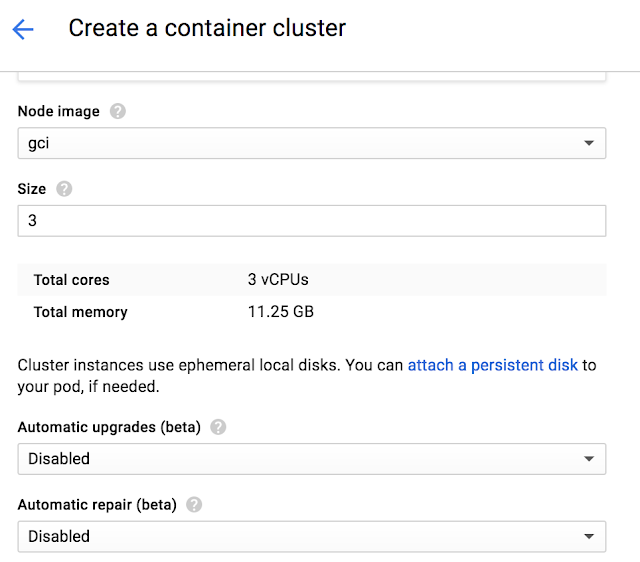
Node Auto-Upgrades

Rather than having to manually execute node upgrades, you can choose to have the nodes automatically upgrade when the latest release has been tested and confirmed to be stable by Google engineers.

You can enable it in the UI during new Cluster and Node Pool creation by enabling the “Auto upgrades”.

To enable it in the CLI add the “–enable-autoupgrade” flag.

gcloud beta container clusters create CLUSTER –zone ZONE –enable-autoupgrade

gcloud beta container node-pools create NODEPOOL –cluster CLUSTER –zone ZONE –enable-autoupgrade

Once enabled, each node in the selected node pool will have its workloads gradually drained, shut down and a new node will be created and joined to the cluster. The node will be confirmed to be healthy before moving onto the next node.

To learn more see Node Auto-Upgrades on Container Engine.

Node Auto-Repairs
Like any production system, cluster resources must be monitored to detect issues (crashing Kubernetes binaries, workloads triggering kernel bugs and out-of-disk issues, etc.) and repair them if they’re out of specification. A node that goes unhealthy will decrease the scheduling capacity of your cluster and as the capacity reduces your workloads will stop getting scheduled.

Google already monitors and repairs your Kubernetes master in case of these issues. With our new Node-Auto Repair feature, we’ll also monitor to each node in the node pool.

You can enable Auto Repairs during new Cluster and Node Pool Creation.

To enable it in the UI:

To enable it in the CLI:

gcloud beta container clusters create CLUSTER –zone ZONE –enable-autorepair

gcloud beta container node-pools create NODEPOOL –cluster CLUSTER –zone ZONE –enable-autorepair

Once enabled, Container Engine will monitor several signals, including the node health status as seen by the cluster master and the VM state from the managed instance group backing the node. Too many consecutive health check failures (around 10 minutes) will trigger a re-creation of the node VM.

To learn more see Node Auto-Repair on Container Engine.

Improving Node Upgrades

In order to achieve both these features, we had to do some significant work under the hood. Previously, Container Engine node upgrades did not consider a node’s health status and did not ensure that it was ready to be upgraded. Ideally a node should be drained prior to taking it offline, and health-checked once the VM has successfully booted up. Without observing these signals, Container Engine could begin upgrading the next node in the cluster before the previous node was ready, potentially impacting workloads in smaller clusters.

In the process of building Auto Node Upgrades and Auto Node Repair, we’ve made several architectural improvements. We redesigned our entire upgrade logic with an emphasis on making upgrades as non-disruptive as possible. We also added proper support for cordoning and draining of nodes prior to taking them offline, controlled via podTerminationGracePeriod. If these pods are backed by a controller (e.g. ReplicaSet or Deployment) they’re automatically rescheduled onto other nodes (capacity permitting). Finally, we added additional steps after each node upgrade to verify that the node is healthy and can be scheduled, and we retry upgrades if a node is unhealthy. These improvements have significantly reduced the disruptive nature of upgrades.

Cancelling, Continuing and Rolling Back Upgrades
Additionally, we wanted to make upgrades more than a binary operation. Frequently, particularly with large clusters, upgrades need to be halted, paused or cancelled altogether (and rolled back). We’re pleased to announce that Container Engine now supports cancelling, rolling back and continuing upgrades.

If you cancel an upgrade, it impacts the process in the following way:

Nodes that have not been upgraded remain at their current version
Nodes that are in-flight proceed to completion
Nodes that have already been upgraded remain at the new version

An identical upgrade (roll-forward) issued after a cancellation or a failure will pick up the upgrade from where it left off. For example, if the initial upgrade completes three out of five nodes, the roll-forward will only upgrade the remaining two nodes; nodes that have been upgraded are not upgraded again.

Cancelled and failed node upgrades can also be rolled back to the previous state. Just like in a roll-forward, nodes that hadn’t been upgraded are not rolled-back. For example, if the initial upgrade completed three out of five nodes, a rollback is performed on the three nodes, and the remaining two nodes are not affected. This makes the upgrade significantly cleaner.

Note: A node upgrade still requires the VM to be recreated which destroys any locally stored data. Rolling back and rolling forward does not restore that local data.

Node ConditionAction

Cancellation

Rolling forward

Rolling back

In Progress

Proceed to completion

N/A

N/A

Upgraded

Untouched

Untouched

Rolled back

Not Upgraded

Untouched

Upgraded

Untouched

Try it
These improvements extend our commitment in making Container Engine the easiest way to use Kubernetes. With Container Engine you get pure open source Kubernetes experience along with the powerful benefits of Google Cloud Platform (GCP): friendly per-minute billing, a global load balancer, IAM integration, and all fully managed by Google reliability engineers ensuring your cluster is available and up-to-date.

With our new generous 12-month free trial that offers a $300 credit, it’s never been simpler to get started. Try Container Engine today.
Quelle: Google Cloud Platform

Google Container Engine fires up Kubernetes 1.6

By David Aronchick, Product Manager

Today we started to make Kubernetes 1.6 available to Google Container Engine customers. This release emphasizes significant scale improvements and additional scheduling and security options, making the running of a Kubernetes clusters on Container Engine easier than ever before.

There were over 5,000 commits in Kubernetes 1.6 with dozens of major updates that are now available to Container Engine customers. Here are just a few highlights from this release:

Increase in number of supported nodes by 2.5 times: We’ve made great effort to support your workload no matter how large your needs. Container Engine now supports cluster sizes of up to 5,000 nodes, up from 2,000, while still maintaining our strict SLO for cluster performance. We’ve already had some of the world’s most popular apps hosted on Container Engine (such as Pokémon GO) and the increase in scale can handle more of the largest workloads.

Fully Managed Nodes: Container Engine has always helped keep your Kubernetes master in a healthy state; we’re now adding the option to fully manage your Kubernetes nodes as well. With Node Auto-Upgrade and Node Auto-Repair, you can optionally have Google automatically update your cluster to the latest version, and ensure your cluster’s nodes are always operating correctly. You can read more about both features here.

General Availability of Container-Optimized OS: Container Engine was designed to be a secure and reliable way to run Kubernetes. By using Container-Optimized OS, a locked down operating system specifically designed for running containers on Google Cloud, we provide a default experience that’s more secure, highly performant and reliable, helping ensure your containerized workloads can run great. Read more details about Container-Optimized OS in this in-depth post here.

Over the past year, Kubernetes adoption has accelerated and we could not be more proud to host so many mission critical applications on the platform for our customers. Some recent highlights include:

Customers

eBay uses Google Cloud technologies including Container Engine, Cloud Machine Learning and AI for its ShopBot, a personal shopping bot on Facebook Messenger.
Smyte participated in the Google Cloud startup program and protects millions of actions a day on websites and mobile applications. Smyte recently moved from self-hosted Kubernetes to Container Engine.
Poki, a game publisher startup, moved to Google Cloud Platform (GCP) for greater flexibility, empowered by the openness of Kubernetes. A theme we covered at our Google Cloud Next conference, showing that open source technology gives customers the freedom to come and go as they choose. Read more about their decision to switch here.

“While Kubernetes did nudge us in the direction of GCP, we’re more cloud agnostic than ever because Kubernetes can live anywhere.”  — Bas Moeys, Co-founder and Head of Technology at Poki

To help shape the future of Kubernetes — the core technology Container Engine is built on — join the open Kubernetes community and participate via the kubernetes-users-mailing list or chat with us on the kubernetes-users Slack channel.

We’re the first cloud to offer users the newest Kubernetes release, and with our generous 12 month free trial of $300 credits, it’s never been simpler to get started, try the latest release today.

Quelle: Google Cloud Platform

Ten Ways a Cloud Management Platform Makes your Virtualization Life Easier

I spent the last decade working with virtualization platforms and the certifications and accreditation’s that go along with them.  During this time, I thought I understood what it meant to run an efficient data center. After six months of working with Red Hat CloudForms, a Cloud Management Platform (CMP), I now wonder what was I thinking.  I encountered every one of the problems below, each are preventable with the right solution. Remember, we live in the 21st century&;shouldn’t the software that we use act like it?

We filled up a data store and all of the machines on it stopped working. 
It does not matter if it is a development environment or the mission critical database cluster, when storage fills up everything stops!  More often than not it is due to an excessive number of snapshots. The good news is CloudForms can quickly be set up with a policy to recognize and prevent this from happening.For example we can check the storage utilization and if it is over 90% full take action, or better yet, when it is within two weeks of being full based on usage trends. That way if manual action is required, there is enough forewarning to do so.  Another good practice is to setup a policy to disable more than a few snapshots. We all love to take snapshots, but there is a real cost to them, and there is no need to let them get out of hand.
I just got thousands of emails telling me that my host is down.The only thing worse than no email alert is receiving thousands of them. In CloudForms it is not only easy to set up alerts, but also to define how often they should be acted upon. For example, check every hour, but only notify once per day.
Your virtual machines (VMs) cannot be migrated because the VM tools updater CD-ROM image was not un-mounted correctly. 
This is a serious issue for a number of reasons.  First it breaks Disaster Recovery (DR) operations and can cause virtual machines to be out of balance. It also disables the ability to put a node into maintenance mode, potentially causing additional outages and delays.Most solutions involve writing a shell script that runs as root and attempts to periodically unmount the virtual CD-ROM drives. These scripts usually work, but are both scary from a security standpoint and indiscriminately dangerous, imagine physically ejecting the CD-ROM while the database administrator is in the middle of a database upgrade!  With CloudForms we can setup a simple policy that can unmount drives once a day, but only after sanity checking that it is the correct CD-ROM image and that the system is in a state where it can be safely unmounted.
I have to manually ensure that all of my systems pass an incredibly detailed and painful compliance check (STIGS, PCI, FIPS, etc.) by next week! 
I have lost weeks of my life to this and if you have not had the pleasure, count yourself lucky.  When the “friendly” auditors show up with a stack of three-ring binders and a mandate to check everything, you might as well clear your calendar for the next few weeks. In addition, since these checks are usually a requirement to continuing operations, expect many of these meetings to involve layers of upper management you did not know existed, and this is definitely not the best time to become acquainted.The good news is CloudForms allows for you to run automatic checks on VMs and hosts. If you are not already familiar with its OpenSCAP scanning capability, you owe yourself a look. Not only that, but if someone attempts to bring a VM online that is not compliant, CloudForms can shut it right back down. That is the type of peace of mind that allows for sleep-filled nights.
Someone logged into a production server as root using the virtual console and broke it.  Now you have to physically hunt down and interrogate all the potential culprits &; as well as fix the problem. 
Before you pull out your foam bat and roam the halls to apply some “sense” to the person who did this, it is good to know exactly who it was and what they did. With CloudForms you can see a timeline of each machine, who logged into what console, as well as perform a drift analysis to potentially see what changed.  With this knowledge you can now not only fix the problem, but also “educate” the responsible party.
The developers insist that all VM’s must have 8 vCPU’s and 64GB of RAM. 
The best way to fight flagrant waste or resources is with data.  CloudForms provides the concept of “Right-Sizing” where it will watch VMs operate and determine what resource allocation is the ideal size. With this information in hand CloudForms can either automatically adjust the allocations, or spit out a report to be used to show what the excessive resources are costing.
Someone keeps creating 32bit VM’s with more than 4GB of RAM! 
As we know there is no “good” way that a 32bit VM can possibly use that much memory and it is essentially just waste.  A simple CloudForms policy to check for “OS Type = 32bit” and “RAM > 4GB”, can be a very interesting report to run. Or better yet, put a policy in place to automatically adjust the memory to 4GB and notify the system owner.
I have to buy hardware for next year, but my capacity-planning formula involves a spreadsheet and a dart board. 
Long term planning in IT is hard, especially with dynamic workloads in a multi-cloud environment.  Once CloudForms is running, it automatically collects performance data and executes trend line analysis to assist with operational management. For example, in 23 days you will be out of storage on your production SAN. If that does not get the system administrator&;s attention nothing will. It can also perform simulations to see what your environment would look like if you added resources. So you can see your trend lines and capacity if you added another 100 VMs of a particular type and size.
For some reason two hosts were swapping VMs back and forth, and I only found out when people complained about performance. 
As an administrator there is no worse way to find out that something is wrong than being told by a user. Large scale issues such as this can be hard to see from the logs since they consist of typical output. With CloudForms, a timeline overview of the entire environment highlights issues like this and the root cause can be tracked down.
I spend most of my day pushing buttons, spinning up VMs, manually grouping them into virtual folders and tracking them with spreadsheets. 
Before starting a new administrator role it is always good to ask for the “Point of Truth” system that keeps track of what systems are running, where they are, and who is responsible for them.  More often than not the answer is, “A guy, who keeps track of the list, on his laptop”.This may be how it was always done, but now with tools such as CloudForms, you can automatically tag machines based on location, projects, users, or any other combination of characteristics, and as a bonus, can provide usage and costing information back to the user. Gary could only dream of providing that much helpful information.

Conclusion
There is never enough time in the day, and the pace of new technologies is accelerating. The only way to keep up is to automate processes. The tools that got you where you are today are not necessarily the same ones that will get you through the next generation of technologies. It will be critical to have tools that work across multiple infrastructure components and provide the visibility and automation required. This is why you need a cloud management platform and where the real power of CloudForms comes into play.
Quelle: CloudForms

Amazon ElastiCache adds Support for Manual Triggering of Redis Automatic Failover to a Read Replica

We are happy to announce that ElastiCache for Redis now allows customer-triggered automatic failover. In clusters that have one or more read-replicas with Multi-AZ enabled, you can trigger a failover by manually failing the primary. This will initiate automatic failover, which will promote a read replica to primary, and replace the failed primary as a new read replica in place of the one promoted. Triggering auto failover can help with testing how your application responds to a failure of an ElastiCache primary.
Quelle: aws.amazon.com

Here's How The White House Is Legitimizing The Pro-Trump Media

The pro-Trump ‘Upside Down’ media is working hard to go mainstream, and it&;s doing so with help of a powerful ally: the White House.

On a Monday jammed with political news, one of the biggest stories on Twitter — especially in conservative circles — was a report that former Obama national security advisor Susan Rice requested to unmask the identities of Trump associates. The story — a sourced piece of reporting attributed to a well-placed government official — didn’t come from the New York Times or the Wall Street Journal. It was written by New Right blogger, motivational author, and self-described semi-troll, Mike Cernovich, who claimed that The New York Times and other mainstream media outlets sat on the story “to protect the reputation of former President Barack Obama” (an allegation the Times called “100 percent false”).

Cernovich’s report, published late Sunday, was later confirmed Monday by Bloomberg. Penned by Eli Lake , the Bloomberg piece offered no credit to Cernovich, but it didn’t matter. The pro-Trump internet exploded with praise for the blogger, who previously propagated the Comet Pizza Pizzagate rumors and championed accusations that Hillary Clinton had Parkinson’s Disease. Among his peers, Cernovich’s scoop was viewed as perhaps the highest profile win yet for an insurgent new media group that’s built its own ecosystem to tell Donald Trump’s story.

And yet it’s still unclear who’s telling that story. While the salaciousness of Cernovich’s scoop is debated in the mainstream press, the piece itself is helping to advance the Trump White House’s — narrative of Obama administration surveillance. So much so that some in the mainstream were quick to speculate that Cernovich — who’s known more for incendiary commentary than big scoops and doesn’t particularly hew to standard journalistic rules of reporting — was tipped off by the White House.

For the right’s new media ecosystem “a new era of access journalism may just be beginning,” I wrote earlier this year. But just 70 or so days into the Trump presidency, it appears that relationship is actually a bit more nuanced. In the blogging era, the political press largely took its editorial lead from the front page of Drudge. But in 2017 it’s found a new assignment editor: President Donald Trump, who offers the appeal of not just page views but a gravitational pull of sorts — a kind of power few publications can possibly provide. As such, Cernovich’s scoop hints at the contours of a symbiotic relationship that — though long present in political media — is sophisticated, self-perpetuating and possibly aimed at discrediting its mainstream counterpart.

If the White House were to attempt to elevate and mainstream an insurgent media member, it might look a lot like Cernovich’s rise over the past week: Find an intelligent, charismatic, and articulate personality with a niche, pro-Trump following who can handle the spotlight (see Cernovich’s news-making appearance and ‘owning’ of Scott Pelley on 60 Minutes a little over a week ago). Talk him up a little from inside the White House (senior advisor to the President Kelllyanne Conway tweeted Cernovich’s full transcript of the 60 Minutes interview with the caption “A must-see ratings bonanza”). Provide that person with some information designed to give the President a big win in the day’s news cycle, top Drudge and advance his narrative. Hail the insurgent personality as a journalistic powerhouse (Donald Trump Jr.’s tweet today suggesting that Cernovich win the Pulitzer Prize for his intrepid reporting).

It’s entirely possible that the tip that lead to Cernovich’s story may not have come from inside the White House. And it could be that those tweets from Conway and Donald Trump Jr. were merely coincidental. There is, however, precedent for this behavior from the President and his sphere. Throughout his campaign, Trump used his Twitter account to tacitly endorse individuals and ideas. It’s a practice he’s continued during his administration. Two weeks ago, as the House healthcare bill was imploding in real-time, the President retweeted two successive tweets from online radio host and Twitter pundit, Bill Mitchell, who remains one of Trump’s most devout supporters. The retweets seemed a small nod of reward for Mitchell’s unrelenting positivity. Across Twitter pro-Trumpers and mainstream journalists alike heralded them as an endorsement for Mitchell, whose Twitter following spiked as a result.

In a sense, this elevation of the pro-Trump media is all going as planned for individuals like Mitchell. In January, Mitchell told me that the presence of a group eager to follow Trump’s assignments and spread his message would create a new paradigm. “The CNNs, MSNBCs, and the Reuters of the world who felt in control for so long? They might not get an answer to a question for a long time, and that will cause big media to come to him on his terms,” Mitchell said.

70 days later, that dynamic appears to be playing out on Twitter; It’s keeping Trump’s narratives in the news cycle, while adding a veneer of credibility among his base. The message to the sympathetic arm of the press corps is clear: stick to the message, advance the story, and rewards will follow.

It’s just the beginning of a whole new era of access journalism. And it’s one that’s intensely loyal to Trump. As Cernovich put it to me back in January: “I’m biased, but honest. I’m not in the business of smearing Trump, so don’t come to me for that — I won’t be the guy to provide Trump criticism.”

Quelle: <a href="Here&039;s How The White House Is Legitimizing The Pro-Trump Media“>BuzzFeed