Amazon Aurora Supports Fast DDL Operations

Amazon Aurora can now execute one of the most common Data Definition Language (DDL) operations – an ALTER command to add a nullable column at the end of a table – nearly instantaneously. This capability, called fast DDL, is available in lab mode. Fast DDL doesn’t require a table copy and does not materially impact other DML statements. Since it doesn’t consume temporary storage for a table copy, it makes DDL statements practical even for large tables on small instance types. Take a look under the hood for how we accomplish this.
Quelle: aws.amazon.com

Here's A First Look At YouTube's Cable TV Service

Google

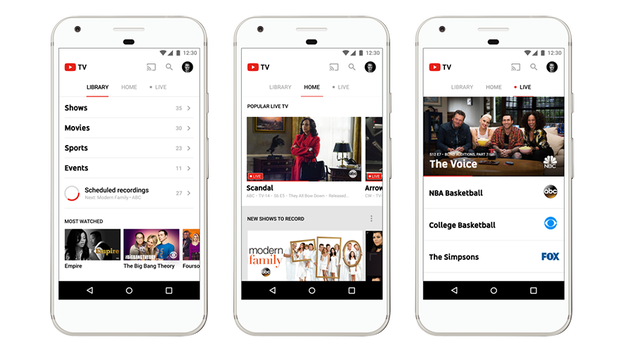
There are already a dozen different ways you can watch TV without cable – and now, Google is offering cord cutters yet another option, called YouTube TV, that offers a mix of live TV, cloud DVR storage, *and* on-demand content to set itself apart from established competition like Netflix and Amazon. The new service, which costs $35 a month, will be offered on the web, Android, iPhone, iPad, Google Chromecast, and Chromecast-enabled TVs.

US households pay $103.10 per month on average for cable, so it’s no wonder that services streaming shows, movies, and sports over the Internet are increasingly popular. Most streaming sites charge between $9 and $25 a month to access content on-demand, on multiple devices, wherever there’s a strong Internet connection. Another plus? Not having to deal with frustrating customer service representatives trying to force you not to cancel your subscription.

YouTube TV is a way for Google to compete with the likes Hulu and Netflix by offering its massive user base premium content, rather than just (mostly amateur) user-uploaded content. The homepage of the YouTube TV app features popular YouTube web series from independent creators like Lizzie Bennet, alongside shows from ABC and Showtime.

So, is YouTube TV worth it? I had a few days to play with the Android version of the new app, and think it’s a compelling option for those who are really into TV, especially live TV. But the on-demand content is fairly limited, so YouTube TV is pricey if you already subscribe a standalone sports package or a TV-focused service, like Hulu Plus.
Nicole Nguyen / BuzzFeed News

Here’s what you get for $35 per month.

YouTube TV is essentially three things: a live TV streaming service, a cloud-based DVR with unlimited storage, and a link to YouTube content related to those TV shows.

A subscription to YouTube TV gets you live streams from Disney (including Disney Channel, ESPN, and ABC), NBCUniversal (including MSNBC, Bravo, E&;, and Telemundo), CBS (including The CW and CBS Sports Network), Fox (including Fox News and Nat Geo), AMC Networks (including AMC and BBC America) and The Weather Channel.

It&;s a bit more limited than what Sling Blue, plus some extras, and Playstation Vue offer though, depending on the package, those are a bit more expensive than YouTube TV. You’ll notice that Viacom channels like Comedy Central and Turner Broadcasting programming from CNN and TBS are missing.

According to Google, YouTube TV subscribers will soon be able to purchase premium add-ons like Showtime ($11/month), Fox Soccer Plus ($15/month), Shudder, and Sundance Now in addition to the base tier.

The full list of YouTube TV&039;s channels:

Disney: ABC, ESPN, ESPN2, ESPN3, ESPNU, ESPNews, SEC Network, Disney Channel, Disney Junior, Disney XD, Freeform

NBCUniversal
: NBC, Telemundo, Bravo, Chiller, CNBC, E&033;, Golf Channel, MSNBC, Universo, NBCSN, Oxygen, Sprout, SyFy, Universal HD, USA, Comcast Regional Sports Networks, NECN (New England Cable News)

CBS
: CBS, The CW, CBS Sports NetworkFox: FOX, FS1 (Fox Sports 1), FS2 (Fox Sports 2), BTN (Big Ten Network), FX, FXX, FXM, Nat Geo, Nat Geo Wild, Fox News, Fox Business, Fox Regional Sports NetworksAMC Networks: AMC, BBC America, BBC World News, WE tv, IFC, Sundance TV

The Weather Channel
: Local Now

You’ll also have access to YouTube Red, which is premium ad-free content made by YouTube stars and would cost you $10 per month without a YouTube TV subscription.

It’s basically an Internet-friendly, mobile-friendly live TV guide.

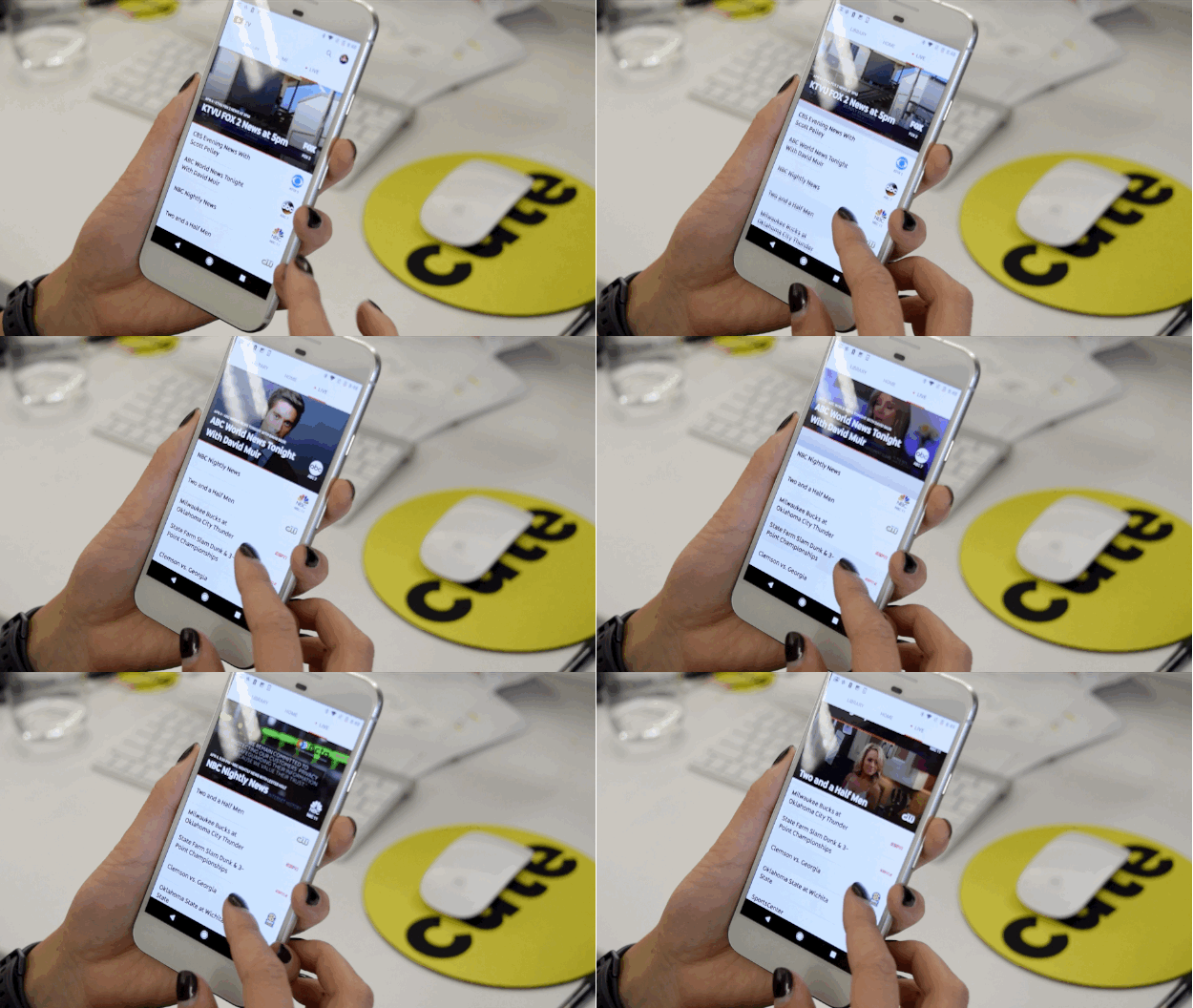
The experience is great on mobile (it’s available on Android, iPhone, and iPad, as well as web and Chromecast). The “Live” tab in the app feels the most like a traditional TV experience. You can scroll through different channels and preview what’s streaming live on each. To start watching a show, you tap in and are taken to a different page with the stream on top and lots of extra content around it, like what’s coming up next and shortcuts to jump to most recently watched channels.

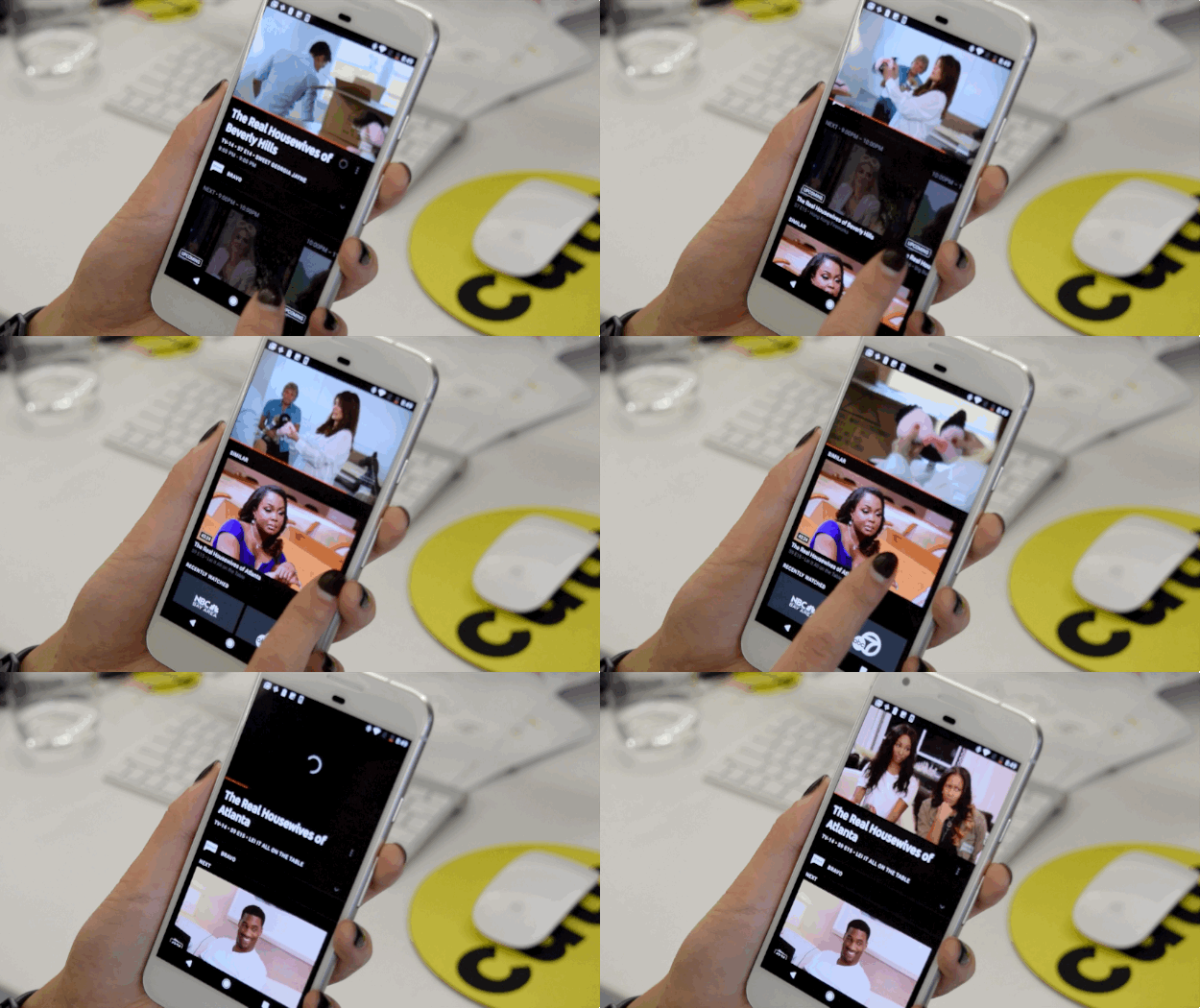
Underneath the stream, there’s a section of recommended content, which is how I went down a Real Housewives rabbit hole for nearly two hours. I recommend tilting your phone to view in landscape, so all of that extra distraction goes away and the show goes full screen.
Nicole Nguyen / BuzzFeed News

Nicole Nguyen / BuzzFeed News

YouTube TV feels a lot like TiVo on your phone.

The playback works like TiVo (lol, remember TiVo??). What you’re watching is live, but you can pause, rewind, and move forward. Unfortunately, like live TV, you have to sit through ads. All of them. (Unless you’ve DVR’d the content and can fast forward.)

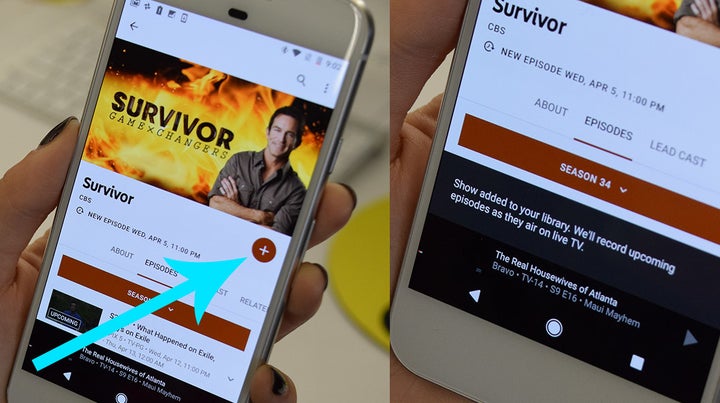
Also like TiVo, you can save upcoming live content to your DVR. Throughout the app, you&039;ll see a big (+) plus button that indicates you can “add” that show or movie to your library. Any show in your library will be recorded the next time it airs on TV, no matter which network it’s on.
Nicole Nguyen / BuzzFeed News

Both new episodes and reruns will be recorded in Google’s cloud, and you weirdly can’t set the app to record just new episodes, but that doesn’t matter, since YouTube TV’s DVR has unlimited storage space.

There are YouTube videos embedded throughout the app.

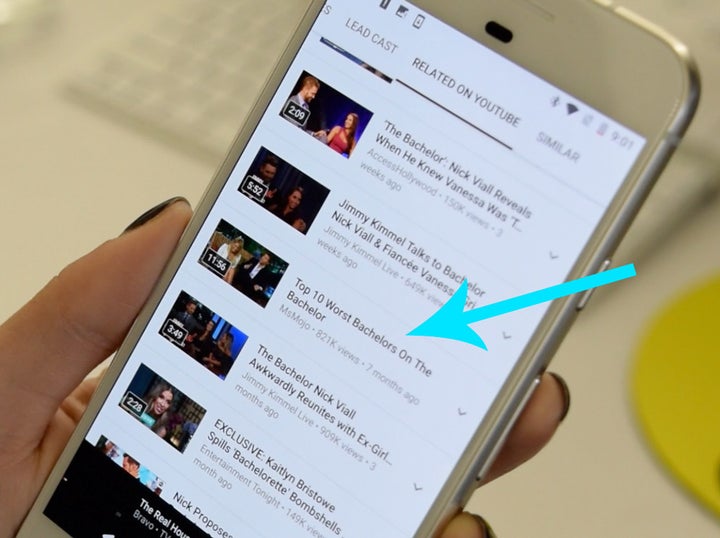
The YouTube TV app takes plenty of opportunities to suggest you watch YouTube videos. Scripted shows like Scandal and reality TV series like Real Housewives have their own landing pages with “Related on YouTube” sections that are auto-populated with YouTube content about the show. For Keeping Up With the Kardashians, there were highlights from past episodes uploaded by E&033;’s official YouTube account. The Bachelor, on the other hand, featured an interview from Nick and Vanessa, the series’ newest couple, on Jimmy Kimmel Live and a video titled “Top 10 Worst Bachelors On The Bachelor” by a user named MsMojo (hard agree).
Nicole Nguyen / BuzzFeed News

What you can and can’t watch on-demand is a bit confusing.

The availability of a show&039;s episodes depends completely on the network. Let’s say you missed last night’s episode of Scandal on ABC and failed to add the show to your “library” beforehand. You can stream the last five episodes, as you would on ABC Go (with a TV provider account) or Hulu Plus.

On Fox’s Empire, you can stream the entire season so far, but only season three is available on YouTube TV, while Hulu has seasons one through three. The same goes for NBC’s The Voice. All 13 episodes that have aired this season are available.

For MSNBC’s The Rachel Maddow Show only one episode, the latest, can be streamed. That’s also true of All In With Chris Hayes.

You can DVR games for teams, but you can’t follow individual athletes.
Nicole Nguyen / BuzzFeed News


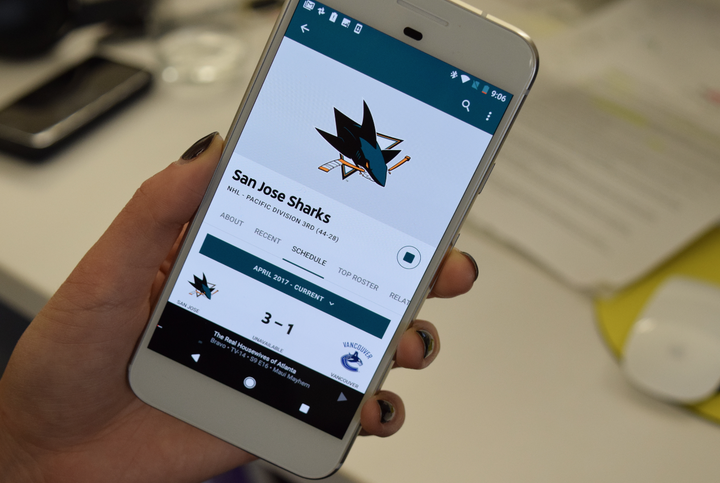
If you love hockey or basketball, you’ll be able to record upcoming games from your favorite teams. But if you’re a tennis fan, you can’t add “Roger Federer” to your library. You could only watch the US Open if it’s playing on one of the networks signed on to YouTube TV.

Ultimately, a streaming service is only as good as its content, and if YouTube TV doesn’t offer a show you watch, it’s not worth it.

On day one, the YouTube TV service will be pretty limited. For now, the service is only open to viewers in LA, New York, Chicago, Philadelphia, and the San Francisco Bay Area. Google says that more markets will follow in the coming months.

If you’re into network shows with a strong live following like The Bachelor, ones that are more timely like NBC Nightly News, or live sports, then YouTube TV isn’t a hard sell. Its closest competitor is Sling TV, starting at $20 per month, though most customers get Sling Blue ($25), plus a variety of extras for news and lifestyle channels at an additional $5 per month per package. Sling has noteworthy channels that YouTube TV doesn’t, like CNN and Comedy Central and recently launched a 50-hour cloud DVR service for $5 per month.

If you’re addicted to HBO’s Game of Thrones or Amazon’s Transparent, then YouTube TV probably isn’t your best choice. HBO, like most premium networks, offers a standalone Internet-only subscription service called HBO Now for $15 per month, specifically targeting cord cutters. Amazon Prime Video costs $9 per month, which is similarly priced to other on-demand services like Hulu Plus and Netflix. If you are already an Amazon Prime member, you get limited access to the Prime Video library. For most cord cutters, it might be better to mix-and-match services with content you’ll actually watch than to pay $35 a month for YouTube TV.

Quelle: <a href="Here&039;s A First Look At YouTube&039;s Cable TV Service“>BuzzFeed

Quantifying the performance of the TPU, our first machine learning chip

By Norm Jouppi, Distinguished Hardware Engineer, Google

We’ve been using compute-intensive machine learning in our products for the past 15 years. We use it so much that we even designed an entirely new class of custom machine learning accelerator, the Tensor Processing Unit.

Just how fast is the TPU, actually? Today, in conjunction with a TPU talk for a National Academy of Engineering meeting at the Computer History Museum in Silicon Valley, we’re releasing a study (this paper will be available from arXiv.org at 5pm PT today) that shares new details on these custom chips, which have been running machine learning applications in our data centers since 2015. This first generation of TPUs targeted inference (the use of an already trained model, as opposed to the training phase of a model, which has somewhat different characteristics), and here are some of the results we’ve seen:

On our production AI workloads that utilize neural network inference, the TPU is 15x to 30x faster than contemporary GPUs and CPUs.
The TPU also achieves much better energy efficiency than conventional chips, achieving 30x to 80x improvement in TOPS/Watt measure (tera-operations [trillion or 1012 operations] of computation per Watt of energy consumed).
The neural networks powering these applications require a surprisingly small amount of code: just 100 to 1500 lines. The code is based on TensorFlow, our popular open-source machine learning framework.
More than 70 authors contributed to this report. It really does take a village to design, verify, implement and deploy the hardware and software of a system like this.

The need for TPUs really emerged about six years ago, when we started using computationally expensive deep learning models in more and more places throughout our products. The computational expense of using these models had us worried. If we considered a scenario where people use Google voice search for just three minutes a day and we ran deep neural nets for our speech recognition system on the processing units we were using, we would have had to double the number of Google data centers!

TPUs allow us to make predictions very quickly, and enable products that respond in fractions of a second. TPUs are behind every search query; they power accurate vision models that underlie products like Google Image Search, Google Photos and the Google Cloud Vision API; they underpin the groundbreaking quality improvements that Google Translate rolled out last year; and they were instrumental in Google DeepMind’s victory over Lee Sedol, the first instance of a computer defeating a world champion in the ancient game of Go.

We’re committed to building the best infrastructure and sharing those benefits with everyone. We look forward to sharing more updates in the coming weeks and months.
Quelle: Google Cloud Platform

Real-time machine learning on globally-distributed data with Apache Spark and DocumentDB

At the Strata + Hadoop World 2017 Conference in San Jose, we have announced the Spark to DocumentDB Connector. It enables real-time data science, machine learning, and exploration over globally distributed data in Azure DocumentDB. Connecting Apache Spark to Azure DocumentDB accelerates our customer’s ability to solve fast-moving data science problems, where data can be quickly persisted and queried using DocumentDB. The Spark to DocumentDB connector efficiently exploits the native DocumentDB managed indexes and enables updateable columns when performing analytics, push-down predicate filtering against fast-changing globally-distributed data, ranging from IoT, data science, and analytics scenarios. The Spark to DocumentDB connector uses the Azure DocumentDB Java SDK. You can get started today and download the Spark connector from GitHub!

What is DocumentDB?

Azure DocumentDB is our globally distributed database service designed to enable developers to build planet scale applications. DocumentDB allows you to elastically scale both, throughput and storage across any number of geographical regions. The service offers guaranteed low latency at P99, 99.99% high availability, predictable throughput, and multiple well-defined consistency models, all backed by comprehensive SLAs. By virtue of its schema-agnostic and write optimized database engine, by default DocumentDB is capable of automatically indexing all the data it ingests and serve SQL, MongoDB, and JavaScript language-integrated queries in a scale-independent manner. As a cloud service, DocumentDB is carefully engineered with multi-tenancy and global distribution from the ground up.
These unique benefits make DocumentDB a great fit for both operational as well as analytical workloads for applications including web, mobile, personalization, gaming, IoT, and many other that need seamless scale and global replication.

What are the benefits of using DocumentDB for machine learning and data science?

DocumentDB is truly schema-free. By virtue of its commitment to the JSON data model directly within the database engine, it provides automatic indexing of JSON documents without requiring explicit schema or creation of secondary indexes. DocumentDB supports querying JSON documents using well-familiar SQL language. DocumentDB query is rooted in JavaScript&;s type system, expression evaluation, and function invocation. This, in turn, provides a natural programming model for relational projections, hierarchical navigation across JSON documents, self joins, spatial queries, and invocation of user defined functions (UDFs) written entirely in JavaScript, among other features. We have now expanded the SQL grammar to include aggregations, thus enabling globally-distributed aggs in addition to these capabilities.

Figure 1: With Spark Connector for DocumentDB, data is parallelized between the Spark worker nodes and DocumentDB data partitions

Distributed aggregations and advanced analytics

While Azure DocumentDB has aggregations (SUM, MIN, MAX, COUNT, SUM and working on GROUP BY, DISTINCT, etc.) as noted in Planet scale aggregates with Azure DocumentDB, connecting Apache Spark to DocumentDB allows you to easily and quickly perform an even larger variety of distributed aggregations by leveraging Apache Spark. For example, below is a screenshot of calculating a distributed MEDIAN calculation using Apache Spark&039;s PERCENTILE_APPROX function via Spark SQL.

select destination, percentile_approx(delay, 0.5) as median_delay
from df
where delay < 0
group by destination
order by percentile_approx(delay, 0.5)

Figure 2: Area visualization for the above distributed median calculation via Jupyter notebook service on Spark on Azure HDInsight.

Push-down predicate filtering

As noted in the following animated gif, the queries from Apache Spark will push down predicated to Azure DocumentDB and take advantage that DocumentDB indexes every attribute by default. Furthermore, by pushing computation close to the where the data lives, we can do processing in-situ, and reduce the amount of data that needs to be moved. At global scale, this results in tremendous performance speedups for analytical queries.

For example, if you only want to ask for the flights departing from Seattle (SEA), the Spark to DocumentDB connector will:

Send the query to Azure DocumentDB.
As all attributes within Azure DocumentDB are automatically indexed, only the flights pertaining to Seattle will be returned to the Spark worker nodes quickly.

This way as you perform your analytics, data science, or ML work, you will only transfer the data you need.

Blazing fast IoT scenarios

Azure DocumentDB is designed for high-throughput, low-latency IoT environments. The animated GIF below refers to a flights scenario.

Together, you can:

Handle high throughput of concurrent alerts (e.g., weather, flight information, global safety alerts, etc.)
Send this information downstream for device notifications, RESTful services, etc. (e.g., alert on your phone of an impending flight delay) including the use of change feed
At the same time, as you are building up ML models against your data, you can also make sense of the latest information

Updateable columns

Related to the previously noted blazing fast IoT scenarios, let&039;s dive into updateable columns:

As the new piece of information comes in (e.g. the flight delay has changed from 5 min to 30 min), you want to be able to quickly re-run your machine learning (ML) models to reflect this newest information. For example, you can predict the impact of the 30min for all the downstream flights. This event can be quickly initiated via the Azure DocumentDB Change Feed to refresh your ML models.

Next steps

In this blog post, we’ve looked at the new Spark to DocumentDB Connector. The Spark with DocumentDB enables both ad-hoc, interactive queries on big data, as well as advanced analytics, data science, machine learning, and artificial intelligence. DocumentDB can be used for capturing data that is collected incrementally from various sources across the globe. This includes social analytics, time series, game or application telemetry, retail catalogs, up-to-date trends and counters, and audit log systems. Spark can then be used for running advanced analytics and AI algorithms at scale on top of the data coming from DocumentDB.

Companies and developers can employ this scenario in online shopping recommendations, spam classifiers for real time communication applications, predictive analytics for personalization, and fraud detection models for mobile applications that need to make instant decisions to accept or reject a payment. Finally, internet of things scenarios fit in here as well, with the obvious difference that the data represents the actions of machines instead of people.

To get started running queries, create a new DocumentDB account from the Azure Portal and work with the project in our Azure-DocumentDB-Spark GitHub repo. Complete instructions are available in the Connecting Apache Spark to Azure DocumentDB article.

Stay up-to-date on the latest DocumentDB news and features by following us on Twitter @DocumentDB or reach out to us on the developer forums on Stack Overflow.
Quelle: Azure






