We pitted Fitbit’s new ultra-slim wristband against a chest strap to see just how accurately it could measure beats per minute.
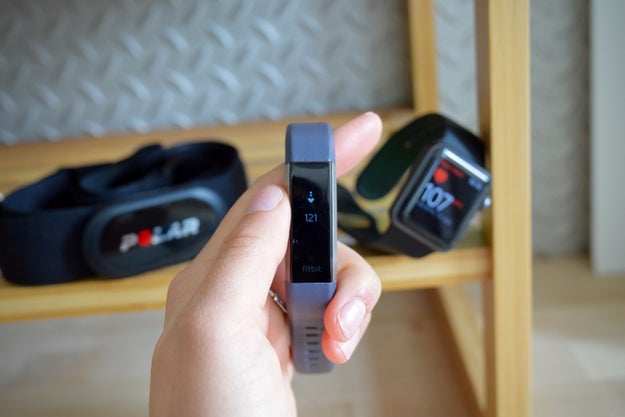
There are a lot of reasons why you’d want to get a fitness tracker. Maybe you’re trying to gather insights about your sleep, or get fitter, or lose weight. Whatever your goal, one thing is true: a fitness tracker is useless if it can’t accurately measure whatever it is you’re trying to track.
Fitbit recently debuted the Alta HR, an ultra-slim wristband with a new feature: heart rate tracking. But just how accurately can the wearable track your beats per minute? When we did a first impressions review of the Alta HR last month, our preliminary tests suggested that the tracker’s heart rate technology wasn’t always on point. So we spent the last two weeks working up a sweat while wearing the new band — and as we originally suspected, the Alta HR struggled to keep up with exercises with a lot of movement and high intensity bursts. It did, however, reliably measure resting heart rate.
Experts say most people don’t actually need to know their exact heart rate during workouts, so this may not matter to you. But accuracy does matter for some, namely people with heart conditions and endurance athletes. Fitbit also heavily markets the heart-rate tracking capability of its latest devices, like the Charge HR, Blaze, and Surge — and last year, it faced a class-action lawsuit over its allegedly inaccurate technology. (The company has called the allegations “baseless” and contested the lawsuit, as well as noting that the devices are “not intended to be scientific or medical devices.”)
With all that in mind, we set out to answer the question: Should you still consider the $150 Alta HR? Here’s what we found.
Nicole Nguyen / BuzzFeed News
Unfortunately, we didn’t have access to an electrocardiograph, a medical device that’s considered the gold standard for heart-rate measuring. Instead we used the next best thing — a chest strap monitor, which multiple studies have shown to be significantly more accurate than wrist-based heart rate monitors, as our control. And we enlisted Open Lab Fellow/chart master Lam Vo to help us sort through all of the data.
For each run and bike ride, we wore a Polar H7 chest strap, in addition to the Fitbit Alta HR and Apple Watch. Nicole wore the devices on different wrists, while Stephanie wore the devices on the same wrist.
Nicole’s Long-ish Run: A Close Look at the Data
During my first-impressions workout, a quick 17-minute run with short, intense uphill sprints, the Alta HR had trouble measuring my heart rate. So, this time around, I went for a longer interval run, switching between a light jog and uphill sprints, for about 40 minutes. The terrain was a mix of trails and concrete on rolling hills.
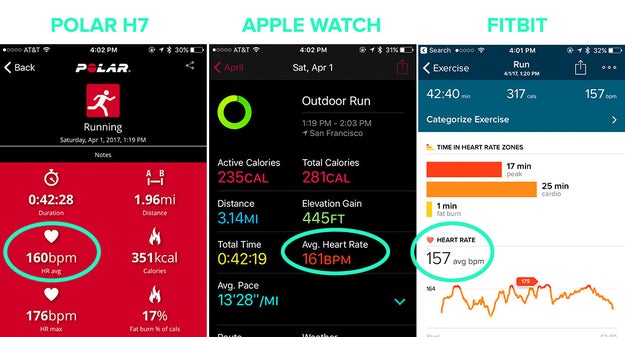
After the run, I checked each device’s workout summaries.The Polar Beat app measured a 160 beats per minute (bpm) average. Compared to that measurement, the Apple Watch overestimated the average by 1 beat (161 bpm), and the Fitbit Alta HR underestimated by 3 bpm, which is pretty impressive and consistent with Fitbit’s claim of average absolute error of less than 6 bpm versus an EKG (electrocardiograph) test strap.
I extracted the heart rate data from each device, and Lam created an interactive chart, so you can see exactly how the wearables performed throughout the duration of my run (try clicking the names of the device and hovering your mouse over the graph!).
Nicole Nguyen / BuzzFeed News
Lam Vo / BuzzFeed News
View Entire List ›
Quelle: <a href="Here&039;s How Accurate The Fitbit Alta HR Actually Is“>BuzzFeed








