
It Looks Like Google Has Shut Down Burger King's Ad

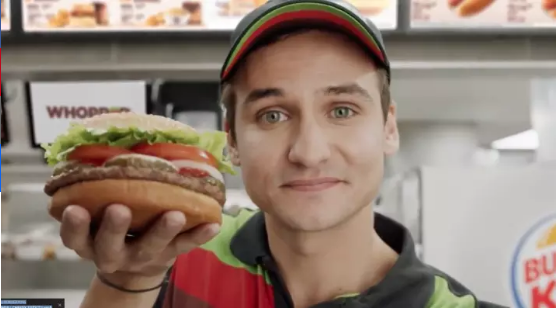
For less than three sweet hours, a Burger King ad successfully tricked Google&;s voice-activated Google Home devices into reading out the ingredients of a Whopper, in a marketing stunt designed to “punch through that fourth wall,” according to Burger King&039;s President.

In the ad, a person looked straight into the camera and said “OK Google, what is the Whopper burger?,” using the prompt that triggers Google Home devices. In response, any Google Home speaker nearby would rattle of an excerpt from the Wikipedia entry for the sandwich.

No more.

While a normal human being can still ask their Google Home about the burger, the audio from the ad itself no longer triggers the devices, BuzzFeed News tests have found.The Verge first reported on the change. It&039;s unclear if Google has disabled the specific audio from the ad from being recognized by its devices — neither Burger King nor Google immediately responded to requests for comment.

The rollout of the Burger King ad hasn&039;t been flawless, although it certainly got the brand plenty of attention. Almost immediately after the ad was first released, Wikipedia users began to alter the site&039;s entry for the Whopper, in an attempt to prank the pranksters and trick Google Home devices into reading out ingredients for the whopper that included “cyanide” and “a medium-sized child.”

Burger King&039;s New Ad Will Hijack Your Voice-Activated Speaker

Quelle: <a href="It Looks Like Google Has Shut Down Burger King&039;s Ad“>BuzzFeed

Faster and unrestricted power by Pivotal Cloud Foundry’s 1.10 now supports .NET

No longer be held back, instead go beyond your limits by having Distributed Tracing, Isolated Segments and Shared Platforms for all apps: Java and .Net. The new PCF 1.10 provides Spring Cloud Sleuth which can be used for many different apps across frameworks. Deployment complexity is lowered, cut costs of maintenance and infrastructure by tying each isolated segment to the same foundry keeping roles and permissions in sync. Achieve greater efficiency as developers can use their preferred framework. Dive into more details at Pivotal.
Quelle: Azure

Azure Analysis Services now available in West India

Last October we released the preview of Azure Analysis Services, which is built on the proven analytics engine in Microsoft SQL Server Analysis Services. With Azure Analysis Services you can host semantic data models in the cloud. Users in your organization can then connect to your data models using tools like Excel, Power BI, and many others to create reports and perform ad-hoc data analysis.

We are excited to share with you that the preview of Azure Analysis Services is now available in an additional region: West India. This means that Azure Analysis Services is now available in the following regions: Australia Southeast, Canada Central, Brazil South, Southeast Asia, North Europe, West Europe, West US, South Central US, North Central US, East US 2, West Central US, Japan East, West India, and UK South.

New to Azure Analysis Services? Find out how you can try Azure Analysis Services or learn how to create your first data model.
Quelle: Azure

Can A Simple Blood Test Really Spot Cancer Early? Don’t Bet On It Yet, Scientists Say.

BuzzFeed News; Getty Images (2)

Silicon Valley startups are racing to develop a blood test for cancer that many scientists believe is years, if not decades, away.

It’s a high-stakes competition, fueled by hundreds of millions of dollars in venture capital. The winner could help millions of patients fight off cancer before the disease shows any outward symptoms — early enough to drastically improve their odds of survival.

Or at least that’s what these companies envision on their websites and pitch decks, and at scientific meetings — and investors are buying it.

Founded in 2014, Freenome raised $65 million last month from Andreessen Horowitz, Peter Thiel’s Founders Fund, and Alphabet’s venture arm GV. One of Freenome’s most prominent rivals, Grail, which spun out of the DNA-sequencing monolith Illumina in 2016, has raised an eye-popping $1 billion from the likes of Bill Gates and Jeff Bezos. Another competitor, Guardant Health, has amassed close to $200 million.

So far, however, these companies have shared scant few details about how, exactly, they’re creating a test that could fundamentally change how we deal with cancer.

Freenome’s CEO and cofounder, Gabriel Otte, told Fast Company in April 2016 that its test would hit the market within nine months, after being published in a scientific journal. In June, he wrote a blog post claiming that those results would appear “very soon.” That hasn’t happened. Otte told BuzzFeed News his staff is still setting up clinical trials and will publish results “when we’re ready to publish.” (Otte recently admitted to BuzzFeed News that he does not have a PhD, despite multiple references to the contrary in the press, company materials, and scientific conferences.)

Grail and Guardant have not published any findings, either, although their executives also say they intend to.

Academic cancer researchers, meanwhile, say producing this kind of test is an incredibly difficult scientific and logistical challenge. Nascent tumors sometimes shed telltale markers in the blood, but often don’t, and these “biomarkers” can be different from one person to another, or even in one person from one month to the next. Plus, credible data will take at least several more years to accumulate in rigorous clinical trials, if not longer.

“It’s not going to be a Star Trek, ‘let’s take a quick sample and tell you exactly what disease you have and how to treat it,’” Jeremy Jones, an assistant professor of cancer biology at the City of Hope in Los Angeles, told BuzzFeed News.

There’s no question that such a test would be revolutionary.

There’s no question that such a test would be revolutionary, giving its inventors enormous social and financial rewards.

“Early detection is incredibly attractive, because if you can detect cancers early, you can cure them at a much higher frequency,” Tony Blau, a hematologist who directs the Center for Cancer Innovation at the University of Washington, told BuzzFeed News.

Just as investors in Theranos, the $9 billion startup now fighting for its life after very public regulatory missteps, envisioned a world where doctors could test for all kinds of conditions from a few drops of blood, Silicon Valley is embracing the vision of cancer screening for everyone, early and often.

Blood tests for early-stage cancer would be drastically better than current diagnostic methods like “tissue biopsies,” in which doctors extract potentially cancerous tissue with needles and surgeries. Tests on a couple teaspoons of blood could be much less expensive and invasive, and performed more often. A highly accurate test would also have an advantage over today’s non-invasive tests. Mammograms, for instance, have high rates of both false negatives (they miss one in five breast cancers) and false positives (which happen to about half of women who get the test annually over a decade).

Scientists have long known that cancer cells routinely shed bits of DNA into the bloodstream. But in the past few years, thanks to advances in DNA sequencing, these bits have become far easier to detect.

There are already a handful of tests, led by Guardant, that use these DNA bits to detect cancer in a cancer patient’s blood, or to identify certain mutations that might be treatable with personalized therapies.

But so far, there is no reliably accurate commercial test that can do this for people who are early in the disease and have not yet been diagnosed — the lofty goal of Freenome and its competitors.

The DNA shed by early-stage tumors accounts for less than one-tenth of a percent of all DNA in a patient’s blood, said Ash Alizadeh, a Stanford University oncologist who helped develop and sell a technology to potentially help doctors monitor how a tumor responds to therapy. For some tumors, such as those that start in the brain, their DNA is virtually undetectable even in tens of milliliters of blood, he added.

“The computations are so low,” Alizadeh said. “That’s been a major challenge for early detection.”

Even if a test was able to detect every single molecule of DNA in a blood sample, that wouldn’t be enough. Machines often generate false-positive readings of clumps of cells that are deceptively cancer-like, such as moles that don’t turn into melanoma or colorectal polyps that don’t become colon cancer, Alizadeh says.

“Do we know that those changes are always going to lead to a cancer that could threaten a patient’s life?” said Blau of the University of Washington. “The answer to that is no, we don’t know that.”

Yet another hurdle is simply knowing what DNA sequences to look for, since, as Blau points out, cancer cells differ within the same patient, and even within the same tumor.

And even if a test appears to work in a lab, proving it works in people will take years. “You have to test thousands of patients, wait long enough that enough of them get cancer and enough of them ultimately die of the disease, to be able to really evaluate if a new test is a useful screening test,” Max Diehn, an assistant professor of radiation oncology at Stanford, told BuzzFeed News. (He also consults for Roche, which owns the technology he co-developed with Alizadeh.)
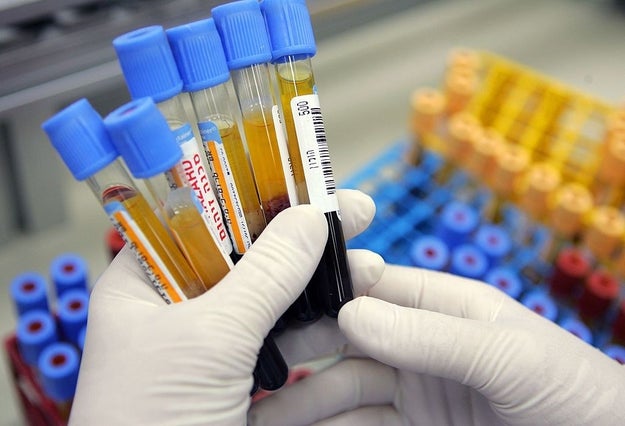
David Silverman / Getty Images

One of Grail’s first steps is a multi-center clinical trial in the United States with at least 7,000 patients with untreated cancer, and 3,000 cancer-free people. It began in August 2016 and plans to wrap up by August 2022.

Scientists hope to understand the molecular differences in the two groups’ blood samples, as well as how they change as disease develops. Grail has an advantage in its ties to Illumina, the world’s dominant supplier of DNA-sequencing machines, which expects Grail to become “one of Illumina’s largest customers over time.”

“Our hope is over time that we’ll be marching the population back earlier and earlier to where almost everyone who has cancer is diagnosed early,” Grail Chief Business Officer Ken Drazan told BuzzFeed News.

Guardant, on the other hand, believes that the knowledge it has already gleaned from testing 35,000 cancer samples can help pinpoint how the disease arises. President AmirAli Talasaz says that in addition to studying tumor DNA fragments, the company is looking at other kinds of chemical changes in tumors, called “epigenomic” variations. Guardant is running clinical trials of various sizes, including on high-risk patients and cancer survivors; a spokeswoman said there is no estimated date of completion.

Meanwhile, Freenome is testing its technology on patient blood samples from UC San Francisco, UC San Diego, Massachusetts General Hospital, and other clinics. For some samples, Freenome tries to predict if the patients received a cancer diagnosis or not. Other samples are from patients who are still being tracked for cancer but haven’t yet been diagnosed. In total, Freenome plans to test “thousands” of samples, though Otte declined to say how many have been tested to date. He still contends that these data will be published in a scientific journal before tests are sold commercially.

The CEO reportedly hooked Freenome’s main investor, Andreessen Horowitz, after acing a blinded test of five blood samples provided by the venture capital firm (which also invests in BuzzFeed). As Otte wrote last year, the company correctly categorized two of the samples as normal, and the other three as cancerous — and even accurately labeled what stage of disease. Although two of the cancer samples were from patients in late stages, he wrote, the third was stage one, a sign that the test could detect early cancer in a healthy-looking person.
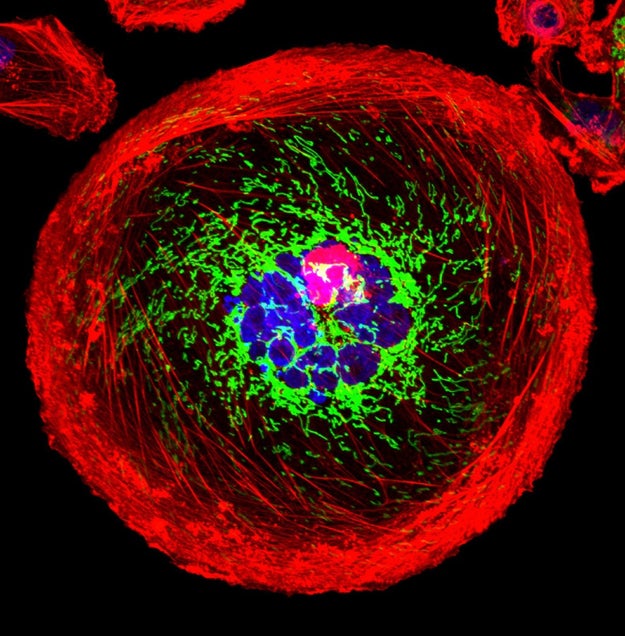
A breast cancer cell

Via visualsonline.cancer.gov

At a conference in San Francisco in February, Otte shared some striking numbers with an audience of scientists. Freenome had an accuracy rate of more than 95% in detecting the presence or absence of prostate cancer in 351 samples, according to an abstract of the presentation that Otte subsequently confirmed was real.

Supposing that Freenome’s test is as sensitive and specific as the rate claimed, “that would be a surprising result,” Diehn, of Stanford, said.

Alizadeh said there doesn’t seem to be enough information about the studies to know what to make of the technology’s apparently high performance. “For any test, especially a clinical one,” he said by email, “interpreting accuracy requires knowing the error rate.”

In Diehn’s view, too, there isn’t enough information to evaluate Freenome’s claims. “When you have a surprising result, the onus is on the scientists to provide evidence — strong evidence, supportive evidence — for such a claim.”

During his presentation, Otte also said Freenome had a 97% average accuracy rate in detecting breast, prostate, lung, and colorectal cancers across four stages of progression, including stage one. The sample size wasn’t disclosed.

“If they’re trying to say they can tell what stage a patient has, based on a blood test, I would find that would be very surprising,” Diehn said.

A stage is defined by how far a tumor has spread from where it started, which usually requires imaging and pathological tests, according to Diehn. Sometimes, he said, the only difference between a stage-one and stage-two tumor is being slightly bigger, or spreading to a single lymph node.

According to Jones, who attended the presentation, Otte said that Freenome could tell when a case of prostate cancer was aggressive or low-risk. There are “early indications” that the technology can do this, Otte told BuzzFeed News, but it is still in development.

Otte acknowledged that all of these results need to be validated in larger clinical trials. “We’re focused on making sure that we get the numbers we need to prove to the world that our tests are safe and function well.”

“What they’re saying could be they’ve developed a great test, or they don’t really have the data, and they’re trying to make it sound like they have.”

Otte’s talk left Jones impressed, he said, but wondering, “How do we know it’s real?” He understands why Freenome wouldn’t want to reveal its technology’s nitty-gritty to competitors before the test is on the market. But that choice, he said, “makes it difficult in academic science to know how valid it is.”

Diehn put it more bluntly: “What they’re saying could be they’ve developed a great test, or they don’t really have the data, and they’re trying to make it sound like they have.”

Freenome’s test picks up not only tumor DNA fragments, Otte said, but DNA changes that signal “how the immune system is responding to the presence or absence of the tumor.” Freenome’s machine-learning platform deduced that a stronger-than-expected link between these unspecified immunological signatures and cancer, Otte said.

It makes sense that the immune system would respond to an abnormal growth early on, Jones says. But “the immune system obviously responds to things other than cancer all the time,” he added. “What if a patient is on antibiotics, what if they have an active viral or bacterial infection? Does that cloud the ability to detect the cancer pattern?”

Unlike Guardant and Grail, Freenome does not have a clinical or scientific advisory board. The company is in the process of building them, Otte wrote last month.

Vijay Pande, a general partner at Andreessen Horowitz and a Freenome board member, said the company is rightfully broadening its analysis beyond just tumor DNA. “There’s a whole landscape, in principle, of what’s going on in your body available in blood,” he told BuzzFeed News.

There aren’t existing papers that describe the basis of Freenome’s approach, Pande acknowledged — but that’s because its computational methods are so advanced, they’re effectively creating new knowledge. “This is new territory,” said the former Stanford computational biologist. “This could not be done 20 years ago.”

Whether it can be done today remains to be seen.

Have a tip about the biotech world? Email reporter Stephanie Lee.

LINK: This Biotech CEO Doesn’t Have A PhD, But He Did Leave School Under A Cloud

Quelle: <a href="Can A Simple Blood Test Really Spot Cancer Early? Don’t Bet On It Yet, Scientists Say.“>BuzzFeed
New search analytics for Azure Search

One of the most important aspects of any search application is the ability to show relevant content that satisfies the needs of your users. Measuring relevance requires combining search results with the app side user interactions, and it can be hard to decide what to collect and how to do it. This is why we are excited to announce our new version of Search Traffic Analytics, a pattern on how to structure, instrument, and monitor search queries and clicks, that will provide you with actionable insights about your search application. You’ll be able to answer common questions, like most clicked documents or most common queries that do not result in clicks, as well as provide evidence for other situations, like deciding on the effectiveness of a new UI layout or tweaks on the search index. Overall, this new tool will provide valuable insights that will let you make more informed decisions.

Let’s expand on the scoring profile example. Let’s say you have a movies site and you think your users usually look for the newest releases, so you add a scoring profile with a freshness function to boost the most recent movies. How can you tell this scoring profile is helping your users find the correct movies? You will need information on what your users are searching for, the content that is being displayed and the content that your users select. When you have the data on what your users are clicking, you can create metrics to measure effectiveness and relevance.

Our solution

To obtain rich search quality metrics, it’s not enough to log the search requests; it’s also necessary to log data on what users are choosing as the relevant documents. This means that you need to add telemetry to your search application that logs what a user searches for and what a user selects. This is the only way you can have information on what users are really interested on and wether they are finding what they are looking for. There are many telemetry solutions available and we didn&;t invent yet another one. We decided to partner with Application Insights, a mature and robust telemetry solution, available for multiple platforms. You can use any telemetry solution to follow the pattern that we describe, but using Application Insights lets you take advantage of the Power BI template created by Azure Search.

The telemetry and data pattern consists of 4 steps:

1.    Enabling Application Insights
2.    Logging search request data
3.    Logging users’ clicks data
4.    Monitoring in Power BI desktop

Because it’s not easy to decide what to log and how to use that information to produce interesting metrics, we created a clear set schema to follow, that will immediately produce commonly asked for charts and tables out of the box on Power BI desktop. Starting today, you can access the easy to follow instructions on the Azure Portal and the official documentation.

Once you instrument your application and start sending the data to your instance of Application Insights, you will be able to use Power BI to monitor the search quality metrics. Upon opening the Power BI desktop file, you’ll find the following metrics and charts
•    Clickthrough Rate (CTR): ratio of users who click on a document to the number of total searches.
•    Searches without clicks: terms for top queries that register no clicks.
•    Most clicked documents: most clicked documents by ID in the last 24 hours, 7 days and 30 days.
•    Popular term-document pairs: terms that result in the same document clicked, ordered by clicks.
•    Time to click: clicks bucketed by time since the search query.


Operational Logs and Metrics

Monitoring metrics and logs are still available. You can enable and manage them in the Azure Portal under the Monitoring section.

Enable Monitoring to copy operation logs and/or metrics to a storage account of your choosing. This option lets you integrate with the Power BI content pack for Azure Search as well as your own custom integrations.

If you are only interested in Metrics, you don’t need to enable monitoring as metrics are available for all search services since the launch of Azure Monitor, a platform service that lets you monitor all your resources in one place.

Next steps

Follow the instructions in the portal or in the documentation to instrument your app and start getting detailed and insightful search metrics.

You can find more information on Application Insights here.  Please visit Application Insights pricing page to learn more about their different service tiers.
Quelle: Azure

Integrating Application Insights into a modular CMS and a multi-tenant public SaaS

The Orchard CMS Application Insights module and DotNest case study

Application Insights has an active ecosystem with our partners developing integrations using our Open Source SDKs and public endpoints. We recently had Lombiq (one of our partners) integrate Application Insights into Orchard CMS and a multi-tenant public SaaS version of the same.

Here is a case study of their experience in their own words, by Zoltán Lehóczky, co-founder of Lombiq, Orchard CMS developer.

We have integrated Application Insights into a multi-tenant service in such a way that each tenant gets its own separate performance and usage monitoring. At the same time, we, the providers of the service, get overall monitoring of the whole platform. The code we wrote is open-source.

Adding Application Insights telemetry to an ASP.NET web app is easy with just a few clicks in Visual Studio. But the complexity of monitoring needs increases when the web app is a rich-featured multi-tenant content management system (CMS) that can be self-hosted or offered as CMS as a Service. So you need to build an integration that feels native to the platform by extending the Application Insights libraries. The aim is to give people the great analytical and monitoring capabilities of Application Insights, specific to the CMS platform, that enables as easily. This blog post explains some techniques and practices that are used in the Orchard CMS Application Insights module.

We at Lombiq Technologies are a .NET software services company from Hungary. We have international clients like Microsoft itself. Orchard, an open source ASP.NET MVC CMS started and still supported by Microsoft, is what we mainly work with, having also built the public multi-tenant Orchard as a Service called DotNest. Being a long-time Azure user we learned about Application Insights when it was still very early in development and started to build an easy to use Orchard integration that can be utilized on DotNest. So, what are our experiences worth sharing?

The Application Insights Orchard module we developed is open source, so make sure to check it out on GitHub if you want to see more code! Everything discussed here is implemented there.

Using Application Insights in a modular multi-tenant CMS

Application Insights, as it is delivered “out of the box”, works easily for single-tenant applications, where it’s no issue that you need some root-level XML config files. However, if your code is a module that will be integrated into other people’s applications, like our Orchard CMS, then you want your code, including all the monitoring extensions, to be self-contained. We don’t want our clients to be exposed to configuration files at the application level. In short, we need to integrate Application Insights into our code to make a single, independently distributable MVC project. The distributed form might be a source repository or a zip file.

To package Application Insights into our code, we must:

Move Application Insights configuration to code—that is, do the same in C# that would normally be done in the XML config file.
Manage the lifetime of telemetry modules in code. Each module handles a different type of telemetry—requests, exceptions, dependencies, and so on. Normally, these modules are instantiated when the .config file is read, and have parameters set in the config file. (Learn more. Our code).
Instead of relying on static singletons, manage TelemetryClient and TelemetryConfiguration objects in a custom way. This allows the telemetry for separate tenants to be kept separate. (See for example this code)
Orchard uses log4net for logging. We can collect this data in Application Insights, but again we need to write code to configure ApplicationInsightsAppender instead of relying on the config files. (Code)
All good, so now we got rid of app-level XML configs. But what if we have multiple tenants in the same app? The default setup of Application Insights only has single-tenancy in mind, so we need to dig a bit deeper. (For the purpose of this post “tenant” will mean a sub-application, a component within the application that maintains a high level of data isolation to other tenants)

We can’t utilize the HttpModule that ships with Application Insights for request tracking, since that would require changes to a global config file (the Web.config) and wouldn’t allow us to easily switch request tracking on or off per tenant. Time to implement an Owin middleware and do request tracking with some custom code! Such middlewares can be registered entirely from code and can be enabled on a per tenant basis.
Since request tracking is done in our own way we also need to add an operation ID from code for each request. In Application Insights, Operation ID is used to correlate telemetry that occur as part of servicing the same request.
Let’s also add an ITelemetryInitializer that will add which tenant a piece of telemetry originates from. (Learn more. Code)
If everything is done we’ll end up with an Application Insights plugin that can be enabled and disabled from the Orchard admin site, separately for each tenant:


Adding some Orchardyness

So far so good, but the result still needs some more work to really be part of the CMS: There’s no place to configure it yet!

In Orchard, the site settings can be used for that. It’s easy to add some configuration options that admins can change from the web UI; these settings are on the level of a tenant. We’ve added a settings screen like this:


Note that calls to dependencies, like SQL queries, storage operations or HTTP requests to remote resources are tracked. However, since this generates a lot of data it’s possible to switch dependency tracking off.

Do note that some settings are either not possible to configure on a tenant level (and thus need to be app level), or it doesn’t make sense to do so: e.g. since log entries might not be tied to a tenant (but rather to the whole application) those are only available for app-wide collection in our module (nevertheless an additional tenant-level log collection would be possible). What you see is the full config that’s only available on the “main” tenant.

Furthermore, we added several extension points for developers to hook into. So if you’re a fellow Orchard developer you can override the Application Insights configuration, add your own context to telemetry data or utilize event handlers (and Orchard-style events for that matter).


Making Application Insights available in a public SaaS

What we’ve seen until now was all the fundamental functionality that’s needed for a self-contained component monitored by Application Insights. However, in DotNest, where everyone can sign up, we need two distinct layers of monitoring by Application Insights:

We want detailed telemetry about the whole application, for our own use.
Users of DotNest tenants want to separately configure Application Insights and collect telemetry that they’re allowed to see, just for their tenants.
Users of DotNest thus don’t even see the original Application Insights configuration options, as those are managed on the level of the whole platform. However, they get another site settings screen where they can configure their own instrumentation key:


When such a key is provided, then another, second Application Insights configuration will be created on the tenant and used together with the platform-level one, providing server-side and client-side request tracking and error reporting. Thus, while we at Lombiq, the owners of the service see all data under our own Application Insights account, each user will also be able to see just their own tenant’s data in the Azure Portal as usual.

This tenant configuration is created and managed in the same way as the original one, from code.


Seeing the results

Once all of this is set up, we want to see what kind of data we gathered, and this happens as usual in the Azure Portal.

Live Metrics Stream

Live Metrics Stream provides real time monitoring. We included the appropriate telemetry processor in our initialization chain. It includes system metrics like memory and CPU usage as well, and as of recently you don’t even need to install the Application Insights Extensions for an App Service to see these:


Tracing errors

But what if something goes wrong? Log entries are visible as Traces (standard log entries) or Exceptions (when exceptions are caught and logged) in the Azure Portal:

But remember that we’ve implemented an operation ID? The great thing once we have that is that events, exceptions, request, any data points are not just visible alone, but in context: Using the operation ID, Application Insights will be able to correlate telemetry data with other data points, for example to tell you the request in which the exception happened.

This makes it easier to find out how you can reproduce a problem that just happened in production.

Wrapping it up

All in all, if you need more than just to add Application Insights to your application with a single configuration, without the need to redistribute the integration, then you need to dig into the Application Insights libraries’ API. Now with the libraries being open source this is not much of an issue and you can fully configure and utilize them just by writing C#. With the Azure Application Insights Orchard module you even have a documented example of doing it.

So, don’t be afraid and code some awesome Application Insights integration! And if you just want to play with fancy graphs on the Azure Portal you can quickly create a free DotNest site and start gathering some data right away!

Quelle: Azure

Azure Data Factory March new features update

Hello, everyone! In March, we added a lot of great new capabilities to Azure Data Factory, including high demanding features like loading data from SAP HANA, SAP Business Warehouse (BW) and SFTP, performance enhancement of directly loading from Data Lake Store into SQL Data Warehouse, data movement support for the first region in the UK (UK South), and a new Spark activity for rich data transformation. We can’t wait to share more details with you, following is a complete list of Azure Data Factory March new features:

Support data loading from SAP HANA and SAP DW
Support data loading from SFTP
Performance enhancement of direct loading from Data Lake Store to Azure SQL Data Warehouse via PolyBase
Spark activity for rich data transformation
Max allowed cloud Data Movement Units increase
UK data center now available for data movement

Support data loading from SAP HANA and SAP Business Warehouse

SAP is one of the most widely-used enterprise softwares in the world. We hear you that it’s crucial for Microsoft to empower customers to integrate their existing SAP system with Azure to unlock business insights. We are happy to announce that we have enabled loading data from SAP HANA and SAP Business Warehouse (BW) into various Azure data stores for advanced analytics and reporting, including Azure Blob, Azure Data Lake, and Azure SQL DW, etc.

The SAP HANA connector supports copying data from HANA information models (such as Analytic and Calculation views) as well as Row and Column tables using SQL queries. To establish the connectivity, you need to install the latest Data Management Gateway (version 2.8) and the SAP HANA ODBC driver. Refer to SAP HANA supported versions and installation for more details.
The SAP BW connector supports copying data from SAP Business Warehouse version 7.x InfoCubes and QueryCubes (including BEx queries) using MDX queries. To establish the connectivity, you need to install the latest Data Management Gateway (version 2.8) and the SAP NetWeaver library. Refer to SAP BW supported versions and installation for more details.

For more information about connecting to SAP HANA and SAP BW, refer to Azure Data Factory offers SAP HANA and Business Warehouse data integration.

Support data loading from SFTP

You can now use Azure Data Factory to copy data from SFTP servers into various data stores in Azure or On-Premise environments, including Azure Blob/Azure Data Lake/Azure SQL DW/etc. A full support matrix can be found in Supported data stores and formats. You can author copy activity using the intuitive Copy wizard (screenshot below) or JSON scripting. Refer to SFTP connector documentation for more details.

Performance enhancement of direct data loading from Data Lake Store to Azure SQL Data Warehouse via PolyBase

Data Factory Copy Activity now supports loading data from Data Lake Store to Azure SQL Data Warehouse directly via PolyBase. When using the Copy Wizard, PolyBase is by default turned on and your source file compatibility will be automatically checked. You can monitor whether PolyBase is used in the activity run details.

If you are currently not using PolyBase or staged copy plus PolyBase for copying data from Data Lake Store to Azure SQL Data Warehouse, we suggest checking your source data format and updating the pipeline to enable PolyBase and remove staging settings for performance improvement. For more detailed information, refer to Use PolyBase to load data into Azure SQL Data Warehouse and Azure Data Factory makes it even easier and convenient to uncover insights from data when using Data Lake Store with SQL Data Warehouse.

Spark activity for rich data transformation

Apache Spark for Azure HDInsight is built on an in-memory compute engine, which enables high performance querying on big data. Azure Data Factory now supports Spark Activity against Bring-Your-Own HDInsight clusters. Users can now operationalize Spark job executions through Spark Activity in Azure Data Factory.

Since Spark job may have multiple dependencies such as jar packages (placed in the java CLASSPATH) and python files (placed on the PYTHONPATH), you will need to follow a predefined folder structure for your Spark script files. For more detailed information about JSON scripting of the Spark Activity, refer to Invoke Spark programs from Azure Data Factory pipelines.

Max allowed cloud Data Movement Units increase

Cloud Data Movement Units (DMU) reflects the powerfulness of copy executor used to empower your cloud-to-cloud copy. To copy multiple files with large volume from Blob storage/Data Lake Store/Amazon S3/cloud FTP/cloud SFTP into Blob storage/Data Lake Store/Azure SQL Database, higher DMUs usually provide you better throughput. Now you can specify up to 32 DMUs for large copy runs. Learn more from cloud data movement units and parallel copy.

UK data center now available for data movement

Azure Data Factory data movement service is now available in the UK, in addition to the existing 16 data centers. With that, you can leverage Data Factory to copy data from Cloud and On-Premise data sources into various supported Azure data stores located in the UK. Learn more about the globally available data movement and how it works from Globally available data movement, and the Azure Data Factory’s Data Movement is now available in the UK blog post.

Above are the new features we introduced in March. Have more feedbacks or questions? Share your thoughts with us on Azure Data Factory forum or feedback site, we’d love to hear more from you.
Quelle: Azure

Deploy Remote Desktops More Easily on EC2 Windows with AWS Microsoft AD

AWS Directory Service for Microsoft Active Directory (Enterprise Edition), also known as AWS Microsoft AD, now supports Microsoft Remote Desktop Licensing Manager (RD Licensing). With the new release you can now enable RD Licensing in your AWS Microsoft AD domain. This reduces the effort to deploy and manage infrastructure for Microsoft Windows Remote Desktop Services in the AWS Cloud. 
Quelle: aws.amazon.com






