The New Resource Groups Tagging API Makes It Easier to Programmatically Manage Tags on Resources Across AWS Services

Today, we made available the new Resource Groups Tagging API, which makes it easier for you to use tags to centrally organize, discover, allocate costs, and control access to AWS resources. The API’s five operations enable you to programmatically tag and untag resources, list resources with a specific tag, and list unique tag keys across multiple AWS services. With this new API, you can now programmatically use AWS resource group and Tag Editor functionality. This makes it easier for you to implement automated tools to manage, search, and filter tags and resources across AWS services.
Quelle: aws.amazon.com

After Internet Privacy Vote, Some ISPs Pledge Not To Sell Browsing Histories

FCC Chairman Ajit Pai

Nicholas Kamm / AFP / Getty Images

This week, Congress voted to gut internet privacy regulations. The new legislation — which only needs President Trump’s signature to become law — would make it easier for internet providers like Comcast and Verizon to sell your browsing history and other information about your online habits to third parties. But just as giant carriers are seeing new avenues for data collection and ad revenue opening up, two California-based internet providers have pledged not to sell their customers’ browsing history, or any other data.

Sonic, a carrier with around 100,000 subscribers that offers service to most of California, and Monkeybrains, a San Francisco-based provider with around 9,000 subscribers, both promise to never sell your internet browsing history, subscriber information, or usage data.

“We&;re not in the business of selling data and we&039;ve never done so. We provide internet as a service and that’s it,” Alex Menendez, co-founder of Monkeybrains.net, told BuzzFeed News. “We have consistently had pro-consumer policies with regards to our privacy practices,” Dane Jasper, the CEO of Sonic, told BuzzFeed News. “We have a long history of differentiating ourselves that way.”

The Electronic Frontier Foundation consistently gives Sonic the highest marks on its annual scorecard “Who Has Your Back,” which evaluates the privacy and transparency practices of internet and technology companies. Monkeybrains counts the EFF as a client of its own. Both companies were among more than a dozen small-scale ISP and networking companies who publicly opposed the repeal of the internet privacy rules. But most Americans don’t have access to these services and have to rely on big ISPs for internet access.

Back in January, several major internet providers, including Comcast, Verizon, AT&T, Charter, and T-Mobile, voluntarily pledged to abide by a set of “ISP Privacy Principles” which rely on guidelines shaped by the Federal Trade Commission. However, there’s a crucial difference between these FTC guidelines and the more robust Obama-era rules that Congress just voted to overturn. The rules established that your browsing history is considered “sensitive” information, meaning that broadband providers first need to get permission before they can share it with third party companies like advertisers.

The ISPs, in their privacy principles, made no such commitment. They favor the older FTC guidelines, where customers’ browsing history may be collected and shared by default, without your affirmative consent.

Now that a Republican-controlled Congress has voted to ensure that these stronger rules won’t take effect, consumer advocates and former regulators have argued that key protections have been erased. Internet providers now have more freedom to make money off of your online activity.

“There is no reason to compete on privacy — that&039;s the problem.”

Under its privacy policy, AT&T, for example, states that it may collect: “IP addresses, URLs, data transmission rates and delays. We also learn about the pages you visit, the time you spend, the links or advertisements you see and follow, the search terms you enter, how often you open an application, how long you spend using the app and other similar information.”

“We or our advertising partners may use anonymous information gathered through cookies and similar technologies, as well as other anonymous and aggregate information that either of us may have to help us tailor the ads you see on non-AT&T sites,” the privacy policy states. “For example, if you see an ad from us on a non-AT&T sports-related website, you may later receive an ad for sporting equipment delivered by us on a different website. This is called Online Behavioral Advertising, which is a type of Relevant Advertising.”

When asked how they planned to use customers’ web histories if the rules were removed, AT&T, Verizon, and Sprint directed BuzzFeed News to their privacy policies. Comcast, Charter, and T-Mobile did not respond to queries about their use of browsing history. (Disclosure: Comcast Corp.&039;s NBCUniversal is an investor in BuzzFeed.)

Telecom industry representatives and Republican lawmakers say they oppose the privacy rules because they unfairly target ISPs, while favoring web companies like Google and Facebook. Because the rules don’t apply to these companies, they can use their customers’ data to rake in ad dollars.

USTelecom told BuzzFeed News that the repeal opens up advertising opportunities for internet providers, which may be helpful to consumers. NCTA — The Internet & Television Association told BuzzFeed News that the repeal will allow internet providers to better compete in the advertising marketplace.

But privacy advocates and Democratic lawmakers have argued that internet subscribers need special protections for two main reasons. The first is that ISPs can monitor everything a person does online, so long as the traffic is unencrypted, which is something web services like Google and Facebook cannot do. Second, most Americans live in areas with only a single internet provider. That means they can’t switch to more privacy-friendly ISPs like Sonic or Monkeybrains; instead, they’re forced to accept the privacy practices of a single carrier if they want internet access.

“We don&039;t believe that telephone companies should listen to our telephone calls,” Sonic’s Jasper said, using an analogy to describe how customers view their internet providers. “Carriers are in a different position, and that position is a trusted position in the minds of consumers.”

On platforms like YouTube and Gmail, for example, Jasper said there is a commonly understood relationship, where businesses provide a free service in exchange for advertising that’s shaped around tracking your behavior. This “implicit compact,” he argued, doesn’t exist between customers and their internet service providers.

Jeff Chester, the executive director of the Center for Digital Democracy, told BuzzFeed News that he hopes consumer pressure might influence how internet providers modify their data collection, but absent strong regulations, he believes the economic incentives are too strong for the big ISPs to ignore. “There is no reason to compete on privacy — that&039;s the problem,” he said.

“You could make the argument that it’s good business — and it is — but there are no regulations requiring any real privacy protections at all. If everybody is just buying and selling your data, then being the one that says &039;No, I&039;ll do better&039; does impact the bottom line.”

Quelle: <a href="After Internet Privacy Vote, Some ISPs Pledge Not To Sell Browsing Histories“>BuzzFeed

Twitter Tweaked How Replies Work And People Have All The Feelings

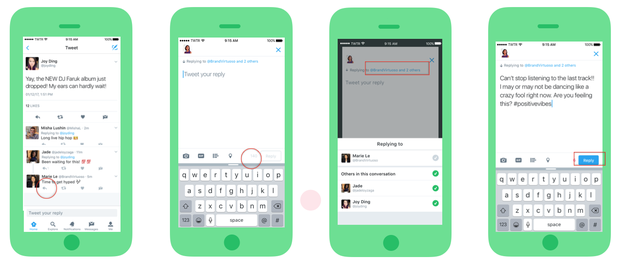
Twitter revamped its reply feature today: @usernames won’t show up in replies to tweets anymore.

Twitter revamped its reply feature today: @usernames won't show up in replies to tweets anymore.

It used to be that a bunch of @ usernames would show up in your Twitter replies, which could occupy a significant chunk of the 140 character limit for tweets. Now, the @ names won&;t appear in the reply itself. The names of the people in the conversation will appear above the tweet, and you can control who&039;s part of the conversation by tapping on that list of names.

And people are ~stressed~

giphy

People pointed out that it&039;s tough to remove yourself from replies with the new feature:

giphy

And just generally…loathe the change

But some people love it, I guess?

The overwhelming majority of reactions have been negative, though.

Twitter rolled back a similar feature in December in response to widespread outrage.

The company has recently shipped a number of updates; many of them are intended to curb abuse. In June 2016, it announced that GIFs, videos, photos, and other media wouldn&039;t count toward the 140-character limit.

It&039;s worth noting that pretty much any time Twitter rolls out a change, people get mad. Twitter did not respond to request for comment.

Quelle: <a href="Twitter Tweaked How Replies Work And People Have All The Feelings“>BuzzFeed

Using Post Hook to Initialize a Database

In the OpenShift v2 days, we used Action Hooks to initialize a database with test data. OpenShift 3.x also provides pod lifecycle hooks that can be leveraged to initialize the database after the database starts inside a pod. This blog explains the approach using pod lifecycle hooks. In this blog, I am using MYSQL database as an example. A similar approach can be used with other databases.
Quelle: OpenShift

Azure Network Security

In Azure, security is built in at every step—design, code development, monitoring, operations, threat intelligence, and response. We understand that the breadth and scale of the cloud demands a deep commitment to security technology and processes that few individual organizations can provide. Decades of building enterprise software and running the world’s largest online services such as Microsoft Azure, Bing, Dynamics 365, Office 365, OneDrive, and Xbox Live have formed Microsoft’s unique perspective on security. Using threat intelligence developed from trillions of signals and billions of sources, Microsoft annually invests more than $1 billion into our security capabilities to provide a comprehensive approach called Microsoft Secure. For more information, see the Microsoft Secure blog.

We’ve applied our vast operational experience to create a secure platform and provide services to help build secure applications. The Microsoft promise is that you can use Azure to secure your applications, data, and identities. We back this promise with a broad set of Azure compliance certifications, making us the leader among cloud service providers. You can learn more about compliance and privacy at the Microsoft Trust Center.

In this blog, I will focus on security from a network perspective and describe how you can use Azure network capabilities to build highly secure cloud services. Four distinct areas highlight how we provide a secure network to customers:

The foundation is Azure Virtual Network to provide a secure network fabric that provides an isolation boundary for customer networks.
Virtual Network configuration and policies protect cloud applications.
Active monitoring systems and tools provide security validation.
An underlying physical network infrastructure with built-in advanced security hardening protects the entire global network. 

Isolating customer networks in single shared physical network

To support the tremendous growth of our cloud services and maintain a great networking experience, Microsoft owns and operates one of the largest dark fiber backbones in the world—it connects our datacenters and customers. In Azure, we run logical overlay networks on top of the shared physical network to provide isolated private networks for customers.

Figure 2. Isolated customer virtual networks run on the same physical network

The overlay networks are implemented by Azure’s software defined networking (SDN) stack. Each overlay network is specifically created on demand for a customer via an API invocation. All configuration for building such networks is performed in software—this is why Azure can scale up to create thousands of overlay networks in seconds. Each overlay network is its own Layer 3 routing domain that comprises the customer’s Virtual Network (VNet).

Azure Virtual Network

Azure Virtual Network is a secure, logical network that provides network isolation and security controls that you treat like your on-premises network. Each customer creates their own structure by using: subnets—they use their own private IP address range, configure route tables, network security groups, access control lists (ACLs), gateways, and virtual appliances to run their workloads in the cloud. 

Figure 3 shows an example of two customer virtual networks. Customer 1’s VNet has connectivity to an on premises corporate network, while Customer 2’s VNet can be accessed only via Remote Desktop Protocol (RDP). Network traffic from the Internet to virtual machines (VMs) goes through the Azure load balancer and then to the Windows Server host that’s running the VM. Host and guest firewalls implement network port blocking and ACL rules.

Figure 3. Customer isolation provided by Azure Virtual Network

The VMs deployed into the VNet can communicate with one another using private IP addresses. You control the IP address blocks, DNS settings, security policies, and routing tables. Benefits include:

Isolation: VNets can be isolated from one another, so you can create separate networks for development, testing, and production. You can also allow your VNets to communicate with each other.
Security: By using network security groups, you can control the traffic entering and exiting the subnets and VMs.
Connectivity: All resources within the VNet are connected. You can use VNet peering to connect with other Virtual Networks in the same region. You can use virtual private network (VPN) gateways to enable IPsec connectivity to VNets via the Internet from on-premises sites and to VNets in other regions. ExpressRoute provides private network connectivity to VNets that bypasses the Internet.
High availability: Load balancing is a key part of delivering high availability and network performance to customer applications. All traffic to a VM goes through the Azure Load Balancer.

Securing your applications

A December 2016 survey of security professionals showed that their biggest year-over-year drop in confidence was in “the security of web applications, [which was] down 18 points from 80 percent to 62 percent.” Microsoft addresses potential vulnerabilities by building security into our applications and providing features and services to help customers enhance the security of their cloud-hosted applications from the development phase all the way to controlling access to the service.

Azure has a rich set of networking mechanisms that customers can use to secure their applications. Here are some examples.

Network ACLs can be configured to restrict access on public endpoint IP addresses. ACLs on the endpoint further restrict the traffic to only specific sources IP addresses.

Network Security Groups (NSGs) control network access to VMs in your VNet. This collection of network ACLs allows a full five-tuple (source IP address, source port, destination IP address, destination port, protocol) set of rules to be applied to all traffic that enters or exits a subnet or a VM’s network interface. The NSGs, associated to a subnet or VM, are enforced by the SDN stack.

Network virtual appliances (NVAs) bolster VNet security and network functions, and they’re available from numerous vendors via the Azure Marketplace. NVAs can be deployed for highly available firewalls, intrusion prevention, intrusion detection, web application firewalls (WAFs), WAN optimization, routing, load balancing, VPN, certificate management, Active Directory, and multifactor authentication.

Many enterprises have strict security and compliance requirements that require on-premises inspection of all network packets to enforce specific polices. Azure provides a mechanism called forced tunneling that routes traffic from the VMs to on premises by creating a custom route or by Border Gateway Protocol (BGP) advertisements through ExpressRoute or VPN.

Figure 4 shows an example of using NSG rules on segregated subnets and an NVA to protect the front end subnet. 

Figure 4. A perimeter network architecture built using Network Security Groups

Azure Application Gateway, our Layer 7 load balancer, also provides Web Application Firewall (WAF) functionality to protect against the most common web vulnerabilities.

Securely connecting from on-premises to Azure can be achieved via the Internet using IPsec to access our VPN Gateway service or with a private network connection using ExpressRoute. Figure 4 illustrates a perimeter network–style enhanced security design where Virtual Network access can be restricted using NSGs with different rules for the front end (Internet-facing) web server and the back-end application servers.

Figure 5. A secured VNet connected to an Internet front-end and back-end connected to on-premises

For more examples and best practices, see Microsoft cloud services and network security.

Security validation

Azure offers many tools to monitor, prevent, detect, and respond to security events. Customers have access to the Azure Security Center, which gives you visibility and control over the security of your Azure resources. It provides integrated security monitoring and policy management, helps detect threats, and works with a broad ecosystem of security solutions.

We also provide Network Watcher to monitor, diagnose, and gain insights into your Azure network. With diagnostic and visualization tools to monitor your network’s security and performance, you can identify and resolve network issues. For example, to view information about traffic coming into and going out of an NSG, Network Watcher provides NSG flow logs. You can verify that the NSGs are properly deployed, and see which unauthorized IPs are attempting to access your resources.

Figure 6. Capture NSG Flow Logs using Network Watcher

Figure 7. Analyze NSG Flow Logs using Power BI

Network infrastructure security hardening

According to a 2015 Ponemon study, for businesses, the average cost per security breach is $15 million. To help protect your organization’s assets, Microsoft Cloud datacenters are protected by layers of defense-in-depth security, including perimeter fencing, video cameras, security personnel, secure entrances, real-time communications networks, and all physical servers are monitored. These regularly audited security measures help Azure achieve our strong portfolio of compliance certifications. 

For many years, we’ve used encryption in our products and services to protect our customers from online criminals and hackers. We don’t want to take any chances with customer data being breached and are addressing this issue head on. We have a comprehensive engineering effort to strengthen the encryption of customer data across our networks and services. This effort will provide protection across the full lifecycle of customer-created content.

Azure traffic between our datacenters stays on our global network and does not flow over the Internet. This includes all traffic between Microsoft Azure public cloud services anywhere in the world. For example, within Azure, traffic between VMs, storage, and SQL stays on the Microsoft network, regardless of the source and destination region. Intra-region VNet-to-VNet, as well as cross-region VNet-to-VNet traffic, stays on the Microsoft network.

Distributed denial of service (DDoS) attacks are a continually rising threat. Protecting against the growing scale and complexity of such attacks requires significant infrastructure deployed at global scale. Azure has a built-in DDoS protection system to shield all Microsoft cloud services. Therefore, all Azure public IPs fall under this protection deployed across all Azure datacenters. Our DDoS system uses dynamic threat detection algorithms to prevent common DDoS volumetric attacks (such as UDP floods, SYN-ACK attacks, or reflection attacks). We monitor hundreds of daily mitigated attack attempts and continually expand our protection.

Azure itself is also protected through active monitoring and intelligence gathering across the Internet. We continuously perform threat intelligence research into the dark web to identify and mitigate potential risks and attacks. This knowledge is applied to our protection techniques and mitigations. The Microsoft Cyber Defense Operations Center, highlighting our commitment, responds to security incidents.

Putting these investments together, we provide a layered security model, as shown in Figure 8 to protect your services running in Azure.

Figure 8. A layered approach to securing Azure

Secure Azure Networking

Azure has made significant investments in security. Customers can use Virtual Networks and our other security features and services to design, configure, and monitor their cloud applications. We aggressively monitor and continually harden our global infrastructure to address the ever-changing landscape of new cyber threats.

Microsoft continues to be a leader in the prevention of network security attacks. With our global footprint and experience running the most popular cloud services, we have both scale and a breadth of inputs to secure our network and help you secure your services. We will continue to invest in network security technologies so that you can safely—and in a compliant manner—build, deploy, monitor, and run your services in Azure. We are your partner to securely run your business.

Read more

To read more posts from this series please visit:

Networking innovations that drive the cloud disruption
SONiC: The networking switch software that powers the Microsoft Global Cloud
How Microsoft builds its fast and reliable global network
Lighting up network innovation

Quelle: Azure

Azure Backup’s cloud-first approach and why it matters

Backup is all about how quickly you can be back up from a disaster or data loss situation. ​On this World Backup Day, this blog post is dedicated to explaining Azure Backup&;s cloud-first approach and how it helps you be back up quickly and securely. 

Backup is a deeply entrenched market and companies generally tend to stick with their backup solution unless there are major shifts in the IT infrastructure. When such a shift occurs, companies are open to evaluating alternate backup solutions that offer significant value tied to that infrastructure shift. Virtualization was a hardware infrastructure inflection that happened in the 2000s that allowed companies to significantly reduce their IT costs with the consolidation and portability benefits offered by virtualization. It also allowed new backup players to emerge and the ones that delivered significant value tied to virtualization became successful. The infrastructure inflection currently underway is the shift to the public cloud and Azure Backup has taken a cloud-first approach to deliver maximum value for backup scenarios in a cloud-transformed IT environment. 

Cloud-first value propositions

These are the benefits customers would likely expect in backup scenarios as they augment the public cloud to their IT infrastructure:

Consistent management experience for Hybrid IT: Companies will be in a hybrid model where in addition to the on-premise IT, they will have a cloud foot print that has IaaS (“lift-and-shift applications”) that possibly extends to PaaS (“born-in-the-cloud applications”) and SaaS (O365). It is important to have a consistent experience to manage backups across the IT assets in this hybrid model.
Agility: Business owners are seeking more agility offered by the public cloud where they can deploy solutions from the marketplace to meet their business needs. From a backup perspective, an application admin should be able to sign up for backup and do self-service restores without having to go through a central IT process to provision compute/storage in the cloud to enable backup.
Reduce TCO (Total Cost of Ownership): A subscription based model (PAYG) is an obvious benefit of the public cloud, but it is also important to consider overall IT cost for backup. For example, if you need to deploy additional infrastructure in the cloud (compute and storage) for backups your overall costs would be higher.
Freedom from infrastructure: This is one of the fundamental benefits companies seek when they move their IT to the cloud and since backup has a significant infrastructure footprint in on-premises IT (storage, compute, licenses, etc), an infrastructure-less backup solution would be a natural expectation for customers.

There are 3 possible approaches backup solutions can take to leverage the cloud inflection and it is important to consider how well they deliver on the above promises in each approach:

Cloud as storage: In this model, the backup solution leverages the public cloud as a storage target for backup either for the second backup copy or to replace tape backups. The customer still needs to manage storage in the cloud, pay for any egress costs for restores, and manage bulk of backup infrastructure that is still on premises.    
Cloud as infrastructure: This is the next level where the customer can run the backup application in an IaaS VM, which can protect applications deployed in IaaS. While it does offer a similar experience, it can only protect IaaS VMs and not the other cloud assets (PaaS, SaaS) and has TCO implications. For example, a single IaaS VM only supports 32 TB of total addressable storage, which is far too small for a backup application so to back up at scale, customers need to deploy additional IaaS VMs, configure scale sets for availability and provision/manage backup storage, all of which adds to the overall TCO for backup. Also, as the name implies, it does not free the customer from infrastructure management which is a fundamental promise of moving to the cloud.
Cloud as platform: Backup can be built in a PaaS model to deliver backup as a service and architected to provide a consistent management experience to both on premises infrastructure as well as backup for born-in-the-cloud applications (IaaS, PaaS, and SaaS). Since all the service infrastructure is owned and managed by the service, there would be no additional costs for the backup and there is complete freedom from managing infrastructure associated with backup. 

Azure Backup is architected from the ground-up as a first-class PaaS service in Azure as described in approach 3 and delivers on the cloud promises customers expect as they cloud transform their IT infrastructure. In addition, since it is a first-party service in Azure, it can also leverage other services in Azure to deliver value beyond backup scenarios. For example, rich monitoring and reporting using PowerBI or the capability to do advanced analytics on backup data in Azure.

Compelling backup scenarios enabled by the cloud first architecture

The cloud-first approach of Azure Backup provides unique benefits to customers which are either difficult or not possible in traditional approaches.

Native Backup for IaaS/PaaS: Azure Backup seamlessly integrates with IaaS VM by providing an enable-backup experience in the VM blade itself. A VM extension is deployed when the customer chooses to enable backup and with a few clicks, the IaaS VM is configured for backup. Backup can also be enabled via ARM templates and it supports all the features of IaaS VMs such as disk encryption, premium disks etc. This capability will be extended for SQL Azure, Azure Files, and other Azure PaaS assets like WebApps and Service Fabric for a first-class backup experience in Azure.
Restore as a service: One of the key concerns customers have when they store their backups in the cloud is the restore experience. There are egress costs, the time it takes to restore data back on premises and handling encryption requirements. Restore operation typically requires all the data has to be restored on premises or a restore appliance needs to be hydrated in the cloud to browse items from the cloud restore points. Azure Backup, restore-as-a-service feature uses a unique approach to mount a cloud recovery point as a volume and browse it to enable item-level-restore. The customer does not need to provision any infrastructure and the egress from Azure is free which are both unique value propositions of Azure Backup. This feature is currently available for IaaS VMS (Windows and Linux) and on premise Windows servers. The same capability for System Center Data Protection Manager and Microsoft Azure Backup Server will be available over the next few months.

Secure Cloud Backups: Azure Backup leverages Azure authentication services to provide multiple layers of security to secure cloud backups against malware attacks such as ransomware. While the predominant ransomware attacks are limited to infecting on-premises data, some of the more evolved ransomware attacks also target backup copies of the data. Typical infections include reducing backup retention, re-encrypting data, and deleting backup schedule/copies that are initiated from compromised machines.  Azure backup has several layers of protection to prevent and alert against such attacks.

Related links and additional content

Need help? Reach out to Azure Backup forum for support or browse Azure Backup documentation
Tell us how we can improve Azure Backup by contributing new ideas and voting up existing ones
Follow us on Twitter @AzureBackup for the latest news and updates
New to Azure Backup, sign up for a free Azure trial subscription
Connect with us at the Azure Tech Community

Quelle: Azure