Apple Says It Has Patched The Vulnerabilities Mentioned In The Wikileaks Dump Of CIA Cyber Tools

The Apple logo is pictured on an iPhone in an illustration photo taken in Bordeaux, France, February 1, 2017. REUTERS/Regis Duvignau

Regis Duvignau / Reuters

SAN FRANCISCO — The ability of the CIA to hack into Apple products was one of the more noteworthy revelations made Tuesday, amid a trove of documents released by Wikileaks purporting to reveal the cyber tools used by the US intelligence agency. But on Tuesday night, Apple released a statement claiming that, as far as they knew, they had patched, or fixed, the bugs allegedly used by the CIA to hack into their products.

“Apple is deeply committed to safeguarding our customers’ privacy and security. The technology built into today’s iPhone represents the best data security available to consumers, and we’re constantly working to keep it that way. Our products and software are designed to quickly get security updates into the hands of our customers, with nearly 80 percent of users running the latest version of our operating system. While our initial analysis indicates that many of the issues leaked today were already patched in the latest iOS, we will continue work to rapidly address any identified vulnerabilities. We always urge customers to download the latest iOS to make sure they have the most recent security updates,” read the Apple statement.

The Wikileaks documents claimed that the CIA had exploits that could work on iPhones, which have widely been seen as a more secure choice than Android. The details of how those exploits work, however, were not included in the documents, likely making it difficult for Apple to conclude with absolute certainty whether it had patched all the bugs within their system the CIA had used to potentially infiltrate the phone.

Those bugs, or exploits, are commonly referred to as “zero days,” a name given to bugs or other issues with a piece of technology that the original manufacturer doesn’t know about yet. Zero days are essentially problems within a machine or system that the manufacturer has had zero days to fix, so whether within an app on an iPhone or Microsoft Word, hackers can use it to break in.

In their release, WikiLeaks wrote that, “‘Year Zero’ introduces the scope and direction of the CIA’s global covert hacking program, its malware arsenal and dozens of ‘zero day’ weaponized exploits against a wide range of U.S. and European company products, include Apple’s iPhone, Google’s Android and Microsoft’s Windows and even Samsung TVs, which are turned into covert microphones.”

LINK: No, WikiLeaks Didn’t Just Reveal That The Government Has Access To Your Secure Messaging Apps

Quelle: <a href="Apple Says It Has Patched The Vulnerabilities Mentioned In The Wikileaks Dump Of CIA Cyber Tools“>BuzzFeed

If You Have A Smart TV, Take A Closer Look At Your Privacy Settings

Tobias Schwarz / AFP / Getty Images

Over 40 million U.S. households own smart TVs, a category that made up more than half of TVs shipped globally in Q1 of 2016. These high-tech, Internet-connected displays offer viewers the ease of access services like Netflix, games, and social media without a Roku, Chromecast, or other media streamer – but they also may be tracking your viewing habits and listening to your conversations.

“Smart TVs are testing the privacy expectations that consumers developed in the era of traditional television,” said Bureau of Consumer Protection director Jessica Rich in her opening remarks at last fall’s smart TV workshop hosted by the Federal Trade Commission.

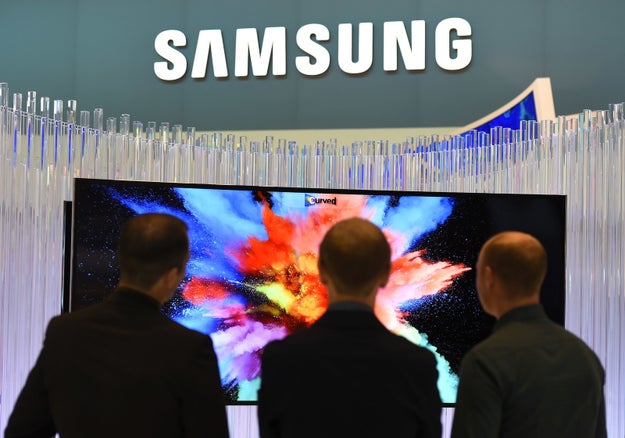
Today&039;s WikiLeaks release revealed that Samsung smart TV owners are particularly vulnerable to spying. Newly published documents detail a program called “Weeping Angel,” an attack designed by the CIA and United Kingdom&;s MI5/BTSS that makes Samsung smart TVs look like they’re turned off when, in fact, they’re not. The smart TV “operates as a bug, recording conversations in the room and sending them over the Internet to a covert CIA server,” according to the documents.

Here are some settings you should review if you’re concerned about snooping corporations.

Samsung TVs

In 2015, Samsung drew criticism for its always-on voice detection privacy policy that stated, “Please be aware that if your spoken words include personal or other sensitive information, that information will be among the data captured and transmitted to a third party.” Most Samsung smart TVs require users to press a microphone button before using voice commands, but the mic is always listening on models like the PN60F8500, which have voice recognition (“Hi TV”), as well as a built-in microphone and camera.

If you have a Samsung TV, there are several ways to turn off voice recording. On newer TVs, go to Home > Settings > System > Expert Settings > Voice Interaction and turn to off. On older TVs, it may be in Settings > select Smart Features > Voice Recognition > switch to off.

You can also go to Settings > Support > Terms & Policies and opt to “Disagree” with the policies for Viewing Information Services, Voice Recognition Services, and Nuance Voice Recognition and Privacy Notices.

If your TV offers gesture control or facial recognition to authenticate your Samsung account, you can turn this off in the Samsung Account settings menu or cover your camera with a piece of tape.

The “Weeping Angel” attack revealed today, which was designed by the CIA to put Samsung TVs into a fake “off” mode, affects Samsung TVs with firmware versions 1111, 1112, and 1116, sold between 2012 and 2013 with “UNF” in the model name. While the attack suppresses most indicator lights on the TV, the blue LED on the back of the TV remains on.

The only way to defend yourself from this particular attack is to either update the firmware or disconnect the smart TV from the Internet entirely, which would essentially make it a dumb TV.

Samsung can also track your viewing habits and send that data to advertisers for targeted marketing purposes. To prevent this tracking, go to Menu > Smart Hub > Terms and Policy > SyncPlus and Marketing > disable SyncPlus.

Vizio TVs

If you own a Vizio TV, you can disable data collection by going to your TV’s Menu > Settings > Smart Interactivity, or any option with Automated Content Recognition, and turning it off. It may also appear under System > Reset & Admin > Smart Interactivity or Menu > System > Reset & Admin > Viewing Data to Off.

In February 2017, Vizio agreed to pay $2.2 million to the Federal Trade Commission for failing to disclose when and how it collects user information and, more frighteningly, for transmitting the user data while it was unencrypted. “Automated content recognition software,” which was pre-installed on Vizio TVs sold since 2014, captured a selection of pixels displayed on Vizio TV screens and sent that data to company’s servers, where those pixels were matched to a database of TV shows, movies, and commercials. Essentially, the software recorded viewing history without the TV owner’s explicit consent.

LG TVs

LV TVs also include tracking software, but by a different name. On webOS TVs, go to Setting > General > About This TV > User Agreements > and opt out of Viewing Information, Personal Advertising and/or Voice Information. Opting out of Voice Information will disable voice control.

On older TVs, click on Settings > Options > LivePlus and toggle to “off.” Some LG TV models may call this Collection of watching info.

In 2013, LG’s smart TVs were found to have collected and sent data whether or not the Collection of watching info was set to “on” or “off” – but since then, LG pushed a software update that does not collect data when the user has opted out by toggling the setting to “off.”

Sony TVs

Go to Home > Settings > TV – About > Legal information > View Privacy Policy and opt to disagree with the policy to prevent the device from sending information to Sony’s servers. Older TVs may show Disable Upload Data instead.

Before I let you go…

When opting out of privacy policies and other user agreements, you may also be disabling automatic software updates. You may need to occasionally check for your TV’s firmware updates or security patches and update them manually.

Additionally, if you use a streaming device like Roku, Chromecast, or Amazon Fire TV, your viewing information is also being collected. You can opt-out of collection for Chromecast, as well as Amazon Fire TV (Settings > System > Internet based ads to off). Roku collects search history, records voice searches, and uses cookies to track what you’re watching. You can go to Settings > System > Privacy > and turn on Limit Ad Tracking to turn off personalized ads and prevent Roku from passing on identifiable ad measurement data to providers. Apple TV doesn’t collect viewing or search data but, if you opt in, it does record a logfile that helps the company diagnose bugs or system errors.

Services like Hulu, Amazon Video, and Netflix are also tracking your viewing habits, no matter what platform you use. You can delete individual titles from your watch history, and those services will stop recommending similar titles to you – but they are looking at what you’re watching and for how long.

Ultimately, it’s always worth it to thoroughly review your tech’s privacy settings options, whether it’s a phone, console, or smart TV.

Realistically, you won’t always be able to escape tracking, so it’s important to at least be aware of what data is being collected and where’s it’s going. If your data is being sent elsewhere, make sure it’s through encrypted means, so hackers won’t be able to access it. You may also be able to turn on settings that anonymize the data and keep your personal info out of it (like “Limit Ad Tracking”).

Quelle: <a href="If You Have A Smart TV, Take A Closer Look At Your Privacy Settings“>BuzzFeed

AWS IoT Available in EU (London)

AWS IoT is a managed cloud platform that lets connected devices easily and securely interact with cloud applications and other devices. AWS IoT can support billions of devices and trillions of messages, and can process and route those messages to AWS endpoints and to other devices reliably and securely. With AWS IoT, your applications can keep track of and communicate with all your devices, all the time, even when they aren’t connected.
Quelle: aws.amazon.com

Google Sometimes Highlights Misinformation In Search Results

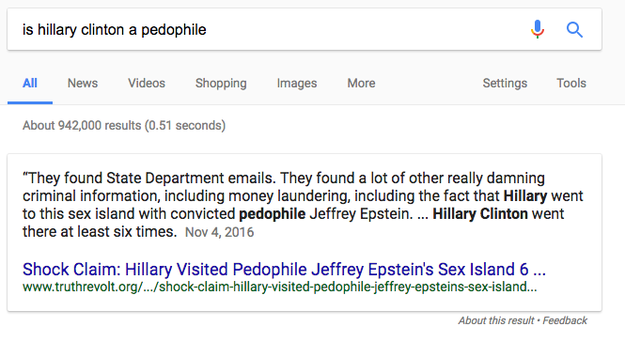
Google keeps highlighting false and conspiratorial information in its search results.

Truthrevolt.org, shown here as the source in a featured snippet on Google, publishes a mix of factual news with hyper-conservative spin and news not supported by facts.

First pointed out by Danny Sullivan, editor-in-chief of the blog SearchEngineLand, the issue concerns featured snippets — which is the text from top search results that Google&;s algorithm sometimes displays when you look something up. Sometimes, Google&039;s featured snippets show conspiratorial and outright false results from hyperpartisan news sources. MozCast, which monitors Google&039;s search algorithm, says that 20% of searches may return a featured snippet.

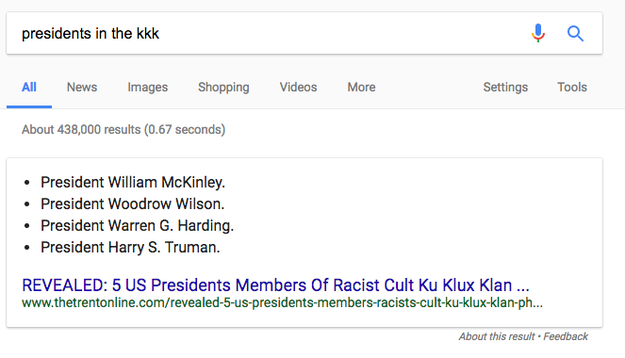
If you search for “presidents in the KKK,” Google shows a featured snippet listing the names of five presidents, none of whom were actually in the KKK. Google is pulling the result from thetrentonline.com, a digital publication that bills itself as “Nigeria&039;s premier online newspaper.” No presidents were confirmed members of the KKK, though Harding and Truman faced allegations of membership. As of March 7, 2017, Google is still showing this as the top result for the search query.

And the problem bridges political ideologies:

It&039;s not the first time this has happened, Sullivan points out. In 2015, Google highlighted a religious answer explaining what happened to dinosaurs, and in 2014 the first result for “king of the united states” was “Barack Obama.”

Google does not present the snippets as facts or news, instead describing them by saying, “When we recognize that a query asks a question, we programmatically detect pages that answer the user&039;s question, and display a top result as a featured snippet in the search results. Like all search results, featured snippets reflect the views or opinion of the site from which we extract the snippet, not that of Google.” But because Google highlights and promotes these results, it can give users a cursory impression that Google may be promoting the material because it directly and correctly answers the searcher&039;s question.

After fake news on Facebook played a starring role in the 2016 election, Google has taken a hard stance against fake news sites in its online ad networks, banning hundred of publishers in Q4 2016. Facebook and Twitter, by contrast, have taken a more hands-off approach as they struggle to remain committed to the idea of unfettered free speech while also facing criticism for being a platform on which misinformation spreads. Making things worse is the fact that most Americans believe fake news when they see it.

If you&039;re getting bad search results in the featured snippets box, you can opt out of having them displayed, though you&039;ll need to understand HTML webpage code to do it.

Google said in a statement, “Featured Snippets in Search provide an automatic and algorithmic match to a given search query, and the content comes from third-party sites. Unfortunately, there are instances when we feature a site with inappropriate or misleading content. When we are alerted to a Featured Snippet that violates our policies, we work quickly to remove them, which we have done in this instance. We apologize for any offense this may have caused.”

Quelle: <a href="Google Sometimes Highlights Misinformation In Search Results“>BuzzFeed

LinkedIn Blocked In Russia Over Refusal To Store Data On Russian-Based Servers

Dado Ruvic / Reuters

Access to LinkedIn remains blocked in Russia as negotiations between Russian communication regulators and the networking company dissolved Tuesday following disagreements over data storage rules.

Businesses that store information tied to Russian citizens are required to hold that data on servers located in Russia, but LinkedIn failed to comply, Russian telecom regulator Roskomnadzor said.

According to Reuters, regulators claimed that the Microsoft-owned company had refused to move its Russian user data to sites on Russian soil, “confirming its lack of interest in working on the Russian market.” Russia first blocked LinkedIn last year, following a court decision in which LinkedIn was found to have violated the law mandating the local storage of Russian data.

The local data storage rules came into effect in 2015, amid broader efforts by Russian authorities to exercise greater control over the internet.

A spokesperson for LinkedIn told BuzzFeed News in a statement that the company is disappointed in the decision, but hopes to restore service in the future. LinkedIn also maintains that it has followed the rules in the Russian Federation.

“We are disappointed with Roskomnadzor&;s action to block LinkedIn as it denies access to our services for our members and customers in Russia,” LinkedIn said. “While we believe we comply with all applicable laws, and despite conversations with Roskomnadzor, including meeting with them in Moscow in December 2016, we have been unable to reach an understanding that would see them lift the block on LinkedIn in the Russian Federation.”

Quelle: <a href="LinkedIn Blocked In Russia Over Refusal To Store Data On Russian-Based Servers“>BuzzFeed