Mark Zuckerberg Just Criticized Trump's Immigration Order

For the first time since the election, Facebook CEO Mark Zuckerberg has commented on the president&;s proposed polices. He posted on his Facebook profile on Friday to say that he&039;s “concerned about the impact of the recent executive orders signed by President Trump,” especially the ones related to immigration restriction.

He writes, “Expanding the focus of law enforcement beyond people who are real threats would make all Americans less safe by diverting resources, while millions of undocumented folks who don&039;t pose a threat will live in fear of deportation.” Zuckerberg advocated for continuing to allow refugees into the country and keeping the Deferred Action for Childhood Arrivals (DACA) in place.

View Video ›

Facebook: zuck

He closed his statement by saying that he will work with the team behind FWD.us, a controversial immigration reform political advocacy group backed by Bill Gates, Yahoo&; CEO Marissa Mayer, Netflix CEO Reid Hoffman, and Zuckerberg himself. The initiative launched a failed bid for reform in 2013 and restarted in late 2015.

Zuckerberg spoke out against the president while he was campaigning but had remained silent about him after the election.

Some have criticized the timing and narrowness of Zuckerberg argument as he calls out the “best and the brightest” immigrants, foreshadowing a debate over the H1-B visas for highly skilled foreign workers.

Zuckerberg&039;s comments come on National Holocaust Remembrance day. Last year, the German government opened an investigation into Facebook over Holocauast-related hate speech.

Quelle: <a href="Mark Zuckerberg Just Criticized Trump&039;s Immigration Order“>BuzzFeed

Docker Online Meetup recap: Introducing Docker 1.13

Last week, we released 1.13 to introduce several new enhancements in addition to building on and improving Docker swarm mode introduced in Docker 1.12. Docker 1.13 has many new features and fixes that we are excited about, so we asked core team member and release captain, Victor Vieux to introduce Docker 1.13 in an online .
The meetup took place on Wednesday, Jan 25 and over 1000 people RSVPed to hear Victor’s presentation live. Victor gave an overview and demo of many of the new features:

Restructuration of CLI commands
Experimental build
CLI backward compatibility
Swarm default encryption at rest
Compose to Swarm
Data management commands
Brand new “init system”
Various orchestration enhancements

In case you missed it, you can watch the recording and access Victor’s slides below.

 
Below is a short list of the questions asked to Victor at the end of the Online meetup:
Q: What will happened if we call docker stack deploy multiple times to the same file?
A: All the services that were modified in the compose file will be updated according to their respective update policy. It won’t recreate a new stack, update the current one. Same mechanism used in the docker-compose python tool.
Q: In &;docker system df&8220;, what exactly constitutes an &8220;active&; image?
A: It means it’s associated with a container, if you have (even stopped) container(s) using the `redis` image, then the `redis` images is “active”
Q: criu integration is available with `–experimental` then?
A: Yes! One of the many features I didn’t cover in the slides as there are so many new ones in Docker 1.13. There is no need to download a separate build anymore, it’s just a flag away
Q: When will we know when certain features are out of the experimental state and part of the foundation of this product?
A: Usually experimental features tend to remain in an experimental state for only one release. Larger or more complex features and capabilities may require two releases to gather feedback and make incremental improvements.
Q: Can I configure docker with multiple registries (some private and some public)?
A: It’s not really necessary to configure docker as the “configuration” happen in the image name.
docker pull my-private-registry.com:9876/my-image and docker pull my-public-registry.com:5432/my-image

Missed the Intro to Docker 1.13 online meetup w/ @vieux? Check out the video & slides here!Click To Tweet

The post Docker Online Meetup recap: Introducing Docker 1.13 appeared first on Docker Blog.
Quelle: https://blog.docker.com/feed/

Mark Zuckerberg Cancels His Lawsuits Forcing Hawaii Families To Sell Land

Chad / Via Flickr: supercooper; Manu Fernandez / AP

Mark Zuckerberg will drop his lawsuits over Hawaiian land, he writes in an op-ed for the Hawaiian newspaper The Garden Island. He said he did not previously understand the “quiet title” process but has reconsidered his legal actions after learning more about it.

The billionaire CEO of Facebook bought 700 acres of land on Kauai for $100 million in 2014, though he did not receive exclusive rights to the land with the purchase. In seeking those rights, he began what&;s called a “quiet title” process, which allows for ownership of land to be decided by a judge.

The question of land ownership stems from the privatization of Hawaiian land by The Kuleana Act of 1850 and the ensuing controversy. Prior to the act, Hawaiians did not have private land ownership. The pieces of land in dispute became known as “kuleana lands.”

He writes, “Our intention is to achieve an outcome that preserves the environment, respects local traditions, and is fair to those with Kuleana lands.” He pledged to “work with the community on a new approach.”

Zuckerberg&039;s quiet title lawsuits named hundreds of Hawaiians with small claims on parcels of land that may have conflicted with his own, sparking a backlash from the community he sought to join. To critics, his actions reeked of the white conquest of indigenous lands that brought Hawaii into the United States in 1893.

In an effort to smooth over the tension, Zuckerberg wrote in The Garden Island, “The right path is to sit down and discuss how to best move forward. We will continue to speak with community leaders that represent different groups, including native Hawaiians and environmentalists, to find the best path.”

Quelle: <a href="Mark Zuckerberg Cancels His Lawsuits Forcing Hawaii Families To Sell Land“>BuzzFeed

Why Boycott Containers? Remain Calm!

There are a lot of important things happening all around the world these days. Some of them have people upset or angry, to the point where they feel the desire to march or boycott to raise awareness and demonstrate their frustrations. As a company that believes in open communities and open discussions, we appreciate the need [&;]
Quelle: OpenShift

A Twitter Bot For Handclap Emoji Tweets Had To Shut Down Because It Became Racist

On Twitter, there’s a convention of adding the handclap emoji between each word for added emphasis. Imagine it done out loud, with a clap for each word: the effect is like a preschool teacher yelling at a child who doesn’t listen, or a cheerleader rah-rah-ing a statement. Like this:

The convention has been a meme for a few years, which means it’s permuted into various levels of irony. Like this:

Serena Parr, a graduate student at NYU’s Interactive Telecommunications Program, came up with the idea for a bot that would retweet emoji handclap tweets as a class project a few weeks ago. Since the handclaps are used for something you’re saying with conviction, Parr thought it would be amusing to see a feed of people’s most emphatic opinions, both serious and silly.

The first challenge was searching for these tweets. Normally, you can’t search emojis on Twitter, so Parr turned to a tool made by Matthew Rothenberg for his very fun website Emoji Tracker, which shows you real-time emoji use on Twitter. With a little bit of coding magic, the bot was made and launched in mid-January. She called it @lol_yelling.

And then, the inevitable and obvious thing happened. Much like Tay, the Microsoft Twitter bot that quickly became a Neo Nazi, within just two days, @lol_yelling took on the tenor of the rest of the cesspool of Twitter.

Parr wasn’t naive to the fact Twitter is often full of harassment and abuse, and she deleted her own personal account recently. “It was making me feel bad and miserable about the world,” she told me. She built into her bot a word filter to block out offensive language. But racism on Twitter isn’t just tweets that use the n-word. Ideologically racist stuff, like someone insisting that reverse racism is real or arguing that MLK’s “I have a dream” speech is bad because black people also owned slaves, kept getting through Parr’s filter. It was the kind of stuff that wouldn’t necessarily get someone banned, but is offensive to a reasonable person.

“If you click on these profiles, they’d retweet the most vile, racist, disgusting things. It was a strange glimpse into how this part of Twitter works,” Parr said. “There’s also really bad images and memes that would never get caught by a racist word filter.”

Less than five full days after it was created, Parr deactivated the bot, because she didn’t want to have to keep filtering out the bad tweets. She was keenly aware that the handclap emoji convention started in Black Twitter — the fact that it’s become so widespread that racists are using it makes the whole thing even more ironic and sad.

The bot isn’t doing any more retweets, but its account is still up, in case you want to enjoy it as a living monument to the fact that Twitter ruins everything .

Quelle: <a href="A Twitter Bot For Handclap Emoji Tweets Had To Shut Down Because It Became Racist“>BuzzFeed

No, Signatures On The White House Petition Site Aren't Intentionally Frozen

Lumy010 / Getty Images

You may have seen stories going around questioning whether the Trump administration has frozen the signatures on certain initiatives on the We The People petition platform. That&;s likely not the case.

President Obama&039;s administration created We The People in 2011 as a way for citizens to communicate with the White House about issues that mattered to them. The platform allows anyone to start a petition that others can digitally sign to show their support, and Obama&039;s White House said it would respond to any petition that received 100,000 signatures within 30 days. That clause is still part of the “about” page on We The People, though whether the Trump administration will respond to petitions is unconfirmed. On the day of his inauguration, Trump&039;s administration archived all existing petitions on the platform.

Right now, though, We The People seems to be barely registering some signatures. A petition titled “Preserve the National Endowment for the Arts and the National Endowment for the Humanities” only had 96 signatures at press time, despite accruing hundreds of shares on Twitter alone. (The president is expected to cut funding for the NEA and NEH dramatically.) Another petition for a similar cause has showed a relatively static number of signatures, despite a continuing high volume of social shares. It is possible that the similarity of these petitions is spreading signatures thinly between them, though another petition about something entirely different shared widely on Twitter also has only one signature.

Trump&039;s administration seemed to acknowledge that something was wrong with the website, but denied it had intentionally stalled the platform. A spokesperson for the White House told BuzzFeed News, “It&039;s a question of high volume at the end of the day, but the signatures are being captured. Because of high volume they&039;re having to change how they’re being captured.” The spokesperson did not elaborate on what that change would entail.

Some of the shortened URLs that appear in shared social media posts for petitions have recently been leading to broken webpages, which also may be affecting the petitions&039; signature counts.

Macon Phillips, who served as Obama&039;s coordinator of International Information Programs, oversaw the creation We The People. In response to questions about how slowly the site seems to be counting signatures, he told BuzzFeed News he didn&039;t think it was intentional interference by Trump&039;s administration. “The system doesn&039;t really allow you to make it behave that way. It seems like more of a caching issue. I think the team there is still trying to get their heads around how it works,” he said. President Trump has appointed a new acting director of International Information Programs, Jonathan Henick, who did not immediately respond to request for comment.

The number of signatures on a few other petitions also indicate that the administration is not suppressing signature counts on We The People. Two petitions on the site, “Immediately release Donald Trump&039;s full tax returns, with all information needed to verify emoluments clause compliance,” and “Divest or put in a blind trust all of the President&039;s business and financial assets,” have reached 372,520 and 114,924 signatures, respectively, at press time. White House spokesperson Kellyanne Conway responded to the tax returns petition on TV recently, at least indirectly — at first, she refused to release the returns, but then later walked back on that refusal.

This is the latest development in the Trump administration&039;s tech struggles. Earlier this week, it was discovered that the @POTUS official Twitter account was tied to a Gmail address. The account registration was changed after journalists flagged the registration on Twitter.

Adrian Carrasquillo contributed to this report.

Quelle: <a href="No, Signatures On The White House Petition Site Aren&039;t Intentionally Frozen“>BuzzFeed

Expanding our IDE support with a new Eclipse plugin for App Engine

By Amir Rouzrokh, Product Manager

Eclipse is one of the most popular IDEs for Java developers. Today, we’re launching the beta version of Cloud Tools for Eclipse, a plugin that extends Eclipse to Google Cloud Platform (GCP). Based on Google Cloud SDK, the initial feature set targets App Engine standard environment, including support for creating applications, running and debugging them inside the IDE with the Eclipse Web Tools Platform tooling and deploying them to production.

You may be wondering how this plugin relates to the Google Plugin for Eclipse, which was launched in 2009. The older plugin is focused on a broader set of technologies than just GCP. Moreover, support for the Eclipse Web Tools Platform and Maven is spotty at best. Moving forward, we’ll invest in building more cloud-related tooling in Cloud Tools for Eclipse.

Cloud Tools for Eclipse is available for Eclipse 4.5 (Mars) and Eclipse 4.6 (Neon) and can be installed through the Eclipse Update Manager. The plugin source code is available on GitHub, and we welcome contributions and reports of issues from the community.

First, install the Cloud Tools for Eclipse plugin. To verify that the plugin has installed correctly, launch Eclipse and look at the bottom right hand side of the window — you should see a Google “G” Icon. Click on this icon to login to your Google account.

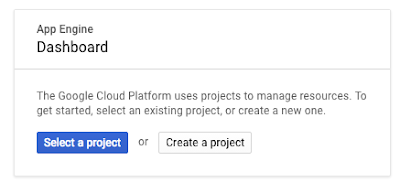
Now we’ll demonstrate how to create and deploy a simple Maven-based “Hello World” App Engine standard environment application. First, create a new App Engine project from Cloud Console. (If this is your first time using GCP, we recommend signing up for our Free Trial first.) When you see this card, click Create a project:

You should then land on the following cards:

Every GCP project has a unique project ID. You’ll need this string later, so let’s grab that. On the left hand nav, click on Home and copy the project ID as shown below.

Now that you have an App Engine project, you’re ready to deploy a simple Hello World application. Open Eclipse and click on File > New > Project and type “Maven-based Google” in the Wizards section, then select the following:

Fill in the Maven group ID and artifact ID and click Next:

In the next page, select the Hello World template and click Finish.

Now, right click on your project in the Project Explorer and select Run As > App Engine. You should now see your application running locally shortly on localhost. In the output terminal in Eclipse, the correct URL is hyperlinked.

Once you’ve finished running the application locally, you can deploy it to the cloud. Right-click on your application in the Eclipse Project Explorer and select Deploy to App Engine Standard. You’ll see the following dialog if you’re logging in for the first time. Click on the Account drop-down and proceed with the web browser UI to link the plugin for your GCP Account.

Once signed in, enter the Project ID of the application you created in Cloud Console and leave the rest as is. This is the ID you wrote down earlier.

Click Deploy to upload the finished project to App Engine. Status updates appear in the Eclipse console as files are uploaded. When the deployment finishes, the URL of the deployed application is shown in the Eclipse console. That’s it!

You can check the status of your application in the Cloud Console by heading to the App Engine tab and clicking on Instances to see the underlying infrastructure of your application.

We’ll continue to add support for more GCP services to the plugin, so stay tuned for update notifications in the IDE. If you have specific feature requests, please submit them in the GitHub issue tracker.

To learn more about Java on GCP, visit the GCP Java developers portal, where you can find all the information you need to run your Java applications on GCP.

Happy Coding!

P.S. IntelliJ users, see here for the Cloud Tools for IntelliJ plugin.
Quelle: Google Cloud Platform