Building Globally Distributed Services using Kubernetes Cluster Federation

Editor’s note: Today’s post is by Allan Naim, Product Manager, and Quinton Hoole, Staff Engineer at Google, showing how to deploy a multi-homed service behind a global load balancer and have requests sent to the closest cluster.In Kubernetes 1.3, we announced Kubernetes Cluster and introduced the concept of Cross Cluster Service Discovery, enabling developers to deploy a service that was sharded across a federation of clusters spanning different zones, regions or cloud providers. This enables developers to achieve higher availability for their applications, without sacrificing quality of service, as detailed in our previous blog post. In the latest release, Kubernetes 1.4, we’ve extended Cluster Federation to support Replica Sets, Secrets, Namespaces and Ingress objects. This means that you no longer need to deploy and manage these objects individually in each of your federated clusters. Just create them once in the federation, and have its built-in controllers automatically handle that for you.Federated Replica Sets leverage the same configuration as non-federated Kubernetes Replica Sets and automatically distribute Pods across one or more federated clusters. By default, replicas are evenly distributed across all clusters, but for cases where that is not the desired behavior, we’ve introduced Replica Set preferences, which allow replicas to be distributed across only some clusters, or in non-equal proportions (define annotations). Starting with Google Cloud Platform (GCP), we’ve introduced Federated Ingress as a Kubernetes 1.4 alpha feature which enables external clients point to a single IP address and have requests sent to the closest cluster with usable capacity in any region, zone of the Federation. Federated Secrets automatically create and manage secrets across all clusters in a Federation, automatically ensuring that these are kept globally consistent and up-to-date, even if some clusters are offline when the original updates are applied.Federated Namespaces are similar to the traditional Kubernetes Namespaces providing the same functionality. Creating them in the Federation control plane ensures that they are synchronized across all the clusters in Federation.Federated Events are similar to the traditional Kubernetes Events providing the same functionality. Federation Events are stored only in Federation control plane and are not passed on to the underlying kubernetes clusters.Let’s walk through how all this stuff works. We’re going to provision 3 clusters per region, spanning 3 continents (Europe, North America and Asia). The next step is to federate these clusters. Kelsey Hightower developed a tutorial for setting up a Kubernetes Cluster Federation. Follow the tutorial to configure a Cluster Federation with clusters in 3 zones in each of the 3 GCP regions, us-central1, europe-west1 and asia-east1. For the purpose of this blog post, we’ll provision the Federation Control Plane in the us-central1-b zone. Note that more highly available, multi-cluster deployments are also available, but not used here in the interests of simplicity.The rest of the blog post assumes that you have a running Kubernetes Cluster Federation provisioned. Let’s verify that we have 9 clusters in 3 regions running.$ kubectl –context=federation-cluster get clustersNAME              STATUS    AGEgce-asia-east1-a     Ready     17mgce-asia-east1-b     Ready     15mgce-asia-east1-c     Ready     10mgce-europe-west1-b   Ready     7mgce-europe-west1-c   Ready     7mgce-europe-west1-d   Ready     4mgce-us-central1-a    Ready     1mgce-us-central1-b    Ready     53sgce-us-central1-c    Ready     39sYou can download the source used in this blog post here. The source consists of the following files:configmaps/zonefetch.yaml – retrieves the zone from the instance metadata server and concatenates into volume mount pathreplicasets/nginx-rs.yaml – deploys a Pod consisting of an nginx and busybox containeringress/ingress.yaml – creates a load balancer with a global VIP  that distributes requests to the closest nginx backendservices/nginx.yaml – exposes the nginx backend as an external serviceIn our example, we’ll be deploying the service and ingress object using the federated control plane. The ConfigMap object isn’t currently supported by Federation, so we’ll be deploying it manually in each of the underlying Federation clusters. Our cluster deployment will look as follows:We’re going to deploy a Service that is sharded across our 9 clusters. The backend deployment will consist of a Pod with 2 containers:busybox container that fetches the zone and outputs an HTML with the zone embedded in it into a Pod volume mount pathnginx container that reads from that Pod volume mount path and serves an HTML containing the zone it’s running inLet’s start by creating a federated service object in the federation-cluster context.$ kubectl –context=federation-cluster create -f services/nginx.yamlIt will take a few minutes for the service to propagate across the 9 clusters. $ kubectl –context=federation-cluster describe services nginxName:                   nginxNamespace:              defaultLabels:                 app=nginxSelector:               app=nginxType:                   LoadBalancerIP:LoadBalancer Ingress:   108.59.xx.xxx, 104.199.xxx.xxx, …Port:                   http    80/TCPNodePort:               http    30061/TCPEndpoints:              <none>Session Affinity:       NoneLet’s now create a Federated Ingress. Federated Ingresses are created in much that same way as traditional Kubernetes Ingresses: by making an API call which specifies the desired properties of your logical ingress point. In the case of Federated Ingress, this API call is directed to the Federation API endpoint, rather than a Kubernetes cluster API endpoint. The API for Federated Ingress is 100% compatible with the API for traditional Kubernetes Services.$ cat ingress/ingress.yaml apiVersion: extensions/v1beta1kind: Ingressmetadata:  name: nginxspec:  backend:    serviceName: nginx    servicePort: 80$ kubectl –context=federation-cluster create -f ingress/ingress.yaml ingress “nginx” createdOnce created, the Federated Ingress controller automatically:creates matching Kubernetes Ingress objects in every cluster underlying your Cluster Federationensures that all of these in-cluster ingress objects share the same logical global L7 (i.e. HTTP(S)) load balancer and IP addressmonitors the health and capacity of the service “shards” (i.e. your Pods) behind this ingress in each clusterensures that all client connections are routed to an appropriate healthy backend service endpoint at all times, even in the event of Pod, cluster, availability zone or regional outagesWe can verify the ingress objects are matching in the underlying clusters. Notice the ingress IP addresses for all 9 clusters is the same.$ for c in $(kubectl config view -o jsonpath='{.contexts[*].name}’); do kubectl –context=$c get ingress; doneNAME      HOSTS     ADDRESS   PORTS     AGEnginx     *                   80        1hNAME      HOSTS     ADDRESS          PORTS     AGEnginx     *         130.211.40.xxx   80        40mNAME      HOSTS     ADDRESS          PORTS     AGEnginx     *         130.211.40.xxx   80        1hNAME      HOSTS     ADDRESS          PORTS     AGEnginx     *         130.211.40.xxx   80        26mNAME      HOSTS     ADDRESS          PORTS     AGEnginx     *         130.211.40.xxx   80        1hNAME      HOSTS     ADDRESS          PORTS     AGEnginx     *         130.211.40.xxx   80        25mNAME      HOSTS     ADDRESS          PORTS     AGEnginx     *         130.211.40.xxx   80        38mNAME      HOSTS     ADDRESS          PORTS     AGEnginx     *         130.211.40.xxx   80        3mNAME      HOSTS     ADDRESS          PORTS     AGEnginx     *         130.211.40.xxx   80        57mNAME      HOSTS     ADDRESS          PORTS     AGEnginx     *         130.211.40.xxx   80        56mNote that in the case of Google Cloud Platform, the logical L7 load balancer is not a single physical device (which would present both a single point of failure, and a single global network routing choke point), but rather a truly global, highly available load balancing managed service, globally reachable via a single, static IP address.Clients inside your federated Kubernetes clusters (i.e. Pods) will be automatically routed to the cluster-local shard of the Federated Service backing the Ingress in their cluster if it exists and is healthy, or the closest healthy shard in a different cluster if it does not. Note that this involves a network trip to the HTTP(S) load balancer, which resides outside your local Kubernetes cluster but inside the same GCP region.The next step is to schedule the service backends. Let’s first create the ConfigMap in each cluster in the Federation. We do this by submitting the ConfigMap to each cluster in the Federation.$ for c in $(kubectl config view -o jsonpath='{.contexts[*].name}’); do kubectl –context=$c create -f configmaps/zonefetch.yaml; doneLet’s have a quick peek at our Replica Set:$ cat replicasets/nginx-rs.yaml apiVersion: extensions/v1beta1kind: ReplicaSetmetadata:  name: nginx  labels:    app: nginx    type: demospec:  replicas: 9  template:    metadata:      labels:        app: nginx    spec:      containers:      – image: nginx        name: frontend        ports:          – containerPort: 80        volumeMounts:        – name: html-dir          mountPath: /usr/share/nginx/html      – image: busybox        name: zone-fetcher        command:          – “/bin/sh”          – “-c”          – “/zonefetch/zonefetch.sh”        volumeMounts:        – name: zone-fetch          mountPath: /zonefetch        – name: html-dir          mountPath: /usr/share/nginx/html      volumes:        – name: zone-fetch          configMap:            defaultMode: 0777            name: zone-fetch        – name: html-dir          emptyDir:            medium: “”The Replica Set consists of 9 replicas, spread evenly across 9 clusters within the Cluster Federation. Annotations can also be used to control which clusters Pods are scheduled to. This is accomplished by adding annotations to the Replica Set spec, as follows:apiVersion: extensions/v1beta1kind: ReplicaSetmetadata:  name: nginx-us  annotations:    federation.kubernetes.io/replica-set-preferences: |        {            “rebalance”: true,            “clusters”: {                “gce-us-central1-a”: {                    “minReplicas”: 2,                    “maxReplicas”: 4,                    “weight”: 1                },                “gce-us-central10b”: {                    “minReplicas”: 2,                    “maxReplicas”: 4,                    “weight”: 1                }            }        }For the purpose of our demo, we’ll keep things simple and spread our Pods evenly across the Cluster Federation.Let’s create the federated Replica Set:$ kubectl –context=federation-cluster create -f replicasets/nginx-rs.yamlVerify the Replica Sets and Pods were created in each cluster:$ for c in $(kubectl config view -o jsonpath='{.contexts[*].name}’); do kubectl –context=$c get rs; doneNAME      DESIRED   CURRENT   READY     AGEnginx     1         1         1         42sNAME      DESIRED   CURRENT   READY     AGEnginx     1         1         1         14mNAME      DESIRED   CURRENT   READY     AGEnginx     1         1         1         45sNAME      DESIRED   CURRENT   READY     AGEnginx     1         1         1         46sNAME      DESIRED   CURRENT   READY     AGEnginx     1         1         1         47sNAME      DESIRED   CURRENT   READY     AGEnginx     1         1         1         48sNAME      DESIRED   CURRENT   READY     AGEnginx     1         1         1         49sNAME      DESIRED   CURRENT   READY     AGEnginx     1         1         1         49sNAME      DESIRED   CURRENT   READY     AGEnginx     1         1         1         49s$ for c in $(kubectl config view -o jsonpath='{.contexts[*].name}’); do kubectl –context=$c get po; doneNAME          READY     STATUS    RESTARTS   AGEnginx-ph8zx   2/2       Running   0          25sNAME          READY     STATUS    RESTARTS   AGEnginx-sbi5b   2/2       Running   0          27sNAME          READY     STATUS    RESTARTS   AGEnginx-pf2dr   2/2       Running   0          28sNAME          READY     STATUS    RESTARTS   AGEnginx-imymt   2/2       Running   0          30sNAME          READY     STATUS    RESTARTS   AGEnginx-9cd5m   2/2       Running   0          31sNAME          READY     STATUS    RESTARTS   AGEnginx-vxlx4   2/2       Running   0          33sNAME          READY     STATUS    RESTARTS   AGEnginx-itagl   2/2       Running   0          33sNAME          READY     STATUS    RESTARTS   AGEnginx-u7uyn   2/2       Running   0          33sNAME          READY     STATUS    RESTARTS   AGEnginx-i0jh6   2/2       Running   0          34sBelow is an illustration of how the nginx service and associated ingress deployed. To summarize, we have a global VIP (130.211.23.176) exposed using a Global L7 load balancer that forwards requests to the closest cluster with available capacity.To test this out, we’re going to spin up 2 Google Cloud Engine (GCE) instances, one in us-west1-b and the other in asia-east1-a. All client requests are automatically routed, via the shortest network path, to a healthy Pod in the closest cluster to the origin of the request. So for example, HTTP(S) requests from Asia will be routed directly to the closest cluster in Asia that has available capacity. If there are no such clusters in Asia, the request will be routed to the next closest cluster (in this case the U.S.). This works irrespective of whether the requests originate from a GCE instance or anywhere else on the internet. We only use a GCE instance for simplicity in the demo. We can SSH directly into the VMs using the Cloud Console or by issuing a gcloud SSH command. $ gcloud compute ssh test-instance-asia –zone asia-east1-a—–user@test-instance-asia:~$ curl 130.211.40.186<!DOCTYPE html><html><head><title>Welcome to the global site!</title></head><body><h1>Welcome to the global site! You are being served from asia-east1-b</h1><p>Congratulations!</p>user@test-instance-asia:~$ exit—-$ gcloud compute ssh test-instance-us –zone us-west1-b—-user@test-instance-us:~$ curl 130.211.40.186<!DOCTYPE html><html><head><title>Welcome to the global site!</title></head><body><h1>Welcome to the global site! You are being served from us-central1-b</h1><p>Congratulations!</p>—-Federations of Kubernetes Clusters can include clusters running in different cloud providers (e.g. GCP, AWS), and on-premises (e.g. on OpenStack). However, in Kubernetes 1.4, Federated Ingress is only supported across Google Cloud Platform clusters. In future versions we intend to support hybrid cloud Ingress-based deployments.To summarize, we walked through leveraging the Kubernetes 1.4 Federated Ingress alpha feature to deploy a multi-homed service behind a global load balancer. External clients point to a single IP address and are sent to the closest cluster with usable capacity in any region, zone of the Federation, providing higher levels of availability without sacrificing latency or ease of operation.We’d love to hear feedback on Kubernetes Cross Cluster Services. To join the community:Post issues or feature requests on GitHubJoin us in the federation channel on SlackParticipate in the Cluster Federation SIGDownload KubernetesFollow Kubernetes on Twitter @Kubernetesio for latest updates
Quelle: kubernetes

Docker Weekly Roundup | October 9, 2016


It’s time for your weekly ! Get caught up on the top news including; expansion into China through a commercial partnership with Alibaba Cloud, announcement of DockerCon 2017, and information on the upcoming Global Mentor Week. As we begin a new week, let’s recap the top five most-read stories of the week of October 9, 2016:

Alibaba Cloud Partnership Docker expands into China market through new partnership with the Alibaba Group, the world&;s largest retail commerce group. The focus of the partnership is to provide a China-based Docker Hub, enable Alibaba to resell Docker’s commercial offerings, and create a “Docker For Alibaba Cloud”.

DockerCon 2017 a three day, conference organized by Docker. This year’s US edition will take place in Austin, TX and continue to build on the success of previous events as it grows and reflects Docker’s established ecosystem and ever-growing community.

Global Mentor Week  is a global event series aimed at providing Docker training to both newcomers and intermediate users. Participants will work through self-paced labs that will be available through an online Learning Management System (LMS). There will be different labs for different skill levels, Developers, Ops, Linux and Windows users.

Docker on Windows &; check out this blog on three tips for setting a solid foundation and improving the Docker on Windows experience from Elton Stoneman.

SQL Server 2016 was publicly available this week and SQL Server 2016 Express Edition in Windows Containers is now available on Docker Hub. In addition, the build scripts will be hosted on the SQL Server Samples GitHub repository and the image can be used in both Windows Server Containers as well as Hyper-V Containers.

Weekly Roundup: Top 5 Docker stories for the week 10/09/16Click To Tweet

The post Docker Weekly Roundup | October 9, 2016 appeared first on Docker Blog.
Quelle: https://blog.docker.com/feed/

Airlines Will Confiscate Your Samsung Galaxy Note7 If You Try To Fly With It

Airlines Will Confiscate Your Samsung Galaxy Note7 If You Try To Fly With It

A photo showing a blown-up Samsung Galaxy Note 7 smartphone in Gwangju, South Korea.

STR / Gwangju Bukbu Police Station / AFP

The Federal Aviation Administration, Department of Transportation, and the Pipeline and Hazardous Materials Safety Administration have issued an emergency order banning all Samsung Galaxy Note7 smartphones, even ones that have been powered off, from commercial and cargo US aircraft. The ban goes into effect October 15.

According to the order, passengers who attempt to board flights with a Note7 on their person or in their bags may have their phones confiscated. If an airline representative sees a passenger attempting to board with a Note7, the order authorizes them to bar that passenger from boarding. And passengers who try to sneak their Note7 phones on planes may face fines and criminal charges, the order states. However, exactly how airlines intend to enforce this ban is still unclear. The FAA previously advised passengers to power off the devices and refrain from charging them on flights.

The smartphone is now considered a forbidden hazardous material under the Federal Hazardous Material Regulations. FedEx and UPS previously told Bloomberg they would not be shipping the phones by air.

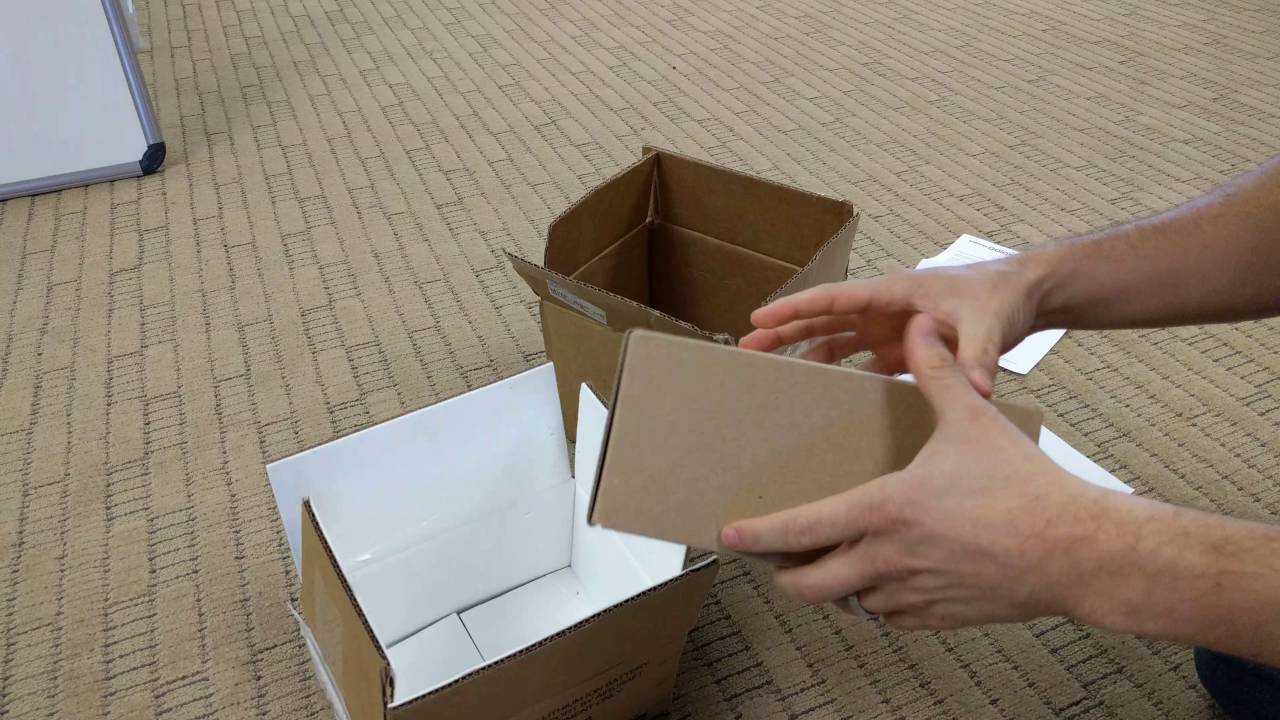
Samsung and the US Consumer Product Safety Commission have recalled the phones, which are linked to nearly 100 reports of overheating, catching fire, and exploding because of faulty batteries. Samsung sold nearly 2 million of them in the US, but after initial reports that the phones were exploding and smoking, it offered replacement Note7s with safe batteries. Several consumers reported, however, that these replacement phones showed the same problems as their predecessors. Notably, a Southwest Airlines flight was grounded because of a smoking replacement Note7. Samsung has stopped sales, shipping, and production of the phone and has sent explosion-proof boxes to customers to return their phones for refunds.

youtube.com

The company has slashed its operating profit projections for the third quarter of 2016 by 33 percent. It estimates the recall will cost $5.3 billion in total.

Samsung did not immediately respond to a request for comment on the FAA&;s announcement. In an October 13 statement about the CPSC&039;s expanded recall, the company said it was working with the government, and that “Customers’ safety remains a top priority and we ask consumers with an original or replacement Galaxy Note7 to power down and take advantage of the remedies available.”

If you have a Galaxy Note7, you can start the return process by clicking here. Now would probably be a good time to get around to it.

Quelle: <a href="Airlines Will Confiscate Your Samsung Galaxy Note7 If You Try To Fly With It“>BuzzFeed

Instacart Cancels Plans To Scrap Tips Amid Threats Of Strikes

Instacart is adjusting planned changes to its pay structure for full-service shoppers, following threats of a boycott by the independent contractors who were outraged over the $2 billion grocery delivery startup’s plans to replace tips with an optional 10% service fee collected by the company.

“After announcing this change we heard from shoppers that they liked most of the changes but wanted to retain the ability for customers to tip online,” Instacart explained in a Friday blog post. “We understand their concern and have decided to continue to accept tips.”

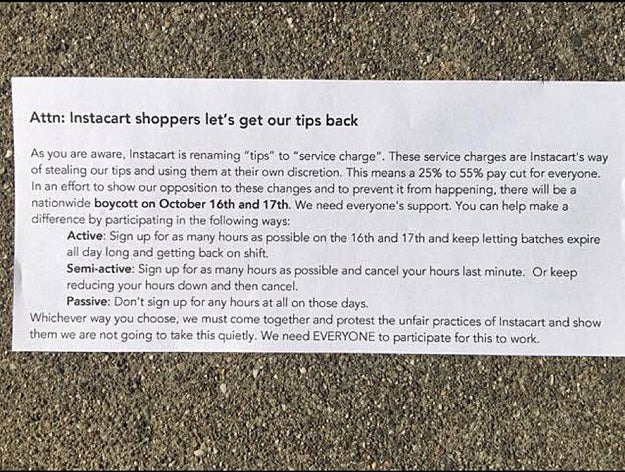
Instacart&;s move comes just two days ahead of a threatened October 16/17 strike organized around a “Let&039;s get our tips back” call to action.

Instacart had maintained that planned changes to its pay rate for independent contractors — which involved raising their base pay rate and replacing tips with an optional 10% “service amount” paid directly to Instacart — were intended to benefit workers by reducing reliance on tips.

“I get a lot of big tips. That’s what I rely on.”

But shoppers who did some back-of-the-envelope math following the company’s announcement worried that the changes would reduce their overall income. “I get a lot of big tips. That’s what I rely on,” said Matt, a shopper in Chicago who planned to boycott Instacart on Sunday and Monday. “I knew it wasn’t going to be in my best interests.”.”

Josh, a shopper on the East Coast, agreed. “Right now on an average week I make about $750, and I&039;ve made up to $1100 if I really work hard all week and things aren&039;t slow,” he told BuzzFeed News via email. “So, with the changes I’m looking at making between $500 and $700 for the same amount of work.”

As independent contractors working in different cities, Instacart shoppers don’t have a central method of communicating. But by sharing their frustration on social media —via Facebook groups, Instagram accounts and on Twitter — the beginnings of a movement started to congeal. Over email, Instacart shoppers in different cities orchestrated a plan to on October 16 and 17, the day the pay changes were set to roll out, hoping to slow service on what are typically two of the company&039;s busiest days.

When a widely shared blog post critical of Instacart&039;s plan to scrap tips fueled further outrage online, Instacart published a rebuttal on its blog. But some shoppers were even more frustrated by the way that post was written, arguing it intentionally clouded the issue of just who collected the “service amount.” While it’s true that 100% of the fee does go to shoppers it won’t necessarily be given to the person doing the shopping and the delivery. Instead, the service amount is pooled and redistributed by Instacart, which is where some in-store shoppers had a problem.
“Instacart is not being fully transparent to shoppers or customers,” said Liz Temkin, a shopper in Los Angeles, who isn’t planning to participate in the boycott. “They are telling customers that the service charge goes directly to the shopper, but that&039;s not the truth. It goes into a general pot, so that Instacart can pay us a higher delivery charge. It makes no sense to pay me the same for a small order of groceries versus the same number of items from Costco. And what about my mileage & loading stuff up from the car to deliver to an office building?”

Some Instacart shoppers who spoke with BuzzFeed News said they were worried about participating in the strike for fear of being removed from the platform for “reliability issues.” Many declined to share their names fearing Instacart might deactivate their account.

But some felt taking a risk was the only way to have an impact on Instacart’s policies. “Fear is going to keep [shoppers] from doing much outside of social media and talking. What we want is action,” said Matt, who estimated as many as forty shoppers in Chicago were prepared to join the boycott. “The only thing that’s going to get us what we want is what affects customer service and profit.”

The threat of a strike has had an impact. Following Instacart’s announcement today, the changes to base fare and addition of a service amount, charged by default when customers checkout, will remain as planned. But customers will have the option to add a tip on top of that in app if they so choose.

Given the adjusted rate and new fee, it’s unclear how many customers will be willing to also add a tip. Though Instacart says 20% of customers already don’t tip at all, and 40% of tips average around $2, top shoppers say big orders or deliveries that involve heavy lifting or lots of stairs can earn them much more than that. Whether the October 16/17 strike will still occur also remains to be seen. But if shoppers have something to say about the update, it seems that — for now at least — Instacart is willing to listen.

Quelle: <a href="Instacart Cancels Plans To Scrap Tips Amid Threats Of Strikes“>BuzzFeed