Evan Rachel Wood And Thandie Newton Defend Sexual Violence In "Westworld"

Evan Rachel Wood And Thandie Newton Defend Sexual Violence In "Westworld"

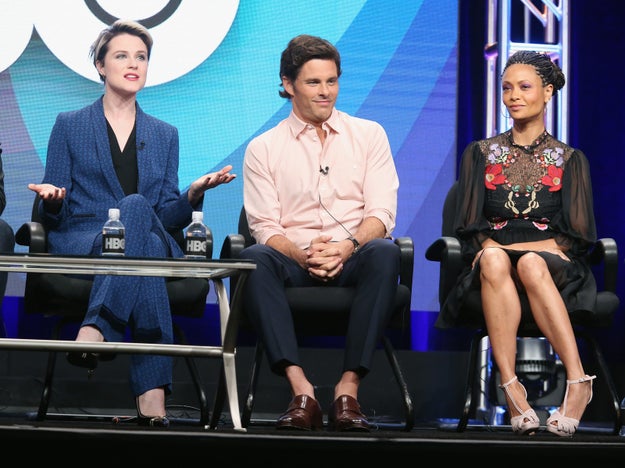
From left: Evan Rachel Wood, James Marsden, and Thandie Newton.

Frederick M. Brown / Getty Images

Westworld, HBO’s much-anticipated sci-fi series about a futuristic theme park where humans pay $40,000 to interact with lifelike robots, finally airs this Sunday. In the months leading up to the premiere, the show’s creators, producers, and even one top HBO executive have defended its fixation on sexual violence. Last night at a press event, actors Evan Rachel Wood and Thandie Newton, who both play artificially intelligent “hosts” who are repeatedly assaulted, also stepped in to defend the show, arguing that Westworld is both responsible and sensitive in its depiction of rape.

“You have an obligation as a storyteller to raise awareness and to show the horrors of that so that people aren’t desensitized to it. I don’t think there’s anything titillating about what we’re doing — it’s all horrific, as it should be,” said Wood.

“We get to see the consequence and ramifications of this violence, the cost of this violence,” added Newton.

There’s only one rule in Westworld: Hosts can’t harm humans. Humans, on the other hand, can do whatever they want to the hosts, which can mean shooting them, stabbing them, and raping them. At the end of each day, the bots are patched up and their memories are mercifully wiped; the same Western-themed adventure starts anew the next morning.

In the first four episodes, the show does not depict rape onscreen. “We don’t actually show sexual violence towards women,” Wood said. “You never see a scene of like rape or anything, but you know it’s going to happen.” But the inanimate hosts emote and bleed just like humans, so it’s harrowing to watch them get treated like bystanders in a first-person shooter game.

Wood and Newton spoke at a roundtable discussion yesterday evening held at the Four Seasons hotel in Silicon Valley to promote Westworld, along with actor Jeffrey Wright, who plays the theme park’s head programmer, as well as the married couple behind the production, showrunners Jonathan Nolan (the brother of director Christopher Nolan) and Lisa Joy. Nolan’s previous works — he co-wrote the movie Interstellar and created the TV series Person of Interest — have also circled around artificial intelligence. With Westworld, he and Joy wanted to tell the story from the robot’s perspective and see what humans look like through their eyes.

“Morality isn’t a problem with video games because the simulation is poor enough that you don’t conflate the experience,” said Nolan. But, he added, “when the intelligence of the nonplayer characters that you’re interacting with eclipses a certain level, then it’s much more problematic than driving around in Grand Theft Auto and running over a bunch of pedestrians.”

Westworld is adapted from Michael Crichton&;s 1973 movie of the same name. But unlike Crichton&039;s Jurassic Park, the threat here is more existential than physical. In the first episode, a line of code in a software update causes the hosts to remember brief flashes of the horrors that they have lived through, leaving the resort essentially “populated by 2,000 abuse victims and survivors, finally waking up,” Willa Paskin wrote in Slate.

Both executive producer J.J. Abrams and HBO president Casey Bloys have called the criticism about excessive sexual violence accurate and valid, but defended Westworld. “You can’t tell a story about oppression without depicting the oppressed,” Abrams told reporters at the show’s premiere in Los Angeles earlier this week.

At the roundtable, Newton and Wood also acknowledged the horror of those scenes, but emphasized that the intent is to force the audience to contend with sexual violence.

“We’re also looking at it from so many different points of view, the perpetrator, the person who has been affected by it, the people who are complicit by being around it. I mean, when do you ever really get a narrative where you get to see it from those different points of view? I think that’s incredibly valuable, but the only way we can really look at it is by showing it,” said Newton.

Newton also stressed there was nothing gratuitous about the sexual violence on the show. “It’s not like we’ll show you this then we’ll distract you and show you something else so you forgot that you’ve seen something so fucking disgusting, and that you don’t even have time to really sit with it and process it, and challenge it in your own mind,” she said. “I think it’s hugely responsible and sensitive filmmaking to first of all be brave enough to put this stuff out there, frankly. Because it’s the opposite of what we want to promote as a team.”

youtube.com

Quelle: <a href="Evan Rachel Wood And Thandie Newton Defend Sexual Violence In "Westworld"“>BuzzFeed

We Tried Fitbit’s New Charge 2 And It Really Wanted Us To Work Out

BuzzFeed News; Fitbit

On the Charge 2, exercise and relaxation aren’t tracked as special, one-off events, but rather, they are as much a part of your routine as steps and sleep. If you’re ready to graduate from a 10,000-steps-per-day program, the Charge 2 might be a good tracker for you.

In addition to continuous heart-rate tracking, Fitbit’s new wearable, which recently became available worldwide, offers a multi-sport mode (including yoga, spinning, and circuit training), guided breathing sessions, and a personalized “cardio fitness score” that reveals how fit you are (and could be). It also has interchangeable bands and a display that’s four times larger than last year’s Charge HR.

Is the Charge 2 right for you? Read on&;

Let’s talk about the biggest improvement first: the bands.
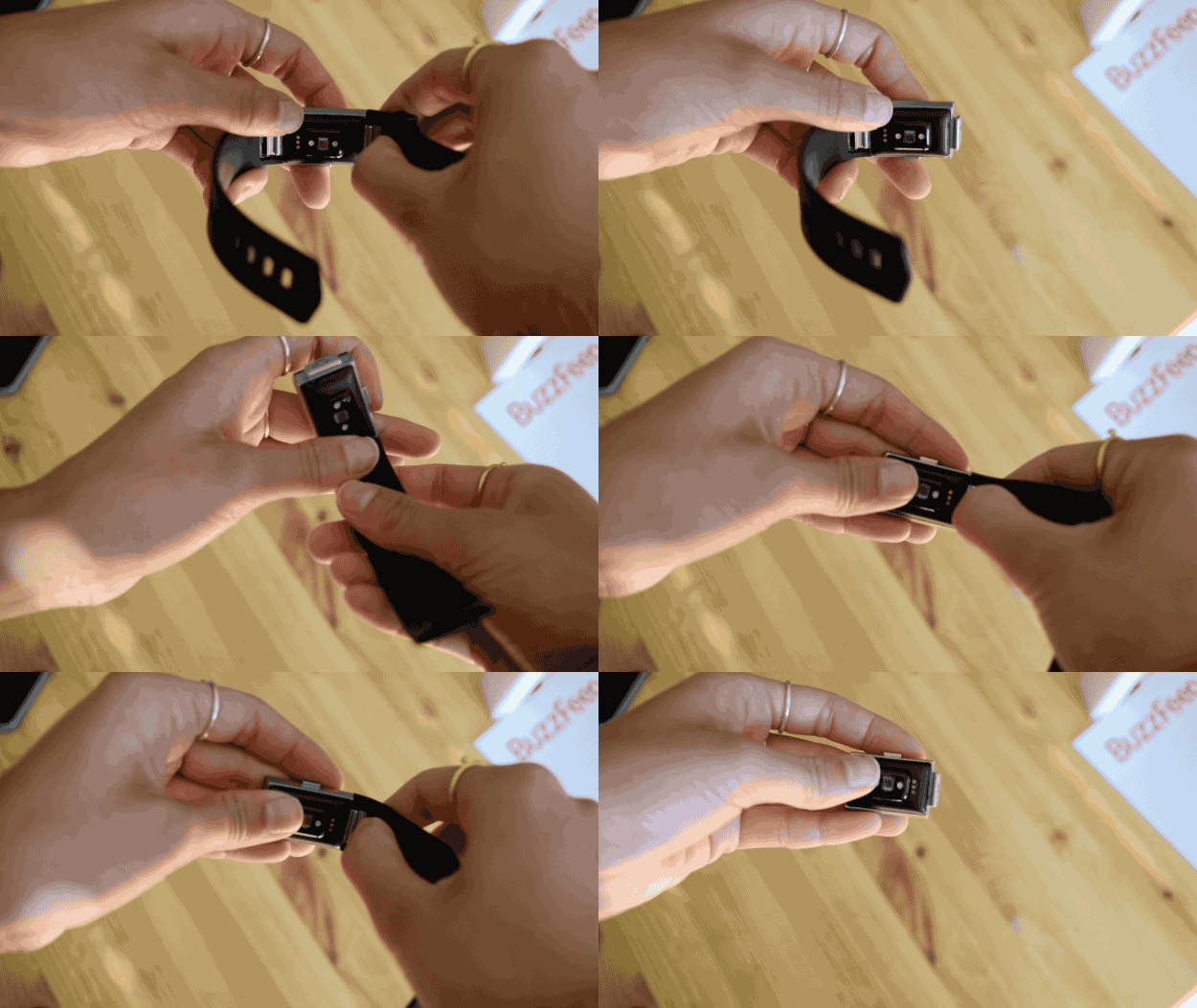
Let’s talk about the biggest improvement first: the bands.

Nicole Nguyen / BuzzFeed News

The Charge 2 has the same sleep, heart rate, and altitude sensors as previous Fitbits and, like the Charge HR, runs on a battery life of up to a week or so. The technology is largely unchanged – but the big game changer are the interchangeable bands.

Take a quick look at Fitbit’s Facebook page and you’ll find dozens of commenters complaining about torn straps and warped bands. If the band was faulty, the entire Charge HR needed to be thrown out, even if the tracker itself was fine. The Charge 2’s bands, on the other hand, are replaceable. Fitbit’s offering a leather version for $70, along with a classic elastomer band in five different colors for $30.
Nicole Nguyen / BuzzFeed News

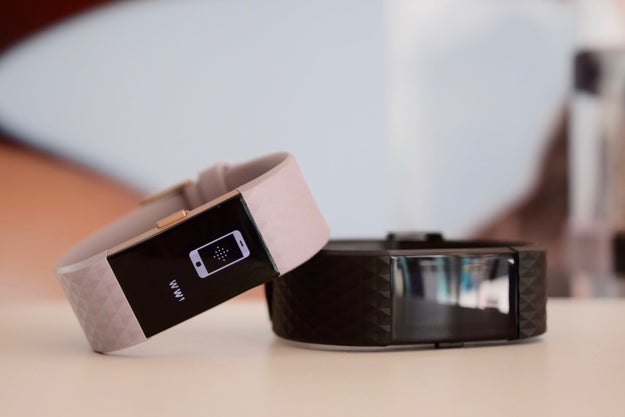
The Charge 2 looks sleeker, but is still pretty chunky.
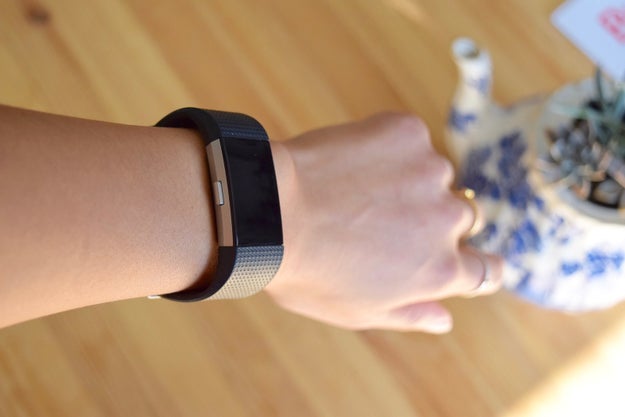
The Charge 2 looks sleeker, but is still pretty chunky.

Nicole Nguyen / BuzzFeed News

The device is essentially a Charge HR with a larger screen. The Charge 2 is a little bit wider and a little bit thicker than the previous model, but comfortable enough to wear all day (although too cumbersome enough to wear to sleep for Nicole).

The classic Charge 2 style comes with a silver-accented tracker and the same rubber-y elastomer band as other Fitbits. For $30 more, you can also choose from two new “special edition” Charge 2 options: one with an all-black tracker and a “gunmetal band,” and another that has a rose gold tracker paired with a lavender band. It’s fancy. But it still looks like a fitness tracker.

Working out with a big display makes a big difference.
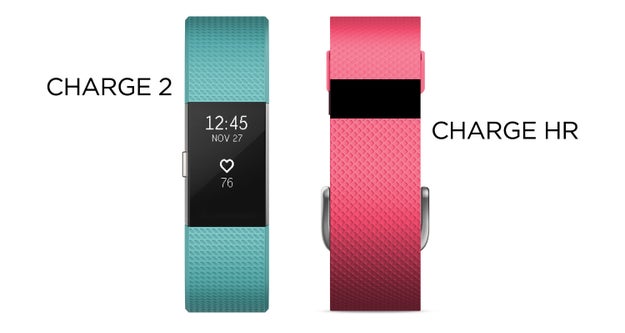
Working out with a big display makes a big difference.

BuzzFeed News; Fitbit

The Charge HR’s screen, which was about .75cm long, was truly the tiniest screen we had ever used. The Charge 2’s large display makes it easier to, you know, actually see information. When the “raise arm to wake display” feature worked (which was about 70% of the time), being able to look at our current pace, steps, and heart rate while running was particularly useful, so we could actually tell when we were slacking off.

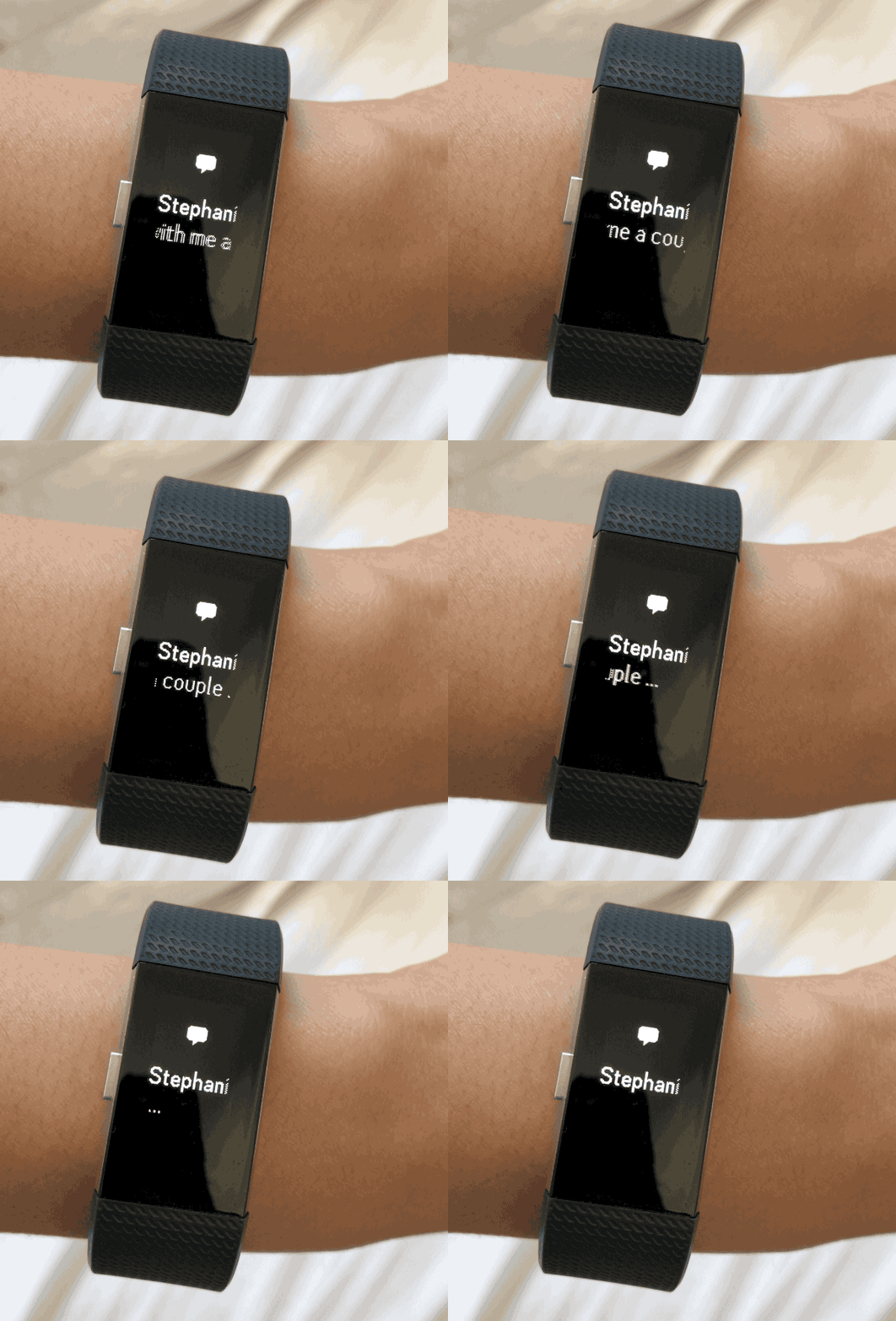
There are several clock faces you can choose from – and there’s finally room to show calendar notifications and text message previews, in addition to caller ID. But, like the Alta, text messages still get cut off, meaning you have to open your phone anyway.
Nicole Nguyen / BuzzFeed News

Sports! So many sports!
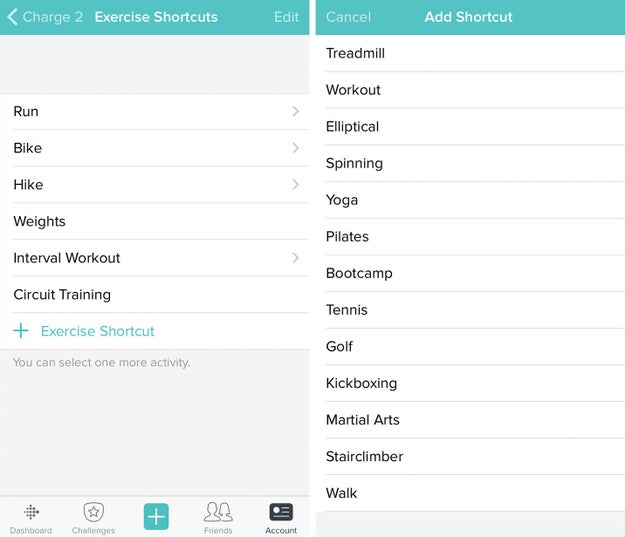
Sports! So many sports!

The Charge HR only had one generic “exercise mode.” The Charge 2 has a “multi-sport mode” with NINETEEN options. You can choose from treadmill, yoga, pilates, kickboxing, spinning, circuit training, and much more, right from the tracker. In the app on your phone, you can choose which seven exercise shortcuts appear on the Charge 2, and customize the order in which they appear.

One cool new mode is “Interval Workout” for workouts with alternating periods of intensity and rest (like this).
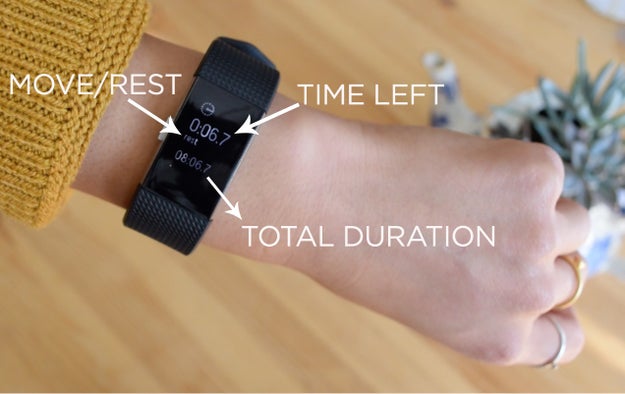
One cool new mode is “Interval Workout” for workouts with alternating periods of intensity and rest (like this).

Nicole Nguyen / BuzzFeed News

You can set the move and rest times on the app, plus how many times you want to repeat the interval. When the interval is up, the tracker will buzz and it’ll show “move” or “rest” on the screen. After years of fidgeting with different apps and the built-in timer on the iPhone, the interval workout mode, so far, has been our favorite use of the Fitbit.

In the Fitbit app’s Exercise section, you strangely can’t filter workouts by type.
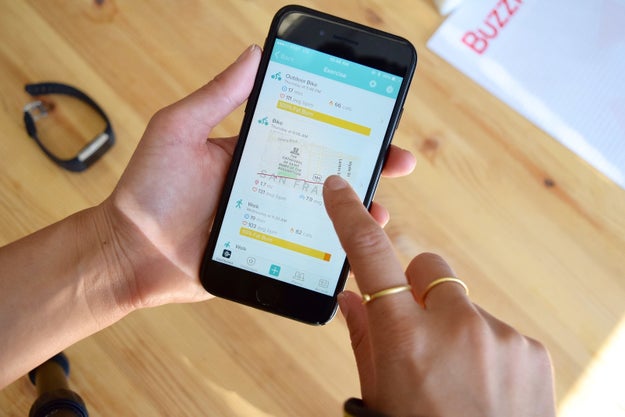
In the Fitbit app’s Exercise section, you strangely can’t filter workouts by type.

Nicole Nguyen / BuzzFeed News

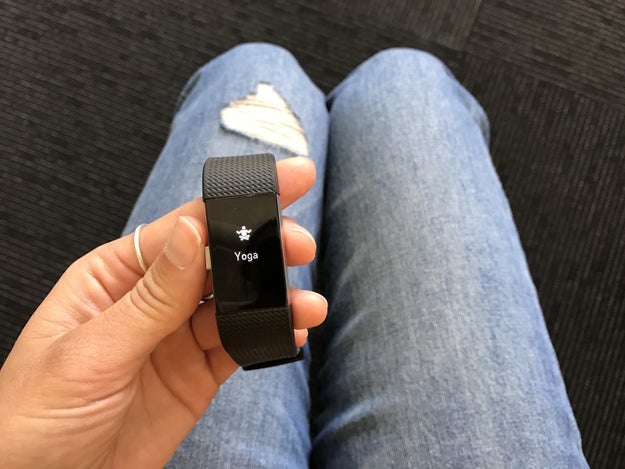
You can see a chronological list of your workout history, but if, say, you wanted to look at only bike rides from the past month, you wouldn’t be able to do so. Also, you don’t get special sport-specific stats that, for example, auto-track how long you held chair pose when you select yoga mode (it will, however, track the duration and heart rate during your practice). But it does validate activities like yoga or hiking as legitimate exercise. Simply by acknowledging that those activities exist, Fitbit is providing a strong motivational tool for users who prefer alternatives to just running or biking.
Nicole Nguyen / BuzzFeed News

Other fitness trackers (like Garmin wearables and the Apple Watch) focus on runs, walks, and bike rides, and categorize everything else as “other.” Fitbit is more aware of the different ways people actually exercise (elliptical&033; tennis&033; boxing&033;) and give you the option to categorize your workout as such. This, IMO, is where Fitbit shines.

The Charge 2 has a tap screen, not a touchscreen, which takes some getting used to.

Tapping on the larger display is much easier than it was on Fitbit’s Alta, which we reviewed earlier this year. Still, the Charge’s interface isn’t very intuitive – initially, at least. The hardware design is very basic (just one button&033;), which means that there are some trade-offs with ease of use.

On the one hand, there’s only one button to figure out, but on the other hand, Fitbit needed to program in a lot of different button/tap combos to accommodate all of the Charge 2’s features. If you want to get serious about tracking your workout on the Charge 2, you’re going to need to learn all of them. To select a sport mode, you need to press the side button and then tap to view the different types of exercise. To start the workout, you press and hold the side button. To scroll through real-time stats, you need to tap or press the side button multiple times. When you’re done, press and hold the button again to finish.

You get the idea. A lot of taps and button pressing.

Putting the tracker into a specific exercise mode really only affects one thing: what shows up on the display while you’re working out.
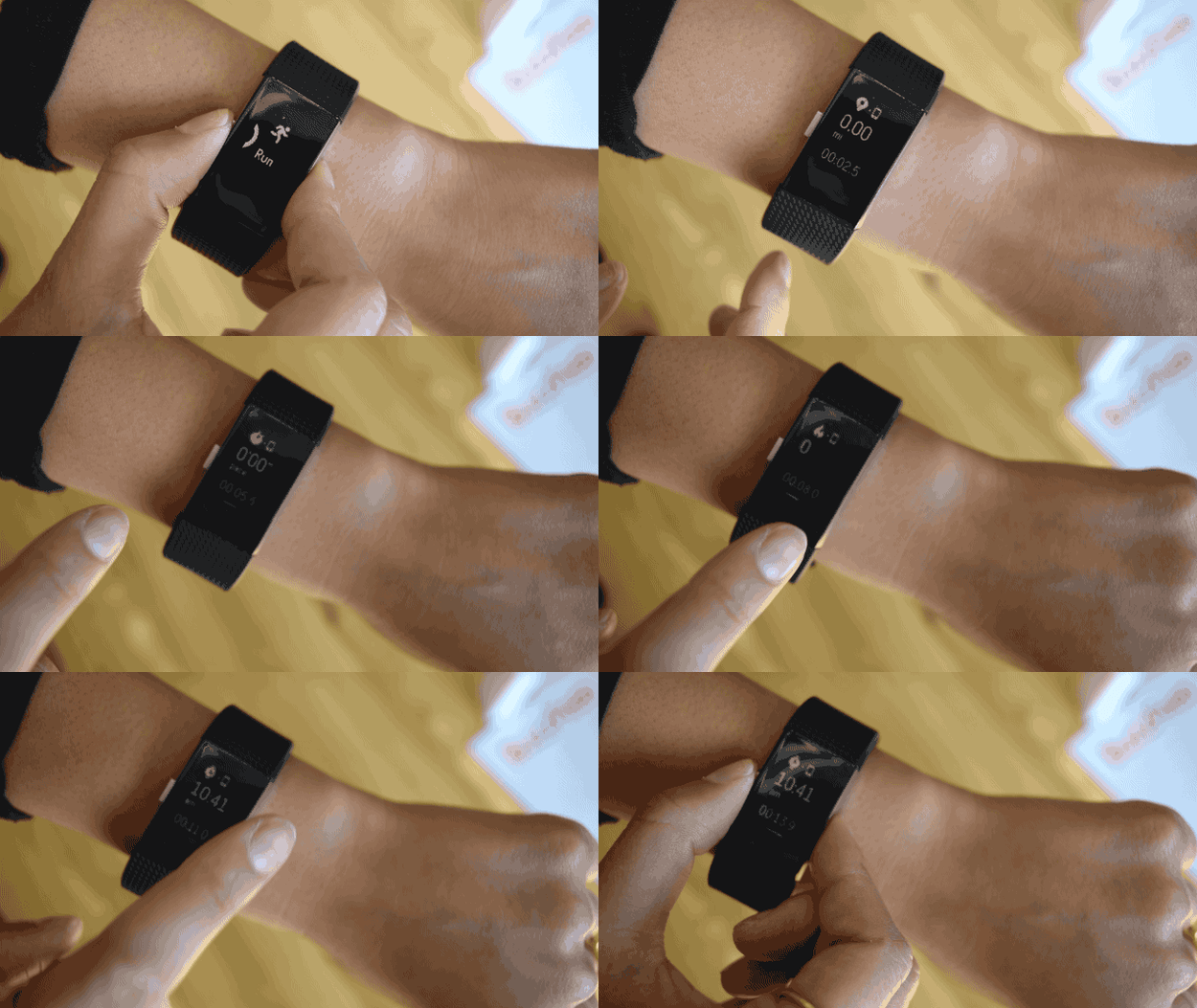
Putting the tracker into a specific exercise mode really only affects one thing: what shows up on the display while you’re working out.

Nicole Nguyen / BuzzFeed News

The screen will always show the duration, plus the information most relevant to that sport. For example, when run, bike, or hike is selected, and your phone is nearby, it’ll show the mileage in big, bold numbers at the top. If your phone isn’t on you, the Charge 2 will estimate that mileage, based on how long your stride is (you need to go on a run with your phone and calibrate your stride first, for this to work). For weight training, it’ll show heart rate.

Tapping the screen over and over again to see different stats during a workout is pretty frustrating. To avoid fiddling around with the display, we’d recommend just focusing on one metric: current pace for running and heart rate for pretty much everything else.

This score is Fitbit’s estimate of your VO2 max — the maximum amount of oxygen your body can use during exercise — and based on your profile (the weight, height, age and gender you input) and resting heart rate. Fitbit told Stephanie she needed to step up the intensity of her exercise (one way would be making sure she’s working hard enough that her heart rate is elevated). She has not done so, but that’s probably just her fault.

Keep in mind that this is just an estimate, and a more accurate reading, as measured in a sports performance lab, would include the amount of oxygen you breathe in and out. Stephanie’s score, for example, is between 45 and 49 (“good to very good” for women age 28; a professional runner’s is 63, according to the app).

For most people, letting Fitbit’s automatic workout tracking (available for walk, run, bike, elliptical, “sports,” and aerobic workout) figure out what you’re doing is much easier than manually starting an exercise mode. You literally don’t need to do anything – the tracker knows when you’re working out and will log it in the app for you. In our experience, the tracker did a great job of recognizing runs, walks, and especially bike rides.

The downside to auto-tracking? It doesn’t record GPS location data, so the mileage is less accurate, and if you want a map of your workout, you’ll need to initiate the exercise on the tracker.

Here’s what Fitbit needs to improve.

One of the most frustrating things about the Charge 2’s exercise mode is that you can’t pause a workout. The Strava app and Garmin trackers both have an auto-pause feature, and the Apple Watch can be paused by hitting its two buttons at the same time.

There are plenty of reasons why you’d want to pause a run&033; Maybe there’s a cute dog you *really* need to pet, or an ex-coworker you need to gloat about your new job to. With the Charge 2, you have to either finish the workout and start a new one later, or let it run.

It provides more precise pace and distance information on the Charge 2’s display and records a map of your run, walk, hike, or bike in the app. But, again, you’re tethered to your phone. The Fitbit app can record and map runs with GPS independently, so the trackers don’t actually add much value when it comes to this metric.

Once you’ve used Connected GPS with your phone once to calculate your stride length, Fitbit claims you’ll get better estimates of your pace and mileage when you don’t bring your phone. So if you just go for a run with your tracker, you will get stats. But you won’t get a map or any other location data.

And beyond that, because the Charge 2 relies on your phone, it may not capture location data with perfect accuracy. On Stephanie’s walk in downtown San Francisco with her phone, the tall, densely-packed buildings made the GPS tracker go haywire – and Fitbit’s app doesn’t work to fix obviously inaccurate data. There are also multiple threads on Fitbit’s website citing issues with connected GPS.

Fitbit integrates with Strava, RunKeeper, MapMyRun, Fitstar, and a dozen other activity apps – but it doesn’t sync activity with Google Fit or Apple’s Health app, where many users consolidate activity, sleep and nutrition data. Fitbit, which launched a sort-of smartwatch of its own, the Blaze, probably doesn’t want to share its data with companies it sees as competitors in the space. Nicole found a small workaround for this, at least to record workouts: connect Fitbit to Strava and Strava to Apple’s Health app or Google Fit. However, you won’t be able to sync your sleep or overall activity data. And it’s a really roundabout way to do something that should be straightforward.

Nicole Nguyen / BuzzFeed News

As we mentioned before, the device can detect when you raise your arm and turns on the screen when you do so. It’s called “Quick View,” and it works really well while running or walking – but for some reason the feature doesn’t agree with biking. It may be because your arm is already at a 90-degree angle while you’re holding the handlebars, and it’s not enough movement for the Charge 2 to tell when you’re raising your arm.
Nicole Nguyen / BuzzFeed News

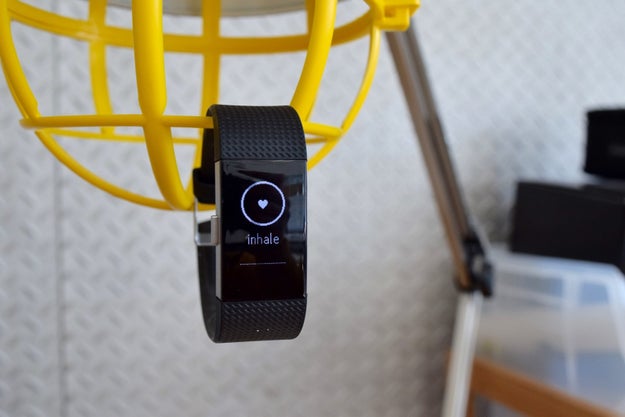
The new “Relax” feature consists of 2- and 5-minute guided sessions that use an animated visualization to prompt you to breathe and slow down your heart rate. (App-guided meditation is very in these days.) To be honest, it was a little weird to try to be mindful with our eyes wide open and glued to our wrists; we would have preferred some kind of buzz or other physical feedback that let us closes our eyes.

Okay, so who should buy the Charge 2?
Nicole Nguyen / BuzzFeed News

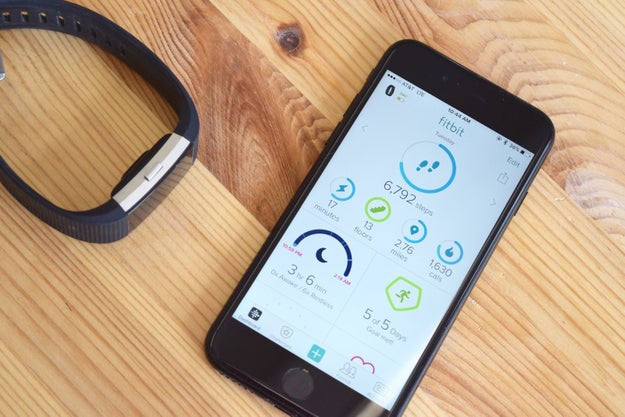
If you’re just starting a workout routine or ready to ditch a pedometer for something a little more advanced, the Charge 2 has most of the fitness-friendly features you’re looking for. Its heart rate and multi-sport modes will give you tools to improve your overall fitness. The Charge 2 is definitely geared more towards runners and cyclists – but if you’re into yoga, circuit training, or interval training, there’s something for you, too.

The automatic workout tracking feature means that you don’t have to worry about logging a run with the tracker or app every time. And when you want more precise distance statistics, you can bring your phone and see mileage and pace on your wrist. On the mobile app, you can look at your cardio fitness score to see how you stack up against your peers, and read about what you can do to be fitter, whether it’s lose weight or increase the intensity of your workouts.

The app is easy to use, and because Fitbit is the top-selling wearable company, according to an IDC survey, it has a big community. In the first quarter of 2016 alone, the company sold 4.8 million units. It’s likely that you have at least a few friends with Fitbits who can cheer you on.

Fitbit also made a crucial update to the bands, making them removable and replaceable. There are more styles to choose from, and it’ll likely last longer than a Charge HR.

If you’re looking for a heart rate-tracking wearable that’s not *too* expensive, tracks activity, and has basic smartphone notifications, then you should consider the Charge 2, which starts at $150.

Who shouldn’t buy the Charge 2?
Nicole Nguyen / BuzzFeed News

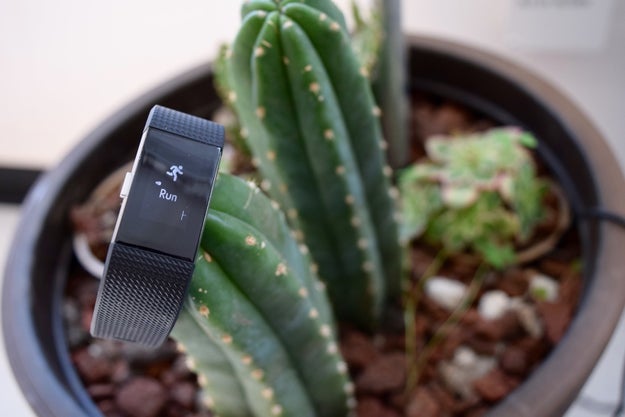
Because of its thick, chunky style, we wouldn’t recommend the Charge 2 for those interested in sleep tracking. The Flex 2 or Alta are much better picks for that. Those two bands are also much more stylish and geared toward the fashion-forward set.

If you want something that isn’t dependent on your smartphone, this Fitbit is not the right device for you. The Fitbit app is great, but the problem is, you need it to change a lot of different settings on the Charge 2.

The connected GPS feature also relies on your phone for location data.The Charge 2 is sweat, rain, and splash-proof, but it’s not safe for the pool or beach. Fitbit’s Flex 2, on the other hand, is suitable for swimming.

More serious athletes should consider swim-friendly, heart rate-tracking, and GPS-enabled wearables, such as the Vivosmart HR+ by Garmin ($200), Apple Watch Series 2 ($369), and Polar M400 ($180).

And a final thing to consider: If you’re trying to lose weight or get fit, you may not even need a fitness tracker&033; A device like the Charge 2 can provide little bits of encouragement throughout your day, which may be effective for some people. But it’s more important to do research on how to exercise workouts or eat in ways that support your goals to actually improve your overall, long-term fitness.

Here’s a guide on what fitness trackers are good for – and where they fall short.

Quelle: <a href="We Tried Fitbit’s New Charge 2 And It Really Wanted Us To Work Out“>BuzzFeed

Introducing Google Container-VM Image

Posted by Aditya Kali and Amey Deshpande, Software Engineers

This spring, we announced Container-VM Image as a beta product under Google Cloud Platform (GCP). If you’re a developer interested in deploying your application or a service provider on Google Compute Engine, we recommend taking a few moments to understand how it can help you.

Linux containers help developers to focus on their application without worrying about the underlying infrastructure. A secure and up-to-date base image is a critical building block of any container-based infrastructure. Container-VM Image represents the best practices we here at Google have learned over the past decade running containers at scale.

Container-VM Image design philosophy
Container-VM Image is designed from the ground up to be a modern operating system for running containers on GCP. Read on for more information about the design choices behind Container-VM Image and its attributes.

Build environment
Container-VM Image is based on the open-source Chromium OS project. Chromium OS is a reliable and vetted source code base for this new operating system. In addition, its allows us to use the powerful build and test infrastructure built by the ChromeOS team.

Designed for containers
The Docker container runtime is pre-installed on Container-VM Image. A key feature of containers is that the software dependencies can be packaged in the container image along with the application. With this in mind, Container-VM Image’s root file system is kept to a minimum by only including the software that’s necessary to run containers.

More secure by design
Container-VM Image is designed with security in mind, rather than as an afterthought. The minimal root file system keeps the attack surface small. The root file system is mounted as read-only, and its integrity is verified by the kernel during boot up. Such hardening features make it difficult for attackers to permanently exploit the system.

Software updates
Having full control over the build infrastructure combined with a minimal root file system allows us to patch vulnerabilities and ship updated software versions very quickly. Container-VM Image also ships with an optional “in-place update” feature that allows users to stay up-to-date with minimal manual intervention.

Getting started
The Container-VM Images are available in the “google-containers” GCP project. Here are a few commands to get you started:

Here’s how to list currently available images:

$ gcloud compute images list –project google-containers –no-standard-images

Note: All new Container-VM Images have “gci-” prefix in their names.

Here’s how to start a new instance:
$ gcloud compute instances create
–zone us-central1-a
–image-family gci-stable –image-project google-containers

Once the instance is ready, you can ssh into it:

$ gcloud compute ssh –zone us-central1-a

You can also start an instance using Cloud-Config, the primary API for configuring an instance running Container-VM Image. You can create users, configure firewalls, start Docker containers and even run arbitrary commands required to configure your instance from the Cloud-Config file.

You can specify Cloud-Config as Compute Engine metadata at the time of instance creation with the special `user-data` key:

$ gcloud compute instances create
–zone us-central1-a
–image-family gci-stable –image-project google-containers
–metadata-from-file user-data=

What’s next
We’re working hard on improving and adding new features to Container-VM Image to make it the best way to run containers on GCP.  Stay tuned for future blogs and announcements. In the meantime, you can find more documentation and examples at the Container-VM Image homepage, and send us your feedback at google-containers@google.com .
Quelle: Google Cloud Platform

Google Container Engine now on Kubernetes 1.4

Posted by David Aronchick, Senior Product Manager, Container Engine

Today, Kubernetes 1.4 is available to all Google Container Engine customers. In addition to all the new features Kubernetes 1.4 — including multi-cluster federation, simplified setup and one-command install for popular workloads like MySQL, MariaDB and Jenkins — we’ve also taken big steps to make Google Cloud Platform (GCP) the best place to run your Kubernetes workloads.

Container Engine has continued its rapid growth, doubling in usage every 90 days, while still providing a fully managed Kubernetes service with 99.5% uptime for applications large and small. We’ve also made a number of improvements to the platform to make it even easier to manage and more powerful to use:

One-click alpha clusters can be spun up as easily as a regular cluster, so testing Kubernetes’ alpha features like persistent application support is a one-click operation.
Support for AppArmor in the base image gives applications deployed to Container Engine multiple layers of defense-in-depth.
Integration with Kubernetes Cluster Federation allows you to add a Container Engine cluster to your existing federation, greatly simplifying cloud bursting and multi-cloud deployments.
Rich support for Google Cloud Identity & Access Management allows you to manage GKE clusters with the same multi-faceted roles you use across your GCP projects.
A new Google Container-VM Image makes upgrading a breeze and allows new upgrades to be automatically installed with a simple reboot.
Monitoring of all cluster add-ons ensures that all key functions for your cluster are available and ready to use — one less thing to think about when running a large distributed application.

From new startups to the largest organizations, we’ve seen tremendous adoption of Container Engine, here are a few unique highlights:

Niantic – creators of the global phenomenon Pokémon GO, relies on Container Engine to power their extraordinary growth.
Philips – smart connected lighting system Hue, receives 200 million transactions a day that are easily handled by Container Engine.
Google Cloud ML – the new Cloud Machine Learning service from GCP is also running fully on Container Engine.
And many more companies, from Box to Pearson, are choosing Kubernetes to manage their production workloads.

As always, if you’d like to help shape the future of Kubernetes, please participate in the Kubernetes community; we’d love to have you! Please join the google-containers mailing list or on the kubernetes-users or google-containers Slack channels.

Finally, if you’ve never tried GCP before, getting started is easy. Sign up for your free trial here.

Thank you for your support!
Quelle: Google Cloud Platform

OpenStack Developer Mailing List Digest September 24-30

Candidate Proposals for TC are now open

Candidate proposals for the Technical committee (9 positions) are open and will remain open until 2016-10-01, 23:45 UTC.
Candidacies must submit a text file to the openstack/election repository [1].
Candidates for the Technical Committee can be any foundation individual member, except the seven TC members who were elected for a one year seat in April [2].
The election will be held from October 3rd through to 23:45 October 8th.
The electorate are foundation individual members that are committers to one of the official programs projects [3] over the Mitaka-Newton timeframe (September 5, 2015 00:00 UTC to September 4, 2016 23:59 UTC).
Current accepted candidates [4]
Full thread

Release countdown for week R-0, 3-7 October

Focus: Final release week. Most project teams should be preparing for the summit in Barcelona.
General notes:

Release management team will tag the final Newton release on October 6th.

Project teams don&;t have to do anything. The release management team will re-tag the commit used in the most recent release candidate listed in openstack/releases.

Projects not following the milestone model will not be re-tagged.
Cycle-trailing projects will be skipped until the trailing deadline.

Release actions

Projects not follow the milestone-based release model who want stable/newton branches created should talk to the release team about their needs. Unbranched projects include:

cloudkitty
fuel
monasca
openstackansible
senlin
solum
tripleo

Important dates:

Newton final release: October 6th
Newton cycle-trailing deadline: October 20th
Ocata Design Summit: October 24-28

Full thread

Removal of Security and OpenStackSalt Project Teams From the Big Tent (cont.)

The change to remove Astara from the big tent was approval by the TC [4].
The TC has appointed Piet Kruithof as PTL of the UX team [5].
Based on the thread discussion [6] and engagements of the team, the Security project team will be kept as is and Rob Clark continuing as PTL [7].
The OpenStackSalt team did not produce any deliverable within the Newton cycle. The removal was approved by the current Salt team PTL and the TC [8].
Full thread

 
[1] &; http://governance.openstack.org/election/-to-submit-your-candidacy
[2] &8211; https://wiki.openstack.org/wiki/TC_Elections_April_2016#
[3] &8211; http://git.openstack.org/cgit/openstack/governance/tree/reference/projects.yaml?id=sept-2016-elections
[4] &8211; https://review.openstack.org/#/c/376609/
[5] &8211; http://eavesdrop.openstack.org/meetings/tc/2016/tc.2016-09-27-20.01.html
[6] &8211; http://lists.openstack.org/pipermail/openstack-dev/2016-September/thread.html#
[7] &8211; http://eavesdrop.openstack.org/meetings/tc/2016/tc.2016-09-27-20.01.html
[8] &8211; https://review.openstack.org/#/c/377906/
Quelle: openstack.org

Amazon Elastic Transcoder Available In The Asia Pacific (Mumbai) Region

Amazon Elastic Transcoder lets you convert source media files into formats that will playback on devices like smartphones, tablets and PCs. It manages all aspects of the media transcoding process for you transparently and automatically. There’s no need to administer software, scale hardware, tune performance, or otherwise manage transcoding infrastructure. You simply create a transcoding “job” specifying the location of your source media file and how you want it transcoded. Amazon Elastic Transcoder also provides transcoding presets for popular output formats, which means that you don’t need to guess about which settings work best on particular devices. All these features are available via service API, AWS SDKs and the AWS Management Console. 
Quelle: aws.amazon.com

Amazon Game Studios Announce Breakaway

Amazon Game Studios announced their new game, Breakaway, at TwitchCon this year. Breakaway is a mythological sport brawler built for fast action, teamwork, and live streaming. AGS also announced new upcoming features that are built for Twitch: Stream+, Twitch Metastream, Broadcaster Match Builder and Broadcaster Spotlight.
To learn about Breakaway and more, visit playbreakaway.com and follow @PlayBreakaway on Twitter.
Quelle: aws.amazon.com