Here’s Pixel, The First Phone Designed Entirely By Google

Google’s getting into the phone manufacturing business.

Google

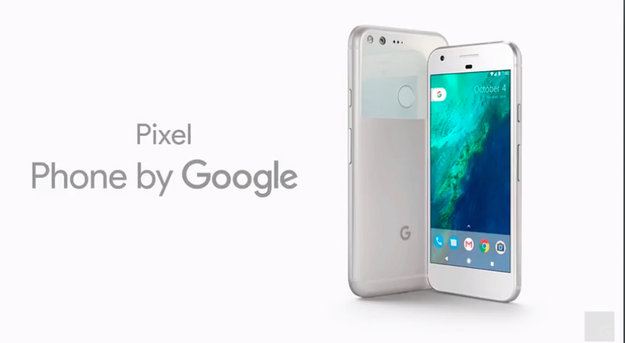
Nexus is no more. This year, Google is breaking tradition with its two new phones, the Pixel and Pixel XL.

Google typically premieres the latest version of its Android software on a Nexus phone, made by a rotating cast of phone makers, every fall. At today’s “Made by Google” event, the company announced that it was sunsetting the Nexus brand, in favor of a new line of smartphones, the first to be designed and manufactured entirely by Google.

The Pixel is Google’s first foray into the smartphone “OEM” (original equipment manufacturer) space. The device takes its name from the Chromebook Pixel laptops, which are also Google-manufactured.

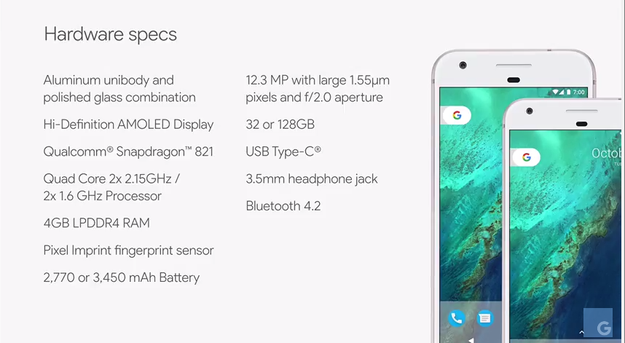
The phones come in two sizes: the 5-inch Pixel and the 5.5-inch Pixel XL.

Google

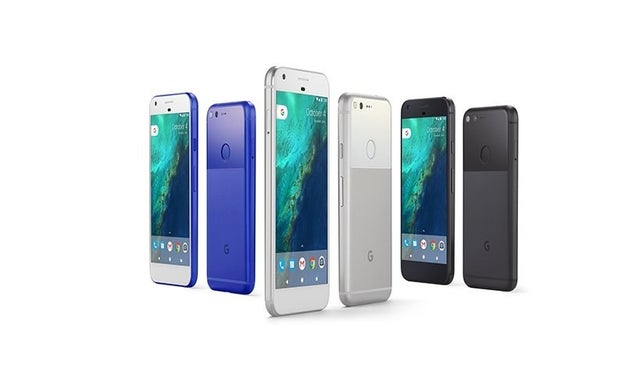
The three colors are (I kid you not) Really Blue (US only), Very Silver, and Quite Black. Yes, those are official names.

The phone has a rear glass panel on the back, with a polished aluminum casing. There&;s a “subtle ledge” along the edge of the phone, making it easy to hold. There&039;s also no camera bump.

Customers can pre-order starting today, Oct. 4, to receive devices when they first ship on Oct. 20. Both phones will be available in 32 GB ($649 for the Pixel, $769 for the XL) and 128 GB ($749 for the Pixel, $869 for the XL). In November, the devices will be available in Canada, the UK, Germany, Australia, and India.

Google

The Pixel phones, which run Google’s new Android N mobile operating system, come with features only Google can offer.

Pixel users will get unlimited Google Photos storage at full resolution. A new feature called “Smart Storage” will automatically free up space on the phone when necessary.

Normal Google Photos users get unlimited photo storage at 16 MP for free. Any image with higher resolution can be stored at its original size, but it will count toward the 15 GB of free storage Google offers (storage plans can also be upgraded to 100GB for $24/year).

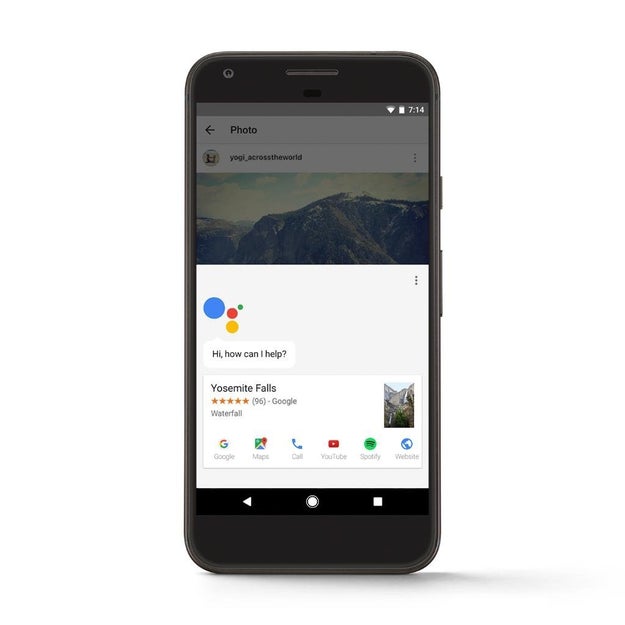
The phone will also come with Google Assistant, a “conversational” virtual assistant. Users can touch and hold the Home Button to start or simply say, “OK Google.” Google Assistant is primed to answer contextual questions. If “What’s playing tonight?” is followed by, “We’re taking the kids,” then Google Assistant will show you kid-friendly movies. The camera can also be used as input for questions such as, “Who designed this?”

Google

Google Assistant is also built into Allo, another app that comes pre-loaded on the Pixel. In the messaging app, you can type “@google” followed by a search (“Vietnamese restaurants nearby” or “damn daniel video”) to yield results right in a conversation. When a BuzzFeed colleague sent a photo of the Golden Gate Bridge in Allo, for example, Google Assistant suggested he respond with a Wikipedia-powered information card about the bridge. Another follow-up prompt was “@google Toll” which, when typed, offered information on toll rates for crossing. The creepiest feature is Smart Reply — canned text responses based on Google Assistant’s analysis of the way you converse. It learns how you communicate and will suggest pre-written messages it thinks you’d say.

The Pixel will also ship with Duo, a video chat app for iOS and Android, that has the truly terrifying feature of previewing incoming video from your caller before you answer.

Google honed in on low-light capabilities and HDR for the Pixel’s camera.

Google

DXoMark, a company that rates all cameras on the market, awarded the Pixel camera an 89, the highest rating ever for a smartphone. The new phones have a 12MP rear camera with f/2.0 aperture.

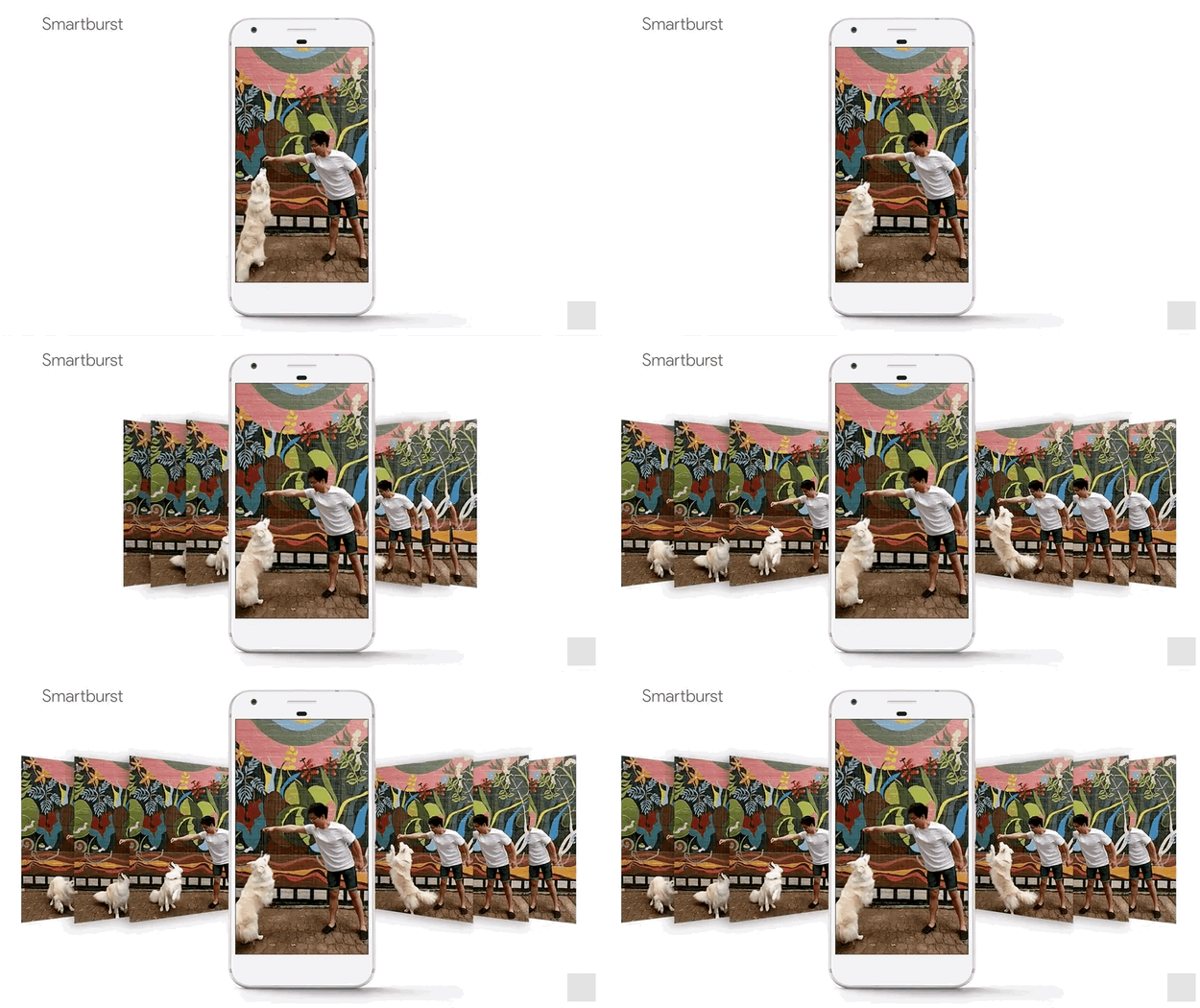
From a software perspective, it comes with Smart Burst, which picks the best photo out of a short burst. HDR+, another new feature, splits images up to short exposures, and then combines the image pixel by pixel. There&039;s also zero shutter lag, so you can keep shooting “rapid fire.” Google claims that it has a shorter capture time than any phone they&039;ve tested. It also comes with image stabilization for smooth videos.

The Pixel also has quick charging.

After a 15-minute charge, the Pixel gets seven hours of battery life via a USB Type-C charger.

Google is also providing a 24/7 customer care support team to help new Pixel users move contacts, photos, videos, music text, calendar events, and iMessages to their new Android devices from iPhone.

Google is teaming up exclusively with Verizon, and also selling the phone unlocked online from the Google Store. The Pixel is also the latest device compatible with Project Fi.

Google

Quelle: <a href="Here’s Pixel, The First Phone Designed Entirely By Google“>BuzzFeed

Here's What You Need To Know About Google's First VR Headset

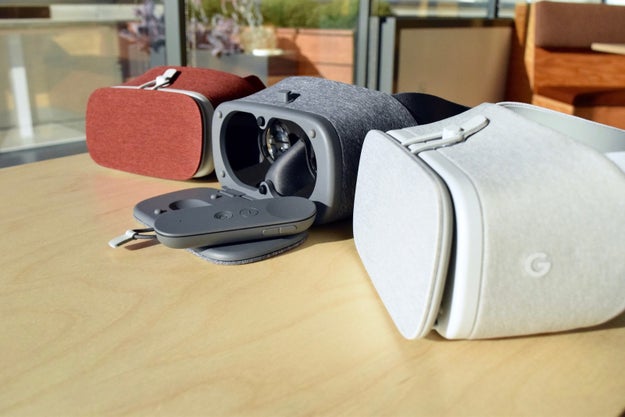
The Daydream View is soft, lightweight, and $79.

Google just unveiled its first ever virtual reality headset. It’s called Daydream View.

Google just unveiled its first ever virtual reality headset. It's called Daydream View.

Today, Google debuted Daydream View, its take on a virtual reality headset for smartphones, designed to bring 360º movies, games, and photos to life. The announcement follows the launch of the Daydream VR platform for Android, which was introduced at Google I/O earlier this year.

Daydream View is the successor to Google Cardboard, the dirt cheap, Android and iOS-compatible VR handheld introduced in 2014. Google&;s new headset, which competes with the likes of Samsung&039;s Gear VR ($100), Zeiss&039;s VR One Plus ($130) and LG 360 VR ($200), is more advanced than Cardboard in every way — but it still requires you to strap in a smartphone to work.

It offers a more comfortable, hands-free experience, and access to an entirely new platform focused on low latency head tracking (in other words, speeding up the time between when you move your head and when the screen adjusts to match that movement).

Daydream View will be available for pre-order on Oct. 20 through the Google Store and ships early November for $79. Before you mark your calendars, here&039;s what you should know about Google&039;s first attempt to strap an immersive photo and video machine on your head.

Nicole Nguyen / BuzzFeed News

The first device that will work with Daydream View is Google’s new Pixel phone.

The first device that will work with Daydream View is Google's new Pixel phone.

Pixel, which starts at $649, is the first smartphone designed and manufactured entirely by Google, and will be the only “Daydream-ready device” at launch. Google is working with Samsung, HTC, ZTE, Huawei, Xiaomi, Alcatel, Asus, and LG on smartphones that will also compatible with the headset in the future. Unlike Cardboard, Daydream View will not be compatible with iOS devices.

Google

There’s no pairing involved: the phone and headset will perform a “wireless handshake” automatically.

There's no pairing involved: the phone and headset will perform a "wireless handshake" automatically.

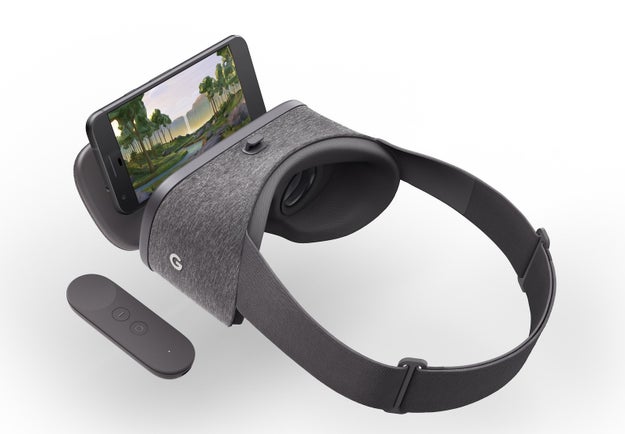
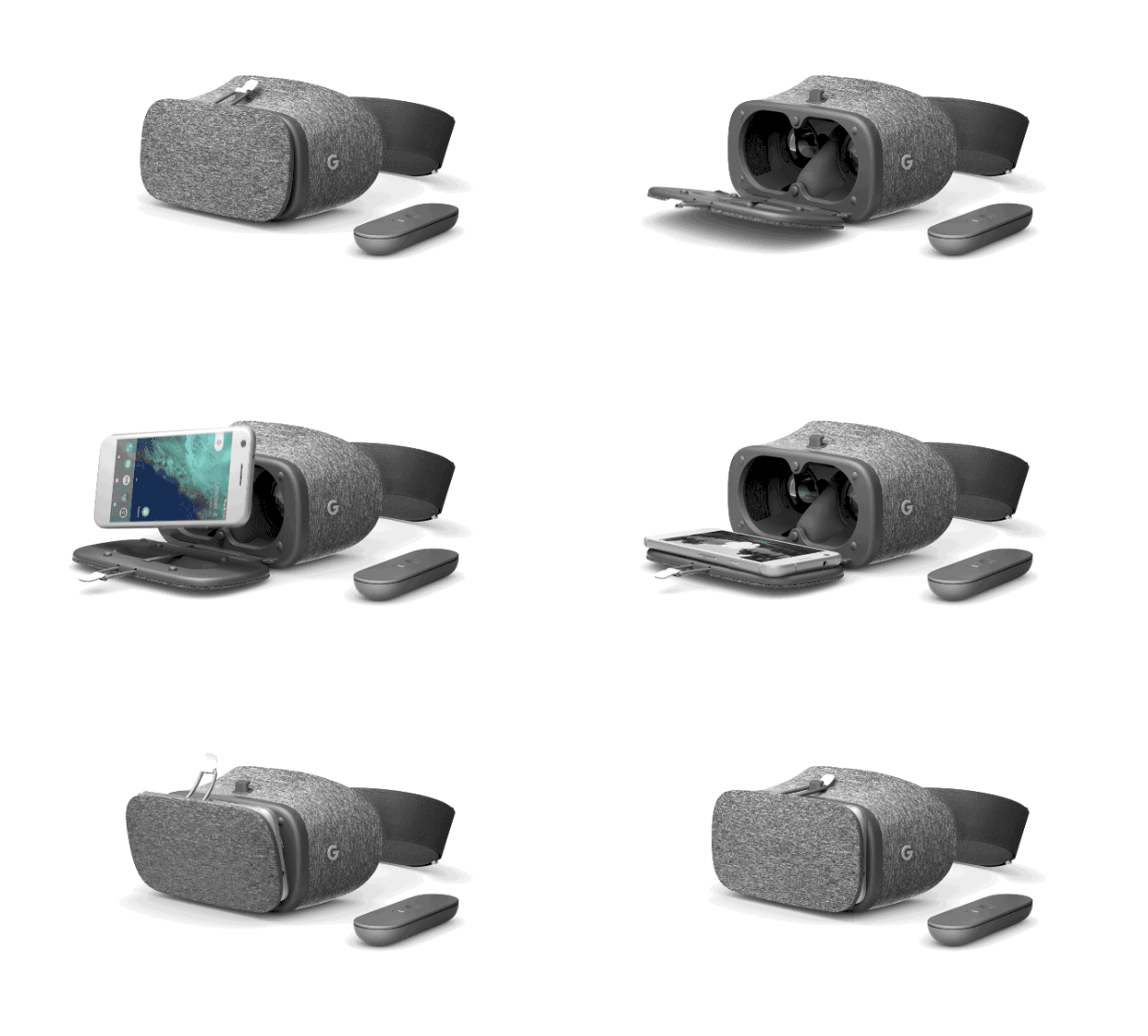
To use the headset, open the front portal using the elastic band, and plop the phone into the viewer. The phone will recognize that it&039;s in the headset and open VR mode automatically.

Users don&039;t have to waste time lining up the device with the lenses — capacitive pieces in the headset detect where the phone is and will auto-align the content that appears on the phone&039;s display.

Google

The controller is stored inside of the headset itself.

The controller is stored inside of the headset itself.

Most apps are controlled by looking left, right, up and down. But for some apps, like Street View, you can point and click the controller to move forward. The remote is also used to get back to the homescreen, where all of your apps live.

The controller has a clickable touchpad, a smooth multi-purpose “app” button, and a recessed home button.

Nicole Nguyen / BuzzFeed News


View Entire List ›

Quelle: <a href="Here&039;s What You Need To Know About Google&039;s First VR Headset“>BuzzFeed

Google's $129 Smart Speaker Ships In Early November

Google

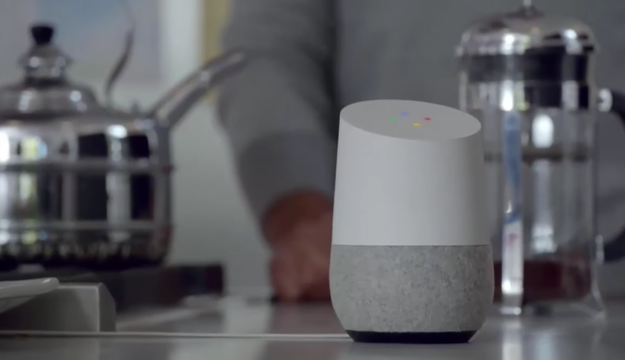
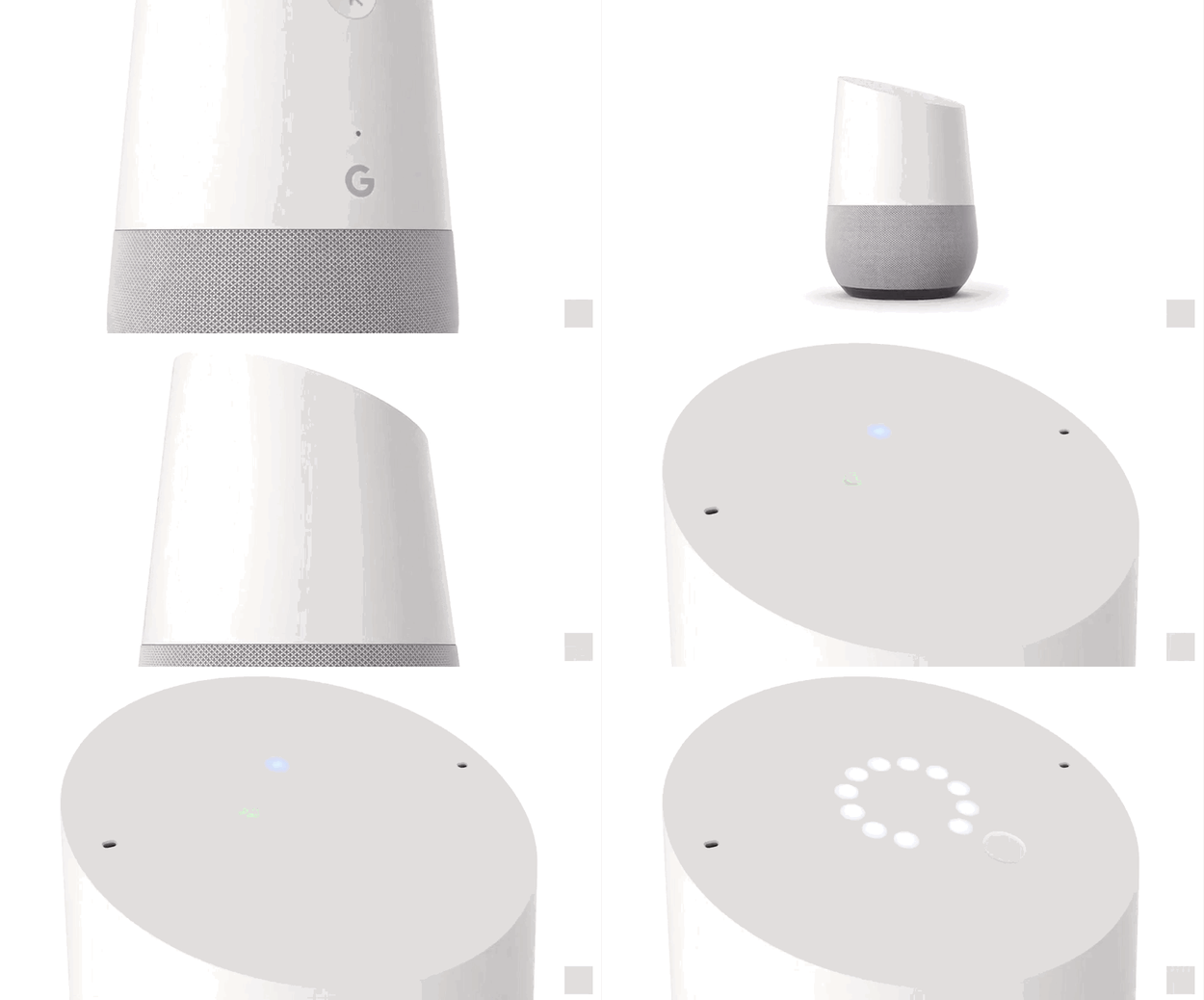
In nondescript building at Google’s Mountain View, California headquarters, Google product VP Rishi Chandra glanced at the small, cylindrical Google Home speaker beside him, and said, “Ok Google, tell me about my day.”

An emotionless female voice gave Chandra a very specific answer: “Good day Rishi,” it said. “It is 3:34 p.m. The weather in Mountain View currently is 73 degrees and sunny, with a high of 77 degrees. Don’t forget your sunglasses. Your flight from San Francisco international airport to San Diego international airport departs at 5:35 PM. It will take 43 minutes to get to the airport with current traffic. Today at 6 PM, your kids have a swimming lesson. By the way, you need to pick up groceries for dinner.”

Hot damn.

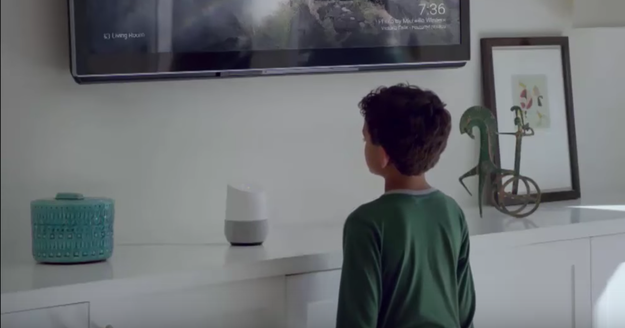
Home, which Google will begin selling for $129 in early November, is the company’s answer to the Amazon Echo, a wildly popular ‘smart speaker’ that has reportedly sold over 3 million devices. Like Echo, Home relies on simple voice commands to play music, answer easily-answered questions, set timers and control smart lighting fixtures. And though Amazon has a significant head start in the nascent smart speaker market, Google’s device could give the e-commerce giant a run for its money.

Google

For years, Google “organized” that information by indexing the Web. But following the advent of smartphones, some of that information migrated into apps and services. Google rolled out Google Now in response, digging through the stuff buried in your email or calendar to deliver just in time notifications. It created an intelligent voice assistant to serve as the layer between you and your apps — “okay google, play Drake on Spotify.” Now, with Home, it&;s attempting to again use voice to become the layer between you and all the devices in your home, and all the information previously captured behind screens.

When the sudden popularity of Amazon&039;s Echo and its Alexa assistant demonstrated there was a market for a small in-home speaker that served as a portal to those services, Google&039;s path became clear. The company had an entire ecosystem of services — search, calendar, streaming music — and in its virtual assistant Google Now (which has since morphed into Google Assistant) an easy way to access them with voice as the primary user interface. Echo — with its quick and easy voice command access to information, music and Amazon&039;s retail experience — was clearly an emerging threat to Google&039;s information-at-your-fingertips ubiquity. But Google, with its array of services and AI acumen, was well-poised to develop a rival device to temper it.

In Google’s office, Chandra showed off a number of neat tricks Home is capable of. He asked it to play happy music, and it played some goofy tunes from YouTube Music. When Chandra told home “play that famous song from Frozen,” the device obliged and played “Let it go.” The latter example showed off one of the cool advantages Google has in this space: artificial intelligence. Google Home can sometimes figure out what we&039;re looking for even if we&039;re only able to provide it with partial information. When I asked the device to play a clip of Conan O’Brien ribbing his employees, it promptly pulled up a YouTube video on on Chandra’s Chromecast showing the TV host crashing a “Conan” show conference room.

Google

Google Home also benefits from a line of productivity products in wide use across the globe. We use Gmail to store our flight details. We use Google Maps to navigate to the airport. Home can tap into all these things. When we ask it about our day, it can tell us when our flight is and when we need to leave to make it. In the future, it could also alert us to flight delays and help to change travel reservations.

Home&039;s power lies in how well it&039;s able to become a new ever-present interface for the ecosystem of Google services many of us already use. If you’re using Google Calendar, Gmail and Maps, Home could become a powerful voice-activated command center for your daily life — assuming you&039;re willing to accept the privacy risks associated with that level of access to your personal information.

Home’s initial release offers basic third party integrations with apps like Pandora and Spotify, but Google eventually plans expand to many more. Which is smart, because — as Amazon has shown us with Echo&039;s voice purchase requests — the business case for these voice-powered assistants is clear. “Once I have this product and it can get me directions, it can also order me flowers and get me a cab and a number of those things are monetizable,” said Google’s Scott Huffman, the engineering lead on Google Assistant.

Google isn’t going to simply bulldoze Amazon in the war to dominate the ‘smart speaker’ market. Amazon currently has over 400 jobs open for positions on its Alexa/Echo team. But this is a key battleground for Google, and if it’s going to keep organizing the world’s information, the company must put its financial and computing weight behind products like Home, or risk seeing a competitor like Amazon run away with its bread and butter.

Quelle: <a href="Google&039;s 9 Smart Speaker Ships In Early November“>BuzzFeed

Google Debuts A New Wi-Fi Router And Chromecast Ultra

Google debuted its advanced Chromecast Ultra streaming device and a new Wi-Fi router at a launch event in San Francisco on October 4th.

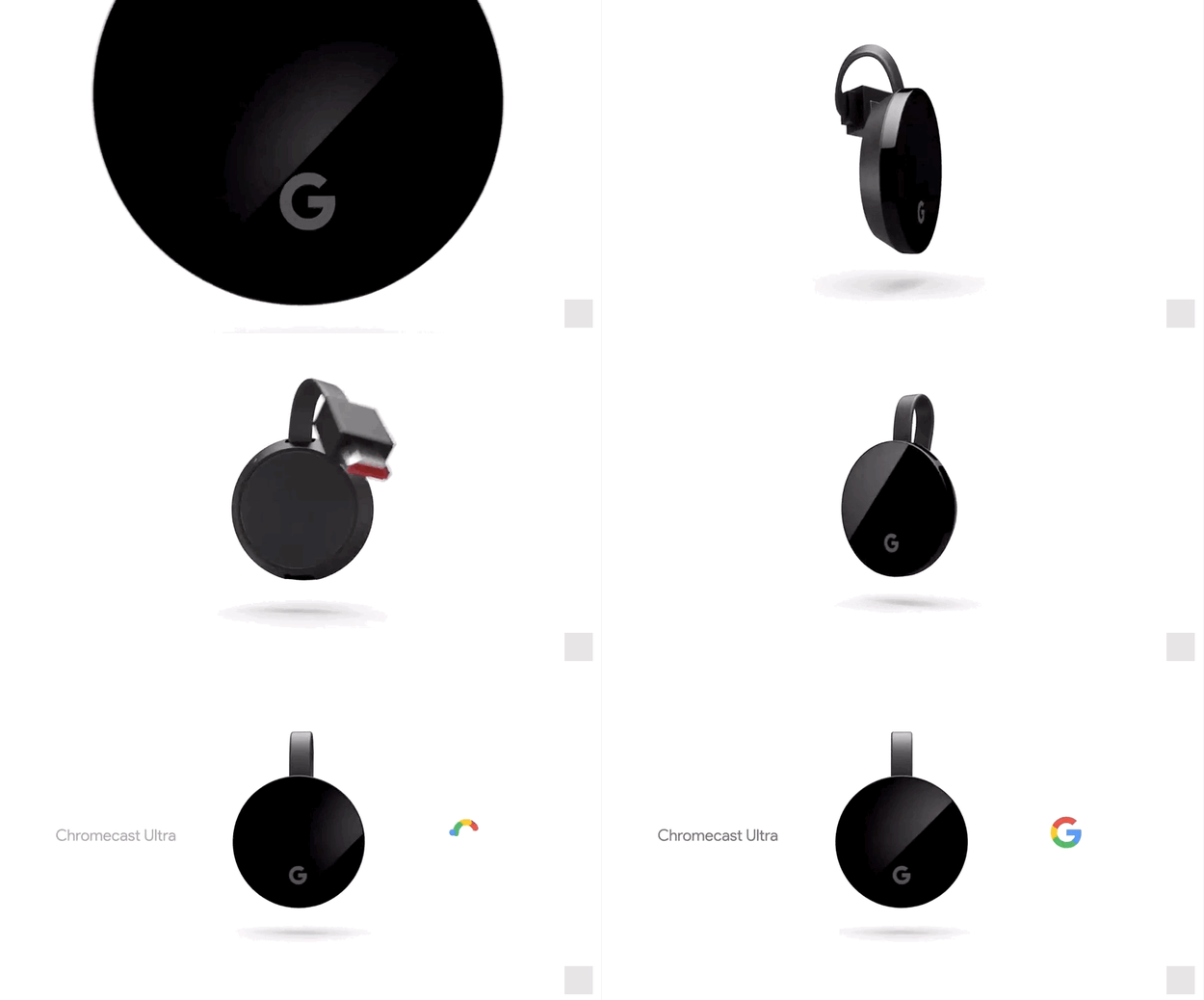
Alongside Google’s new Pixel phones, Daydream View VR headset, and its new Google Home device, the company announced Chromecast Ultra, an advanced version of Chromecast, which allows computers and phones to broadcast to other devices such as TVs and speakers. It also announced Google Wifi, a new wireless router.

Building on Chromecast&;s popularity — Google said it had sold 30 million copies of the device and that watching time is up 160% since 2015 — the revamped Chromecast Ultra will feature faster and higher quality streaming, as well as ethernet support. It retails for $69 and will be available in November.

Google Wifi, a mesh network Wi-Fi router similar to Eero and Luma, will retail for $129 for one device and $299 for three. Eero&039;s routers sell for $199 each and $499 for three. Google&039;s device will feature an updated version of Google Assistant, which resembles Amazon’s Alexa voice control. This new router is an update to Google OnHub, announced in 2015 to little fanfare.

“Traditional routers weren’t designed for the way we use the internet today,” said a Google spokesperson during the announcement.

The router comes with Network Assist, a feature that controls and optimizes the network, transitions users to the nearest and strongest router, and allows users to pause Wi-Fi access on connected devices through an app. Google said it added Network assist “so you don&039;t have to deal with your router.” Google Wifi will be available for preorder in November — $129 for one, $299 for three — and will ship in December.

Quelle: <a href="Google Debuts A New Wi-Fi Router And Chromecast Ultra“>BuzzFeed

Real-Time Feature Engineering for Machine Learning with DocumentDB

Ever wanted to take advantage of your data stored in DocumentDB for machine learning solutions? This blog post demonstrates how to get started with event modeling, featurizing, and maintaining feature data for machine learning applications in Azure DocumentDB.

Machine Learning and RFM

The field of machine learning is pervasive – it is difficult to pinpoint all the ways in which machine learning affects our day-to-day lives. From the recommendation engines that power streaming music services to the models that forecast crop yields, machine learning is employed all around us to make predictions. Machine learning, a method for teaching computers how to think and recognize patterns in data, is increasingly being used to help garner insights from colossal datasets – feats humans do not have the memory capacity and computational power to perform.

In the world of event modeling and machine learning, RFM is no strange concept. Driven by three dimensions (Recency, Frequency, Monetary), RFM is a simple yet powerful method for segmenting customers used often in machine learning models. The reasoning behind RFM is intuitive and consistent across most scenarios: a customer who bought something yesterday is more likely to make another purchase than a customer who has not bought anything in a year. In addition, spendy customers who frequently make purchases are also categorized as valuable using the RFM technique.

Properties of RFM features:

RFM feature values can be calculated using basic database operations.
Raw values can be updated online as new events arrive.
RFM features are valuable in machine learning models.

Because insights drawn from raw data become less useful over time, being able to calculate RFM features in near real-time to aid in decision-making is important [1]. Thus, a general solution that enables one to send event logs and automatically featurize them in near real-time so the RFM features can be employed in a variety of problems is ideal.

Where does DocumentDB fit in?

Azure DocumentDB is a blazing fast, planet-scale NoSQL database service for highly available, globally distributed apps that scales seamlessly with guaranteed low latency and high throughput. Its language integrated, transactional execution of JavaScript permits developers to write stored procedures, triggers, and user defined functions (UDFs) natively in JavaScript.

Thanks to these capabilities, DocumentDB is able to meet the aforementioned time constraints and fill in the missing piece between gathering event logs and arriving at a dataset composed of RFM features in a format suitable for training a machine learning model that accurately segments customers. Because we implemented the featurization logic and probabilistic data structures used to aid the calculation of the RFM features with JavaScript stored procedures, this logic is shipped and executed directly on the database storage partitions. The rest of this post will demonstrate how to get started with event modeling and maintaining feature data in DocumentDB for a churn prediction scenario.

The end-to-end code sample of how to upload and featurize a list of documents to DocumentDB and update RFM feature metadata is hosted on our GitHub.

Scenario

The first scenario we chose to tackle to begin our dive into the machine learning and event modeling space is the problem from the 2015 KDD Cup, an annual Data Mining and Knowledge Discovery competition. The goal of the competition was to predict whether a student will drop out of a course based on his or her prior activities on XuetangX, one of the largest massive open course (MOOC) platforms in China.

The dataset is structured as follows:

Figure 1. We would like to gratefully acknowledge the organizers of KDD Cup 2015 as well as XuetangX for making the datasets available.

Each event details an action a student completed. Examples include watching a video or answering a particular question. All events consist of a timestamp, a course ID (cid), student ID (uid), and enrollment ID (eid) which is unique for each course-student pair.

Approach

Modeling Event Logs

The first step was to determine how to model the event logs as documents in DocumentDB. We considered two main approaches. In the first approach, we used the combination of <entity name, entity value, feature name> as the primary key for each document. An example primary key with this strategy is <”eid”, 1, “cat”>. This means that we created a separate document for each feature we wanted to keep track of when the student enrollment id is 1. In the case of a large number of features, this can result in a multitude of documents to insert. We took a bulk approach in the second iteration, using <entity name, entity value> instead as the primary key. An example primary key with this strategy is <”eid”, 1>. In this approach, we used a single document to keep track of all the feature data when the student enrollment id is 1.

The first approach minimizes the number of conflicts during insertion because there is the additional feature name attribute, making the primary key more unique. The resulting throughput is not optimal, however, in the case of a large number of features because an additional document needs to be inserted for each feature. The second approach maximizes throughput by featurizing and inserting event logs in a bulk manner, increasing the probability of conflicts. For this blog post, we chose to walk through the first approach, which provides for simpler code and fewer conflits.

Step 1

Create the stored procedure responsible for updating the RFM feature metadata.

private static async Task CreateSproc()
{
string scriptFileName = @"updateFeature.js";
string scriptName = "updateFeature";
string scriptId = Path.GetFileNameWithoutExtension(scriptFileName);

var client = new DocumentClient(new Uri(Endpoint), AuthKey);
Uri collectionLink = UriFactory.CreateDocumentCollectionUri(DbName, CollectionName);

var sproc = new StoredProcedure
{
Id = scriptId,
Body = File.ReadAllText(scriptFileName)
};
Uri sprocUri = UriFactory.CreateStoredProcedureUri(DbName, CollectionName, scriptName);

bool needToCreate = false;

try
{
await client.ReadStoredProcedureAsync(sprocUri);
}
catch (DocumentClientException de)
{
if (de.StatusCode != HttpStatusCode.NotFound)
{
throw;
}
else
{
needToCreate = true;
}
}

if (needToCreate)
{
await client.CreateStoredProcedureAsync(collectionLink, sproc);
}
}

Step 2

Featurize each event. In this example, each student action expands into 12 rows of the form { entity: { name: “ “, value: …}, feature: { name: “ “, value: …} } that must be inserted in your DocumentDB collection with the previously created stored procedure. We did this process in batches, the size of which can be configured.

private static string[] Featurize(RfmDoc doc)
{
List<string> result = new List<string>();

var entities = new Tuple<string, object>[] { new Tuple<string, object>("eid", doc.Eid), new Tuple<string, object>("cid", doc.Cid),
new Tuple<string, object>("uid", doc.Uid) };
var features = new Tuple<string, object>[] { new Tuple<string, object>("time", doc.Time), new Tuple<string, object>("src_evt", doc.SourceEvent),
new Tuple<string, object>("cat", doc.Cat), new Tuple<string, object>("obj", doc.Obj) };

foreach (var entity in entities)
{
foreach (var feature in features)
{
StringBuilder eb = new StringBuilder();
StringBuilder fb = new StringBuilder();
StringWriter eWriter = new StringWriter(eb);
StringWriter fWriter = new StringWriter(fb);

JsonSerializer s = new JsonSerializer();
s.Serialize(eWriter, entity.Item2);
string eValue = eb.ToString();

s.Serialize(fWriter, feature.Item2);
string fValue = fb.ToString();

var value = string.Format(CultureInfo.InvariantCulture, "{{"entity":{{"name":"{0}","value":{1}}},"feature":{{"name":"{2}","value":{3}}}}}",
entity.Item1, eValue, feature.Item1, fValue);
result.Add(value);
}
}

return result.ToArray();
}

Step 3

Execute the stored procedure created in step 1.

private static async Task<StoredProcedureResponse<string>> UpdateRFMMetadata(DocumentClient client, string metaDoc)
{
object metaDocObj = JsonConvert.DeserializeObject(metaDoc);

int retryCount = 100;
while (retryCount > 0)
{
try
{
Uri sprocUri = UriFactory.CreateStoredProcedureUri(DbName, CollectionName, "updateFeature");
var task = client.ExecuteStoredProcedureAsync<string>(
sprocUri,
metaDocObj);
return await task;
}
catch (DocumentClientException ex)

The stored procedure takes as input a row of the form { entity: { name: “ ”, value: …}, feature: { name: “ ”, value: …} } and updates the relevant feature metadata to produce a document of the form { entity: { name: "", value: "" }, feature: { name: "", value: …}, isMetadata: true, aggregates: { "count": …, "min": … } }. Depending on the name of the feature in the document that is being inserted into DocumentDB, a subset of predefined aggregates is updated. For example, if the feature name of the document is “cat” (category), the count_unique_hll aggregate is employed to keep track of the unique count of categories. Alternatively, if the feature name of the document is “time”, the minimum and maximum aggregates are utilized. The following code snippet demonstrates how the distinct count and minimum aggregates are updated. See the next section for a more detailed description of the data structures that we are using to maintain these aggregates.

case AGGREGATE.count_unique_hll:
if (aggData === undefined) aggData = metaDoc.aggregates[agg] = new CountUniqueHLLData();
aggData.hll = new HyperLogLog(aggData.hll.std_error, murmurhash3_32_gc, aggData.hll.M);

let oldValue = aggData.value = aggData.hll.count();
aggData.hll.count(doc.feature.value); // add entity to hll
aggData.value = aggData.hll.count();

if (aggData.value !== oldValue && !isUpdated) isUpdated = true;
break;
case AGGREGATE.min:
if (aggData === undefined) aggData = metaDoc.aggregates[agg] = new AggregateData();
if (aggData.value === undefined) aggData.value = doc.feature.value;
else if (doc.feature.value < aggData.value) {
aggData.value = doc.feature.value;
if (!isUpdated) isUpdated = true;
}
break;

Probabilistic Data Structures

We implemented the following three probabilistic data structures in JavaScript, each of which can be updated conditionally as part of the stored procedure created in the previous section.

HyperLogLog

Approximates the number of unique elements in a multiset by applying a hash function to each element in the multiset (obtaining a new multiset of uniformly distributed random numbers with the same cardinality as the original set) and calculating the maximum number of leading zeros in the binary representation of each number in the new set n. The estimated cardinality is 2^n [2].

BloomFilter

Tests whether an element is a member of a set. While false positives are possible, false negatives are not. Rather, a bloom filter either returns maybe in the set or definitely not in the set when asked if an element is a member of a set. To add an element to a bloom filter, the element is fed into k hash functions to arrive at k array positions. The bits at each of those positions are set to 1. To test whether an element is in the set, the element is again fed to each of the k hash functions to arrive at k array positions. If any one of the bits is 0, the element is definitely not in the set [3].

Count-Min Sketch

Ingests a stream of events and counts the frequency of distinct members in the set. The sketch may be queried for the frequency of a specific event type. Similar to the bloom filter, this data structure uses some number of hash functions to map events to values – however, it uses these hash functions to keep track of event frequencies instead of whether or not the event exists in the dataset [4].

Each of the above data structures returns an estimate within a certain range of the true value, with a certain probability. These probabilities are tunable, depending on how much memory you are willing to sacrifice. The following snippet shows how to retrieve the HyperLogLog approximation for the number of unique objects for the student with eid = 1.

private static void OutputResults()
{
var client = new DocumentClient(new Uri(Endpoint), AuthKey);
Uri collectionLink = UriFactory.CreateDocumentCollectionUri(DbName, CollectionName);

string queryText = "select c.aggregates.count_unique_hll["value"] from c where c.id = "_en=eid.ev=1.fn=obj"";
var query = client.CreateDocumentQuery(collectionLink, queryText);

Console.WriteLine("Result: {0}", query.ToList()[0]);
}

Conclusion

The range of scenarios where RFM features can have a positive impact extends far beyond churn prediction. Time and time again, a small number of RFM features have proven to be successful when used in a wide variety of machine learning competitions and customer scenarios.

Combining the power of RFM with DocumentDB’s server-side programming capabilities produces a synergistic effect. In this post, we demonstrate how to get started with event modeling and maintaining feature data with DocumentDB stored procedures. It is our hope that developers are now equipped with the tools to add functionality to our samples hosted on GitHub to maintain additional feature metadata on a case by case basis. Stay tuned for a future post that details how to integrate this type of solution with Azure Machine Learning where you can experiment with a wide variety of machine learning models on your data featurized by DocumentDB.

To learn more about how to write database program application logic that can be shipped and executed directly on the database storage partitions in DocumentDB, see DocumentDB server-side programming: Stored procedures, database triggers, and UDFs. Stay up-to-date on the latest DocumentDB news and features by following us on twitter @DocumentDB.

Lastly, please reach out to us at askdocdb@microsoft.com or leave a comment below for inquiries about additional ML support and to show us how you’re using DocumentDB for machine learning.

References

[1] Oshri, Gal. “RFM: A Simple and Powerful Approach to Event Modeling.” Cortana Intelligence and Machine Learning Blog (2016). https://blogs.technet.microsoft.com/machinelearning/2016/05/31/rfm-a-simple-and-powerful-approach-to-event-modeling/

[2] https://gist.github.com/terrancesnyder/3398489, http://stackoverflow.com/questions/5990713/loglog-and-hyperloglog-algorithms-for-counting-of-large-cardinalities

[3] https://github.com/jasondavies/bloomfilter.js, Copyright © 2011, Jason Davies

[4] https://github.com/mikolalysenko/count-min-sketch, The MIT License (MIT), Copyright © 2013 Mikola Lysenko
Quelle: Azure