Full Stack Automation with Ansible and OpenStack

Ansible offers great flexibility. Because of this the community has figured out many useful ways to leverage Ansible modules and playbook structures to automate frequent operations on multiple layers, including using it with OpenStack.
In this blog we’ll cover the many use-cases Ansible, the most popular automation software, with OpenStack, the most popular cloud infrastructure software. We’ll help you understand here how and why you should use Ansible to make your life easier, in what we like to call Full-Stack Automation.

Let’s begin by analyzing the layers of Full-Stack Automation, shown in the diagram above. At the bottom, we have the hardware resources (servers, storage area networks, and networking gear). Above, is the operating system (Linux or Windows). On the Linux side, you can install OpenStack to abstract all of your datacenter resources and offer a software-defined version of your compute, network, and storage resources. On top of OpenStack, are the tenant-defined services needed to create the virtual machines where the applications will reside. Finally, you have to manage the operating system (Linux or Windows) to deploy the actual applications and workloads that you really care about (databases, web servers, mobile application backends, etc.). If you use containers (like Docker or Rkt), you’ll package those applications in images that will be deployed on top of your Guest OS. In addition to that, some languages introduce the concept of application servers, which adds another layer (i.e. J2EE).
Ansible management possibilities
With Ansible, you have a module to manage every layer. This is true even for the networking hardware, although technically speaking it’s for the network operating system, like IOS or NXOS (see the full list of Ansible network modules here).

General interaction with the Operating System: install packages, change or enforce file content or permissions, manage services, create/remove users and groups, etc.

Linux and BSD via SSH (the first and most popular use-case)
Windows via PowerShell (since 1.7)

IaaS Software: install the IaaS software and its dependencies (databases, load balancers, configuration files, services, and other helper tools)

OpenStack-ansible installer https://github.com/openstack/openstack-ansible, as used in some upstream-based OpenStack distributions from other vendors. Note that the Red Hat OpenStack Platform does not use Ansible, but Heat and Puppet. Future releases will leverage Ansible to perform certain validations and to help operators perform their updates and upgrades.
CloudStack installer is also an Ansible-based project.

Virtual Resources: define the resource, like a Virtual Machine or Instance, in terms of how big it is, who can access it, what content should it have, what security profile and network access it requires, etc.

OpenStack Ansible modules (since Ansible 2.0): for instance, Nova or Neutron. It&;s based on the OpenStack &;shade&; library, a common tool for all CLI tools in OpenStack.
It can also manage not so virtual network resources, via netconf (since 2.2) https://docs.ansible.com/ansible/netconf_config_module.html
VmWare vSphere Ansible modules
RHV or oVirt or Libvirt for bare KVM
It also has modules for public cloud providers, like Amazon, Google Cloud, Azure and Digital Ocean

Guest OS: the same components as described for the Host OS. But how do you discover how many Guests you have?

Ansible Dynamic Inventory will dynamically interrogate the IaaS/VM layer and discover which instances are currently available. It detects their hostname, IPs, and security settings and replaces the static Inventory concept. This is especially useful if you leverage Auto Scaling Groups in your cloud infrastructure, which makes your list of instances very variable over time.

Containers Engine (optional)

Docker: Note that the old Docker module is deprecated for a new, native version, in Ansible 2.1.
Kubernetes
Atomic Host

Tenant Software: databases, web servers, load balancers, data processing engines, etc.

Ansible Galaxy is the repository of recipes (playbooks) to deploy the most popular software, and it’s the result of the contributions of thousands of community members.
You can also manage web Infrastructure such as JBoss, allowing Ansible to define how an app is deployed in the application server.

How to install the latest Ansible on a Python virtual environment
As you have seen, some features are only available with very recent Ansible versions, like 2.2. However, your OS may not ship it yet. For example, RHEL 7 or CentOS 7 only comes with Ansible 1.9.
Given that Ansible is a command-line tool written in Python, which supports multiple versions on a system, you may not need the security hardening in Ansible that your distribution offers, and you may want to try the latest version instead.
However, as any other Python software, there are many dependencies, and it’s very dangerous to mix untested upstream libraries with your system-provided ones. Those libraries may be shared and used in other parts of your system, and untested newer libraries can break other applications. The quick solution is to install the latest Ansible version, with all its dependencies, in a isolated folder under your non-privileged user account. This is called a Python Virtual Environment (virtualenv), and if done properly, allows you to safely play with the latest Ansible modules for a full-stack orchestration. Of course, we do not recommend this practice for any production use-case; consider it a learning exercise to improve your DevOps skills.
1) Install prerequisites (pip, virtualenv)
The only system-wide python library we need here is “virtualenvwrapper”. Other than that, you should not do “sudo pip install” as it will replace system python libraries with untested, newer ones. We only trust one here, “virtualenvwrapper”. The virtual environment method is a good mechanism for installing and testing newer python modules in your non-privileged user account.
$ sudo yum install python-pip
$ sudo pip install virtualenvwrapper
$ sudo yum install python-heatclient python-openstackclient python2-shade
2) Setup a fresh virtualenv, where we’ll install the latest Ansible release
First, create a directory to hold the virtual environments.
$ mkdir $HOME/.virtualenvs
Then, add a line like &8220;export WORKON_HOME=$HOME/.virtualenvs&8221; to your .bashrc. Also, add a line like &8220;source /usr/bin/virtualenvwrapper.sh&8221; to your .bashrc. Now source it.
$ source ~/.bashrc
At this point, wrapper links are created, but only the first time you run it. To see the list of environments, just execute &8220;workon&8221;. Next, we&8217;ll create a new virtualenv named “ansible2” , which will be automatically enabled, with access to the default RPM-installed packages.
$ workon
$ mkvirtualenv ansible2 –system-site-packages
To exit the virtualenv, type &8220;deactivate&8221;, and to re-enter again, use &8220;workon&8221;.
$ deactivate
$ workon ansible2
3) Enter the new virtualenv and install Ansible2 via PIP (as regular user, not root)
You can notice your shell prompt has changed and it shows the virtualenv name in brackets.
(ansible2) $ pip install ansible
The above command will install just the ansible 2 dependencies, leveraging your system-wide RPM-provided python packages (thanks to the &;system-site-packages flag we used earlier). Alternatively, if you want to try the development branch:
(ansible2) $ pip install git+git://github.com/ansible/ansible.git@devel
(ansible2) $ ansible –version
If you ever want to remove the virtualenv, and all its dependencies, just use use &8220;rmvirtualenv ansible2&8221;.
4) Install OpenStack client dependencies
The first command below ensures you have the latest stable OpenStack API versions, although you can also try a pip install to get the latest CLI. The second command provides the latest python “shade” library to connect to latest OpenStack API versions using ansible, regardless of the CLI tool.
(ansible2) $ yum install python-openstackclient python-heatclient
(ansible2) $ pip install shade –upgrade
5) Test it
(ansible2) $ ansible -m ping localhost

localhost | SUCCESS => {

“changed”: false,

“ping”: “pong”

}
NOTE: you cannot run this version of ansible outside the virtualenv, so always remember to do “workon ansible2” before usi.

Using Ansible to orchestrate OpenStack
Our savvy readers will notice that using Ansible to orchestrate OpenStack seems to ignore the fact that Heat is the official orchestration module for OpenStack. Indeed, an Ansible Playbook will do almost the same as a HOT template (HOT is the YAML-based syntax for Heat, an evolution of AWS CloudFormation). However, there are many DevOps professionals out there who don’t like to learn new syntax, and they are already consolidating all their process for their hybrid infrastructure.
The Ansible team recognized that and leveraged Shade, the official library from the OpenStack project, to build interfaces to OpenStack APIs. At the time of this writing, Ansible 2.2 includes modules to call the following APIs

Keystone: users, groups, roles, projects
Nova: servers, keypairs, security-groups, flavors
Neutron: ports, network, subnets, routers, floating IPs
Ironic: nodes, introspection
Swift Objects
Cinder volumes
Glance images

From an Ansible perspective, it needs to interact with a server where it can load the OpenStack credentials and open an HTTP connection to the OpenStack APIs. If that server is your machine (localhost), then it will work locally, load the Keystone credentials, and start talking to OpenStack.
Let’s see an example. We’ll use Ansible OpenStack modules to connect to Nova and start a small instance with the Cirros image. But we’ll first upload the latest Cirros image, if not present. We’ll use an existing SSH key from our current user. You can download this playbook from this github link.

# Setup according to Blogpost “Full Stack automation with Ansible and OpenStack”. Execute with “ansible-playbook ansible-openstack-blogpost.yml -c local -vv”
# #
# #
# #
– name: Execute the Blogpost demo tasks
hosts: localhost
tasks:
– name: Download cirros image
get_url:
url: http://download.cirros-cloud.net/0.3.4/cirros-0.3.4-x86_64-disk.img
dest: /tmp/cirros-0.3.4-x86_64-disk.img
– name: Upload cirros image to openstack
os_image:
name: cirros
container_format: bare
disk_format: qcow2
state: present
filename: /tmp/cirros-0.3.4-x86_64-disk.img

– name: Create new keypair from current user’s default SSH key
os_keypair:
state: present
name: ansible_key
public_key_file: “{{ ‘~’ | expanduser }}/.ssh/id_rsa.pub”

– name: Create the test network
os_network:
state: present
name: testnet
external: False
shared: False
: vlan
: datacentre
register: testnet_network

– name: Create the test subnet
os_subnet:
state: present
network_name: “{{ testnet_network.id }}”
name: testnet_sub
ip_version: 4
cidr: 192.168.0.0/24
gateway_ip: 192.168.0.1
enable_dhcp: yes
dns_nameservers:
– 8.8.8.8
register: testnet_sub

– name: Create the test router
ignore_errors: yes for some reasons, re-running this task gives errors
os_router:
state: present
name: testnet_router
network: nova
external_fixed_ips:
– subnet: nova
interfaces:
– testnet_sub

– name: Create a new security group
os_security_group:
state: present
name: secgr
– name: Create a new security group allowing any ICMP
os_security_group_rule:
security_group: secgr
protocol: icmp
remote_ip_prefix: 0.0.0.0/0
– name: Create a new security group allowing any SSH connection
os_security_group_rule:
security_group: secgr
protocol: tcp
port_range_min: 22
port_range_max: 22
remote_ip_prefix: 0.0.0.0/0

– name: Create server instance
os_server:
state: present
name: testServer
image: cirros
flavor: m1.small
security_groups: secgr
key_name: ansible_key
nics:
– net-id: “{{ testnet_network.id }}”
register: testServer

– name: Show Server’s IP
debug: var=testServer.openstack.public_v4

After the execution, we see the IP of the instance. We write it down, and we can now use Ansible to connect into it via SSH. We assume Nova’s default network allows connections from our workstation, in our case via a provider network.

Comparison with OpenStack Heat
Using Ansible instead of Heat has it&8217;s advantages and disadvantages. For instance, with Ansible you must keep track of the resources you create, and manually delete them (in reverse order) once you are done with them. This is especially tricky with Neutron ports, floating IPs and routers. With Heat, you just delete the stack, and all the created resources will be properly deleted.
Compare the above with a similar (but not equivalent) Heat Template, that can be downloaded from this github gist:
heat_template_version: 2015-04-30

description: >
Node template. Launch with “openstack stack create –parameter public_network=nova –parameter ctrl_network=default –parameter secgroups=default –parameter image=cirros –parameter key=ansible_key –parameter flavor=m1.small –parameter name=myserver -t openstack-blogpost-heat.yaml testStack”

parameters:
name:
type: string
description: Name of node
key:
type: string
description: Name of keypair to assign to server
secgroups:
type: comma_delimited_list
description: List of security group to assign to server
image:
type: string
description: Name of image to use for servers
flavor:
type: string
description: Flavor to use for server
availability_zone:
type: string
description: Availability zone for server
default: nova
ctrl_network:
type: string
label: Private network name or ID
description: Network to attach instance to.
public_network:
type: string
label: Public network name or ID
description: Network to attach instance to.

resources:

ctrl_port:
type: OS::Neutron::Port
properties:
network: { get_param: ctrl_network }
security_groups: { get_param: secgroups }

floating_ip:
type: OS::Neutron::FloatingIP
properties:
floating_network: { get_param: public_network }
port_id: { get_resource: ctrl_port }

instance:
type: OS::Nova::Server
properties:
name: { get_param: name }
image: { get_param: image }
flavor: { get_param: flavor }
availability_zone: { get_param: availability_zone }
key_name: { get_param: key }
networks:
– port: { get_resource: ctrl_port }

Combining Dynamic Inventory with the OpenStack modules
Now let’s see what happens when we create many instances, but forget to write down their IP’s. The perfect example to leverage Dynamic Inventory for OpenStack is to learn the current state of our tenant virtualized resources, and gather all server IP’s so we can check their kernel version, for instance. This is transparently done by Ansible Tower, for instance, which will periodically run the inventory and collect the updated list of OpenStack servers to manage.
Before you execute this, you don’t have stale cloud.yaml files in either ~/.config/openstack, /etc/openstack, or /etc/ansible. The Dynamic Inventory script will look for environment variables first (OS_*), and then it will search for those files.
ensure you are using latest ansible version

$ workon ansible2
$ wget https://raw.githubusercontent.com/ansible/ansible/devel/contrib/inventory/openstack.py
$ chmod +x openstack.py
$ ansible -i openstack.py all -m ping
bdef428a-10fe-4af7-ae70-c78a0aba7a42 | SUCCESS => {
    “changed”: false,
    “ping”: “pong”
}
343c6e76-b3f6-4e78-ae59-a7cf31f8cc44 | SUCCESS => {
    “changed”: false,
    “ping”: “pong”
}
You can have fun by looking at all the information that the Inventory script above returns if you just executed as follows:
$ ./openstack.py &8211;list
{
 “”: [
    “777a3e02-a7e1-4bec-86b7-47ae7679d214″,
    “bdef428a-10fe-4af7-ae70-c78a0aba7a42″,
    “0a0c2f0e-4ac6-422d-8d9b-12b7a87daa72″,
    “9d4ee5c0-b53d-4cdb-be0f-c77fece0a8b9″,
    “343c6e76-b3f6-4e78-ae59-a7cf31f8cc44″
 ],
 “_meta”: {
    “hostvars”: {
     “0a0c2f0e-4ac6-422d-8d9b-12b7a87daa72″: {
       “ansible_ssh_host”: “172.31.1.42”,
       “openstack”: {
         “HUMAN_ID”: true,
         “NAME_ATTR”: “name”,
         “OS-DCF:diskConfig”: “MANUAL”,
         “OS-EXT-AZ:availability_zone”: “nova”,
         “OS-EXT-SRV-ATTR:host”: “compute-0.localdomain”,
         “OS-EXT-SRV-ATTR:hypervisor_hostname”: “compute-0.localdomain”,
         “OS-EXT-SRV-ATTR:instance_name”: “instance-000003e7″,
         “OS-EXT-STS:power_state”: 1,
         “OS-EXT-STS:task_state”: null,
         “OS-EXT-STS:vm_state”: “active”,
         “OS-SRV-USG:launched_at”: “2016-10-10T21:13:24.000000″,
         “OS-SRV-USG:terminated_at”: null,
         “accessIPv4″: “172.31.1.42”,
         “accessIPv6″: “”,
(….)

Conclusion
Even though Heat is very useful, some people may prefer to learn Ansible to do their workload orchestration, as it offers a common language to define and automate the full stack of I.T. resources. I hope this article has provided you with a practical example, with a very basic use case for Ansible to launch OpenStack resources. If you are interested in trying Ansible and Ansible Tower, please visit https://www.ansible.com/openstack. A good starting point would be connecting Heat with Ansible Tower callbacks, as described in this other blog post
Also, if you want to learn more about Red Hat OpenStack Platform, you&8217;ll find lots of valuable resources (including videos and whitepapers) on our website. https://www.redhat.com/en/technologies/linux-platforms/openstack-platform
 
Quelle: RedHat Stack

Azure Managed Cache and In-Role Cache Service shutdown reminder

As announced last December, we are on track to retire Azure Managed Cache service and Azure In-Role Cache support by November 30, 2016. We strongly suggest that all currently active users of these services to move off them as early as possible, before the deadline.

Azure Redis Cache, based on the popular open-source implementation, is a fully-managed and high-performance caching solution that supersedes the Managed Cache and In-Role Cache services. It offers more features and options. We recommend that you consider Redis Cache as a replacement for the caching needs in your application. We have updated the Migrate from Managed Cache Service to Azure Redis Cache documentation webpage to facilitate your migration efforts.

If you have any questions or need assistance, please feel free to contact us.
Quelle: Azure

Mirantis OpenStack 9.1 – Continuing to Simplify the Day-2 Experience

The post Mirantis OpenStack 9.1 &; Continuing to Simplify the Day-2 Experience appeared first on Mirantis | The Pure Play OpenStack Company.
Mirantis OpenStack 9.1 makes it easier for cloud operators to consume upstream innovation on a periodic basis, both for bug fixes and minor feature enhancements, and you can get access to this capability through an easy and reliable update mechanism. In addition, along with a number of additional features in Fuel, Mirantis OpenStack 9.1 simplifies the day-2, or post-deployment, experience for operators.
Improved Day-2 Operations
Streamline OpenStack updates
The prior mechanism of applying Maintenance Updates (MU) had several limitations. First, the MU script could only apply package updates to controller and compute nodes, and not to the Fuel Master itself. Next, the previous mechanism suffered from the inability to restart services automatically, and lacked integration with Fuel.
In 9.1, a new update mechanism has been introduced that uses Fuel’s internal Deployment Tasks to update the cloud and the Fuel Master. This new mechanism delivers the following:

Reliability: It is tested and verified as part of the Mirantis OpenStack release. This includes going through our automated CI/CD pipelines and extensive QA process.
Customizations: It provides users the ability to detect any customizations before applying an update to a cloud to enable operators to decide whether an update is safe to apply.
Automatic restart: It enables automatic restart of services so that changes can take effect. The prior mechanism required users to manually restart services.

Simplify Custom Deployment Tasks With a New User Interface
In Mirantis OpenStack 9.0, we introduced the ability to define custom deployment tasks to satisfy advanced lifecycle management requirements. Operators could customize configuration options, execute any command on any node, update packages etc. with deployment tasks. In the 9.1 release, you get access to a new Deployment Task user interface in Fuel that shows the deployment workflow history. The UI can also be used to manage deployment tasks.

Automate Deployment Tasks With Event-Driven Execution
Consider an example where you need to integrate third-party monitoring software. In that case, you would want to register a new node with the monitoring software as soon as it is deployed via Fuel. Items such as these can now be automated with 9.1, where a custom deployment task can be triggered by specific Fuel events.
Reduce Footprint With Targeted Diagnostic Snapshots
With prior releases, diagnostic snapshots continued to grow over time to consume multiple GB of storage per node in just a few weeks. To solve this problem, 9.1 features targeted diagnostic snapshots to only allow log retrievals of recent N (configurable) days for a specific set of nodes.
Enhanced Security
Mirantis OpenStack 9.1 includes a number of important security features:

SSH Brute Force protection on the Host OS
Basic DMZ Enablement to separate the API/Public Network from the Floating Network
RadosGW S3 API authentication through Keystone to enable the use of the same credentials for Ceph object storage APIs

The latest versions of StackLight and Murano are compatible with 9.1, so you will also be able to benefit from the latest features of the logging, monitoring and alerting (LMA) toolchain and application catalog and orchestration tool.
Because it&;s an update, installation of the Mirantis OpenStack 9.1 update package requires you to already have Mirantis OpenStack 9.0 installed, but then you&8217;re ready to go.  All set? Then hit the 9.0 to 9.1 update instructions to get started.
The post Mirantis OpenStack 9.1 &8211; Continuing to Simplify the Day-2 Experience appeared first on Mirantis | The Pure Play OpenStack Company.
Quelle: Mirantis

Simpler Azure Management Libraries for Java – Beta 3

Beta 3 adds support for the following Azure services and features

Virtual machine scale sets
Load balancers
Parallel creation of virtual machines and other resources
Virtual machine extensions
Key vault and
Batch

https://github.com/azure/azure-sdk-for-java

In July, we announced a developer preview of the new, simplified Azure management libraries for Java. Our goal is to improve the developer experience by providing a higher-level, object-oriented API, optimized for readability and writability. Thank you for trying the libraries and providing us with plenty of useful feedback.

Create a Virtual Machine Scale Set

You can create a virtual machine scale set instance by using another define() … create() method chain.

VirtualMachineScaleSet virtualMachineScaleSet = azure.virtualMachineScaleSets()
.define(vmssName)
.withRegion(Region.US_EAST)
.withExistingResourceGroup(rgName)
.withSku(VirtualMachineScaleSetSkuTypes.STANDARD_D3_V2)
.withExistingPrimaryNetworkSubnet(network, "Front-end")
.withPrimaryInternetFacingLoadBalancer(loadBalancer)
.withPrimaryInternetFacingLoadBalancerBackends(backendPoolName)
.withPrimaryInternetFacingLoadBalancerInboundNatPools(natPool50XXto22)
.withoutPrimaryInternalLoadBalancer()
.withPopularLinuxImage(KnownLinuxVirtualMachineImage.UBUNTU_SERVER_16_04_LTS)
.withRootUserName(userName)
.withSsh(sshKey)
.withNewStorageAccount(storageAccountName1)
.withNewStorageAccount(storageAccountName2)
.withCapacity(2)
.create();

Create a Network Load Balancer

You can create a network load balancer instance by using another define() … create() method chain.

LoadBalancerloadBalancer=azure.loadBalancers().define(loadBalancerName)
.withRegion(Region.US_EAST)
.withExistingResourceGroup(rgName)
.definePublicFrontend(frontendName)
.withExistingPublicIpAddress(publicIpAddress)
.attach()

// Add a backend pool for HTTP
.defineBackend(backendPoolName)
.attach()

// Add a probe for HTTP
.defineHttpProbe(httpProbe)
.withRequestPath("/")
.withPort(80)
.attach()

// Add a load balancing rule that uses the above backend and probe
.defineLoadBalancingRule(httpLoadBalancingRule)
.withProtocol(TransportProtocol.TCP)
.withFrontend(frontendName)
.withFrontendPort(80)
.withProbe(httpProbe)
.withBackend(backendPoolName)
.attach()

// Add a NAT pool to enable direct VM connectivity for
// SSH to port 22
.defineInboundNatPool(natPool50XXto22)
.withProtocol(TransportProtocol.TCP)
.withFrontend(frontendName)
.withFrontendPortRange(5000,5099)
.withBackendPort(22)
.attach()
.create();

Sample Code

You can find plenty of sample code that illustrates management scenarios in Azure Virtual Machines, Virtual Machine Scale Sets, Storage, Networking, Resource Manager, Key Vault and Batch …

Service
Management

Virtual Machines

Manage virtual machine
Manage availability set
List virtual machine images
Manage virtual machines using VM extensions
List virtual machine extension images

Virtual Machines – parallel execution

Create multiple virtual machines in parallel
Create multiple virtual machines with network in parallel

Virtual Machine Scale Sets

Manage virtual machine scale sets (behind an Internet facing load balancer)

Storage

Manage storage accounts

Network

Manage virtual network
Manage network interface
Manage network security group
Manage IP address
Manage Internet facing load balancers
Manage internal load balancers

Resource Groups

Manage resource groups
Manage resources
Deploy resources with ARM templates
Deploy resources with ARM templates (with progress)

Key Vault

Manage key vaults

Batch

Manage batch accounts

Give it a try

You can run the samples above or go straight to our GitHub repo. Give it a try and let us know what do you think (via e-mail or comments below), particularly –

Usability and effectiveness of the new management libraries for Java?
What Azure services you would like to see supported soon?
What additional scenarios should be illustrated as sample code?

The next preview version of the Azure Management Libraries for Java is a work in-progress. We will be adding support for more Azure services and tweaking the API over the next few months.

You can find plenty of additional info about Java on Azure at http://azure.com/java.
Quelle: Azure

Announcing Docker Global Mentor Week 2016

Building on the the success of the Docker Birthday  Celebration and Training events earlier this year, we’re excited to announce the Docker Global Mentor Week. This global event series aims to provide Docker training to both newcomers and intermediate Docker users. More advanced users will have the opportunity to get involved as mentors to further encourage connection and collaboration within the community.

The Docker Global Mentor Week is your opportunity to either or help others learndocker. Participants will work through self paced labs that will be available through an online Learning Management System (LMS). We’ll have different labs for beginners and intermediate users, Developers and Ops and Linux or Windows users.
Are you an advanced Docker user?
We are recruiting a network of mentors to help guide learners work through the labs. Mentors will be invited to attend local events to help answer questions attendees may have while completing the self-paced beginner and intermediate labs. To help mentors prepare for their events, we&;ll be sharing the content of the labs and hosting a Q&A session with the Docker team before the start of the global mentor week.
 
Sign up as a Mentor!
 
With over 250 Docker Meetup groups worldwide, there is always an opportunity for collaboration and knowledge sharing. With the launch of Global Mentor Week, Docker is also introducing a Sister City program to help create and strengthen partnerships between local Docker communities which share similar challenges.
Docker NYC Organiser Jesse White talks about their collaboration with Docker London:
“Having been a part of the Docker community ecosystem from the beginning, it&8217;s thrilling for us at Docker NYC to see the community spread across the globe. As direct acknowledgment and support of the importance of always reaching out and working together, we&8217;re partnering with Docker London to capture the essence of what&8217;s great about Docker Global Mentor week. We&8217;ll be creating a transatlantic, volunteer-based partnership to help get the word out, collaborate on and develop training materials, and to boost the recruitment of mentors. If we&8217;re lucky, we might get some international dial-in and mentorship at each event too!”
If you’re part of a community group for a specific programming language, open source software projects, CS students at local universities, coding institutions or organizations promoting inclusion in the larger tech community and interested in learning about Docker, we&8217;d love to partner with you. Please email us at meetups@docker.com for more information about next steps.
We&8217;re thrilled to announce that there are already 37 events scheduled around the world! Check out the list of confirmed events below to see if there is one happening near you. Make sure to check back as we’ll be updating this list as more events are announced. Want to help us organize a Mentor Week training in your city? Email us at meetups@docker.com for more information!
 
Saturday, November 12th

New Delhi, India

Sunday, November 13th

Mumbai, India

Monday, November 14th

Auckland, New Zealand
London, United Kingdom
Mexico City, Mexico
Orange County, CA

Tuesday, November 15th

Atlanta, GA
Austin, TX
Brussels, Belgium
Denver, CO
Jakarta, Indonesia
Las Vegas, NV
Medan, Indonesia
Nice, France
Singapore, Singapore

Wednesday, November 16th

Århus, Denmark
Boston, MA
Dhahran, Saudia Arabia
Hamburg, Germany
Novosibirsk, Russia
San Francisco, CA
Santa Barbara, CA
Santa Clara, CA
Washington, D.C.
Rio de Janeiro, Brazil

Thursday, November 17th

Berlin, Germany
Budapest, Hungary
Glasgow, United Kingdom
Lima, Peru
Minneapolis, MN
Oslo, Norway
Richmond, VA

Friday, November 18th

Kanpur, India
Tokyo, Japan

Saturday, November 19th

Ha Noi, Vietnam
Mangaluru, India
Taipei, Taiwan

Excited about Docker Global Mentor Week? Let your community know!

Excited to learndocker during @docker Global Mentor Week! Get involved by signing up for&;Click To Tweet

The post Announcing Docker Global Mentor Week 2016 appeared first on Docker Blog.
Quelle: https://blog.docker.com/feed/

Managing containerized ASP.NET Core apps with Kubernetes

Posted by Mete Atamel, Developer Advocate

One of our goals here on the Google Cloud Platform team is to support the broadest possible array of platforms and operating systems. That’s why we’re so excited about the ASP.NET Core, the next generation of the open source ASP.NET web framework built on .NET Core. With it, .NET developers can run their apps cross-platform on Windows, Mac and Linux.

One thing that ASP.NET Core does is allow .NET applications to run in Docker containers. All of a sudden, we’ve gone from Windows-only web apps to lean cross-platform web apps running in containers. This has been great to see!

ASP.NET Core supports running apps across a variety of operating system platforms

Containers can provide a stable runtime environment for apps, but they aren’t always easy to manage. You still need to worry about how to automate deployment of containers, how to scale up and down and how to upgrade or downgrade app versions reliably. In short, you need a container management platform that you can rely on in production.

That’s where the open-source Kubernetes platform comes in. Kubernetes provides high-level building blocks such as pods, labels, controllers and services that collectively help maintenance of containerized apps. Google Container Engine provides a hosted version of Kubernetes which can greatly simplify creating and managing Kubernetes clusters.

My colleague Ivan Naranjo recently published a blog post that shows you how to take an ASP.NET Core app, containerize it with Docker and and run it on Google App Engine. In this post, we’ll take a containerized ASP.NET Core app and manage it with Kubernetes and Google Container Engine. You’ll be surprised how easy it is, especially considering that running an ASP.NET app on a non-Windows platform was unthinkable until recently.

Prerequisites
I am assuming a Windows development environment, but the instructions are similar on Mac or Linux.

First, we need to install .NET core, install Docker and install Google Cloud SDK for Windows. Then, we need to create a Google Cloud Platform project. We’ll use this project later on to host our Kubernetes cluster on Container Engine.

Create a HelloWorld ASP.NET Core app
.NET Core comes with .NET Core Command Line Tools, which makes it really easy to create apps from command line. Let’s create a HelloWorld folder and create a web app using dotnet command:

$ mkdir HelloWorld
$ cd HelloWorld
$ dotnet new -t web

Restore the dependencies and run the app locally:

$ dotnet restore
$ dotnet run

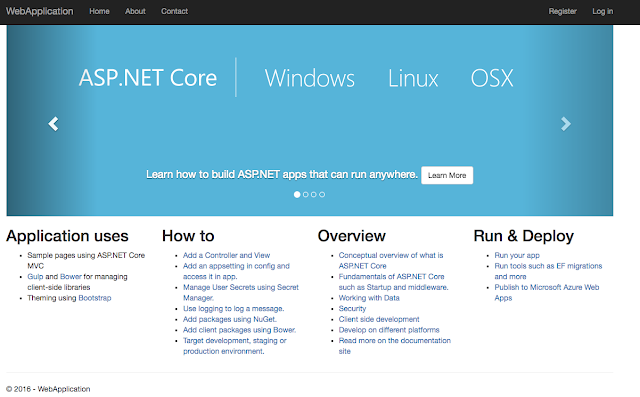
You can then visit http://localhost:5000 to see the default ASP.NET Core page.

Containerize the ASP.NET Core app with Docker
Let’s now take our HelloWorld app and containerize it with Docker. Create a Dockerfile in the root of our app folder:

FROM microsoft/dotnet:1.0.1-core
COPY . /app
WORKDIR /app

RUN [“dotnet”, “restore”]
RUN [“dotnet”, “build”]

EXPOSE 8080/tcp
ENV ASPNETCORE_URLS http://*:8080

ENTRYPOINT [“dotnet”, “run”]

This is the recipe for the Docker image that we’ll create shortly. In a nutshell, we’re creating an image based on microsoft/dotnet:latest image, copying the current directory to /app directory in the container, executing the commands needed to get the app running, making sure port 8080 is exposed and that ASP.NET Core is using that port.

Now we’re ready to build our Docker image and tag it with our Google Cloud project id:

$ docker build -t gcr.io/<PROJECT_ID>/hello-dotnet:v1 .

To make sure that our image is good, let’s run it locally in Docker:

$ docker run -d -p 8080:8080 -t gcr.io/<PROJECT_ID>/hello-dotnet:v1

When you visit http://localhost:8080 to see the same default ASP.NET Core page, this time, it’s running inside a Docker container.

Create a Kubernetes cluster in Container Engine
We’re ready to create our Kubernetes cluster but first, let’s push our image to Google Container Registry using gcloud, so we can later refer to this image when we deploy and run our Kubernetes cluster. In the Google Cloud SDK Shell, type:

$ gcloud docker push gcr.io//hello-dotnet:v1

Create a Kubernetes cluster with two nodes in Container Engine:

$ gcloud container clusters create hello-dotnet-cluster –num-nodes 2 –machine-type n1-standard-1

This will take a little while but when the cluster’s ready, you should see something like this:

Creating cluster hello-dotnet-cluster…done.

Deploy and run the app in Container Engine
At this point, we have our image hosted on Google Container Registry and we have our Kubernetes cluster ready in Container Engine. There’s only one thing left to do: run our image in our Kubernetes cluster. To do that, we can use the kubectl command line tool. Let’s first install kubectl. In Google Cloud SDK Shell:

$ gcloud components install kubectl

Configure kubectl command line access to the cluster with the following:

$ gcloud container clusters get-credentials hello-dotnet-cluster
–zone europe-west1-b –project <PROJECT_ID>

Finally, create a deployment from our image in Kubernetes:

$ kubectl run hello-dotnet –image=gcr.io/hello-dotnet:v1
–port=8080
deployment “hello-dotnet” created

Make sure the deployment and pod are running:

$ kubectl get deployments
NAME DESIRED CURRENT UP-TO-DATE AVAILABLE AGE
hello-dotnet 1 1 1 0 28s

$ kubectl get pods
NAME READY STATUS RESTARTS AGE
hello-dotnet-3797665162-gu99e 1/1 Running 0 1m

And expose our deployment to the outside world:

$ kubectl expose deployment hello-dotnet –type=”LoadBalancer”
service “hello-dotnet” exposed

Once the service is ready, we can see the external IP address:

$ kubectl get services
NAME CLUSTER-IP EXTERNAL-IP PORT(S) AGE
hello-dotnet XX.X.XXX.XXX XXX.XXX.XX.XXX 8080/TCP 1m

Finally, if you visit the external IP address on port 8080, you should see the default ASP.NET Core app managed by Kubernetes!

It’s fantastic to see the ASP.NET and Linux worlds are coming together. With Kubernetes, ASP.NET Core apps can benefit from automated deployments, scaling, reliable upgrades and much more. It’s a great time to be a .NET developer, for sure!
Quelle: Google Cloud Platform